Comparing Two GTM Container Exports: Normalising Before the Diff and What a Line Diff Cannot Show

Contents
Comparing two exports of the same configuration is the fastest way to find out what someone changed, and the first attempt almost always produces a result that is useless. There are several hundred differing lines, of which one matters and the rest are the file format talking to itself.
Everything below is about the gap between those two numbers – what fills it, how to remove it, and what remains invisible even after it is gone.
What Fills the Gap
Exports are generated, and generators are not obliged to be stable. The same configuration exported twice can differ in the order of object keys, in identifiers assigned at export time, in a fingerprint that is a timestamp, and in whether the file ends with a newline. None of that is a change; all of it is a difference.
| Source of noise | What it looks like | How it is removed |
|---|---|---|
| Key order | whole blocks marked as changed | jq -S . sorts keys recursively |
| Fingerprints, timestamps | one changed line per object | delete the fields before comparing |
| Export-time identifiers | every reference differs | the same – or compare by name instead |
| Indentation | everything differs | jq reformats both sides identically |
| Line endings | every line differs, and looks identical | dos2unix, or the diff tool’s own option |
| Minification | one line differs and says nothing | reformat, then compare |
The line-endings row is the one that costs an hour, because the two lines look exactly the same on screen. A file that has been through a Windows editor differs from its origin in every single line, and every one of those differences is invisible.
Normalise First, Compare Second
The fix is a pipeline rather than a better diff tool. Both files go through the same normalisation, the volatile fields are removed, and only then are the results compared – at which point the diff contains what changed and nothing else.
norm() {
  jq -S 'walk(if type == "object"
              then del(.fingerprint, .accountId, .containerVersionId)
              else . end)' "$1"
}

diff <(norm alt.json) <(norm neu.json)
walk descends into every object, so the fields disappear wherever they occur rather than only at the top level. -S sorts the keys of every object, which removes the largest source of noise on its own. What survives both is a change someone made.
Three Levels, Three Different Answers
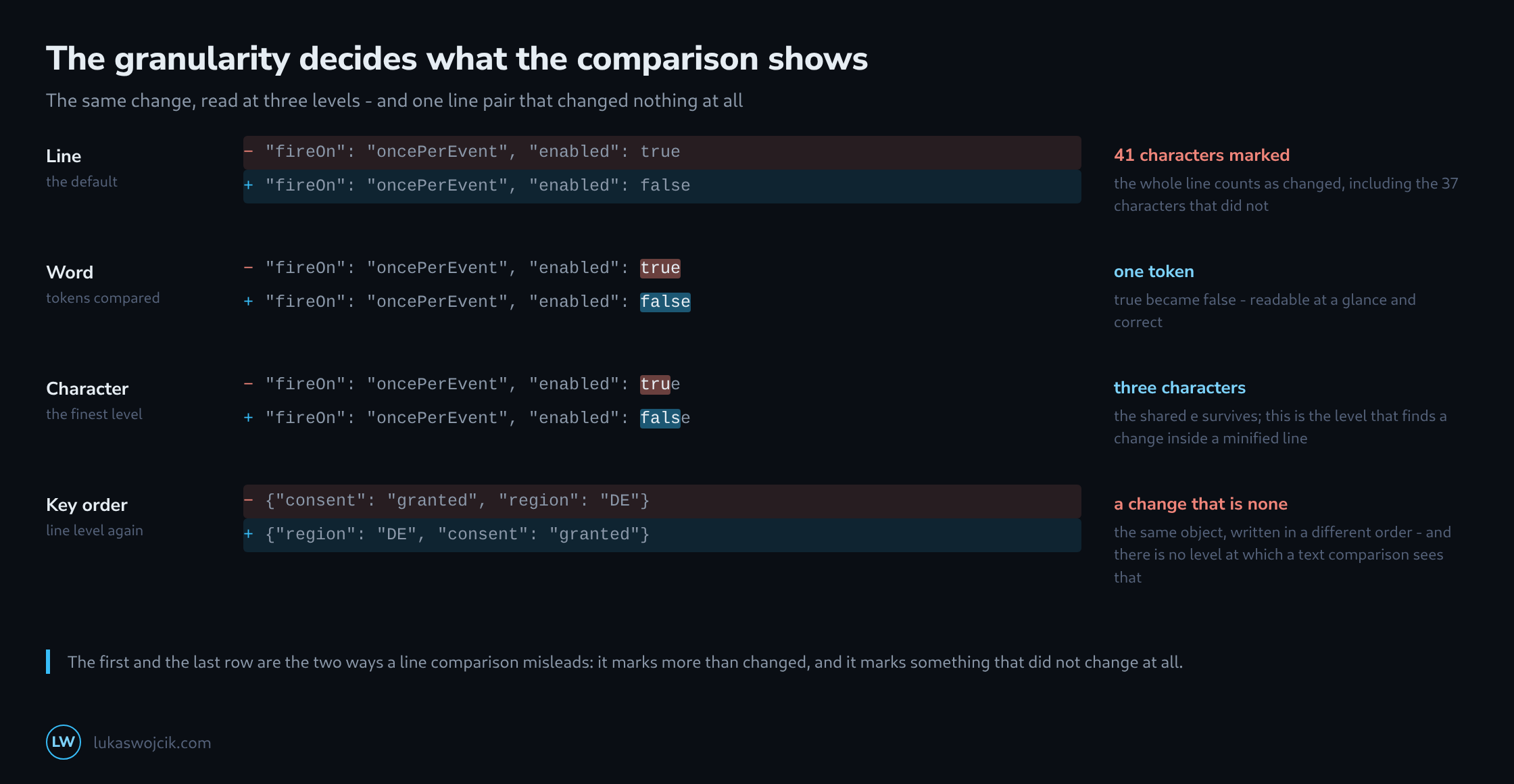
Line, word and character are not degrees of quality but different questions. A line comparison answers “which lines are not identical”, which is the right question for source code, where a line is roughly a statement. It is the wrong question for a JSON file with one object per line and entirely useless for a minified one, where the whole document is a single line.
Word level compares tokens and is what makes a one-value change readable. Character level is finer than anyone needs for reading, and it is exactly what is needed when the line is long: in a minified container export, only a character comparison can point at the single boolean that flipped.
What No Level Can Show
A text comparison sees text. Which means three kinds of change stay invisible no matter how fine the granularity gets. A moved block appears as a deletion in one place and an addition in another, with nothing connecting them. A renamed variable used in twelve places appears as twelve unrelated changes rather than one intention. And a value that changed type without changing appearance – "1" becoming 1 – is a two-character difference with consequences that no amount of highlighting will convey.
The opposite case is the one the fourth row of the diagram shows: two files that differ in every line and describe the same object. A comparison of text can only ever answer questions about text, and the question actually being asked – did the configuration change – is a question about structure.
What to Compare Instead When the Answer Matters
For anything with a schema, the honest comparison is between parsed objects rather than between files. jq can do it directly: two documents are equal or they are not, and the answer is a single boolean that is not affected by formatting, order or whitespace.
# are they the same object at all?
jq -e --slurpfile b neu.json '. == $b[0]' alt.json >/dev/null && echo "identical"

# which top-level keys differ?
jq -n --slurpfile a alt.json --slurpfile b neu.json \
  '($a[0] | keys) as $ka | ($b[0] | keys) as $kb
   | { nur_alt: ($ka - $kb), nur_neu: ($kb - $ka) }'
Which leaves the line comparison the job it is good at: showing a person what someone else did, in a form that reads like the file they will edit. It answers “what should I look at” very well and “is this the same” not at all, and most of the frustration with it comes from asking it the second question.
Related articles