Local Voice Control in Home Assistant with Whisper & Piper
Part 4 of 6 in the series Home Assistant without the cloud

Contents
Cloud-dependent voice assistants such as Amazon Alexa, Google Assistant, and Apple Siri rely on remote servers for voice activity detection, automatic speech recognition (ASR), and natural language processing (NLP). This dependency introduces latency, creates vulnerability to internet outages, and raises severe privacy concerns regarding continuous acoustic monitoring. Implementing a fully local voice control architecture in Home Assistant using the Wyoming protocol—combining OpenAI Whisper for Speech-to-Text (STT) and Piper for neural Text-to-Speech (TTS)—enables sub-second voice command execution entirely within the local area network.
1. Architectural Framework: The Wyoming Voice Pipeline
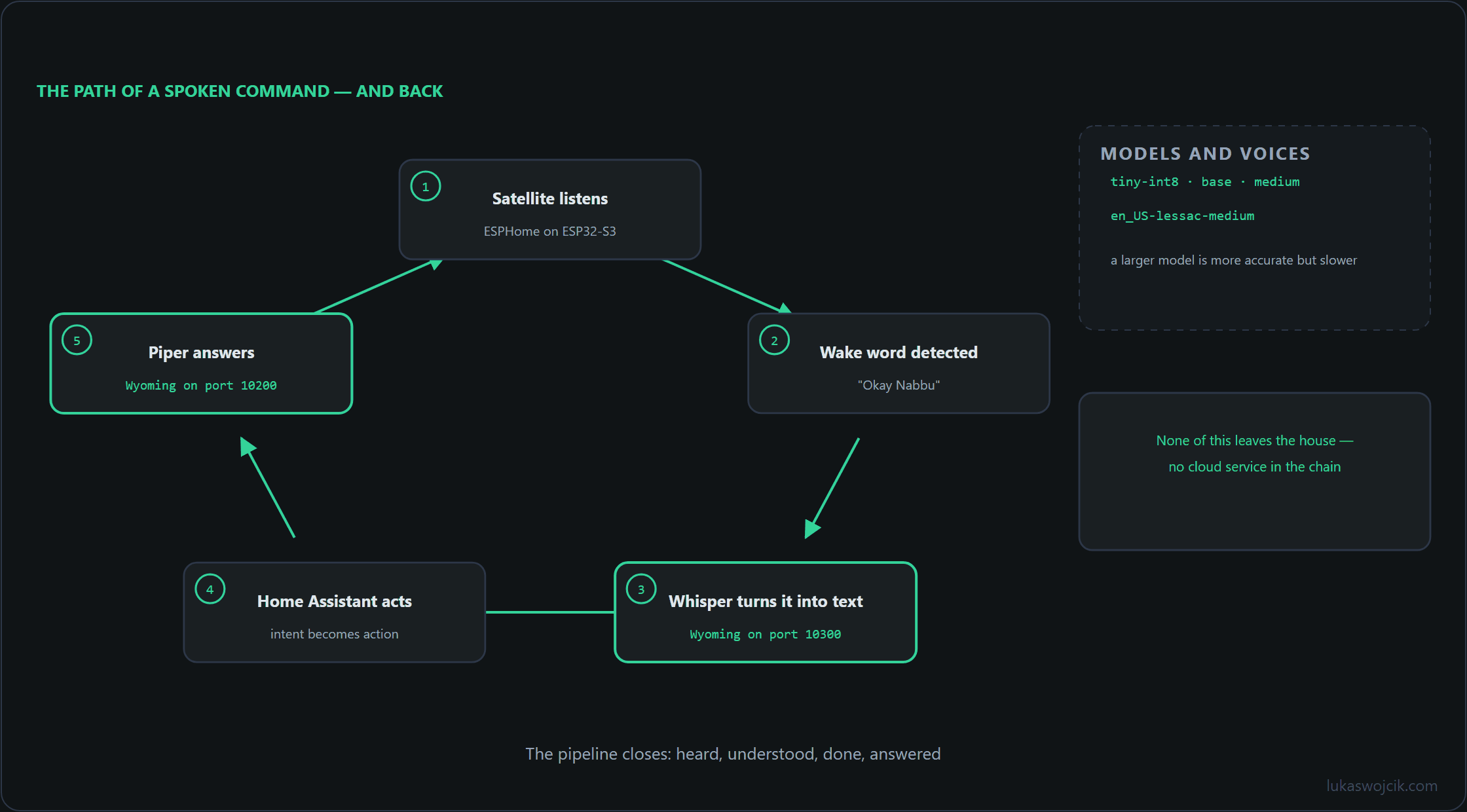
Local voice processing in Home Assistant operates as a modular, decoupled pipeline where audio streams are processed sequentially without external API calls:
- Wake Word Detection (openWakeWord / microWakeWord): Lightweight models constantly analyze microphone input on local satellite hardware (such as ESP32-S3 devices) to trigger pipeline activation upon detecting a keyword.
- Speech-to-Text (Whisper): Audio packets are streamed via the Wyoming protocol to a local Whisper container, converting spoken language into structured text strings.
- Intent Recognition (Home Assistant Assist): Natural language parser engines match the transcribed text against defined device entities, areas, and automation aliases.
- Text-to-Speech (Piper): The response string is synthesized into natural-sounding speech audio by Piper and streamed back to the voice satellite speaker.
2. Step-by-Step Installation of Whisper & Piper Add-ons
Deploying local voice services requires provisioning dedicated container add-ons within Home Assistant OS or supervised Docker environments:
- Install the Whisper Add-on: Navigate to Settings > Add-ons > Add-on Store and search for Whisper. During configuration, select the appropriate model size:
tiny-int8orbasefor CPU-only servers (Raspberry Pi 4/5), ormediumfor servers equipped with GPU acceleration or Google Coral TPUs. - Install the Piper Add-on: Search for and install the Piper add-on. In the configuration tab, select the preferred neural voice model (e.g.,
en_US-lessac-mediumfor English) and initialize the service. - Configure the Wyoming Integration: Navigate to Settings > Devices & Services > Add Integration, search for Wyoming Protocol, and add both Whisper (default port
10300) and Piper (default port10200).
3. Step-by-Step Assist Pipeline Configuration
Once the processing engines are integrated, a cohesive voice assistant pipeline must be established:
- Create a Voice Pipeline: Navigate to Settings > Voice Assistants > Add Pipeline. Assign an explicit name such as
Local Assist - English. - Assign Local Engines: Set the Speech-to-Text engine to Whisper, set the Conversation Agent to Home Assistant, and set the Text-to-Speech engine to Piper.
- Enable Local Wake Word: If using local wake word detection, select openWakeWord as the wake word engine and choose an activation keyword (such as
Okay NabbuorHey Jarvis).
Production-Ready ESPHome Satellite YAML
To capture audio and stream responses without cloud hardware, an ESP32-S3 voice satellite (such as the ESP32-S3-BOX-3 or Atom Echo) can be provisioned using the following ESPHome configuration:
esphome:
  name: "voice-satellite-livingroom"
  friendly_name: "Living Room Voice Satellite"

esp32:
  board: esp32-s3-devkitc-1
  framework:
    type: esp-idf

api:
  encryption:
    key: "GENERATE_YOUR_KEY_HERE"

i2s_audio:
  - id: i2s_in
    i2s_lrclk_pin: GPIO4
    i2s_bclk_pin: GPIO5
  - id: i2s_out
    i2s_lrclk_pin: GPIO15
    i2s_bclk_pin: GPIO16

microphone:
  - platform: i2s_audio
    id: sat_mic
    i2s_audio_id: i2s_in
    i2s_din_pin: GPIO6
    adc_type: external
    pdm: false

speaker:
  - platform: i2s_audio
    id: sat_speaker
    i2s_audio_id: i2s_out
    i2s_dout_pin: GPIO17

voice_assistant:
  id: va_pipeline
  microphone: sat_mic
  speaker: sat_speaker
  use_wake_word: true
  noise_suppression_level: 2
  auto_gain: 31dBFS
  volume_multiplier: 2.0
4. Summary & Architectural Value
What this tutorial achieves: The successful deployment of a fully autonomous, local voice control architecture in Home Assistant using the Wyoming protocol, Whisper STT, Piper TTS, and ESPHome-based hardware satellites.
Resulting value: Smart home voice interaction becomes completely independent of third-party cloud servers. Private conversations and acoustic telemetry remain isolated within the local network, eliminating profiling and data harvesting risks. Furthermore, removing cloud round-trip routing reduces voice command execution latency to sub-second speeds while ensuring 100% voice control availability during internet outages.
Sources
Home Assistant without the cloud
- Zigbee2MQTT vs. ZHA: Building a Highly Reliable Mesh Network in Home Assistant
- ESPHome and ESP32 in Practice: Building Cloud-Free Environmental Sensors
- Presence Detection 2.0: mmWave Radars (LD2410/LD2450) in Lighting Automation
- Local Voice Control in Home Assistant with Whisper & Piper
- WireGuard & Tailscale DMZ: Secure External Access to Home Assistant and Self-Hosted Servers
- Local Energy Management: Integrating PV Inverters and Battery Storage via Modbus TCP
Related articles