English
 Deutsch
 Polski
Raspberry Pi Monitoring with Prometheus and Grafana
Part 7 of 7 in the series Homelab on the Raspberry Pi

Management Summary
Monitoring makes the condition of a Raspberry Pi visible over time rather than only when a service fails. Prometheus collects measurements such as temperature and resource use; Grafana turns them into readable charts. In a small server installation, this helps reveal overheating, power problems or growing workload. Warnings can draw attention to unusual conditions, but a chart alone does not explain the cause. Missing or stale measurements also matter, because silence is not evidence that the device is healthy.
Contents
Load monitoring and its limits
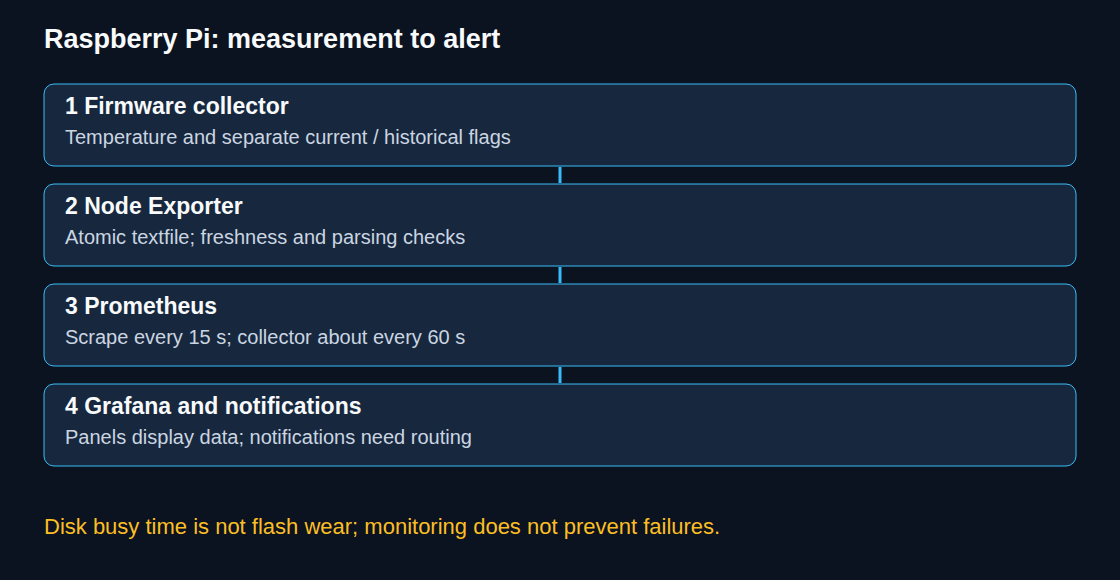
Prometheus stores measurements over time, while Grafana displays those measurements. On a Raspberry Pi, node_exporter makes Linux measurements available for retrieval. A small collection script adds temperature and warning flags reported by the firmware, the device’s built-in control software. Monitoring helps investigate bottlenecks. A dashboard does not prevent overheating, repair a power supply or predict the failure date of a storage device.
The example targets a separate, new Raspberry Pi OS setup with Python 3, Docker Engine and Compose. Existing accounts, collector directories and services require reconciliation before installation. Administrative privileges are needed for the host service configuration. All network endpoints below listen on the local address 127.0.0.1, called loopback. Devices elsewhere on the network cannot connect directly; browser access uses an encrypted SSH tunnel to the Pi.
1. Firmware collection with error handling
The following file, rpi-hardware-metrics.py, reads only temperature and throttling status. Each command has a timeout, and unexpected output aborts the run. A failed run leaves the previous file unchanged. The last-success metric distinguishes old measurements from new ones; a successful HTTP scrape alone would not reveal a stalled collector.
#!/usr/bin/env python3
import os
import re
import subprocess
import sys
import tempfile
import time
from pathlib import Path

FLAGS = ("undervoltage", "frequency_capped", "throttled", "soft_temperature_limit")

def read_value(argument):
    return subprocess.run(
        ["/usr/bin/vcgencmd", argument], check=True,
        capture_output=True, text=True, timeout=5
    ).stdout.strip()

def collect(reader=read_value):
    temperature = re.fullmatch(r"temp=(-?[0-9]+(?:[.][0-9]+)?)'C", reader("measure_temp"))
    throttle = re.fullmatch(r"throttled=0x([0-9a-fA-F]{1,8})", reader("get_throttled"))
    if temperature is None or throttle is None:
        raise ValueError("Unexpected vcgencmd output")
    mask = int(throttle.group(1), 16)
    lines = [
        "# HELP rpi_soc_temperature_celsius SoC temperature",
        "# TYPE rpi_soc_temperature_celsius gauge",
        "rpi_soc_temperature_celsius " + temperature.group(1),
        "# HELP rpi_soc_throttled_bitmask Complete firmware bitmask",
        "# TYPE rpi_soc_throttled_bitmask gauge",
        f"rpi_soc_throttled_bitmask {mask}",
        "# HELP rpi_hardware_flag Firmware flag; current or since boot",
        "# TYPE rpi_hardware_flag gauge",
    ]
    for state, offset in (("current", 0), ("since_boot", 16)):
        for bit, name in enumerate(FLAGS):
            value = (mask >> (offset + bit)) & 1
            lines.append(f'rpi_hardware_flag{{state="{state}",flag="{name}"}} {value}')
    lines += [
        "# HELP rpi_collector_last_success_timestamp_seconds Last successful collection",
        "# TYPE rpi_collector_last_success_timestamp_seconds gauge",
        f"rpi_collector_last_success_timestamp_seconds {time.time():.3f}",
    ]
    return "\n".join(lines) + "\n"

def publish(directory, content):
    directory = Path(directory)
    fd, temporary = tempfile.mkstemp(prefix=".rpi-", suffix=".tmp", dir=directory)
    try:
        with os.fdopen(fd, "w", encoding="utf-8") as output:
            output.write(content)
            os.fchmod(output.fileno(), 0o644)
        os.replace(temporary, directory / "rpi_metrics.prom")
    finally:
        if os.path.exists(temporary):
            os.unlink(temporary)

if __name__ == "__main__":
    if len(sys.argv) != 2:
        raise SystemExit("Usage: rpi-hardware-metrics.py TEXTFILE_DIRECTORY")
    publish(sys.argv[1], collect())
Current flags and flags recorded since boot have separate labels. For example, 0x50000 records earlier undervoltage and throttling, without asserting that either condition is active now. Sampling once a minute can miss brief current states; historical flags preserve some of that evidence but do not provide an incident timestamp. Unknown future bits remain visible in the complete bitmask.
Core voltage is deliberately absent. A core rail is not the USB input voltage or a diagnosis of a defective adapter. Pi 5 provides separate readings from its power-management chip (PMIC), such as vcgencmd pmic_read_adc EXT5V_V; adding those values requires model-specific parsing and permission tests.
2. A host collector and timer
The setup commands assume the three supplied files are in the working directory and the video group exists. The rpi-metrics account is a new, non-login service account; an existing account must be checked rather than recreated. Raspberry Pi OS must provide /usr/bin/vcgencmd. Access to the hardware device depends on the installed OS and must be tested under the service account.
sudo apt update
sudo apt install prometheus-node-exporter python3
sudo useradd --system --user-group --groups video --no-create-home --shell /usr/sbin/nologin rpi-metrics
sudo install -d -o rpi-metrics -g rpi-metrics -m 755 /var/lib/node_exporter/textfile_collector
sudo install -d -m 755 /usr/local/libexec
sudo install -m 755 rpi-hardware-metrics.py /usr/local/libexec/rpi-hardware-metrics.py
sudo install -m 644 rpi-collector.service rpi-collector.timer /etc/systemd/system/
The file rpi-collector.service contains:
[Unit]
Description=Collect Raspberry Pi firmware metrics

[Service]
Type=oneshot
User=rpi-metrics
SupplementaryGroups=video
ExecStart=/usr/bin/python3 /usr/local/libexec/rpi-hardware-metrics.py /var/lib/node_exporter/textfile_collector
NoNewPrivileges=true
ProtectSystem=strict
ProtectHome=true
ReadWritePaths=/var/lib/node_exporter/textfile_collector
The file rpi-collector.timer contains:
[Unit]
Description=Collect Raspberry Pi firmware metrics periodically

[Timer]
OnBootSec=30s
OnUnitActiveSec=60s
AccuracySec=1s

[Install]
WantedBy=timers.target
sudo -u rpi-metrics /usr/bin/vcgencmd measure_temp and the corresponding get_throttled call check actual access. The exporter must be able to read the directory and generated file. The script is root-owned after installation; the service account writes only the collector output directory.
For the Debian-packaged exporter, systemctl cat prometheus-node-exporter shows how startup arguments are loaded. In installations using /etc/default/prometheus-node-exporter, the existing ARGS needs --collector.textfile.directory=/var/lib/node_exporter/textfile_collector and --web.listen-address=127.0.0.1:9100. Existing unrelated options remain necessary; duplicate directory or listen flags must be resolved. The installed package’s configuration takes precedence over an assumed file layout.
After configuration, sudo systemctl restart prometheus-node-exporter, sudo systemctl daemon-reload and sudo systemctl enable --now rpi-collector.timer activate the services. sudo systemctl start rpi-collector.service performs an initial run. Failures remain visible through journalctl -u rpi-collector.service; repeated installation does not append duplicate cron entries.
3. Measurement storage with Prometheus
The following compose.yaml uses host networking on Linux so container loopback reaches the host exporter. Explicit listen addresses keep Prometheus and Grafana local. A protected .env defines tested ARM-compatible image references for PROMETHEUS_IMAGE and GRAFANA_IMAGE, plus a unique GRAFANA_ADMIN_PASSWORD for first initialization. An existing Grafana database retains its existing administrator password.
services:
  prometheus:
    image: ${PROMETHEUS_IMAGE:?set tested prom/prometheus release}
    network_mode: host
    restart: unless-stopped
    command:
      - --config.file=/etc/prometheus/prometheus.yml
      - --storage.tsdb.path=/prometheus
      - --storage.tsdb.retention.time=7d
      - --web.listen-address=127.0.0.1:9090
    volumes:
      - ./prometheus.yml:/etc/prometheus/prometheus.yml:ro
      - ./alerts.yml:/etc/prometheus/alerts.yml:ro
      - prometheus-data:/prometheus
  grafana:
    image: ${GRAFANA_IMAGE:?set tested grafana/grafana release}
    network_mode: host
    restart: unless-stopped
    environment:
      GF_SERVER_HTTP_ADDR: 127.0.0.1
      GF_SERVER_HTTP_PORT: "3000"
      GF_SECURITY_ADMIN_PASSWORD: ${GRAFANA_ADMIN_PASSWORD:?set initial admin password}
      GF_AUTH_ANONYMOUS_ENABLED: "false"
    volumes:
      - grafana-data:/var/lib/grafana
volumes:
  prometheus-data:
  grafana-data:
The file prometheus.yml in the same directory contains:
global:
  scrape_interval: 15s
  evaluation_interval: 15s
rule_files:
  - /etc/prometheus/alerts.yml
scrape_configs:
  - job_name: raspberry_pi
    static_configs:
      - targets: ["127.0.0.1:9100"]
Seven-day retention is an example, not a disk-size limit. Named volumes retain data when containers are recreated. Free space, storage writes and backups need their own monitoring. The 15-second scrape does not make the collector’s approximately 60-second measurements more frequent.
4. Alert rules and notifications are separate
The following alerts.yml checks both measurements and collection health. The 75 °C threshold is an example operating threshold, not a universal hardware limit. The missing-series rule assumes this one-target job; multiple hosts need per-target absence handling.
groups:
  - name: raspberry_pi
    rules:
      - alert: PiExporterDown
        expr: up{job="raspberry_pi"} == 0
        for: 2m
      - alert: PiCollectorStale
        expr: time() - rpi_collector_last_success_timestamp_seconds{job="raspberry_pi"} > 180
        for: 1m
      - alert: PiCollectorMissing
        expr: absent(rpi_collector_last_success_timestamp_seconds{job="raspberry_pi"})
        for: 2m
      - alert: PiTextfileError
        expr: node_textfile_scrape_error{job="raspberry_pi"} == 1
        for: 1m
      - alert: PiTemperatureHigh
        expr: rpi_soc_temperature_celsius{job="raspberry_pi"} > 75
        for: 5m
      - alert: PiCurrentFirmwareWarning
        expr: rpi_hardware_flag{job="raspberry_pi",state="current"} == 1
docker compose config --quiet checks the Compose configuration. The selected image’s promtool check config and promtool check rules validate Prometheus files before startup. docker compose up -d starts the stack. These rules expose pending/firing states in Prometheus; no email or push message is sent until an Alertmanager integration is configured and tested. A Grafana panel threshold alone is also not a notification rule.
On the workstation, ssh -N -L 3000:127.0.0.1:3000 -L 9090:127.0.0.1:9090 ACCOUNT@PI_ADDRESS forwards the local browser ports. The placeholders identify the actual SSH account and Pi address. Grafana then opens at http://127.0.0.1:3000; its Prometheus data source uses http://127.0.0.1:9090 because both containers share the host network.
Useful panels and their limits
rpi_soc_temperature_celsius: sampled SoC temperature.rpi_hardware_flag{state="current"}: current firmware flags;state="since_boot"shows recorded incidents.100 * rate(node_disk_io_time_seconds_total[5m]): device busy-time percentage, subject to kernel accounting limits. This is neither flash wear nor request latency.100 * node_memory_MemAvailable_bytes / node_memory_MemTotal_bytes: available memory percentage, not a rate per second.
Device selection prevents misleading comparisons of physical disks and virtual devices. Storage wear requires supported SMART/NVMe or manufacturer health data; many SD cards expose little usable wear information. High busy time alone does not identify a worn controller.
Questions and answers
How is the pipeline verified without stressing storage?
Exporter reachability, up, node_textfile_scrape_error, last-success age and timer logs provide the first checks. In a separate test environment, a paused timer should produce a stale-data alert; malformed synthetic command responses should leave the last good file intact. An intensive random-write benchmark is unnecessary for this verification.
Does an undervoltage flag identify the cause?
No. The flag reports a detected state. Power supply, cable, connectors and peripheral load require separate investigation. Temperature and throttling data describe symptoms; neither a graph nor a flag guarantees prevention of an outage.
Does 127.0.0.1 always refer to the host?
No. Ordinary bridge containers have separate loopback interfaces. This example explicitly uses host networking. A different network layout needs a reachable exporter address and a matching Grafana data-source URL.
Sources
- Prometheus documentation
- Grafana documentation
- vcgencmd: temperature, bit definitions, core voltage versus Pi5 PMIC
- Node Exporter: host metrics and atomic textfile publishing
- Prometheus: rule activation and for durations
- Linux: disk busy time versus other I/O statistics
- Grafana: loopback binding and environment settings
- PromQL: absent and time
- Prometheus: web listener and retention flags
Homelab on the Raspberry Pi
- Raspberry Pi 4 and 5: Booting From an SSD by Changing the Bootloader
- Raspberry Pi UPS: five options and selection criteria
- Local CI/CD for Raspberry Pi: Automating Docker Compose Deployments
- Docker Compose Home Server: Traefik, TLS and Update Monitoring
- Jellyfin on Raspberry Pi 5: Direct Play and Transcoding Limits
- Raspberry Pi as a Hardened WireGuard VPN Gateway with Split-Tunneling
- Raspberry Pi Monitoring with Prometheus and Grafana
Related articles