English
 Deutsch
 Polski
Docker Compose Home Server: Traefik, TLS and Update Monitoring
Part 4 of 7 in the series Homelab on the Raspberry Pi

Management Summary
A home server can host several local services behind one organised entry point. The setup routes browser requests to the right application, renews certificates for encrypted connections and reports available software updates. Automating these routine tasks makes small installations on a Raspberry Pi easier to maintain. The tasks remain distinct: an update notification does not install a correction. One device also remains a single point of hardware failure, so stored data still needs recoverable backups.
Contents
A home server with clear responsibilities
Traefik routes incoming requests to Docker containers and can obtain and renew TLS certificates through Let’s Encrypt. TLS encrypts the connection between the browser and Traefik. Docker Compose keeps the service configuration in a file. Watchtower can check container images for changes. These tools reduce routine work; backups, monitoring and deliberate updates remain necessary.
The example below is a starting point for a separate test stack on a Raspberry Pi with Docker Engine and Compose installed. Image architecture, Docker API compatibility and the selected versions require verification on the target system. A single Pi and one container per application provide no high availability.
1. DNS, images and certificate storage
HTTP-01 requires a domain under administrative control and inbound port 80 reachable from the internet. Public A/AAAA records, router forwarding and IPv4/IPv6 firewall rules must agree. Ports 80 and 443 must be available on the host. DNS-01 can issue certificates without inbound access, but does not make a server behind CGNAT reachable. With CGNAT, the internet provider shares a public IPv4 address among several customers; ordinary port forwarding on the home router is then insufficient.
In a writable project directory, the following commands create certificate storage without truncating existing files. The container process needs appropriate ownership as well as file mode 600. Certificate files contain private keys and belong in protected backups.
mkdir -p data
touch data/acme-staging.json data/acme-production.json
chmod 600 data/acme-staging.json data/acme-production.json
The main configuration is saved as compose.yaml. A neighbouring .env must define TRAEFIK_IMAGE, SOCKET_PROXY_IMAGE, WHOAMI_IMAGE, ACME_EMAIL and APP_HOST. Image values are complete references for tested releases of traefik, ghcr.io/tecnativa/docker-socket-proxy and traefik/whoami, preferably with recorded digests. A digest is a content hash that pins the exact image instead of a changeable version label. The hostname must be an owned test hostname, without a scheme or path. Missing values stop Compose rather than silently selecting latest.
2. Request routing with limited Docker API access
services:
  socket-proxy:
    image: ${SOCKET_PROXY_IMAGE:?set tested image reference}
    restart: unless-stopped
    networks: [control]
    volumes:
      - /var/run/docker.sock:/var/run/docker.sock:ro
    environment:
      CONTAINERS: "1"
      EVENTS: "1"
      NETWORKS: "1"
      PING: "1"
      VERSION: "1"
      POST: "0"
  traefik:
    image: ${TRAEFIK_IMAGE:?set tested Traefik v3 image reference}
    restart: unless-stopped
    depends_on: [socket-proxy]
    networks: [control, proxy]
    ports: ["80:80", "443:443"]
    volumes:
      - ./data:/data
    command:
      - --providers.docker=true
      - --providers.docker.endpoint=tcp://socket-proxy:2375
      - --providers.docker.exposedbydefault=false
      - --providers.docker.network=home_proxy
      - --entrypoints.web.address=:80
      - --entrypoints.web.http.redirections.entrypoint.to=websecure
      - --entrypoints.web.http.redirections.entrypoint.scheme=https
      - --entrypoints.websecure.address=:443
      - --certificatesresolvers.home.acme.email=${ACME_EMAIL:?set account email}
      - --certificatesresolvers.home.acme.storage=/data/${ACME_FILE:-acme-staging.json}
      - --certificatesresolvers.home.acme.caserver=${ACME_CA:-https://acme-staging-v02.api.letsencrypt.org/directory}
      - --certificatesresolvers.home.acme.httpchallenge.entrypoint=web
  whoami:
    image: ${WHOAMI_IMAGE:?set tested whoami image reference}
    restart: unless-stopped
    networks: [proxy]
    labels:
      traefik.enable: "true"
      traefik.http.routers.demo.rule: Host(`${APP_HOST:?set owned test hostname}`)
      traefik.http.routers.demo.entrypoints: websecure
      traefik.http.routers.demo.tls.certresolver: home
      traefik.http.services.demo.loadbalancer.server.port: "80"
      com.centurylinklabs.watchtower.enable: "true"
      com.centurylinklabs.watchtower.scope: home-demo
networks:
  control:
    internal: true
  proxy:
    name: home_proxy
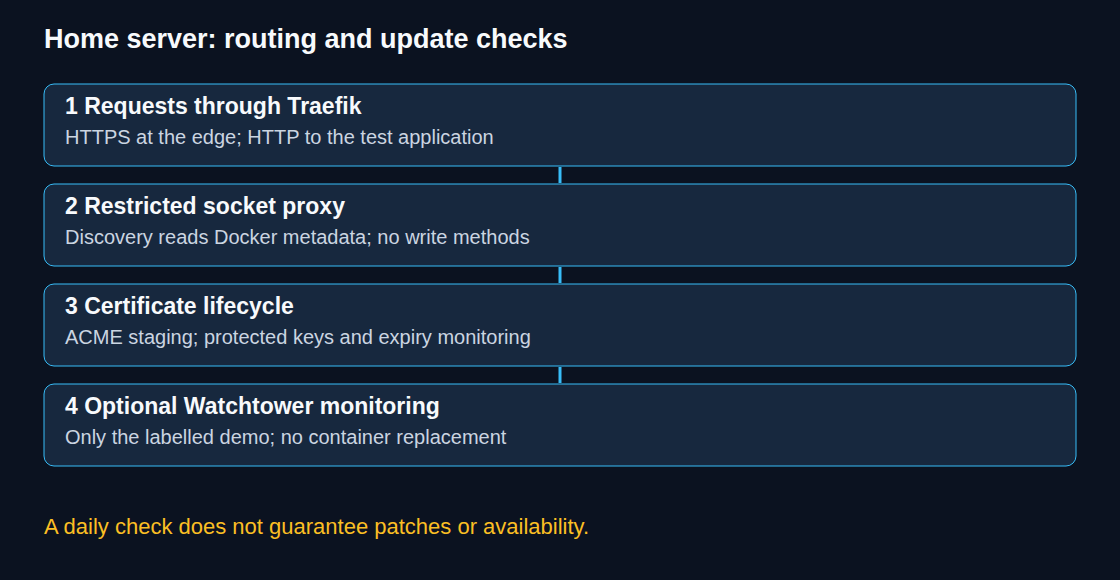
Only Traefik publishes host ports. The application shares the home_proxy network with Traefik; the internal control network contains only Traefik and the socket proxy. Compose creates both networks. The fixed network name must be unique on the host or consistently renamed in both places.
Traefik has no direct socket mount. The proxy allows the listed read endpoints and blocks write methods through POST=0. Read access still reveals container metadata, potentially including environment variables. The socket proxy itself retains powerful access to Docker; network isolation and trusted images remain essential. A :ro socket mount alone does not make Docker API operations read-only.
No dashboard is exposed. HTTPS terminates at Traefik; the example uses HTTP from Traefik to whoami. This is not end-to-end TLS. The diagnostic whoami service returns request information and is intended for a short routing test, without credentials or sensitive headers.
3. Staging checks before trusted certificates
docker compose config --quiet checks the assembled configuration. After reviewing the resolved values, docker compose up -d starts the test stack. Logs from docker compose logs traefik socket-proxy help diagnose discovery, denied API requests and ACME failures. The proxy allow list may need adjustment for the chosen versions; broad write access is not a remedy.
The default ACME endpoint is Let’s Encrypt staging. The resulting certificates are intentionally untrusted by browsers. After successful routing and challenge checks, .env receives ACME_CA=https://acme-v02.api.letsencrypt.org/directory and ACME_FILE=acme-production.json. The command docker compose up -d traefik recreates Traefik with the changed configuration. Staging and production use separate files.
Verification includes the HTTP redirect, the HTTPS hostname and certificate chain, expiry monitoring, and an actual application request from outside the home network. A populated JSON file alone does not prove a valid public certificate. Renewal can fail because of DNS, connectivity, permissions or rate limits. The demo should be removed after testing.
4. Optional update monitoring
The original containrrr/watchtower repository was archived on 17 December 2025. The nicholas-fedor/watchtower fork publishes the nickfedor/watchtower image. Fork selection requires an independent maintenance and compatibility assessment; a familiar image name is no security guarantee.
The following optional file, monitor.yaml, observes only containers carrying both the enable label and the home-demo scope. The example labels only whoami. WATCHTOWER_IMAGE must reference a tested release. Starting with docker compose -f compose.yaml -f monitor.yaml up -d adds the monitor. Existing Watchtower instances on the host also need compatible selection rules.
services:
  watchtower:
    image: ${WATCHTOWER_IMAGE:?set tested nickfedor/watchtower image reference}
    restart: unless-stopped
    volumes:
      - /var/run/docker.sock:/var/run/docker.sock
    environment:
      WATCHTOWER_MONITOR_ONLY: "true"
      WATCHTOWER_LABEL_ENABLE: "true"
      WATCHTOWER_SCOPE: home-demo
      WATCHTOWER_POLL_INTERVAL: "86400"
      WATCHTOWER_CLEANUP: "false"
      WATCHTOWER_LABEL_TAKE_PRECEDENCE: "false"
      WATCHTOWER_LIFECYCLE_HOOKS: "false"
    labels:
      com.centurylinklabs.watchtower.enable: "false"
      com.centurylinklabs.watchtower.scope: home-demo
This mode does not replace containers. Image downloads can still occur; lifecycle hooks, which run additional commands at defined stages, are explicitly disabled. Results appear in logs; external notifications require separate configuration and testing. Watchtower retains full Docker socket access even in monitoring mode. The label filter is an operational selection rule, not a security boundary.
For DNS-01 automation, narrowly scoped DNS API credentials or a delegated challenge zone reduce exposure; unrestricted DNS credentials do not belong in a public application container.
Questions and answers
Does a daily check guarantee patches within 24 hours?
No. Updates depend on image publication, the tracked reference, registry availability and successful execution. A fixed digest does not follow newer releases. A version tag can change but may stop receiving fixes. The monitor installs nothing; selected version references need deliberate maintenance.
Are automatic restarts free of downtime?
No. Replacing a single application container interrupts that instance. Rolling restarts alone provide no redundancy or data migration strategy. Automatic updates require an explicit opt-in, tested health checks, backups and a rollback procedure that covers data as well as the image. Keeping an old image is insufficient after an incompatible database migration.
Is an IP allow list enough for an administrative dashboard?
The example exposes no dashboard. A later administrative route requires authentication and restricted access, such as a VPN. IP rules depend on the actual source address and trusted proxy configuration; broad private address ranges do not establish identity.
Is a monitoring run entirely read-only?
No. Monitor-only can download images, and enabled hooks can execute commands. A second process inside a running updater does not suspend the original process. --no-pull prevents image downloads but is not a substitute for monitor-only.
Sources
- Docker Compose documentation
- Traefik documentation
- Let’s Encrypt documentation
- Traefik Docker provider: endpoint, discovery and API security
- Traefik ACME: storage, staging and challenges
- Docker Socket Proxy: endpoint permissions and isolation
- Watchtower: original repository archived
- Watchtower fork and image
- Watchtower: label and scope selection
- Watchtower: monitoring and image downloads
- Watchtower: lifecycle hooks
- Watchtower: polling interval
- Docker Compose: required environment variables
- ACME HTTP-01 and DNS-01
Homelab on the Raspberry Pi
- Raspberry Pi 4 and 5: Booting From an SSD by Changing the Bootloader
- Raspberry Pi UPS: five options and selection criteria
- Local CI/CD for Raspberry Pi: Automating Docker Compose Deployments
- Docker Compose Home Server: Traefik, TLS and Update Monitoring
- Jellyfin on Raspberry Pi 5: Direct Play and Transcoding Limits
- Raspberry Pi as a Hardened WireGuard VPN Gateway with Split-Tunneling
- Raspberry Pi Monitoring with Prometheus and Grafana
Related articles