English
 Deutsch
 Polski
Tutorial: Turning a Floor Plan into a Camera Layout with Lens and Mounting Height

Management Summary
A camera layout turns a building plan into a decision about which areas should be visible and what details each camera must capture. It supports the choice of lens, location and mounting height before equipment is installed. A broad overview and recognition of a person require different amounts of detail, so a sharper view of one area can leave another route outside the frame. Real lighting, movement and night conditions determine whether the recorded footage fulfils the intended purpose.
Contents
A camera layout connects each position to a clear task: following activity across a yard, capturing characteristics at a gate or recognizing a known person at an entrance. That task determines the required framing and detail. Resolution, lens and mounting position follow from those requirements.
Calculations narrow the choice of suitable configurations. Whether the recording actually performs the task requires testing with movement, difficult lighting and the stream intended for recording.
1. Task and standard edition
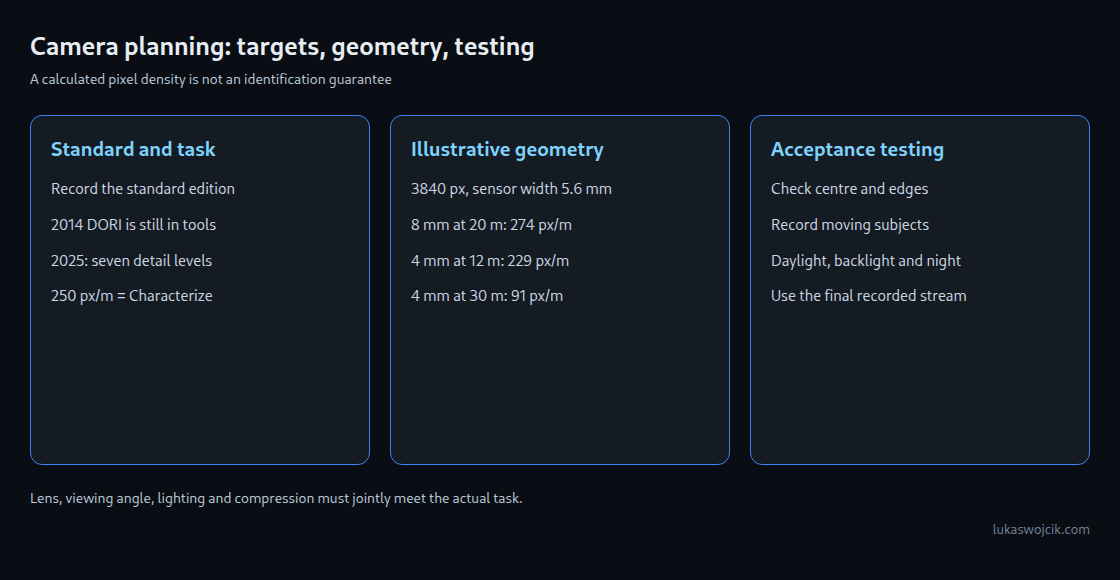
The familiar DORI values belong to the older IEC 62676-4:2014 model: Detect 25, Observe 62.5, Recognize 125 and Identify 250 pixels per metre. These numbers do not form a uniform doubling sequence. DORI remains present in datasheets and design tools.
The second edition, IEC 62676-4:2025, was published on 9 October 2025. The current Axis explanation lists seven detail levels. Keeping the original English names avoids confusion with the older DORI labels:
| IEC 62676-4:2025 | px/m |
|---|---|
| Overview | 20 |
| Outline | 40 |
| Discern | 80 |
| Perceive | 125 |
| Characterize | 250 |
| Validate | 500 |
| Scrutinize | 1500 |
Characterize concerns visible characteristics such as gait and behaviour. Validate concerns checking known persons; Scrutinize targets a much more confident identity assessment. These are task categories for human evaluation, not success guarantees.
In this model, 250 px/m belongs to Characterize, not to a general promise of identification. The plan must record the edition, specific task and numerical target together. These levels concern human interpretation of visible-light images; automated analytics and thermal imaging need suitable separate requirements.
Meeting a pixel target does not guarantee a usable face or licence plate. Viewing direction, occlusion and image quality remain decisive. The 250 px/m target below is an example for calculation, not a general recommendation for every identification task.
2. Test areas on the floor plan
A scaled plan records target areas, possible routes, obstructions and mounting positions. A passage may need a detailed view while another camera records activity across the yard. The requirements determine the number and placement; no fixed rule of two or three cameras follows.
Each target area has a near and a far boundary. Lighting, low sun, glass, reflections and potential occlusion also matter. Direction and shielding can reduce backlight. Wide Dynamic Range (WDR) aims to keep detail visible in both bright and dark parts of a scene. WDR may help but needs testing and can itself introduce motion artifacts, depending on the method. A generic gain of one or two stops is not a reliable device specification.
Unwanted areas such as neighbouring windows belong in the initial planning. Technical coverage alone does not establish permission to capture an area.
3. Scene width and pixel density
The following relationships describe a simplified distortion-free model. W is scene width in metres, d the axial distance to the target plane, S active sensor width and f focal length in matching units. N is the horizontal pixel count of the image actually used, and P is pixel density. HFOV means horizontal field of view; the tangent function must use the intended angle units.
W = d × S / f
P = N / W
W = 2 × d × tan(HFOV / 2)
The model describes a plane perpendicular to the optical axis. Sloping target areas, strong wide-angle distortion and dewarped images require more than a single distance. A manufacturer’s field of view describes outer coverage, not uniform local pixel density across the whole frame.
The example assumes 5.6 mm active sensor width and a recording 3840 pixels wide. A 1/2.8-inch designation is an optical format and does not establish exactly the same active width for every camera. Device specifications determine the active area and any cropping.
N = 3840 px; S = 5.6 mm; d = 20 m
W_max (P = 250 px/m) = 3840 / 250 = 15.36 m
f_min = 20 × 5.6 / 15.36 = 7.29 mm

f = 8.0 mm: W = 14.00 m; P = 274.3 px/m
f = 6.0 mm: W = 18.67 m; P = 205.7 px/m
f = 2.8 mm: W = 40.00 m; P = 96.0 px/m
An 8 mm lens exceeds the selected target at 20 m in this model. At the same time, the entire required area must fit within the 14 m scene width. The next longer lens is therefore not automatically the right purchase: added detail may exclude important routes. A varifocal lens has an adjustable focal length and helps adjust framing but still requires checking the final view.
With the same assumptions, the 8 mm lens reaches 250 px/m at approximately 21.9 m, 500 px/m at 11.0 m and 1500 px/m at 3.7 m. These are geometric density thresholds, not guaranteed identification distances.
4. Mounting height and viewing direction
High pixel density is of limited use when the image mostly shows the top of a head. The vertical viewing angle to a target follows from the height difference and horizontal distance:
angle = atan((H_camera − H_target) / D_horizontal)
H_camera = 3.0 m; H_target = 1.6 m

D_horizontal = 20 m: 4.0°
D_horizontal =  5 m: 15.6°
D_horizontal =  2 m: 35.0°
These numbers do not establish real-world face recognition performance. A side view or a face turned away may remain unsuitable despite a shallow vertical angle. A 20-degree limit also cannot produce a general mounting recommendation of 2.5–3.5 m: at 20 m horizontal distance and 1.6 m target height, that angular limit corresponds to about 8.88 m. Actual height depends on visibility, required detail, tamper protection and safe mounting.
Infrared range also needs a specific device profile. Beam angle, output, reflections and target surfaces affect results. A 30 m rating implies neither a universal narrowest-lens measurement nor a general one-third range in a wide view.
5. Documentation of every target distance
The following table retains the simplified model with 5.6 mm sensor width and 3840 image pixels. Tasks are design objectives; each still needs acceptance testing.
| Position / task | Distance | Lens | Height | px/m |
|---|---|---|---|---|
| Gate / details | 20 m | 8 mm | 3.0 m | 274 |
| Yard / overview | 12 m | 4 mm | 3.5 m | 229 |
| Yard / overview | 30 m | 4 mm | 3.5 m | 91 |
| Entrance / details | 4 m | 2.8 mm | 2.6 m | 480 |
The overview camera provides about 229 px/m at 12 m, already below the example target of 250. At 30 m, about 91 px/m remain. One density figure for the entire yard would be misleading. The entrance figure of 480 is also below 500; a higher target requires a different configuration.
The complete plan also records the recording stream, analytics stream, frame rate, compression, lighting, acceptance criterion and retention period. Longer retention increases storage demand at an unchanged bitrate; duration does not change bitrate automatically. At identical framing, a 1920-pixel stream has half the horizontal density of a 3840-pixel stream.
6. Acceptance testing of recorded movement
A smartphone photo helps locate obstructions and unwanted areas. A generic full-frame equivalent focal length is not an accurate lens simulation: aspect ratio, stabilization, cropping and capture mode affect framing. A central crop to half the width represents a doubled focal length only under matching projection and format assumptions.
Acceptance testing uses the final recording at full output resolution. A known dimension in the target area allows local pixel measurement. The frequently used 16 cm face width is a model assumption: 250 px/m then gives 40 pixels, but faces vary in width and 40 pixels do not prove the required image quality.
Geometric density remains unchanged at night if framing and resolution remain unchanged. Visible detail can still disappear through noise, focus errors, compression and motion blur. For approximately uniform transverse movement:
blur_px ≈ transverse_speed_m_s × exposure_s × density_px_m

1.4 m/s × 1/30 s  × 274 px/m = 12.8 px
1.4 m/s × 1/100 s × 274 px/m =  3.8 px
1.4 m/s × 1/250 s × 274 px/m =  1.5 px
Consequently, 1/100 second is not a universal limit for adequate sharpness. Acceptable blur and expected movement determine the required exposure time; shorter exposures need sufficient light. Stationary test subjects alone do not test this case.
The test matrix covers centre and edge, near and far positions, daylight, backlight, night and typical movement. Changes to zoom, resolution, compression or lighting require repeating the affected checks. Results, settings and sample recordings become part of the plan.
Questions and answers
Why does a planning tool still show DORI?
Tool version and standard model can differ. The September 2026 Axis white paper still describes 2014 DORI presets in Site Designer and manual entry of values from the 2025 edition. A green coverage area without its model and target is insufficient evidence.
Does corridor format preserve pixel density?
With a true 90-degree rotation, square pixels and unchanged scale, local density remains unchanged. Image width and height exchange roles. Additional cropping or scaling in a camera mode may change the result and needs checking again.
Is a sharp live view sufficient?
The stream used for later evaluation matters. A live view may use different resolution or compression. Acceptance therefore relies on the actual recording, including moving subjects under difficult lighting.
Related articles