English
EDM Studio 2026: Choosing Hardware for the Task

Management Summary
An electronic music studio needs equipment that makes recording, playing and judging sound reliable. Headphones, speakers and the room work together; more expensive speakers alone cannot fix booming bass caused by the room. The overview explains the roles of audio connections, controllers and computer capacity so purchases address a specific need. Example budgets help plan costs, while software, accessories and room treatment must also be included rather than treating the listed devices as a complete studio.
Contents
- Start with the problem in the existing studio
- Interface: check connections and delay
- Monitors: compare bass specifications carefully
- Headphones: a second perspective
- Placement, absorbers and correction
- Choose controllers and instruments for the task
- Computer: the actual project sets the requirements
- Microphone: consider distance and the room
- Three price examples with additional costs
- Questions and answers
- Sources
An EDM studio needs monitoring that makes differences in kick, bass and level easy to judge. Headphones, speakers and the room all matter. An interface connects microphones and speakers to the computer; a MIDI controller helps with playing parts. Useful equipment depends on the available connections, room and way of working.
The models below are examples, not a tested ranking. The tables retain price assumptions from the original overview dated 23 September 2026. No individually verifiable record of those historical retailer prices is available. The amounts therefore illustrate a budget calculation, not current offers. The first table lists single speakers, the second lists pairs. A computer, music software and other necessary equipment cost extra.
Start with the problem in the existing studio
If bass booms only at the desk, the room may be responsible. Walls reflect sound; direct and reflected sound reinforce or weaken particular frequencies. Moving the listening position can therefore change the bass substantially. Spending more on speakers alone does not remove this problem.
With a limited budget, suitable headphones and a reliable audio output are a useful starting point. A separate interface is mainly needed for microphones, instruments, speaker connections or better drivers. Suitable monitors and room treatment can follow. A keyboard, hardware synthesizer or subwoofer adds value when a specific need exists.
Interface: check connections and delay
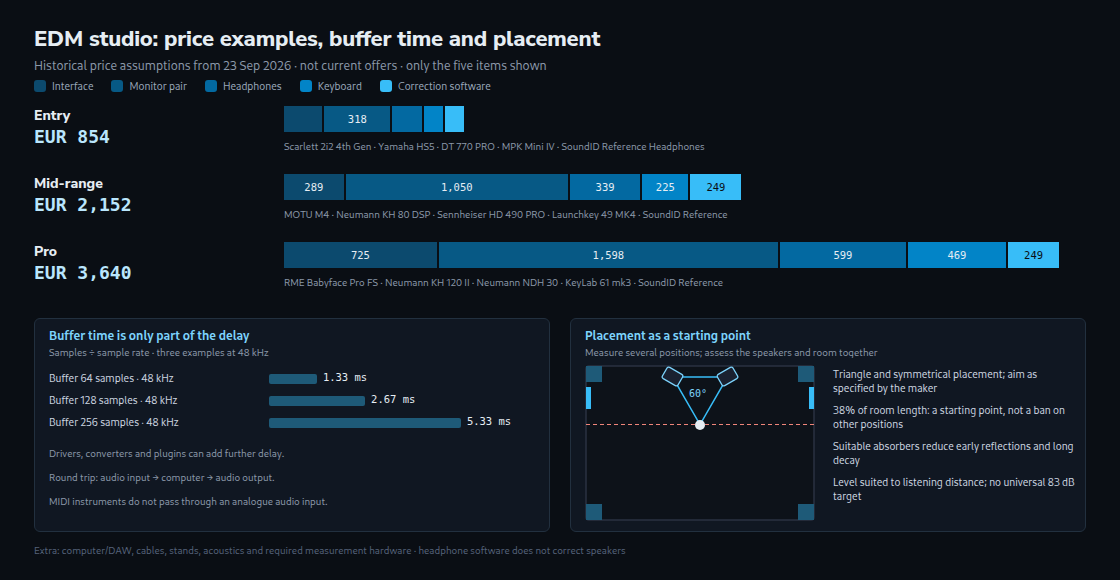
Latency means the delay between an input and the audible result. An audio buffer briefly stores digital measurements called samples. Sample rate is the number of samples per second. Buffer duration is samples divided by sample rate: at 48 kHz, 64 samples take 1.33 ms, 128 samples 2.67 ms and 256 samples 5.33 ms. This is one buffer’s time, not the complete delay. The Audio Latency Calculator converts other values.
Round-trip latency covers the path from an audio input through the computer back to an audio output. Drivers, buffers and converters contribute. A software synthesizer played over MIDI does not pass through an analogue audio input. MIDI processing, the instrument and effects also influence playing response. A limiter with lookahead deliberately waits for upcoming samples and can increase the audible delay.
RME Babyface Pro FS, MOTU M2/M4 and Focusrite Scarlett 2i2 4th Gen are possible candidates. Results from different tests do not form a fair ranking: 32 samples at 96 kHz are different conditions from 48 samples at 44.1 kHz. A useful comparison uses the same computer, sample rate and similar projects, and checks for dropouts. The linked individual reviews do not replace that comparison.
Both the MOTU M2 and M4 have loopback, which returns computer playback as a recording input. The M4 adds, among other features, two line inputs and a total of four balanced line outputs. Exact model names also matter at SSL: the SSL 2 MKII has two balanced line outputs; the SSL 2+ MKII has four and adds MIDI connections.
Monitors: compare bass specifications carefully
A lower frequency limit only becomes useful together with its level deviation. At −10 dB, bass is already substantially quieter than the main frequency range. A specification of 39 Hz at −10 dB is therefore not directly comparable with 44 Hz at −3 dB. Woofer size alone does not determine bass extension either. Listening distance, available level and distortion also matter.
| Monitor | Woofer | Lower limit per manufacturer | Historical price assumption each |
|---|---|---|---|
| Yamaha HS5 | 5 inch | 54 Hz (−10 dB), 74 Hz (−3 dB) | EUR 159 |
| Kali Audio LP-6 V2 | 6.5 inch | 47 Hz (±3 dB), 39 Hz (−10 dB) | EUR 209 |
| Yamaha HS8 | 8 inch | 38 Hz (−10 dB), 47 Hz (−3 dB) | EUR 285 |
| Neumann KH 80 DSP | 4 inch | 57 Hz (±3 dB) | EUR 525 |
| ADAM Audio A7V | 7 inch | 44 Hz (−3 dB), 40 Hz (−6 dB) | EUR 733 |
| Genelec 8330A | 5 inch | 45 Hz (−6 dB) | EUR 778 |
| Neumann KH 120 II | 5.25 inch | 44 Hz (±3 dB) | EUR 799 |
The table contains manufacturer specifications, not measurements in the listening room. ADAM A7V can store compatible Sonarworks profiles in the speaker. Neumann KH 80 DSP and KH 120 II support MA 1 alignment, with the appropriate measurement equipment purchased separately. Genelec 8330A uses GLM with separate calibration hardware. Built-in digital signal processing, or DSP, does not mean that all measurement accessories are included.
A subwoofer can add frequencies that small monitors reproduce only quietly. Position, crossover frequency and alignment with the main speakers are crucial. The crossover determines the frequency region in which the subwoofer takes over the bass. Wrong settings can worsen the bass, but a small room does not automatically rule out a well-integrated subwoofer. Measurements before and after installation show whether reproduction at the listening position improves.
Headphones: a second perspective
Headphones bypass room reflections. Bass response still depends on the model, fit and condition of the ear pads. Closed models such as the DT 770 PRO reduce sound leaking out and can therefore be useful during microphone recording. Open models such as the HD 490 PRO or NDH 30 leak more sound. Open construction does not automatically mean greater accuracy or weaker bass.
On headphones, the left channel mainly reaches the left ear; with speakers, each channel reaches both ears. Perceived width can therefore differ. Familiar reference tracks and a speaker cross-check help put the result in context. A correction profile compensates for certain frequency deviations, but cannot guarantee correct bass or stereo decisions.
Placement, absorbers and correction
An equilateral triangle between the speakers and listening position is a common starting point. Symmetrical placement helps; the speakers should face the listening area as specified by the manufacturer. RealTraps suggests 38 per cent of the room length as an initial position. This is not a fixed rule: measuring several positions is more useful than a blanket ban on the centre of the room.
Absorbers at early reflection points reduce sound arriving from a wall or ceiling in addition to the direct sound. Low frequencies require suitable, sufficiently large bass absorbers; thin acoustic foam is not a substitute. Construction, thickness and position determine the effect. An explanation that every bass trap works simply at the highest sound pressure is incomplete.
Frequency response describes the level at which different frequencies are reproduced. Room correction changes that balance with filters. A strong bass peak can be reduced. A deep cancellation cannot simply be filled with unlimited extra level. Reflections and ringing in the room do not disappear just because the frequency response looks smoother. Placement and acoustic treatment remain important.
On 25 October 2026, Sonarworks lists SoundID Reference at EUR 99 for headphones and EUR 249 for speakers and headphones. A measurement microphone is an additional item. A SoundID profile running on the computer and MA 1 alignment stored in a Neumann speaker are different methods. The software licence does not replace MA 1 or GLM accessories.
A repeatable, comfortable monitoring level helps comparisons. The often quoted 83 dB from the K-System is not a universal target for long sessions at a desk. Bob Katz explicitly discusses listening distance and lower settings for nearfield use. Calibration does not make sustained high volume harmless.
Choose controllers and instruments for the task
A compact keyboard can handle bass lines; two-handed chords need more space. The Akai MPK Mini IV provides pitch and modulation wheels. The Launchkey 49 MK4 has 49 keys and pads with polyphonic aftertouch: pressure after the initial strike can control further sound changes for each pad. The Arturia KeyLab 61 mk3 provides semi-weighted keys with aftertouch. The instrument must support the relevant function.
A pad controller can make drum patterns easier to play. Whether this is faster than a mouse depends on the workflow. Hardware synthesizers and grooveboxes offer dedicated controls, and some work without a computer. Alongside sound, buying decisions need to account for audio connections to the interface, MIDI synchronisation and saving settings. Extra devices do not automatically improve a mix.
Computer: the actual project sets the requirements
Many demanding synthesizers load the processor; large sample libraries loaded into memory need RAM. A fast SSD helps load and stream audio data. Smaller projects may work with 16 GB; 32 GB provides more reserve. A universal rule of memory before processor does not suit every project. Additional SSDs are one possible expansion, not a general requirement.
Apple specifies a Mac with Apple Silicon for the current Logic Pro version. On Windows, suitable audio drivers and a computer that processes audio on time without dropouts matter. A fast SSD alone does not guarantee this. Before a change, the requirements of the music software, plugins and interface need checking together.
Microphone: consider distance and the room
One suitable microphone can be enough to begin recording vocals. The RØDE NT1 5th Generation offers XLR and a digital USB output with 32-bit float recording. That recording feature applies to USB with suitable software and, on Windows, the specified driver, not to the analogue XLR output. A dynamic microphone does not remove room reverberation by itself: distance, pickup pattern and recording position affect how much room sound is captured.
Three price examples with additional costs
The totals below add only the five listed items. The labels describe the spending level, not guaranteed sound quality. Price assumptions come from the original overview; current stock and offers require a separate check.
| Item | Entry | Mid-range | Pro |
|---|---|---|---|
| Interface | Focusrite Scarlett 2i2 4th Gen · EUR 189 | MOTU M4 · EUR 289 | RME Babyface Pro FS · EUR 725 |
| Monitor pair | Yamaha HS5 · EUR 318 | Neumann KH 80 DSP · EUR 1,050 | Neumann KH 120 II · EUR 1,598 |
| Headphones | beyerdynamic DT 770 PRO · EUR 149 | Sennheiser HD 490 PRO · EUR 339 | Neumann NDH 30 · EUR 599 |
| Keyboard | Akai MPK Mini IV · EUR 99 | Novation Launchkey 49 MK4 · EUR 225 | Arturia KeyLab 61 mk3 · EUR 469 |
| Correction software | SoundID Reference Headphones · EUR 99 | SoundID Reference Speakers & Headphones · EUR 249 | SoundID Reference Speakers & Headphones · EUR 249 |
| Total | EUR 854 | EUR 2,152 | EUR 3,640 |
A computer and music software, also called a DAW, cables, stands and, where needed, absorbers, a measurement microphone and licence add-ons cost extra. The EUR 99 headphone edition of SoundID does not correct speakers. The two larger examples need a suitable measurement microphone for speaker calibration. MA 1 alignment of the Neumann monitors is not included in these totals.
The practical test remains the task: enough connections, reliable playing response and monitoring that makes differences understandable. A targeted purchase, such as a needed microphone input or appropriate acoustic treatment, is more useful than upgrading every device by default.
Questions and answers
Is buffer duration the same as audible latency?
No. At 48 kHz, 128 samples give 2.67 ms for one buffer. Drivers, converters and plugins can add time. Playing a software instrument also follows a different path from sending a microphone through the computer. One metre of distance to a speaker adds approximately 2.9 ms of sound travel time.
Can software replace bass traps?
A filter can reduce a peak. An absorber changes how sound energy dissipates in the room. The two measures address different parts of the problem. Measuring frequency response and decay helps identify the treatment needed.
Why do the price examples omit a subwoofer?
The examples initially limit the number of devices and the cost. This is not a general ban for small rooms. A subwoofer needs suitable placement and alignment; headphones can provide an additional check of deep bass, but do not replace checking the speaker system.
Sources
- RME Babyface Pro FS – Sound On Sound
- Focusrite Scarlett 4th Gen – Sound On Sound
- MOTU M2
- Next Generation Monitoring: Neumann releases the KH 120 II
- Genelec – Monitor placement
- RealTraps – Room Setup
- Monitor calibration with K-System
- Sonarworks SoundID Reference – Pricing
- Novation unveil Launchkey MK4 range
- MOTU M2 / M4 — specifications
- SSL 2 / 2+ MKII — User Guide
- Neumann KH 120 II — specifications
- Kali LP Series — specifications
- Yamaha HS Series — specifications
- ADAM A7V — specifications
- Genelec 8330A — specifications
- Akai MPK mini IV — FAQ
- Arturia KeyLab mk3
- Apple Logic Pro — requirements
- Neumann KH 80 DSP — specifications
- Novation Launchkey 49 MK4
- RØDE NT1 5th Generation
- Shure — Critical Distance and Microphone Placement
Related articles