English
 Deutsch
 Polski
Frigate and Home Assistant: Camera Alerts with Clear Conditions
Part 2 of 2 in the series Video surveillance on your own hardware

Management Summary
Frigate analyses camera pictures for people, while Home Assistant turns selected detections into phone notifications. Together they can make home-camera alerts more relevant by considering where and when a person appears. Clear areas and notification rules help avoid repeated or unhelpful messages. Detection describes what the camera appears to show, not whether a break-in occurred. The practical goal is timely, useful information rather than an alert for every movement.
Contents
Frigate can identify objects such as people in camera footage. Home Assistant can turn a detection into a notification, for example for driveway activity at night. An object label establishes neither unauthorized access nor a burglary. A high detection score does not eliminate false alarms.
This guide starts with a notification whose conditions can be checked. It requires a running Frigate installation, Home Assistant, a shared MQTT broker and a configured Companion App. Camera, zone and notification-service names must match the installation.
1. Connections and responsibilities
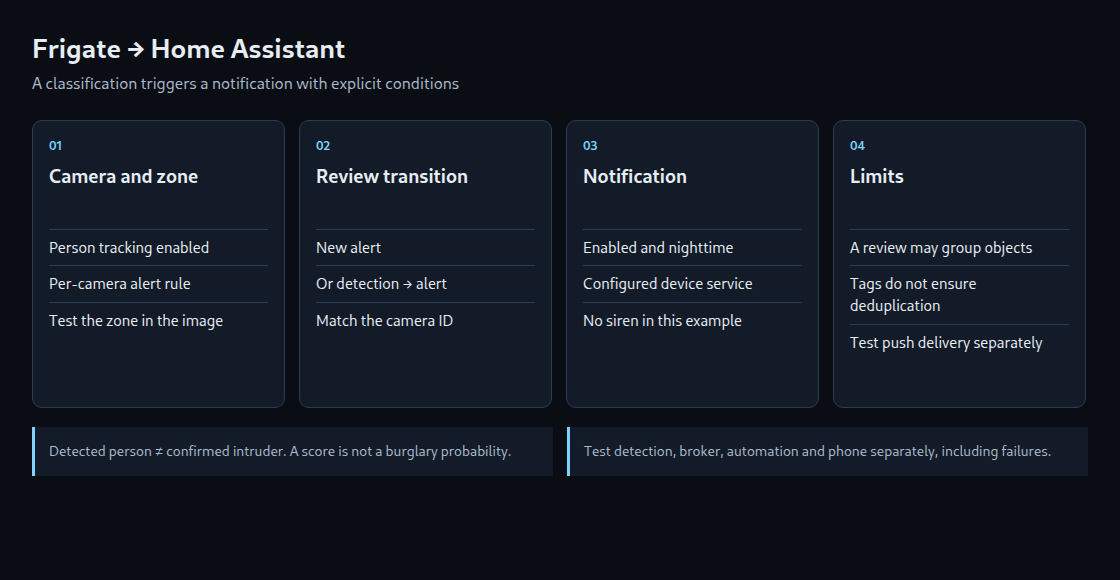
Frigate analyzes footage, MQTT carries changes, and Home Assistant decides whether to notify. The HACS Frigate integration adds camera and media features; it does not install the Frigate server. The MQTT broker receives messages and forwards them to subscribed systems. Both systems need access to the same broker. The example uses the default topic prefix frigate; installations with another prefix require an adjustment.
Port 8971 provides the authenticated Frigate endpoint for network connections. Port 5000 is an internal unauthenticated endpoint and must not be freely exposed. HTTPS requires a certificate accepted by Home Assistant; a default self-signed certificate can prevent connection. Credentials and broker permissions should allow only the connections required.
2. Camera alert rules
Camera driveway needs a zone named driveway_zone, drawn on its actual image. Zone membership uses the bottom center of the object’s bounding box; overlap alone is insufficient. Walk-through tests in daylight and darkness reveal the effect of perspective, shadows and headlights.
In the camera’s Review settings, alerts are restricted to label person and required zone driveway_zone. Object tracking must actually include person; review labels do not activate additional object classes. These rules concern tracked objects. Manually created API events follow different rules and need separate handling before entering an alarm workflow.
A value such as top_score: 0.8 is not an 80-percent probability of burglary. Threshold tuning uses observed false detections and missed detections. Motion masks replace neither object filters nor an appropriate zone.
3. Responses to a review’s change of state
Frigate recommends frigate/reviews for notification triggers. A review covers a period of camera activity and may contain several objects. Its ID therefore does not identify one individual. Messages provide the previous state in before and the new state in after.
The example reacts to a new alert or an upgrade from detection (activity recorded without an alert) to alert (activity meeting the configured alert rules). Further changes to an existing alert do not generate another notification. This intentionally means that an additional person appearing within the same review does not trigger a separate notification.
The example belongs in the YAML editor for a single Home Assistant automation. It requires an existing helper input_boolean.camera_notifications; notify.mobile_app_replace_device is replaced with the configured device service. The helper is a manual notification switch, not an intruder-alarm system. The time condition uses Home Assistant’s timezone.
alias: Frigate driveway night notification
triggers:
- trigger: mqtt
topic: frigate/reviews
conditions:
- condition: state
entity_id: input_boolean.camera_notifications
state: "on"
- condition: time
after: "22:00:00"
before: "06:00:00"
- condition: template
value_template:
{% set p = trigger.payload_json | default({}) %}
{% set a = p.get('after') if p is mapping else none %}
{% set b = p.get('before') if p is mapping else none %}
{{ p is mapping and p.get('type') in ['new', 'update']
and a is mapping and a.get('camera') == 'driveway'
and a.get('id') is string and a.get('id') | length > 0
and a.get('severity') == 'alert'
and a.get('end_time') is none
and (p.get('type') == 'new'
or (b is mapping and b.get('severity') == 'detection')) }}
actions:
- action: notify.mobile_app_replace_device
data:
title: "Camera alert"
message: "Driveway: activity classified as alert."
data:
tag: "frigate-{{ trigger.payload_json['after']['id'] }}"
mode: queued
max: 10The message deliberately describes an alert classification: its meaning depends on the previously checked Frigate settings. The example does not activate a siren. Lighting and other actions require separate conditions, duration limits and testing.
4. Repetition and failure
mode: queued runs accepted invocations sequentially. max: 10 limits running and queued invocations together; excess messages can be dropped. An automation queue is not durable message storage and cannot be relied on across restarts.
A repeated notification tag can replace a notification on the phone. It guarantees neither exactly-once execution nor exactly one sound. Repeated or redelivered MQTT messages may trigger the same transition again. Preventing duplicate processing requires a record of processed review IDs that survives restarts, has a defined size or retention limit, and follows explicit rules when delivery fails. This example also has no age check, so redelivered old messages can produce stale notifications.
mode: single only rejects further invocations while a run is active. A brief action finishes quickly, allowing the next message to start another run. Adding a long blocking delay can instead discard notifications for unrelated activity.
5. Separate tests for media and delivery
Reliable text notifications are the first test. A later thumbnail attachment requires an object event ID from after.data.detections, not the review ID. With several objects, the first list entry is not necessarily the intended person. A completed clip or snapshot may also be unavailable at notification time. The phone needs a working, appropriately protected retrieval address.
Local detection does not imply local push delivery. Standard push may use Apple or Google services; Local Push depends on the platform, settings and connection to Home Assistant. An offline test must therefore examine detection, MQTT, automation, phone delivery and any local actuators separately.
Questions and Answers
Which tests are useful before regular operation?
Walk-throughs inside and outside the zone, another camera, daytime and nighttime, disabled notifications, and a detection-to-alert transition. Further checks cover repeated messages, an unavailable broker and an unreachable phone. The automation trace identifies conditions that prevented execution. A successful notify action does not establish that the phone displayed an alert or that the alert was noticed.
Does entered_zones show the current location?
No. Object messages on frigate/events use entered_zones for previously entered zones and current_zones for current membership. Requiring both a fresh zone entry and an already-high score can miss a score improvement arriving later. This example instead uses the review classification.
Can the camera replace an alarm system?
A camera automation depends on visibility, the model, power and networking. Reliable alarm handling requires additional sensors, failure monitoring and equipment appropriate to the task. Person detection alone does not establish danger.
Video surveillance on your own hardware
- Storage and Bandwidth Engineering for Enterprise CCTV Networks
- Frigate and Home Assistant: Camera Alerts with Clear Conditions
Related articles