English
 Deutsch
 Polski
Automating Solar Energy in Home Assistant: Dynamic Surplus Charging

Management Summary
Solar panels sometimes generate more electricity than the household currently needs. Surplus charging directs this extra energy towards a car, battery or heating instead of buying that energy later. Home Assistant, a home automation platform, can bring measurements and device controls together for this purpose. The benefit depends on actual demand and electricity prices. The example explains detecting surplus and sending a notification; fully automatic charging needs an additional control process.
Jump to the interactive example ↓
Contents
Surplus charging starts or increases a suitable device’s charging when photovoltaic production leaves power available. Home Assistant can combine meter readings, device status and charging commands. The achievable savings depend on tariffs, losses and demand; a high self-consumption percentage alone does not establish profitability. This guide separates a measurement example from the additional control logic required for actual charging.
1. The balance at the grid connection
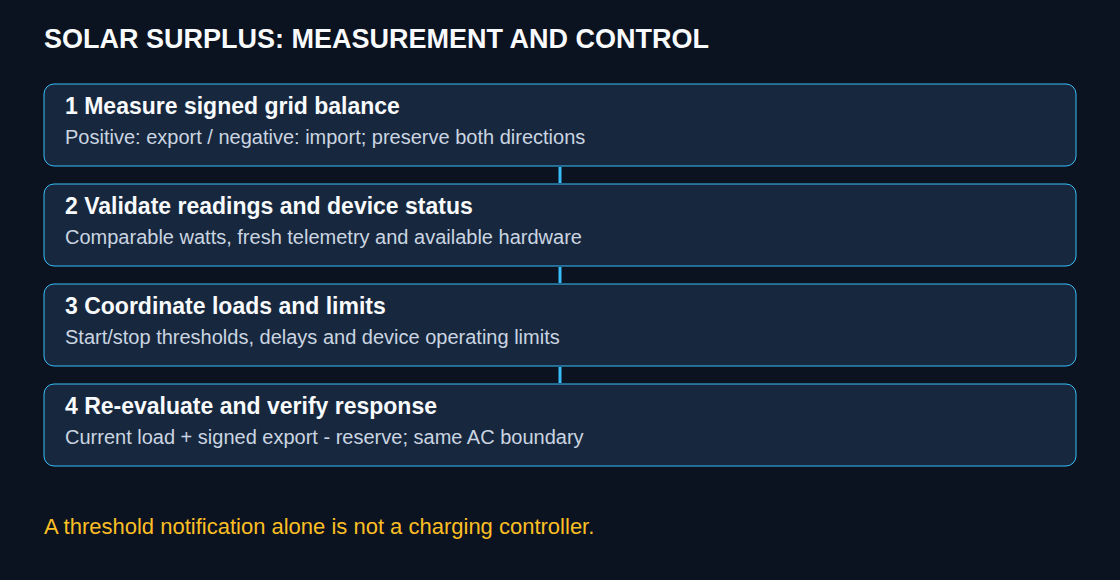
A grid meter records the remaining import or export after household loads and any active battery charging. Positive export does not prove that all exported electricity came from solar panels: battery discharge or another generator can also contribute. The sign convention and measurement location therefore need explicit documentation.
The example below expects two non-negative, current power readings in watts from the same grid connection: export and import. Both readings need comparable timestamps. Watts describe power at that moment; kilowatt-hours record energy over time. Cumulative kWh counters are unsuitable. With an existing signed power sensor, a documented sign conversion is sufficient; subtracting import again would count the same flow twice.
2. A signed template sensor
This configuration.yaml example preserves negative values for grid import. Clamping import to zero would hide information required for reducing a load. Entity names are placeholders; the resulting entity ID also needs verification in Home Assistant.
template:
- sensor:
- name: "Grid Export Balance"
unique_id: "grid_export_balance_example"
unit_of_measurement: "W"
device_class: power
state_class: measurement
availability:
{% set e = states('sensor.grid_meter_export_power') %}
{% set i = states('sensor.grid_meter_import_power') %}
{{ is_number(e) and is_number(i)
and e | float(0) >= 0 and i | float(0) >= 0 }}
state:
{{ (states('sensor.grid_meter_export_power') | float(0)
- states('sensor.grid_meter_import_power') | float(0)) | round(0) }}availability rejects missing, non-numeric and negative input readings. The fallback conversions do not make invalid readings valid. Numeric values can still be stale: device availability and a reliable reporting heartbeat require separate monitoring. An unchanged value is not automatically stale. The template performs subtraction and rounding, with no low-pass filter.
Filtering, hysteresis and delays serve different purposes. A low-pass filter or moving average smooths measurements but adds delay. Hysteresis uses different start and stop thresholds; a minimum duration postpones switching. None of these mechanisms guarantees zero grid import during a sudden load change.
3. Threshold observation before hardware control
The following YAML belongs in the YAML editor of a single automation. It creates a notification after the measured balance crosses above 1,500 W and remains there for five minutes. It sends no charging command and is not a dynamic controller.
alias: "Solar surplus diagnostic"
triggers:
  - trigger: numeric_state
    entity_id: sensor.grid_export_balance
    above: 1500
    for:
      minutes: 5
actions:
  - action: persistent_notification.create
    data:
      notification_id: solar_surplus_diagnostic
      title: "Solar surplus diagnostic"
      message: "Grid export balance above 1500 W for five minutes. No charging command sent."
mode: single
A numeric-state trigger reacts to entry into a range, not continuously while a value remains in that range. The notification remains a historical message, not a live charging permission. A Home Assistant restart or automation reload resets a pending for period. Persistent timing requires separate state handling.
4. The control loop for actual charging
A real controller needs repeated evaluation, current measurements, device readiness, an explicit stop path and a fallback for missing telemetry or failed commands. The update interval must match meter and device response times. A single coordinator should allocate capacity between battery, vehicle and heating; competing controllers can otherwise counteract each other. Battery-first is a policy choice, not a universal rule.
AC means alternating current, as used on the household supply side. For one controllable AC load, a useful starting relationship is: target load power = current measured load power + signed grid export balance − desired export reserve. All terms must refer to the same AC boundary. For example, 2,000 W already consumed by the load plus 500 W exported, less a 100 W reserve, gives a provisional 2,400 W target. With 300 W imported instead, the provisional target is 1,600 W. Device limits, ramps, minimum operating power and stop rules still apply; this calculation is not a complete regulator.
DC means direct current, as used on the battery side. A DC battery-current command cannot be obtained reliably from an arbitrary fixed 50 V. Actual voltage, conversion efficiency, inverter semantics and battery-management limits matter. A 40 A limit is 2 kW only at 50 V, and a 10% reserve cannot guarantee avoidance of imports. Heating equipment likewise needs its supported control interface and minimum run times.
Questions and answers
Is 1,500 W enough for an EV charger?
At 230 V and 6 A, nominal single-phase power is 1,380 W; three phases require about 4,140 W. Actual limits depend on vehicle and charger. A threshold near 1,500 W offers little single-phase reserve and is insufficient for solar-only three-phase charging at that current. Phase switching requires explicit hardware support and a suitable switching procedure.
Does this guarantee 80–90% self-consumption?
No. Array size, demand, storage, season and charging availability determine the outcome. Evaluation should compare imported and exported energy, charging interruptions and costs over representative periods. Hardware protections and safe device behavior must remain effective when Home Assistant is unavailable.
Learn by trying
Where does your solar surplus go?
Distribute solar power between home, battery and car. Switch between one- and three-phase charging to see the starting threshold.
- Charging current per phase
- Charging power
Snapshot: home first, then battery, then car. Nominal 230 V, 6–16 A per phase, whole amps, no grid power for charging. Excludes losses, battery charge level, delays and hysteresis; not device control or an installation plan. Real wallboxes and vehicles may have other limits.
This module runs in your browser and does not send or store your input.
Learn by trying
One minute: can you spot the mistake?
Three phases, 230 V, at least 6 A per phase: is 1,500 W remaining surplus enough to start in this model?
3 × 230 V × 6 A = 4,140 W. One phase would need 1,380 W. Phase count and minimum current therefore belong in the control logic; one watt threshold does not fit every wallbox.
Take a guess!
Explore
Take a guess!
Enter your estimate first. Then reveal the calculation, result and difference.
PNG with settings, result and article link. Created locally only when you click.
These exercises calculate in your browser. The learning module does not send your answers.
Related articles