English
 Deutsch
 Polski
Secure, HttpOnly, SameSite: Cookie Protection and Its Limits

Management Summary
Cookies are small values stored by a browser, often used to keep a website account signed in. Their protection settings determine where they may be sent and what page code can read them. Secure restricts sending to protected connections, HttpOnly prevents direct access by scripts and SameSite limits use across websites. The article explains how these controls complement one another and why their usefulness depends on the cookie’s purpose. They are part of application security rather than a complete substitute for it.
Contents
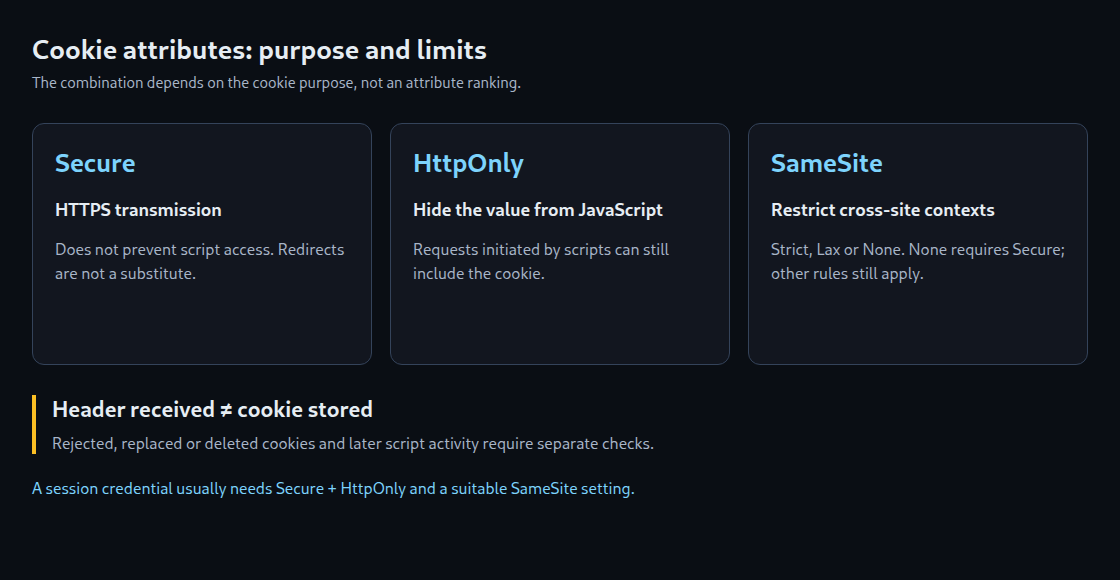
Secure, HttpOnly and SameSite protect different parts of cookie use. The appropriate combination depends on purpose: a session credential that lets the server recognize an existing login needs different properties from a harmless display preference intended for JavaScript. Counting attributes therefore does not produce a security ranking.
Secure: transmission over HTTPS
Secure restricts transmission to secure connections, normally HTTPS for websites. Browser exceptions exist for localhost. The attribute neither adds encryption to the cookie value itself nor prevents JavaScript access.
Without Secure, an eligible cookie may travel unencrypted in an HTTP request. A subsequent HTTPS redirect is too late for that request. An already effective HSTS policy can upgrade the connection before transmission; a newly received HSTS header does not retroactively protect the first HTTP request. HTTPS alone does not automatically add Secure to cookies.
HttpOnly: no document.cookie access
HttpOnly hides the cookie from ordinary JavaScript cookie APIs. This makes direct theft of a session value by injected scripts harder. The browser can still attach the cookie to eligible requests, including requests initiated by JavaScript. HttpOnly therefore neither fixes an XSS vulnerability (execution of injected scripts) nor prevents every action inside a compromised session.
HttpOnly is generally appropriate for server-side session credentials. A display preference deliberately read by JavaScript cannot use the attribute. JavaScript cannot set HttpOnly through document.cookie. A missing attribute therefore needs assessment by cookie purpose, not merely by frequency.
SameSite: context rather than encryption
Same-site is not the same as same-origin. For ordinary domains, the scheme and registrable domain determine the site. For example, https://shop.example.com and https://login.example.com are same-site but different origins. Switching from HTTPS to HTTP is cross-site.
Strict: restrictive for cross-site contexts; even an external link can initially arrive without the cookie.Lax: additionally permits certain cross-site top-level navigations using safe methods, such as an ordinary GET link. An embedded fetch or ordinary cross-site POST does not qualify.None: removes the SameSite restriction and requires Secure. Other cookie and privacy rules still apply; third-party cookie availability is not guaranteed.
Some browsers apply a Lax default when the attribute is omitted. That default may include a temporary POST exception for recently set cookies. Missing SameSite therefore means neither unrestricted transmission nor complete CSRF protection (against unwanted requests using an existing login). Explicit SameSite values make transmission rules clearer. Requests that change data, such as an address update, also need safeguards such as validated CSRF tokens.
An example for a server-side session credential
Set-Cookie: __Host-session=SERVER_GENERATED_RANDOM_VALUE; Path=/; Secure; HttpOnly; SameSite=LaxSERVER_GENERATED_RANDOM_VALUE is a placeholder for a secure random value generated by the server. In supporting browsers, the __Host- prefix requires Secure, Path=/ and no Domain attribute. The cookie is consequently restricted to the host that sets it. Lax is one possible starting configuration; login redirects and embedded applications require separate functional testing.

What a header check actually establishes
A Set-Cookie line is initially an instruction, not proof that a cookie was stored. A browser may reject the instruction; a line may also replace or delete a cookie. Responses in a redirect chain need separate capture.
A simple front-page fetch also misses cookies created by JavaScript and responses to subsequent script, image or API requests. No Set-Cookie in the main document therefore does not mean that the website sets no cookies. Even a visit without clicks can run scripts and trigger further requests.
A reliable assessment records a fresh browser profile, browser version, starting URL, time and interaction sequence. Network responses and actually stored cookies are compared separately. Each cookie needs a documented purpose, host, path, lifetime and requirement for script access. An attribute counter alone answers none of these questions.
Questions and answers
Is HttpOnly more important than Secure?
A universal ranking is not useful. A session credential needs protection in transit and against direct script access. SameSite adds context restrictions. None of these attributes replaces server-side authorization or remediation of XSS.
Can Path securely separate applications?
Path controls selection for transmission but is not a reliable security boundary against scripts on the same host. Separate trust domains require appropriate host and application boundaries.
Does a high attribute count prove website security?
No. Missing HttpOnly may be intentional for a harmless JavaScript preference; a session cookie with all attributes may still belong to an insecure application. Purpose, effective browser behaviour and server-side processing determine the assessment.
Related articles