

 English
 Deutsch
 Polski
What 24 GHz mmWave Radar Sees Through the Wall

Management Summary
Radar presence sensors detect small movements so home automation can keep lights on even when a person sits quietly. Their detection area does not necessarily stop at a room’s wall, and fans or moving curtains can also affect the result. The article explains why lights that stay on are not automatically evidence of movement next door. Placement, range and sensitivity work together to recognise real presence while rejecting unwanted activity in and around the room.
Contents
A radar presence sensor can keep a light on because movement outside the intended room still reaches the sensor. That is one possible cause, not a diagnosis by itself. A configured absence delay, a moving curtain, a fan, sensor vibration or reflections can produce a similar symptom.
Three separate questions help identify the cause: where radar echoes can reach the sensor, which echoes count as presence, and how long the light remains on after presence ends. Placement, distance limits and per-distance thresholds work together. A drawing of a cone cannot establish which adjacent room is actually detected.
A wall attenuates the signal; the result depends on its construction
At 24 GHz, some non-conductive materials allow enough energy through for detection beyond a cover or partition. Thickness, moisture, coatings, internal layers and incidence angle matter. For a target behind a wall, the transmitted signal and the returning echo both traverse the obstruction. A material name alone does not determine whether the remaining echo exceeds the detector threshold.
- Thin plasterboard, wood and plastic can permit transmission. A complete wall can include additional layers, studs or foil that change the result.
- Glass can transmit radar, but glazing thickness and conductive coatings matter. A street-facing window does not guarantee detection of every pedestrian or car.
- Brick and concrete can substantially attenuate the signal. Neither material is a universal guarantee that an adjacent target cannot be detected.
- Metal usually strongly reflects or shields the direct path. Edges, openings and reflected paths still matter; a small metal sheet does not create a perfect room boundary.
Published 4–40 GHz measurements show different losses for specific material samples, rather than a universal transparent/opaque classification. Those measurements do not establish the performance of an assembled wall or a particular presence sensor. Detection also depends on the target’s orientation, movement and reflective properties. Radar is not a detector exclusively for people.
Angular width is not the same as radial range
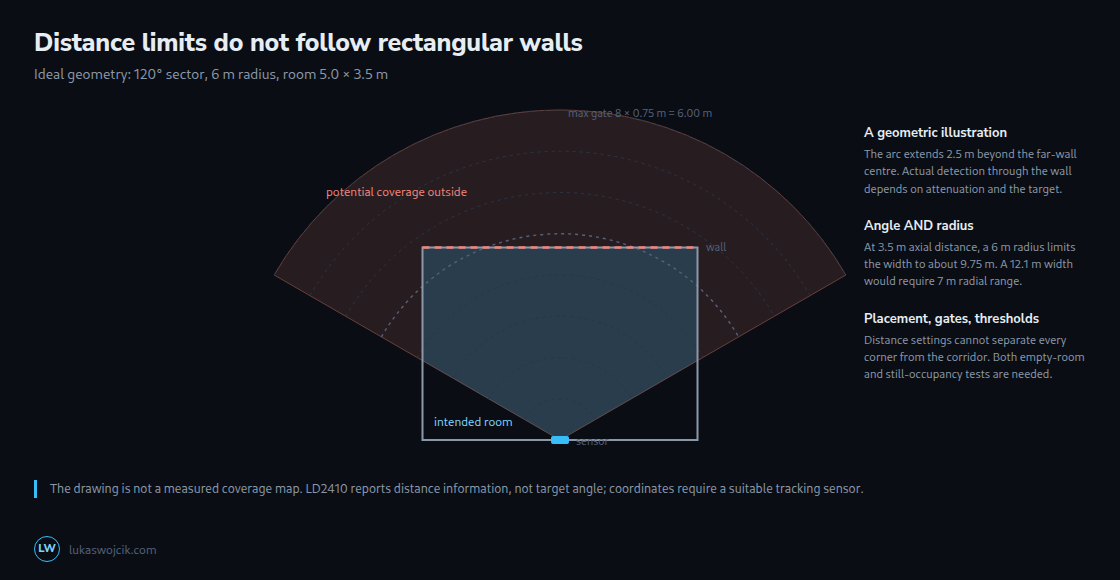
An axial distance is measured straight ahead along the centre line. A radial distance runs directly from the sensor to the target, including targets to either side. For an ideal 120° horizontal sector, the width at an axial distance d in front of the sensor is 2 × d × tan(60°), or about 3.46 × d. At d = 3.5 m, that gives about 12.12 m. However, the two outer points are 7 m from the sensor. A 6 m radial limit cannot reach those points.
For a finite ideal range R, the cross-section is limited by both angle and radius: width = 2 × min(d × tan(60°), sqrt(R² − d²)), for 0 ≤ d ≤ R. With R = 6 m and d = 3.5 m, the result is about 9.75 m. This remains a geometric illustration: actual coverage depends on the antenna pattern, target and environment, not a sharp 120° edge.
Distance gates and thresholds solve different problems
The LD2410 has separate maximum-distance settings for moving and still targets, plus thresholds for individual distance gates. With 0.75 m distance resolution, the manufacturer’s maximum-gate convention gives gate 4 a nominal 3 m limit, gate 5 a 3.75 m limit and gate 6 a 4.5 m limit. ESPHome also exposes a 0.2 m resolution option on supported hardware/firmware. The configured resolution must be checked before converting a gate number into metres.
The telemetry labels g0 to g8 are not a reason to add an extra 0.75 m to the maximum-distance setting. Gate values are coarse distance information, and the measured distance can fluctuate. A configured limit is a detection rule, not physical shielding or a perfectly sharp cut at a wall.
For the LD2410 energy thresholds, a higher threshold makes triggering harder; lowering the threshold makes detection more sensitive. Raising a threshold can suppress unwanted echoes but also lose weak movements from a seated person. Thresholds can be adjusted separately by distance and target type, so this is a legitimate tool alongside distance limits. A nearer corridor target is not always stronger: attenuation, body orientation and movement also affect the echo.
Placement needs tests in the intended positions
Pointing away from doors, windows and moving equipment can reduce unwanted coverage. The antenna also sends and receives some energy behind and beside its main direction; these areas are called rear and side lobes. These lobes or reflections can still produce detections outside the simplified forward sector. Stable mounting and a suitable non-metallic cover are also important.
There is no universal rule that mounting above 2 m destroys stationary detection. The LD2410 manufacturer documentation includes both wall and ceiling installations. The relevant test is detection at the actual desk, sofa and other occupied positions, including prolonged still sitting. Mounting height, tilt, obstructions and body orientation change that result.
A practical LD2410 measurement sequence
- Firmware, distance resolution, moving/still limits, thresholds and absence timeout are recorded. The sensor state is checked separately from the lighting automation.
- Engineering mode provides additional measurements for adjustment. The mode and the required Home Assistant sensor entries for signal strength in each distance band are enabled. The empty room is observed with fans, curtains and other equipment in their normal operating conditions.
- Repeated corridor movements are compared with movements at known in-room positions. A correlated gate response helps locate a disturbance but does not identify an object uniquely.
- Placement or one setting is changed at a time. Still occupancy, corners, entry and exit are tested again, including the configured absence delay.
- A longer observation period follows the short setup test. Intermittent disturbances may not appear within five minutes.
The LD2450 adds target coordinates and up to three rectangular zones in ESPHome. These can distinguish regions at similar distances, provided the sensor-relative coordinates and mounting orientation are accounted for. Software zones are not physical shielding; tracking uncertainty, reflections and still-target performance still need testing. The presence timeout can also keep a zone occupied after a target disappears.
Questions and answers
Why does a distance limit not match a rectangular room?
Equal radial distances form an arc, while the far wall is straight. In a simplified horizontal model with the sensor centred on a 4 m wall and the opposite wall 3.5 m away, the far corners are sqrt(3.5² + 2²) ≈ 4.03 m away. A nominal 3.75 m limit reaches the middle but not the corners; a 4.5 m limit includes the corners and extends 1 m beyond the middle of the far wall.
At 0.75 m resolution, those nominal maximum-distance settings are 5 and 6. Height differences and real ranging errors require additional consideration. Losing occupied corners is not automatically an acceptable compromise; another position, a zone-capable sensor or a combination of sensors may serve the room better.
Can a metal shield remove unwanted detections?
A suitable shield can reduce a particular path. Hi-Link also describes a metal backplane for rear-lobe interference. Placement close to an antenna can alter its radiation pattern, while reflections may introduce new disturbances. Any modification therefore needs empty-room and occupied-room tests; shielding is not a substitute for checking coverage.
Why are per-gate energies missing in Home Assistant?
With the ESPHome LD2410 component, per-gate moving and still energies require engineering mode and configured sensor entities. UART communication and the integration must also work. The engineering_mode switch enables the mode; ordinary aggregate energy readings are distinct from the per-gate values.
ESPHome applies a default throttle_with_priority: 1000ms filter to these sensor entities unless custom filters replace it. Engineering mode consumes additional resources, so disabling the mode after calibration is reasonable. Missing entities or values are not automatically explained by the mode alone.
Related articles


