

Microsoft Ads Consent Mode: Implementation via JavaScript and GTM, Differences From Google

Contents
With growing privacy regulations (GDPR, DMA), managing user consent has become the foundation of web analytics. Everyone is familiar with Google Consent Mode (GCM), but Microsoft Ads (formerly Bing Ads) has also introduced its own mechanism for its UET (Universal Event Tracking) tag. How does it work, and how is it implemented?
What is Microsoft Ads Consent Mode?
Microsoft Ads Consent Mode allows the UET tag to adjust its behavior based on whether the user has granted consent for advertising cookies (ad_storage). If consent is denied, the UET tag does not store cookies (like _uetvid) but can still send anonymous, cookieless pings to Microsoft’s servers. This helps with basic conversion modeling.
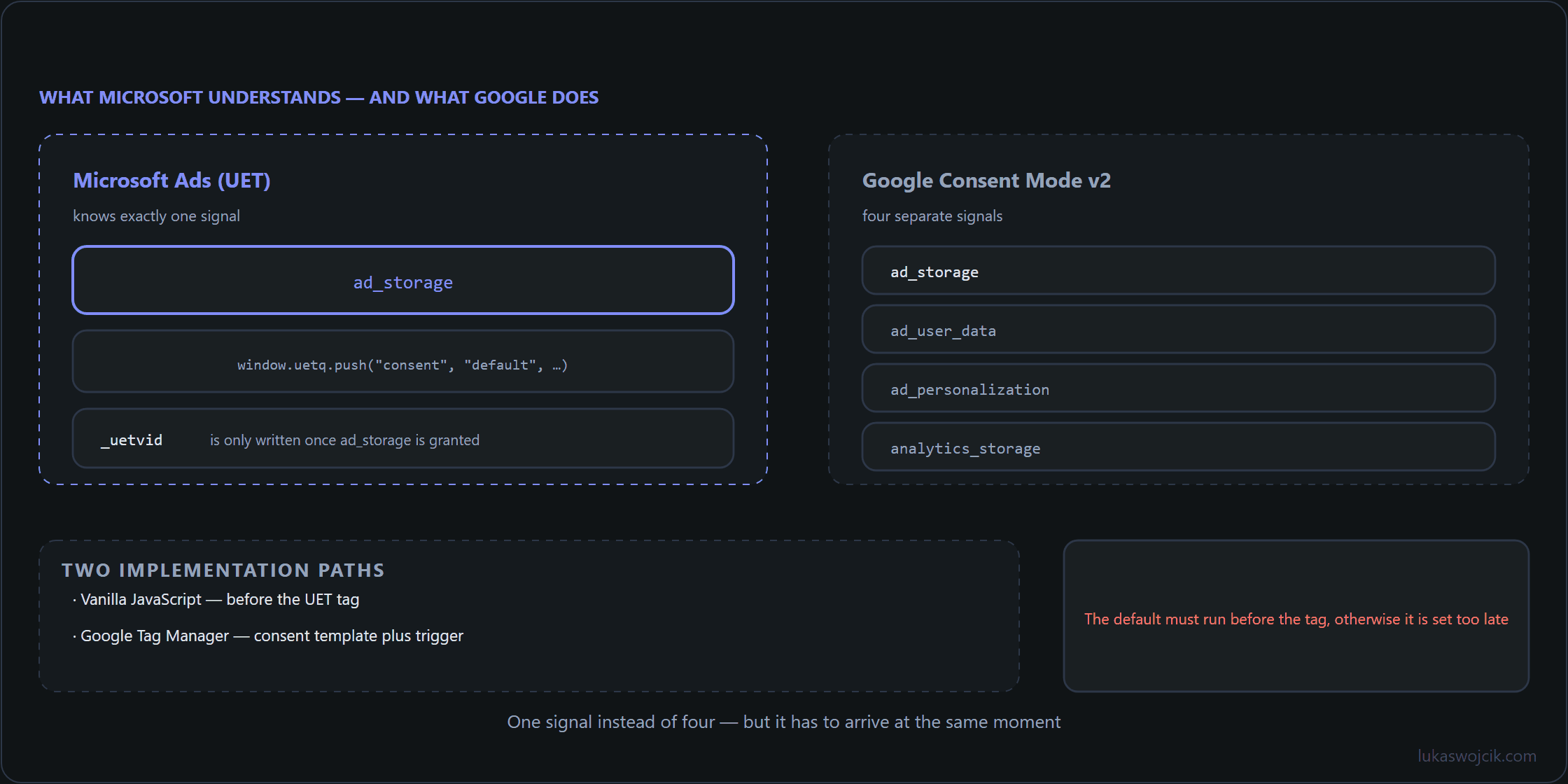
Implementation via Vanilla JavaScript
Without GTM, with the UET tag hardcoded on the site, consent is managed through the .push method on the uetq array. Microsoft has aligned its API closely with Google’s approach.
Step 1: Set the default state (before the UET tag loads):
window.uetq = window.uetq || [];
window.uetq.push('consent', 'default', {
    'ad_storage': 'denied'
});
Step 2: Update after the user clicks “Accept” in the banner:
window.uetq.push('consent', 'update', {
    'ad_storage': 'granted'
});
This tells the UET tag that it is now allowed to drop and read identifiers in the browser.
Implementation via Google Tag Manager (GTM)
Implementing this via GTM is straightforward because the official Microsoft UET tag natively integrates with GTM’s Consent API.
- State Management (Simo Ahava’s Template): Use the Consent Mode (Google tags) template created by Simo Ahava. While named for Google, this template sets the global GTM consent state (like
ad_storage). - UET Tag Configuration: Add the official “Microsoft Advertising Universal Event Tracking” tag in the GTM workspace.
- Advanced Consent Settings: Under the tag’s Advanced Settings -> Consent Settings, specify that the tag requires
ad_storageconsent. - When consent is granted, GTM updates the state, and the UET tag automatically reacts, shifting from cookieless pings to full tracking.
Differences: Google Consent Mode vs. Microsoft Ads
The core concept is identical, but the maturity of the modeling engines differs:
- Data Modeling: Google has a highly sophisticated Conversion Modeling engine that uses cookieless pings (from Advanced Consent Mode) to fill data gaps in GA4 and Google Ads. Microsoft Ads also uses cookieless pings for modeling, but their system is less mature and typically requires a higher volume of data to function accurately.
- Signal Complexity: Google now requires
ad_user_dataandad_personalizationflags (GCM v2). Microsoft Ads primarily relies on the coread_storagesignal.
Do Other Platforms (Meta, TikTok, LinkedIn, Pinterest) Have a Consent Mode?
The short answer is: Not in the same way as Google (Advanced Mode with pings).
Other social networks rely almost entirely on Basic Consent Mode (which means strictly blocking the tag if consent is denied).
- Meta (Facebook): The Meta Pixel does not have an official GDPR “cookieless ping” mode. If a user rejects cookies, the Meta tag simply stays blocked in GTM. They do have Limited Data Use (LDU), but that is primarily for California’s CCPA compliance.
- TikTok: The official TikTok GTM template respects GTM’s Consent API, but it acts as a hard block (no consent = tag doesn’t fire).
- LinkedIn: The Insight Tag supports GTM consent checks, but it pauses tracking completely if consent is missing. It does not send anonymous pings.
- Pinterest: The Pinterest Tag behaves similarly. Denied consent results in a hard block.
Google (and subsequently Microsoft) are the main platforms pushing for restricted data transmission (pings) without cookies to train their AI models.
Sources
Related articles




2 comments
The comparison table at the end settles an argument I have had several times: most platforms outside Google implement a hard block rather than a restricted mode, and calling both of them "consent mode" confuses the discussion.
On Meta specifically: the article mentions Limited Data Use as being aimed at California. Can LDU be used in the EEA as a fallback when consent is missing, or does that miss the point?
It misses the point, though not because the setting is wrong — because it answers a different question.
LDU restricts how Meta processes data that has already arrived. The European question comes earlier: whether anything may be written to or read from the device, and whether the data may be sent at all. A flag that constrains downstream processing does not address either, so a tag that fires without consent and sets LDU has still done the two things that were in question.
That is why the hard block is the honest answer for the browser tag, and why the interesting work has moved to the server: a Conversions API call carrying an explicit consent flag keeps the decision auditable in one place, instead of spreading it across tag settings that each behave slightly differently. The tutorial on passing consent to server-side GTM covers that route in detail.