English
 Deutsch
 Polski
Microsoft Advertising Conversions API: Server-Side UET in Practice

Contents
- 1. Request contract and credentials
- 2. A real documentation mismatch, with limited conclusions
- 3. Deduplication is more than an order number
- 4. Field-specific normalization and consent
- 5. Seven days, future timestamps and the last hour
- 6. HTTP success and event success differ
- 7. Monitoring and reconciliation
- Questions and answers
- Sources
Microsoft Advertising Conversions API (CAPI) provides a server route for events recorded in checkout, CRM or other systems. This can reduce gaps caused by a missing browser request. An accepted event is not automatically an attributed conversion: consent, identifiers, conversion goals and attribution rules still apply.
The practical work comprises event mapping, credentials, permitted identifiers, duplicate handling and an observable delivery queue. A universal implementation estimate of one or two weeks would hide differences between existing data systems. The May 2026 release added GetUetTagAuthKey and the click-ID performance report; a documentation update date alone does not prove a change in backend behavior.
1. Request contract and credentials
Events are posted as JSON to https://capi.uet.microsoft.com/v1/{tagId}/events, with the tag’s CAPI key in Authorization: Bearer …. The data array contains at most 1,000 events. eventType is custom or pageLoad; eventTime is UTC Unix time in seconds within the preceding seven days. userData requires at least one supported identifier. Page-load events also require eventSourceUrl. Custom conversion goals must match the configured event properties.
The separate Campaign Management call uses OAuth and the required developer/account headers. Those credentials are not interchangeable with the CAPI key. GetUetTagAuthKey retrieves an existing key; creating a key when none exists requires ownership of the tag. Retrieving a key again does not rotate that key. Regeneration or revocation must follow the supported account process.
2. A real documentation mismatch, with limited conclusions
At the review date of 24 October 2026, the integration guide shows TagId and a nested TagAuthKey.AuthKey response. The operation reference shows UetTagId and a flat UetTagAuthKey. This is a documentation inconsistency, not evidence that each account uses a different API contract. Requests should follow the selected SDK or operation contract and be validated in an authorized integration environment.
The adapter below accepts dictionary and object responses in either described shape, rejects reported partial errors and conflicting keys, and never logs the secret. Dictionary access is used only after checking the response type.
from collections.abc import Mapping

def field(value, name):
    return value.get(name) if isinstance(value, Mapping) else getattr(value, name, None)

def extract_auth_key(response):
    if field(response, "PartialErrors"):
        raise ValueError("Auth response contains errors; inspect redacted diagnostics")
    values = [field(response, "UetTagAuthKey"),
              field(field(response, "TagAuthKey"), "AuthKey")]
    keys = {v for v in values if isinstance(v, str) and v.strip()}
    if len(keys) != 1:
        raise ValueError("Missing or conflicting auth-key fields")
    key = keys.pop()
    if any(c.isspace() or ord(c) < 32 or ord(c) == 127 for c in key):
        raise ValueError("Invalid auth-key whitespace/control character")
    return key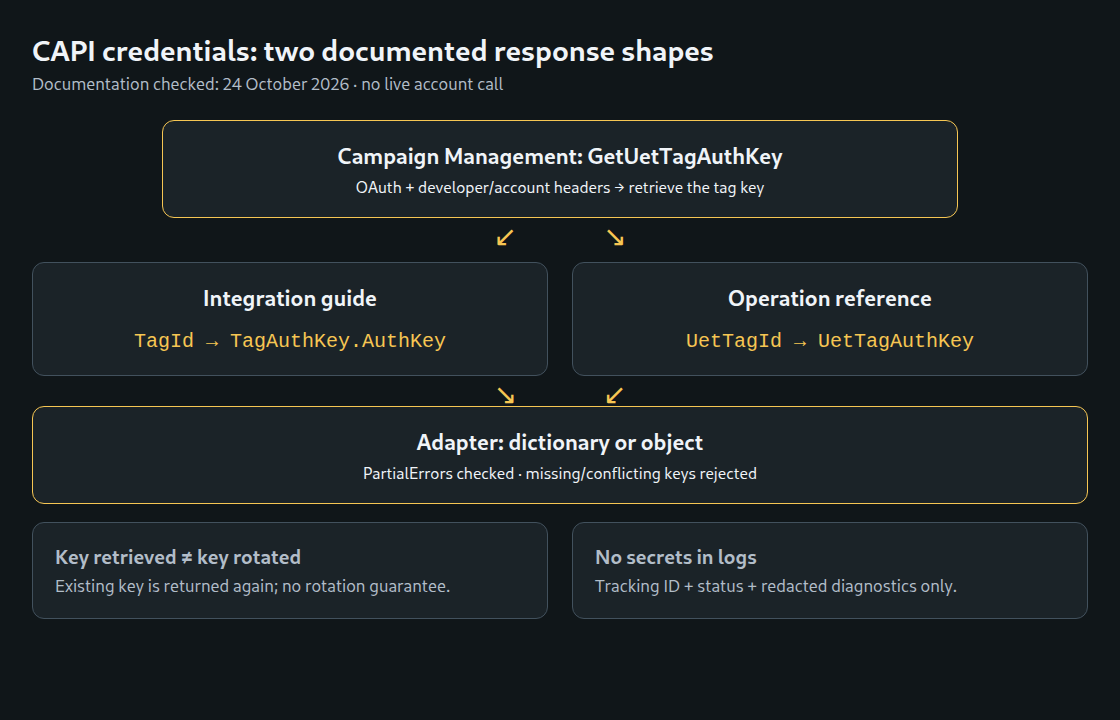
Schema tolerance cannot repair wrong credentials or an invalid request. Diagnostic logs should contain request/tracking IDs, status and a redacted error classification. Raw auth responses, bearer headers and customer data do not belong in ordinary logs. Loading a newly approved secret between batches helps deployment, but neither zero-downtime rotation nor negligible secret-store latency is guaranteed.
3. Deduplication is more than an order number
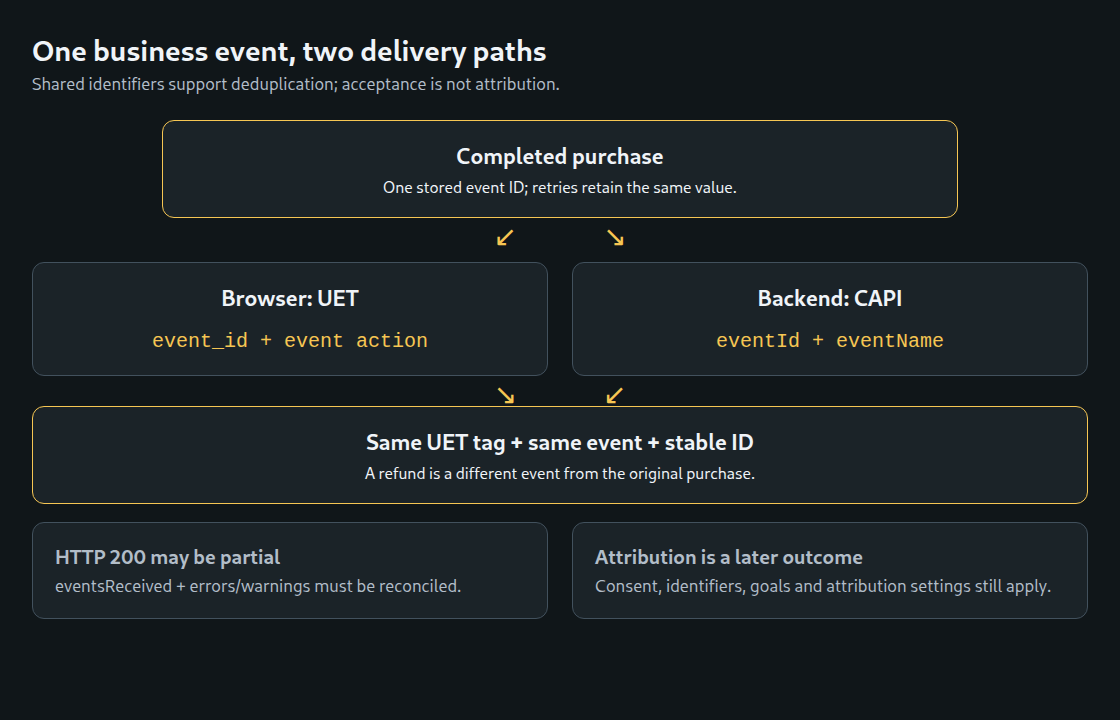
Browser and server copies of the same event need the same UET tag, compatible event name and stable event ID. UET JavaScript uses event_id; CAPI uses eventId. An ID should identify the business event, for example the completed purchase, and remain unchanged across retries. Purchase and refund are different events even when both reference one order.
A stored random event ID or a deliberately namespaced order-event ID can provide this stability. No second random ID should be generated by the other transport. Server-only CRM events have no browser counterpart to merge, but still need reliable retry bookkeeping. Stable IDs support duplicate prevention; a crash-proof, exactly-once delivery guarantee does not follow from one field.
4. Field-specific normalization and consent
Microsoft’s current email instructions include trimming edge whitespace, removing dots and the plus-alias from the local part, lowercasing and SHA-256 hashing. This is a Microsoft-specific matching rule, not a general rule for editing stored contact addresses or other platforms. Phone hashing uses canonical E.164 including the leading plus. The helper accepts an already normalized international number; country-aware parsing and real-number validation belong upstream.
import hashlib
import re

def microsoft_email_hash(value):
    if not isinstance(value, str):
        return None
    value = value.strip()
    if value.count("@") != 1 or any(c.isspace() or ord(c) < 32 for c in value):
        return None
    local, domain = value.split("@")
    local = local.split("+", 1)[0].replace(".", "")
    if not local or not domain or "." not in domain:
        return None
    return hashlib.sha256((local + "@" + domain).lower().encode("utf-8")).hexdigest()

def microsoft_phone_hash(e164):
    if not isinstance(e164, str) or not re.fullmatch(r"\+[1-9][0-9]{6,14}", e164):
        return None
    return hashlib.sha256(e164.encode("utf-8")).hexdigest()
These helpers are deliberately narrow examples, not complete email or telephone validators. Invalid or unavailable identifiers should be omitted rather than replaced by hashes of placeholders. IP address, user agent and click ID follow their own field rules; the blanket instruction to hash every identifier is wrong. Hashing also does not make identifying data anonymous.
adStorageConsent accepts G or D. The documented default when omitted is granted. Explicit consent handling therefore matters: a denied event is not used for advertising purposes, including attribution and remarketing. That field is not permission to send otherwise prohibited personal data.
The application must establish a permitted collection and delivery basis, retain the relevant consent evidence and recheck applicable withdrawal or suppression rules before queued delivery. A historical grant is not a reason to ignore a later withdrawal. A telephone sale may have a separate consent record; absence of a web banner alone establishes neither permission nor prohibition. Unknown must never silently become granted.
5. Seven days, future timestamps and the last hour
An age check must reject future timestamps without discarding valid events merely because expiry is approaching. The function separates invalid, future, expired and urgent timestamps. An urgent event remains eligible for an immediate attempt; the warning margin is not an earlier API expiry. Eligibility must be checked again immediately before dispatch.
from datetime import datetime, timedelta, timezone

def event_age_state(event_time, now):
    if not isinstance(event_time, datetime) or not isinstance(now, datetime):
        return "invalid"
    if event_time.tzinfo is None or event_time.utcoffset() is None or now.tzinfo is None or now.utcoffset() is None:
        return "invalid"
    age = now.astimezone(timezone.utc) - event_time.astimezone(timezone.utc)
    if age < timedelta(0):
        return "future"
    if age >= timedelta(days=7):
        return "expired"
    if age >= timedelta(days=7, hours=-1):
        return "urgent"
    return "ready"
The seven-day boundary is handled conservatively as expired. The helper returns states only; it neither sends nor discards records. A durable queue needs explicit outcomes, bounded retry scheduling and ownership of in-flight work. A worker crash can leave delivery uncertain, so a state column alone is not proof of harmless recovery. Old events cannot be backdated to the current time to bypass the window.
6. HTTP success and event success differ
The guide now explicitly documents HTTP 400 validation failures and 401 authorization failures. A 401 requires credential/tag correction; an unchanged invalid payload should not be retried indefinitely after a 400. Transient transport or service failures may use bounded exponential backoff with jitter. A response that actually supplies a Retry-After instruction should be handled accordingly; no undocumented numeric rate limit is assumed.
By default, a validation error prevents processing the entire batch. With continueOnValidationError: true, valid events can be processed while invalid ones are skipped. HTTP 200 can therefore contain errors or warnings; a warning can mean an optional field was removed. eventsReceived and diagnostic details must be reconciled before marking records accepted. The documentation limits detailed errors/warnings to the first ten, so absence from the visible error list is not always sufficient proof of acceptance for every record.
A simpler initial policy keeps partial processing disabled, validates locally and isolates invalid records for correction. Monitoring should distinguish API acceptance, rejected events, removed fields and later attributed conversions. Logs should store safe identifiers and error categories instead of unrestricted response bodies.
7. Monitoring and reconciliation
Useful measures include oldest pending age, urgent/expired counts, delivery-lag percentiles, accepted event counts, validation failures, consent state and coverage of all supported identifiers. “No email hash” does not mean “no identifier”; an event may carry msclkid or another accepted field. An expired count can result from old backfill or incorrect timestamps and does not prove a six-day outage.
Sudden consent or identifier changes justify investigation, but do not prove a particular form or consent-tool defect. Traffic mix, acquisition channels and legitimate business changes can also move those figures. Microsoft-reported conversions are not expected to equal all accepted orders: matching, goals, windows, counting settings, reporting dates and processing delay affect the comparison.
Questions and answers
Can aggregate totals prove deduplication?
No. Aligned totals can reveal suspicious changes, but event-level test cases and delivery records are needed to isolate duplicate handling. A lower platform total does not by itself prove lost API events.
Is the click-ID report mandatory?
No. MSClickIdPerformanceReport can support click-level analysis when available. Its column reference includes feature-specific availability notices; two notices on that page do not prove that the entire report is a pilot. ConversionsQualified is documented as a double. Account availability and report semantics must be checked before making the report an operational dependency.
What changes for remarketing?
The current guide requires client-side ID Sync for remarketing/audience use and recommends it for conversion measurement quality. A server-only event feed does not automatically replace that browser step. Any sync must follow the applicable consent controls, and the visitor ID must align with anonymousId in the server event.
Related articles