English
 Deutsch
 Polski
Protecting Digital Privacy: How Anonymous Emails Work

Management Summary
An email alias is a substitute address that can keep a primary address away from shops and newsletters. It does not guarantee anonymity or confidential communication. Open disposable inboxes such as getSend can be read by anyone knowing the address and are unsuitable for password resets or sensitive records. Forwarding does not protect the original inbox. Privacy also depends on the provider’s logs, access controls, encryption and identifying details in messages or attachments.
Contents
An email alias can keep a primary address out of a shop or newsletter database. That is useful privacy protection, but it does not guarantee anonymity. The service operator, mail servers, message content and attachments can still create links to an identity. A disposable inbox also differs fundamentally from a private, password-protected mailbox.
What an email service can—and cannot—hide
Email headers contain routing and sender information. The exact fields depend on the sending software and provider; a personal device address or precise location is not exposed by every message. Removing selected headers cannot remove identifying details from the text, signature or attached files.
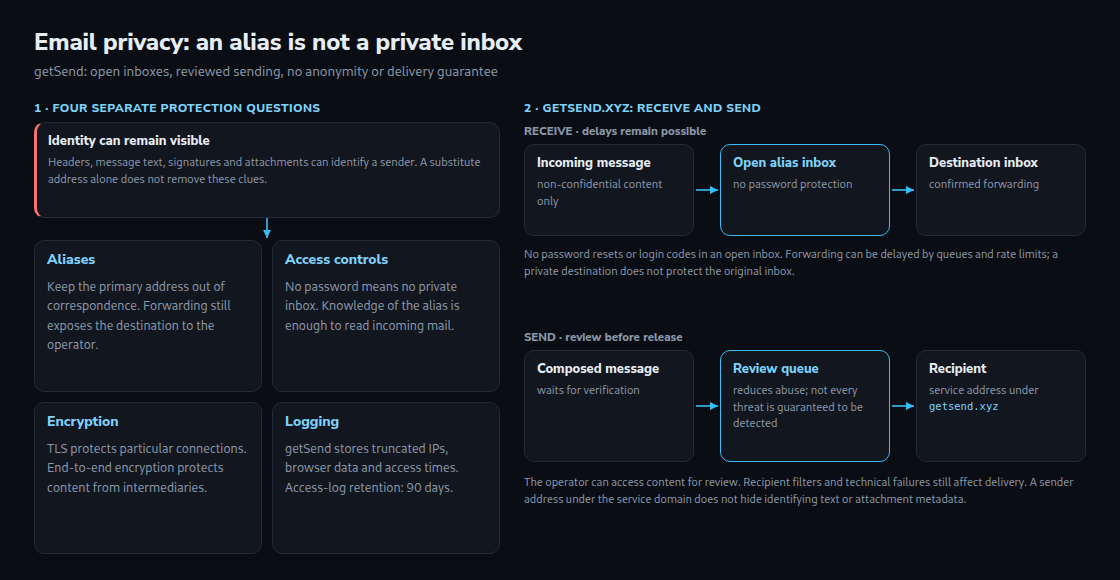
- Aliases: A substitute address reduces disclosure of a primary address to correspondents. Forwarding still requires the operator to process the destination address.
- Logging: No-registration service does not mean no logs. Storage of IP addresses, truncated addresses, browser information and access times must be checked in the specific privacy policy.
- Transport encryption: HTTPS and mail transport TLS protect particular connections. That is different from end-to-end encryption, which protects message content from intermediary providers. HTTPS alone says nothing about every later mail hop.
- Access protection: An inbox without a password is not a confidential inbox. A hard-to-guess alias reduces accidental discovery but does not create authentication.
getSend.xyz: disposable addresses with important limits
getSend accepts incoming mail without registration. Anyone knowing or guessing the alias can read the inbox without a password. Password resets, login links, two-factor codes, financial records and other confidential information therefore do not belong in these mailboxes. Incoming messages and attachments are deleted after seven days, according to the service documentation.
Receiving and forwarding
Forwarding can be enabled for a selected period after confirmation of the destination address. Incoming messages do not pass through the approval process for messages composed in the service. Nevertheless, retrieval, forwarding queues, rate limits and the destination server can delay delivery. There is no guarantee of instant arrival.
The current forwarding implementation creates a new message from the subject, body and attachments. The original routing headers are not copied. The service mailbox supplies the technical sender, while the alias appears in the display name and Reply-To field. A reply therefore returns to the alias inbox, not automatically to the original sender. The new message still has its own transport headers.
Sending and moderation
Phishing uses deceptive messages to obtain passwords or other sensitive information. Messages composed in getSend enter a review queue before release. This can reduce abuse, but cannot guarantee that all phishing is detected or that legitimate messages reach an inbox. Recipient filtering, authentication, domain reputation and technical failures remain relevant. Delivery within minutes should not be assumed.
A service-domain sender does not make the message anonymous. Names in the body, signatures or attachment metadata, such as an author name stored in a document file, can identify the author. Content review also means that message content is accessible to the reviewing service. End-to-end encryption with keys unavailable to the operator prevents that operator from reading the encrypted content; it does not rule out every form of metadata-based abuse control.
Data processed by the operator
The current getSend privacy policy describes access logs containing truncated IP addresses, browser information, requested pages and timestamps, retained for 90 days. Forwarding also requires the private destination address. The service is therefore not a no-logging system and does not provide anonymity from the operator merely because registration is unnecessary.
A practical distinction
An alias can reduce unwanted disclosure of a main email address. Confidential communication requires appropriate access controls and, where needed, end-to-end encryption. Public disposable inboxes suit only messages whose disclosure and short retention are acceptable.
Questions and answers
Does forwarding make an open inbox private?
No. Delivery to a protected destination does not add a password to the original getSend inbox. The original message remains readable there until deletion or expiry. The private destination address is also processed by getSend.
Can a password reset be received safely because incoming mail bypasses moderation?
No. Moderation timing and access protection are separate issues. Anyone with the alias can read a reset link in the open inbox. A protected, durable email account is needed for account recovery.
Related articles