

 English
 Deutsch
 Polski
Integrating the Fronius Symo Inverter with Smart Home Systems

Management Summary
A Fronius Symo inverter turns electricity from solar panels into power usable in the home. Its production readings can also feed a local display or Home Assistant, a system for managing smart-home devices. This makes current output and the day's generated energy visible without a cloud connection for the reading. The information helps explain how the solar installation is performing. Automatic charging or heating additionally needs household-consumption measurements, because high production alone does not mean spare power.
Contents
The Fronius Symo can provide measurements through its local Solar API. A small webpage can display PV production, while Home Assistant can use the data for monitoring and automation. The installation needs compatible communication hardware, a reachable local address and available API readings. This local request does not require a cloud connection.
Power and energy are different measurements
PAC describes current AC power in watts. DAY_ENERGY represents energy generated during the day in watt-hours. Watts describe how much power is being produced at that moment. If production stays at 2,000 W for one hour, it adds 2,000 Wh, or 2 kWh, of energy. Available fields and accuracy depend on the device and firmware; assumptions about the original Symo do not automatically apply to Symo GEN24.
The example uses GetInverterRealtimeData.cgi with Scope=Device, DeviceId=1 and DataCollection=CommonInverterData. The IP address and device ID must match the installation. The example address is not a universal Fronius default.
A small PHP display with error handling
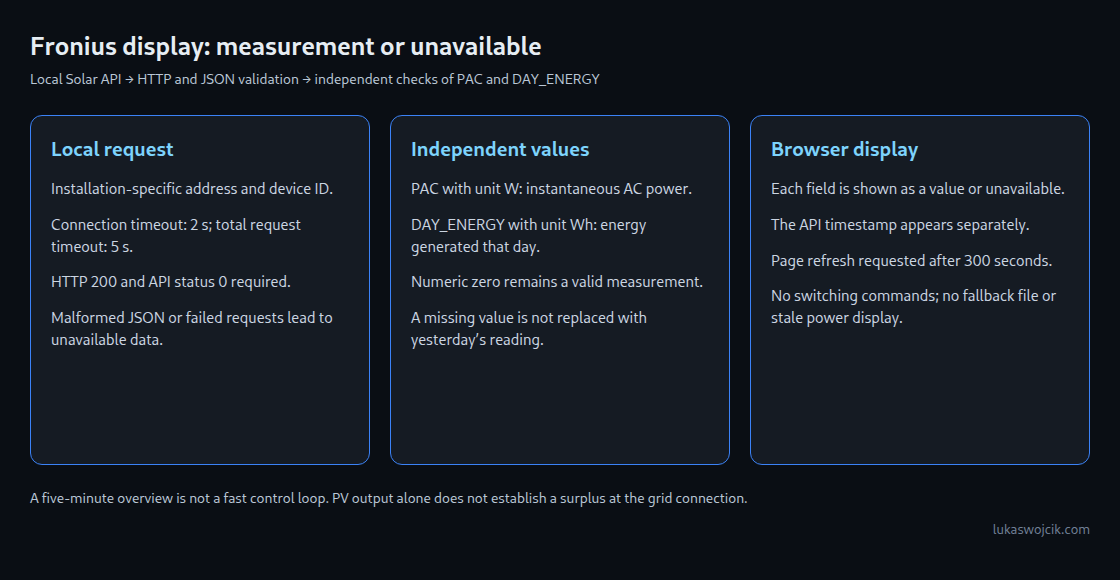
The example requires PHP 8 with cURL and a local web server that can reach the inverter. A smartphone also needs network or VPN access to that server. The page reloads after five minutes; browsers and widget apps may delay background updates. This interval suits an overview rather than fast control.
The display validates the HTTP response, JSON and API status. Missing values appear as “unavailable”; a reported zero remains a valid zero. The API timestamp appears separately so that an older response can be identified. The example stores no fallback readings and sends no control commands.
declare(strict_types=1);
header('Cache-Control: no-store');
// Local inverter address and device ID are installation-specific.
$url = 'http://192.168.1.50/solar_api/v1/GetInverterRealtimeData.cgi?'
. 'Scope=Device&DeviceId=1&DataCollection=CommonInverterData';
function measurement(array $data, string $key, string $unit): ?float {
$entry = $data[$key] ?? null;
if (!is_array($entry) || ($entry['Unit'] ?? null) !== $unit) {
return null;
}
$value = $entry['Value'] ?? null;
return (is_int($value) || is_float($value)) && is_finite((float)$value)
? (float)$value : null;
}
$power = $energy = null;
$sampleTime = null;
$state = 'unavailable';
try {
$ch = curl_init($url);
curl_setopt_array($ch, [
CURLOPT_RETURNTRANSFER => true,
CURLOPT_CONNECTTIMEOUT => 2,
CURLOPT_TIMEOUT => 5,
CURLOPT_FOLLOWLOCATION => false,
]);
$raw = curl_exec($ch);
$status = curl_getinfo($ch, CURLINFO_RESPONSE_CODE);
curl_close($ch);
if (!is_string($raw) || $status !== 200) {
throw new RuntimeException('HTTP request failed');
}
$reply = json_decode($raw, true, 64, JSON_THROW_ON_ERROR);
if (!is_array($reply) || ($reply['Head']['Status']['Code'] ?? null) !== 0
|| !is_array($reply['Body']['Data'] ?? null)) {
throw new RuntimeException('Invalid API response');
}
$power = measurement($reply['Body']['Data'], 'PAC', 'W');
$energy = measurement($reply['Body']['Data'], 'DAY_ENERGY', 'Wh');
$sampleTime = $reply['Head']['Timestamp'] ?? null;
$state = ($power === null && $energy === null) ? 'unavailable' : 'response received';
} catch (Throwable $e) {
error_log('PV display: request or response unavailable');
}
function esc(string $text): string {
return htmlspecialchars($text, ENT_QUOTES | ENT_SUBSTITUTE, 'UTF-8');
}
<html lang="en"><meta charset="utf-8">
<meta name="viewport" content="width=device-width,initial-scale=1">
<meta http-equiv="refresh" content="300">
<title>PV measurements</title>
<style>body{font:20px sans-serif;margin:2rem;background:#f5f7fa;color:#17202a}</style>
<h1>PV</h1>
<p>PAC: $power === null ? 'unavailable' : esc((string)$power) . ' W' </p>
<p>DAY_ENERGY: $energy === null ? 'unavailable' : esc((string)$energy) . ' Wh' </p>
<p>Status: esc($state) </p>
<p>API timestamp: is_string($sampleTime) ? esc($sampleTime) : 'unavailable' </p>
</html>The example address requires adjustment before use. Access to the display should be limited to the intended local network or protected remote access. A central polling service reads the inverter at regular intervals and shares the result with all displays. This avoids a separate inverter request from every open view. A compatible smartphone widget app provides an optional display layer; support depends on the app and operating system.
Home Assistant and surplus power
The Fronius integration provides an alternative to custom PHP. The available sensors depend on the installation. Energy statistics require suitable energy counters with the correct units and state class. The state class tells Home Assistant how to interpret the values, for example as measurements or accumulated totals. A power reading in watts is not an energy counter. Grid import, export and cost calculations require additional measurements or tariff information.
High PV output alone does not prove a surplus: household consumption and battery operation also affect the available power. Heat-pump or charging automations should therefore consider measured grid flow. Minimum run times, separate start and stop thresholds, and a stop condition for missing or outdated readings help avoid rapid cycling and decisions based on old data.
Questions and answers
Does a missing nighttime reading mean zero?
No. A missing response supplies no measurement. The last daily yield can be displayed separately with its date and measurement time, but the last power reading must not appear as current power. Yesterday’s daily yield is not today’s production.
Can a counter that resets each day work in the Energy dashboard?
Yes, with appropriate sensor configuration and reset handling. Requiring only an ever-increasing lifetime counter is too restrictive. Custom sensors need suitable state classes, units and valid statistics; the native integration provides a useful starting point.
Related articles


