English
 Deutsch
 Polski
Tutorial: Managing Disk Space: Finding Largest Files via SSH on Ubuntu/Debian

Contents
A nearly full filesystem needs a diagnosis before cleanup. Large individual files are one possible cause; many small files, open deleted files or filesystem-specific storage can also matter. The following commands inspect usage on Ubuntu and Debian. The commands do not delete files.
First identify the filesystem
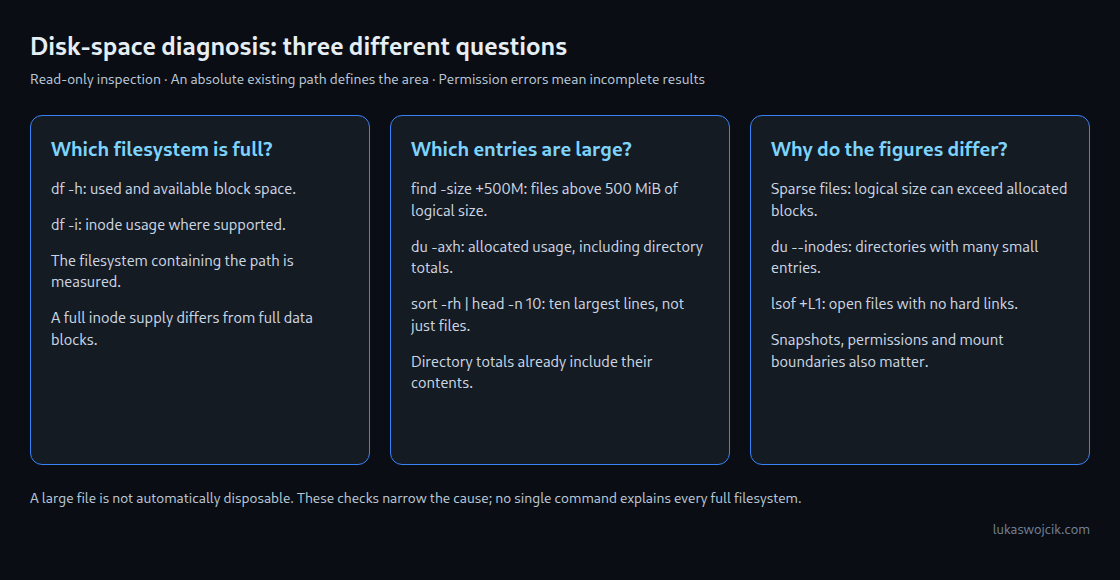
After connecting through SSH, an absolute path defines the area to inspect. The example path below must be replaced with an existing directory. df reports the filesystem containing that directory, not just the directory itself.
df -h -- "/path/to/directory"
df -i -- "/path/to/directory"
df -h reports space in readable binary units. df -i reports inode usage where supported. Inodes hold filesystem metadata; exhausting the available inode supply can prevent new files even when data blocks remain free.
Find individual files larger than 500 MiB
find "/path/to/directory" -xdev -type f -size +500M -exec ls -lh -- {} +-type f selects regular files. GNU find interprets M as 1,048,576 bytes, so +500M means larger than 500 MiB, not 500 decimal MB. The comparison uses logical file size. A sparse file can have a large logical size while using few disk blocks.
-xdev avoids descending into other filesystems. -exec ls -lh -- {} + passes matching names directly to ls in batches. This lists details but does not rank the results. Quoted paths handle spaces; permission errors still need attention because inaccessible directories make the search incomplete.
Rank allocated usage with du
du -axh -- "/path/to/directory" | sort -rh | head -n 10du -a includes files and directories; -h formats sizes and -x stays on one filesystem. sort -rh orders readable sizes from largest to smallest, and head -n 10 keeps ten lines. Directory entries include their contents: adding every displayed line would count the same data more than once. This is a top-ten entry list, not a file-only list.
The pipeline is intended for interactive inspection. File names containing newlines can disrupt its line-based presentation. Automated processing needs NUL-delimited records instead. Large scans and sorting can consume time, I/O and temporary space, so narrowing the starting directory is useful.
When the figures do not match
df and du measure different things. A mismatch is a clue, not proof of one cause. Inaccessible paths, different mount boundaries, snapshots, reserved space and filesystem accounting can also affect the comparison.
du --inodes -x --max-depth=1 -- "/path/to/directory" | sort -nr
lsof -nP +L1
du --inodes helps locate directories containing many filesystem entries, including large collections of tiny files. lsof +L1 lists open files with fewer than one hard link. On Linux, an unlinked file can retain allocated blocks until the final open reference is released. Process visibility depends on permissions, and lsof may need separate installation.
Questions and answers
Does du overlook lots of small files?
No. The directory totals include the files, and du --inodes offers a complementary count. A threshold search for large individual files can miss this cause, but that limitation does not apply to directory aggregation.
Is every large file safe to remove?
No. A database, application file or backup can be large and still required. Cleanup depends on ownership, retention and the application’s supported procedures. For logs, a configured rotation or reopen procedure is preferable to deleting an active file indiscriminately.
Do these checks explain every full-disk incident?
No. Quotas, snapshots, filesystem metadata or a different full mount can require additional checks. The exact failing path and filesystem are the starting point.
Related articles