English
 Deutsch
 Polski
GA4 & Server-Side GTM: The “Migrate from JavaScript Managed Client ID” Feature Explained
Part 2 of 5 in the series From pixel to server: tracking that holds

Contents
The GA4 client in server-side Google Tag Manager receives measurement requests and prepares events for server tags. Client identification determines the browser identifier in outgoing GA4 data. Changing that identifier can affect user counts, session association and longer-term analysis.
Separate the two settings
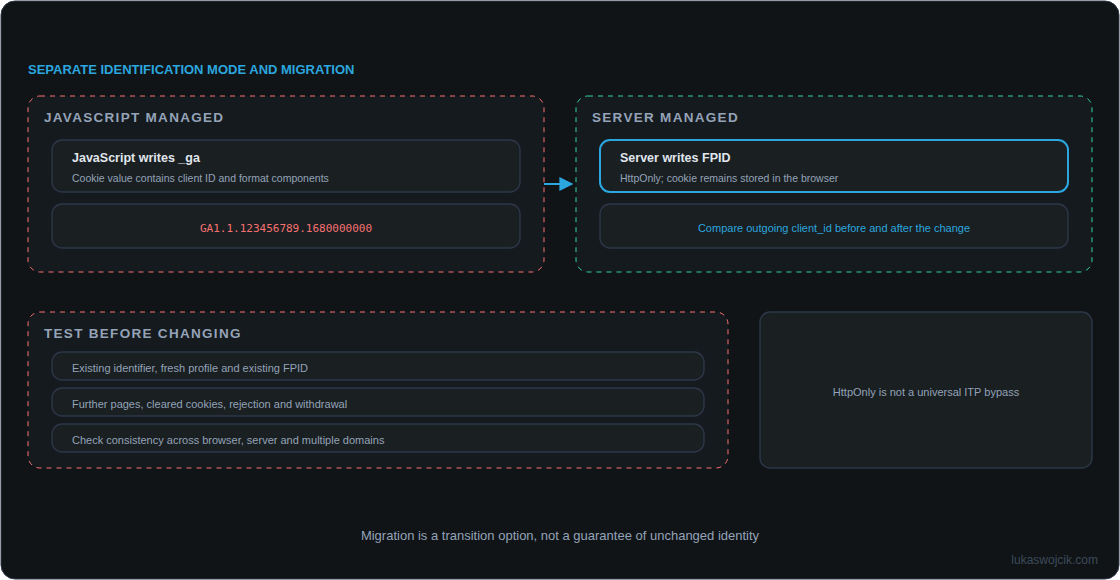
JavaScript Managed uses the client ID supplied by the browser. The usual _ga cookie contains that identifier alongside format components: GA1.1.123456789.1680000000 is a cookie value, while 123456789.1680000000 is the client ID within the value. A client ID is not a reliable identity for a person.
Server Managed uses a server-managed identifier, typically stored in the FPID cookie. An HTTP response sets this cookie, which remains stored in the browser. The additional Migrate from JavaScript Managed Client ID option concerns the transition from existing browser identifiers; the checkbox does not itself select the management mode.
What migration is intended to preserve
For an existing measurement setup, migration is intended to avoid an abrupt change of existing client IDs. This is neither a retrospective merger of all identifiers nor a guarantee of unchanged attribution. Already deleted or expired identifiers cannot be recovered through this setting.
Describing migration as “converting the old cookie into FPID while keeping the GA4 identity identical forever” is insufficient. The forwarded client_id is what matters. Before changing production settings, comparison of incoming and outgoing identifiers in the deployed client version must establish how existing IDs, fresh profiles and existing FPID cookies are handled.
HttpOnly provides a specific protection
HttpOnly prevents direct access to the cookie from page JavaScript, for example through document.cookie. This reduces simple cookie theft in some XSS attacks. The website does not become immune to XSS: malicious code can still modify page content or initiate requests. An analytics identifier is also different from a login session cookie.
Two years in Safari is not guaranteed
A configured expiry date does not guarantee actual retention. WebKit can also restrict cookies set in HTTP responses: detected third-party CNAME or IP cloaking triggers a seven-day cap. Private sessions, cookie deletion and browser settings can further reduce availability. FPID is not a universal ITP bypass.
Testing must cover the first-party endpoint, cookie domain, path, HTTPS and actual browser responses. Consent requirements still apply to storing and using the identifier.
Test the transition deliberately
- Save the current container version and settings. Start with a separate test measurement setup.
- Use a profile with an existing client ID and a fresh profile. Compare incoming IDs, response cookies and outgoing GA4 client IDs.
- Test subsequent page views, existing FPID cookies, expired or removed identifiers, rejection and withdrawal separately.
- Include every event route: browser events, server-side purchases, Measurement Protocol where applicable and multiple domains. Different IDs can split the same journey.
- After a controlled release, monitor users, sessions and campaign assignment by browser against the actual rollout date.
An identifier change can weaken historical continuity. That does not mean every visit must become a new user or every conversion must become “Direct / None.” Other identity signals, campaign parameters and reporting settings affect the outcome.
Questions and answers
Is migration always required?
Keeping JavaScript-managed identification requires no FPID migration. An established measurement setup moving to Server Managed warrants specific transition testing. A new setup without existing identifiers has no such legacy population.
Does the identifier survive deletion of all cookies?
A deleted FPID cookie is no longer available to the server. Recognition through other permitted signals is a separate matter; FPID alone does not restore the deleted identifier.
Is the internal migration algorithm fully established here?
No. Public Google introductory documentation explains server cookies and processing but does not specify every internal transition case. Testing the deployed GA4 client version therefore remains part of the migration.
From pixel to server: tracking that holds
- The Evolution of Web Tracking: From Log Files to the Server-Side Future
- GA4 & Server-Side GTM: The “Migrate from JavaScript Managed Client ID” Feature Explained
- Server-Side GTM on GCP Cloud Run: Architecture, Auto-Scaling, and Cost Optimization
- GA4 Measurement Protocol: Server-Side CRM Offline Conversion Integration
- Meta Conversions API: Maximizing Event Match Quality (EMQ) and Deduplication
Related articles