English
 Deutsch
 Polski
Raspberry Pi UPS: five options and selection criteria
Part 2 of 7 in the series Homelab on the Raspberry Pi

Contents
A UPS bridges a power outage and can provide time for an orderly shutdown. Reliable operation depends on the complete system: power adapter, UPS, batteries, cooling, connected devices and shutdown software. A battery alone does not guarantee data integrity or replace backups.
This comparison describes five products using manufacturer documentation. No comparative load or runtime measurements are available for this article; the order is not a ranking. Compatibility differs: several boards below are designed specifically for Raspberry Pi 5.
Power requirements before product selection
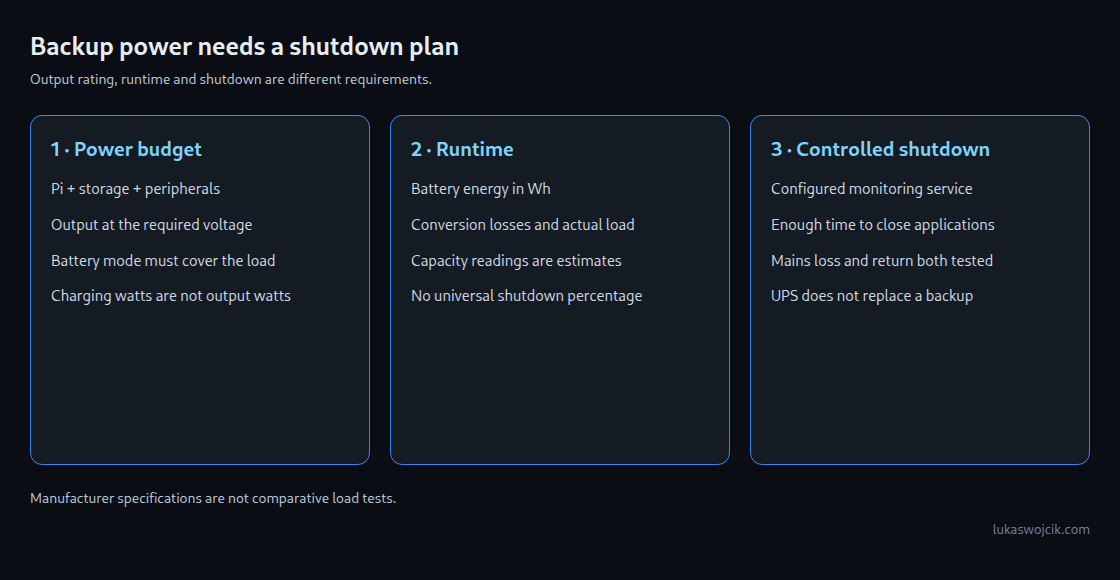
Raspberry Pi recommends a 3 A supply for Pi 4 and the 27 W supply for Pi 5. Pi 5 can run from a suitable 5 V/3 A supply, with the USB peripheral budget normally limited to 600 mA instead of 1.6 A. A 5 A rating describes available current, not constant consumption. SSDs and other accessories must fit within the relevant power budget.
For a UPS, the relevant figure is the sustained output at the Pi’s voltage, including battery operation. A high charging wattage does not establish the output current. Direct GPIO power also requires the board-specific configuration; a USB-C power-detection assumption cannot simply be transferred to a HAT.
Five products with different installation requirements
Argon PWR 27W UPS
Argon lists 5 V/5 A on USB-C, integrated Li-ion battery variants of 5,000 or 10,000 mAh, and a USB data connection for status information. The product supports Pi 4 and Pi 5; full feature support depends on the matching Argon case. The 27 W product name does not mean 27 W are available at 5 V/5 A.
Waveshare UPS HAT (B)
Waveshare specifies up to 5 V/5 A, two separately purchased 18650 cells, an 8.4 V charger and I2C battery monitoring. Power reaches the Pi through spring contacts. The current selection guide includes Pi 5, while older documentation lists earlier boards. The exact revision, contact positions and mounting clearance therefore need checking before purchase.
Waveshare UPS HAT (E)
This model uses four separately purchased 21700 cells and provides a specified 5 V/6 A output. The USB-C fast-charging port supports up to 40 W; that figure is distinct from the 5 V output rating. I2C exposes status information. A suitable charger must also support simultaneous load and battery charging.
Geekworm X1208
The X1208 combines a Pi 5 UPS with an NVMe socket. The specification gives a maximum of 5.1 V/5 A and one unprotected 21700 cell, no longer than 70.3 mm. The PCIe connection is occupied by storage. Automatic shutdown requires the documented hardware and software setup; battery operation at maximum load still needs validation.
DFRobot FIT0992
FIT0992 is a Pi 5 UPS board with four 18650 positions and 6–18 V DC input. The wiki specifies 5 V ±5%, maximum 5 A; some product labels say 5.1 V. The exact revision’s documentation is decisive. Power-loss detection and programmable shutdown are provided, with software configuration required.
Practical selection
A USB-C UPS leaves more freedom for other expansion boards. A HAT can integrate monitoring and power control but needs space around the GPIO header, cooler and storage hardware. Neither design is inherently a winner. Useful acceptance checks include mains loss at representative peak load, shutdown with a partly discharged battery, and mains return during shutdown. A maintenance window and disposable test data reduce the consequences of a failed test.
Questions and answers
Does I2C monitoring automatically shut down the system?
No. Readings need a configured service or manufacturer-supported control software that triggers shutdown. The service must start after boot and recover from failure. A universal charge threshold such as two percent is unsuitable: shutdown time and remaining runtime depend on the system, battery condition and load.
Which battery specifications matter?
Cell format, dimensions, chemistry, permitted protection circuitry and continuous discharge current must match the board manual. Capacity in mAh is not directly comparable across packs with different voltages. Energy in Wh and measured runtime at the intended load are more useful. Incorrect polarity or incompatible cells can damage the board and create a fire risk; assembly must follow the manufacturer’s battery instructions.
Homelab on the Raspberry Pi
- Raspberry Pi 4 and 5: Booting From an SSD by Changing the Bootloader
- Raspberry Pi UPS: five options and selection criteria
- Local CI/CD for Raspberry Pi: Automating Docker Compose Deployments
- Docker Compose Home Server: Traefik, TLS and Update Monitoring
- Jellyfin on Raspberry Pi 5: Direct Play and Transcoding Limits
- Raspberry Pi as a Hardened WireGuard VPN Gateway with Split-Tunneling
- Raspberry Pi Monitoring with Prometheus and Grafana
Related articles