English
 Deutsch
 Polski
Passing Cookie Consent Choices to Server-Side Google Tag Manager
Part 4 of 4 in the series Wiring consent correctly

Management Summary
A consent banner records whether a website may send data for advertising. When part of that measurement runs on a server instead of in the browser, the decision needs to reach the server too. The article explains this connection using data sent to Meta as an example. Passing the choice along allows both parts of the measurement process to respect the same permission, including refusal or withdrawal. Receiving data on a server does not itself grant permission to share it further.
Contents
A server-side Google Tag Manager container (sGTM) processes incoming requests. The current consent-banner choice is available only through a suitable transmitted signal or a reliable server-side source. Missing consent information does not automatically send data to Meta CAPI: the configured tags and triggers determine what happens.
A container groups the configured tags and rules. A tag sends data to a service; a trigger decides when it runs. The consent management platform (CMP), here Usercentrics, manages the banner and saved choices. Meta CAPI sends events from the server to Meta.
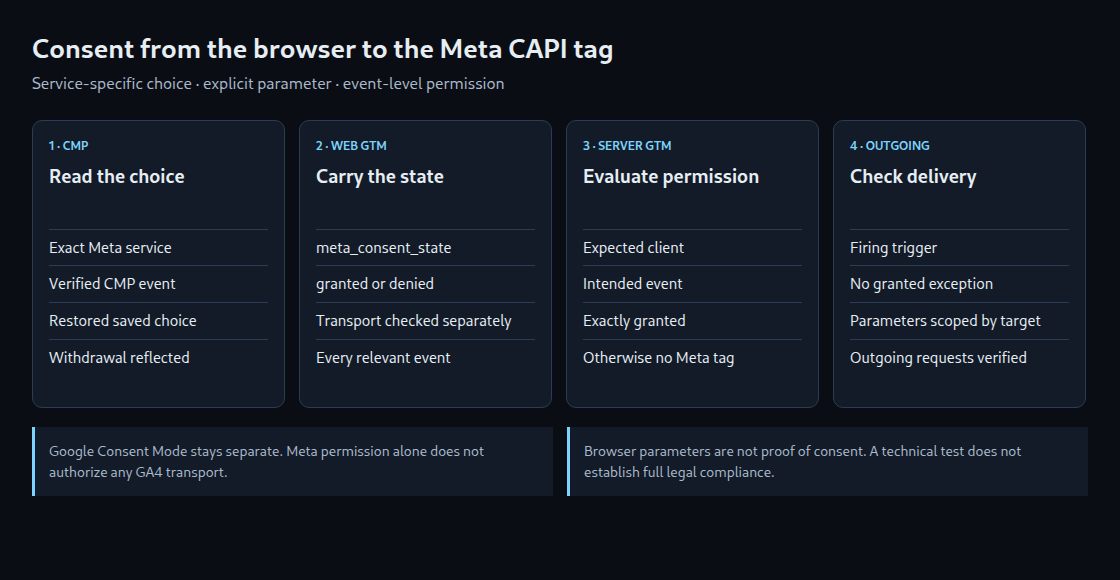
This example carries the service-specific Meta choice from Usercentrics as an event parameter. Google Consent Mode remains separately configured for Google tags. The result is a technical firing rule, not proof that the overall data processing is lawful.
1. Prerequisites and a consistent value
The setup requires working web and server containers, a server-side GA4 client, and a Usercentrics integration with documented consent events. CMP versions and integrations expose different structures. The web preview must first confirm the actual event and the exact Meta service name. An invented data-layer key will not retrieve consent automatically.
A Data Layer Variable named {{UC - Meta Consent}} reads that service-specific value, with false as its default. The data layer is the collection of event information read by web GTM. If the consent system announces a choice through a window event, integration code must first copy the required value into that collection. This Custom JavaScript Variable example accepts only the Boolean value true or the text 'true' as consent:
function () {
  var value = {{UC - Meta Consent}};
  return value === true || value === 'true' ? 'granted' : 'denied';
}
The resulting variable is named {{Meta Consent State}}. Missing values, numbers, and other strings become denied. These two output strings are a convention for this example, not built-in Meta or Google consent parameters.
2. Browser tags and transport
- The Meta Pixel initialization tag receives the appropriate consent-event trigger plus
{{Meta Consent State}} equals granted. Depending on the integration, Usercentrics documentsconsent_statusor related event variants. Preview confirms the actual name. - Additional Meta events, such as a purchase, need the same service-specific condition on their own event triggers. An initialization trigger does not protect every subsequent tag.
- The Google tag transport routes to the tagging server. Each relevant GA4 event carries
meta_consent_statewith{{Meta Consent State}}as its value. Shared event settings can reduce repeated setup. Preview must still show that every intended event actually contains the parameter.
Google consent signals do not replace the Meta-specific choice. The transport also needs an appropriate consent configuration. In Basic Consent Mode, an analytics tag without permission can remain completely blocked, so its Meta parameter never reaches the server. Meta permission alone does not justify enabling the GA4 transport indiscriminately.
Blocking a later GTM trigger does not unload a Pixel library that is already running. Automatic Pixel events and other integrations therefore need separate checks. Withdrawal must also update the loaded library through the CMP/Pixel integration; the Meta template supports grant/revoke for this. The state-update path must remain usable when consent is denied.
3. A server-side firing trigger
An Event Data variable with key path meta_consent_state reads the received value. The GA4 client must actually expose that parameter in the event; server preview shows whether that happened.
The Meta CAPI trigger requires the expected client, an explicitly supported event, and meta_consent_state equals granted together. The client name must match the configured client. Separate rules or a precise list can cover page_view and purchase; .* matches every event, not only e-commerce events.
This rule belongs under the tag’s firing triggers. It is not a blocking exception: an exception matching “granted” would block the allowed case. Other broader firing triggers need removal or equivalent restrictions. Missing, denied, and unexpected values do not satisfy this rule.
4. Limited forwarding and observable checks
A transport parameter need not reach every destination. An sGTM Exclude parameters transformation targeted to the GA4 tag can remove meta_consent_state before forwarding data to Google. Its scope must preserve the value wherever Meta gating needs it. Not registering a custom dimension does not prevent transmission.
| Test case | Expected Meta behavior |
|---|---|
| No decision, rejection, or missing parameter | No Pixel/CAPI delivery through the protected triggers |
| Meta allowed and a relevant event | Only the intended tags fire |
| Other services allowed, Meta denied | Meta stays blocked |
| Withdrawal followed by a new event | Updated state blocks further delivery |
| New page with a saved choice | Choice is restored before the relevant event |
Verification covers web and server preview, resolved variables, and actual outgoing requests. Withdrawal cannot recall events already sent. A newly granted choice is also not a reason to replay previously blocked events without a separate assessment.
Questions and answers
Does the parameter prove valid consent?
No. A browser parameter can be altered and is not tamper-proof evidence. Validity, purposes, required information, and any separate evidence requirements belong to the overall system design.
Why can events be missing after consent was granted?
Possible causes include a choice not yet restored by the CMP, the wrong key, missing parameter inheritance, or a blocked transport. A later choice cannot change a request already received. These cases need separate technical diagnosis.
Does this work with every Meta CAPI template?
Event data and triggers must fit the installed template. Parameter mapping, additional delivery paths, and potential browser/server duplicates require their own checks. A successful trigger condition alone does not establish a correct overall implementation.
Sources and review date
2026-10-24
Wiring consent correctly
- How to Implement Google Consent Mode v2
- Google Consent Mode: What Data Is Sent When Cookies Are Rejected
- Checking GA4 Consent Mode: When the Cookie Banner and Tracking Code Start in the Wrong Order
- Passing Cookie Consent Choices to Server-Side Google Tag Manager
Related articles