Algorithmic ROAS Optimization: BigQuery Attribution Export to Google Ads OCI

Contents
Standard conversion tracking in performance marketing frequently optimizes bidding models toward superficial metrics. Feeding automated bidding systems with gross order revenue or unweighted transaction counts ignores critical financial realities such as product profit margins, order cancellation rates, shipping overhead, and long-term Customer Lifetime Value (LTV). Implementing an algorithmic ROAS optimization pipeline between Google BigQuery and Google Ads Offline Conversion Import (OCI) allows data engineering teams to replace raw browser conversion pixels with enriched, real-profit signals tied directly to ad click identifiers.
1. Architectural Framework: Value-Based Bidding (VBB) & OCI
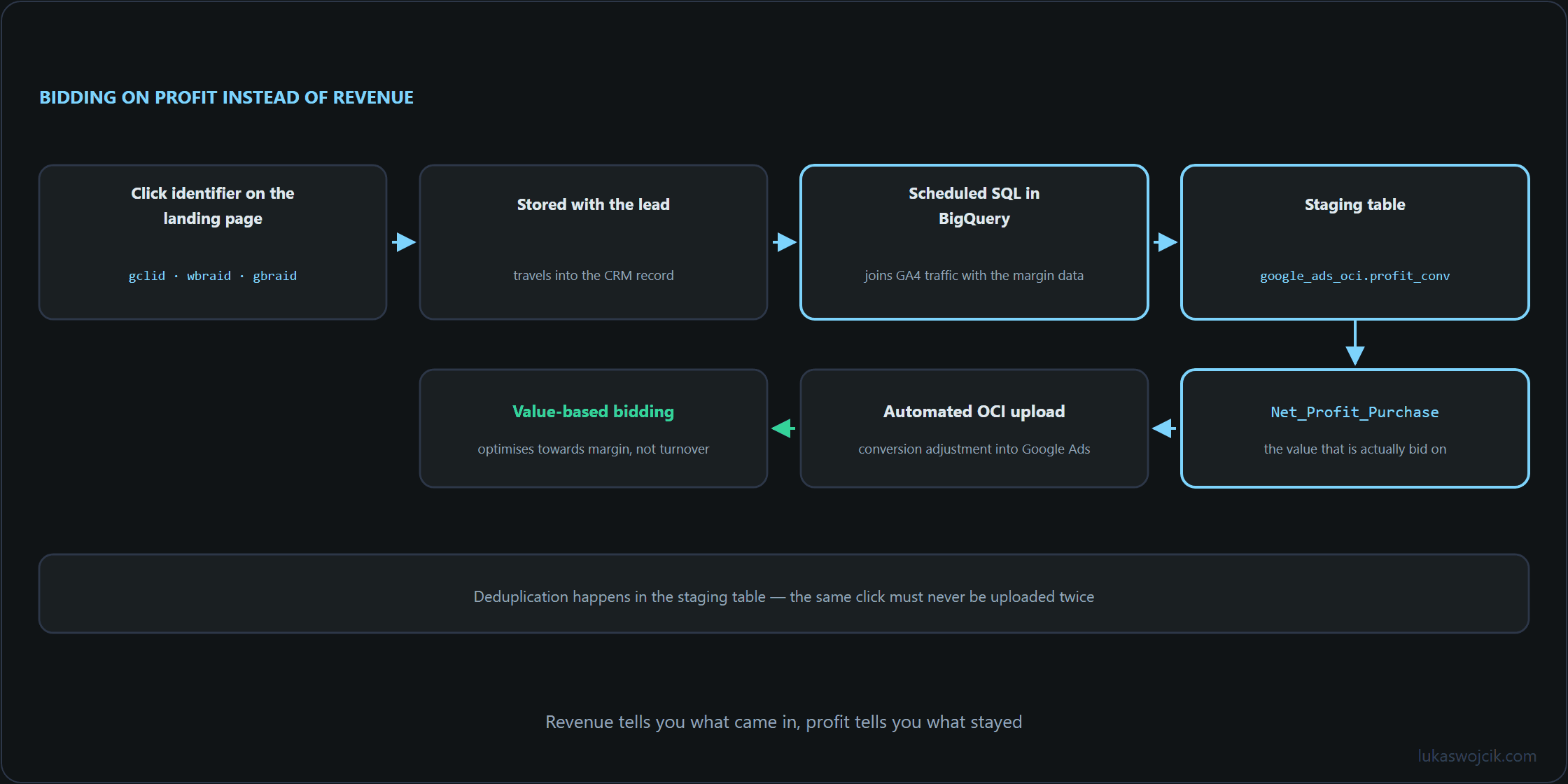
Value-Based Bidding (VBB) relies on transmitting accurate profit and LTV metrics back into Google Ads Smart Bidding algorithms. The OCI data pipeline consists of three structural components:
- Click Identifier Capture: Every inbound landing page URL containing Google click parameters (
gclid,wbraid, orgbraid) must persist these identifiers within first-party cookies and backend ERP/CRM transaction databases. - Financial Attribution Modeling in BigQuery: A scheduled SQL transformation joins GA4 web traffic streams with backend accounting datasets, calculating the actual net profit and predicted 90-day LTV for each converting customer.
- Automated OCI Payload Sync: Formatted conversion payloads are uploaded automatically to Google Ads via scheduled BigQuery data transfers or the Google Ads API, allowing bidding models to bid higher on customer profiles generating true financial profit.
2. Step-by-Step SQL Modeling in Google BigQuery
To calculate true conversion value, GA4 click identifiers must be joined with backend transactional data and product margin tables. The following production-grade SQL script extracts click IDs and calculates net profit values for OCI ingestion:
WITH ga4_click_params AS (
    SELECT
        (SELECT value.string_value FROM UNNEST(event_params) WHERE key = 'transaction_id') AS transaction_id,
        (SELECT value.string_value FROM UNNEST(event_params) WHERE key = 'gclid') AS gclid,
        (SELECT value.string_value FROM UNNEST(event_params) WHERE key = 'gbraid') AS gbraid,
        (SELECT value.string_value FROM UNNEST(event_params) WHERE key = 'wbraid') AS wbraid,
        TIMESTAMP_MICROS(event_timestamp) AS event_time
    FROM
        `project_id.analytics_XXXXXXXXX.events_*`
    WHERE
        _TABLE_SUFFIX BETWEEN FORMAT_DATE('%Y%m%d', DATE_SUB(CURRENT_DATE(), INTERVAL 7 DAY))
                          AND FORMAT_DATE('%Y%m%d', DATE_SUB(CURRENT_DATE(), INTERVAL 1 DAY))
        AND event_name = 'purchase'
),
backend_financials AS (
    SELECT
        order_id AS transaction_id,
        order_status,
        -- Gross Revenue minus Cost of Goods Sold (COGS), Returns, and Shipping Cost
        ROUND((gross_revenue - cogs_amount - shipping_cost) * COALESCE(ltv_multiplier, 1.2), 2) AS net_profit_value,
        currency_code
    FROM
        `project_id.erp_data.completed_orders`
    WHERE
        order_status = 'PAID_AND_SHIPPED'
        AND return_status = 'NO_RETURN'
)
SELECT
    COALESCE(g.gclid, g.gbraid, g.wbraid) AS click_id,
    CASE
        WHEN g.gclid IS NOT NULL THEN 'GCLID'
        WHEN g.gbraid IS NOT NULL THEN 'GBRAID'
        WHEN g.wbraid IS NOT NULL THEN 'WBRAID'
    END AS click_id_type,
    'Net_Profit_Purchase' AS conversion_name,
    FORMAT_TIMESTAMP('%Y-%m-%d %H:%M:%S%z', g.event_time) AS conversion_time,
    b.net_profit_value AS conversion_value,
    b.currency_code AS conversion_currency
FROM
    ga4_click_params g
INNER JOIN
    backend_financials b
    ON g.transaction_id = b.transaction_id
WHERE
    COALESCE(g.gclid, g.gbraid, g.wbraid) IS NOT NULL
    AND b.net_profit_value > 0;
3. Step-by-Step Data Staging for Google Ads OCI
Google Ads OCI mandates specific schema rules and timing thresholds before conversions can be processed without rejection:
- Deduplication Management: The SQL output must be saved into a staging table named
google_ads_oci.profit_conversions_staging. Deduplication is enforced by grouping on `transaction_id` to prevent double-uploading orders adjusted over multiple billing cycles. - Conversion Timing Buffer: Uploads must occur between 24 hours and 90 days after the initial ad click. Orders processed faster than 6 hours after click timestamp risk rejection due to click identifier indexing delays within Google Ads servers.
- Conversion Action Mapping: A dedicated Secondary Conversion Action named
Net_Profit_Purchasemust be created in Google Ads under Goals > Conversions > Uploads. Once data import stability is verified over a 14-day window, this action can be promoted to a Primary Conversion Goal.
4. Step-by-Step Automated Sync Configuration
To eliminate manual CSV exports, automated synchronization between BigQuery and Google Ads must be configured:
- BigQuery Scheduled Query: Configure a daily Scheduled Query executing at 04:00 UTC, overwriting the staging table with newly reconciled financial transactions from the preceding day.
- Google Ads Scheduled Upload Connection: In Google Ads, navigate to Goals > Conversions > Uploads > Schedules. Select HTTPS / Google Cloud Storage or link directly to the BigQuery staging table using a service account credentials key.
- Upload Frequency & Alerting: Schedule the upload daily for 06:00 UTC. Configure error notification webhooks in Google Ads to monitor rejected click identifiers or formatting syntax errors.
5. Summary & Architectural Value
What this tutorial achieves: The deployment of an automated, accounting-verified Offline Conversion Import (OCI) pipeline from Google BigQuery into Google Ads Smart Bidding algorithms.
Resulting value: Smart Bidding algorithms cease optimizing for empty revenue volume or fraudulent orders. Ad budgets are automatically shifted toward customer cohorts that generate high net profit margins and strong Customer Lifetime Value. Consequently, overall advertising efficiency improves, Return on Ad Spend (ROAS) reflects real financial cash flow, and wasted ad spend on high-return, low-margin products is permanently minimized.
Related articles