Structuring a Flawless B2B Lead Funnel with UTM Inheritance

Contents
In B2B performance marketing, customer journeys rarely convert on the first touchpoint. A prospect frequently clicks a LinkedIn Ads campaign, browses an educational blog article, returns days later via organic search to download a technical whitepaper, and finally schedules a sales call after receiving a lead-nurturing email. Standard web analytics implementations discard initial campaign parameters as soon as the visitor navigates across multiple internal pages. Structuring an enterprise B2B lead funnel with persistent UTM inheritance guarantees that first-touch and last-touch attribution data survive across sessions and are transmitted cleanly into the Customer Relationship Management (CRM) platform.
1. Architectural Framework: The Attribution Drop-Off Problem
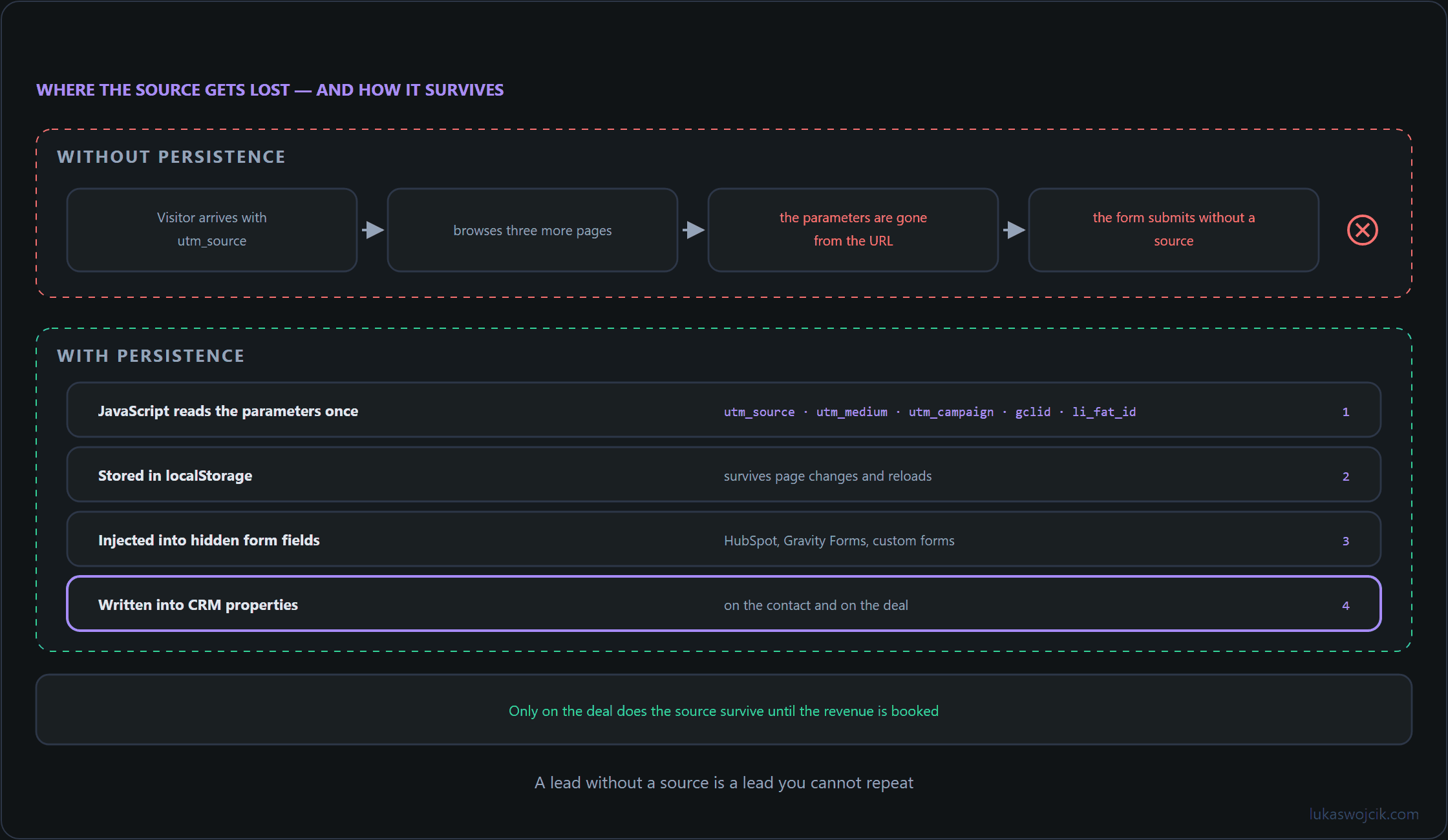
When inbound traffic arrives via paid media, query parameters such as utm_source, utm_medium, utm_campaign, utm_term, utm_content, gclid, and li_fat_id exist solely in the browser address bar of the initial landing page. Moving to another subpage causes those URL parameters to disappear. To prevent attribution loss, an automated persistence architecture requires three technical layers:
- Session & Local Storage Persistence: A lightweight JavaScript utility must capture all relevant UTM and ad click parameters upon initial page load and store them persistently in the browser’s
localStorageand first-party cookies. - Dynamic Form Field Injection: Lead capture forms (e.g., HubSpot embedded forms, Gravity Forms, or Contact Form 7) must contain hidden input fields that are populated programmatically with stored attribution data before form submission occurs.
- CRM Schema Synchronization: The destination CRM platform (such as Salesforce, HubSpot, or Pipedrive) must feature custom property fields designed specifically to ingest and index first-touch and last-touch campaign values.
2. Step-by-Step JavaScript UTM Persistence Engine
To capture inbound marketing parameters without slowing down page rendering, the following vanilla JavaScript snippet must be loaded in the global footer or deployed as a Custom HTML Tag within Google Tag Manager. It stores both initial acquisition parameters (First Touch) and the most recent referral data (Last Touch):
document.addEventListener('DOMContentLoaded', function() {
    const trackingKeys = [
        'utm_source', 'utm_medium', 'utm_campaign',
        'utm_term', 'utm_content', 'gclid', 'li_fat_id'
    ];

    const urlParams = new URLSearchParams(window.location.search);
    let currentTouch = {};
    let hasParams = false;

    trackingKeys.forEach(function(key) {
        if (urlParams.has(key)) {
            currentTouch[key] = urlParams.get(key);
            hasParams = true;
        }
    });

    if (hasParams) {
        // Persist First Touch if not already existing
        if (!localStorage.getItem('b2b_first_touch')) {
            localStorage.setItem('b2b_first_touch', JSON.stringify(currentTouch));
        }
        // Continuously overwrite Last Touch with newest campaign parameters
        localStorage.setItem('b2b_last_touch', JSON.stringify(currentTouch));
    }
});
3. Step-by-Step Automated Form Field Injection
Every lead capture form across the B2B web architecture must include hidden fields designed to receive attribution payloads. For HTML and WordPress forms, injection is executed automatically by appending the following DOM mutation logic:
function populateHiddenAttributionFields() {
    const firstTouchData = JSON.parse(localStorage.getItem('b2b_first_touch') || '{}');
    const lastTouchData = JSON.parse(localStorage.getItem('b2b_last_touch') || '{}');

    // Mapping structure for hidden inputs: [field_name_in_form, value]
    const mappings = [
        ['first_utm_source', firstTouchData.utm_source || 'direct'],
        ['first_utm_medium', firstTouchData.utm_medium || 'none'],
        ['first_utm_campaign', firstTouchData.utm_campaign || 'none'],
        ['last_utm_source', lastTouchData.utm_source || 'direct'],
        ['last_utm_medium', lastTouchData.utm_medium || 'none'],
        ['last_utm_campaign', lastTouchData.utm_campaign || 'none'],
        ['gclid_val', lastTouchData.gclid || ''],
        ['linkedin_click_id', lastTouchData.li_fat_id || '']
    ];

    mappings.forEach(function(item) {
        const fieldName = item[0];
        const fieldValue = item[1];
        const inputElements = document.querySelectorAll('input[name="' + fieldName + '"]');

        inputElements.forEach(function(input) {
            input.value = fieldValue;
        });
    });
}

// Execute upon standard DOM load and after AJAX form rendering
window.addEventListener('load', populateHiddenAttributionFields);
document.addEventListener('gform_post_render', populateHiddenAttributionFields);
4. Step-by-Step CRM Attribution Configuration
To convert raw parameter strings into actionable marketing intelligence, CRM data models must be structured explicitly for multi-touch evaluation:
- Custom Field Provisioning: Within CRM setup, create dedicated Contact and Deal properties matching the hidden form field names (e.g.,
First Touch UTM Campaign,Last Touch UTM Campaign,LinkedIn Click ID). - Lead Source Standardization: Implement an automated CRM workflow that parses
last_utm_mediumand sets standardized lifecycle categories (e.g., classifyingcpcorpaid_socialas Paid Acquisition leads). - Closed-Loop Attribution Sync: When a B2B deal transitions to a closed-won stage, use the stored
gclidorli_fat_idproperties to fire offline conversion API payloads back into Google Ads and LinkedIn Campaign Manager.
5. Summary & Architectural Value
What this tutorial achieves: The implementation of a persistent, automated UTM and click-parameter inheritance pipeline that captures first-touch and last-touch attribution across complex, multi-touch B2B buyer journeys.
Resulting value: Attribution blind spots between initial paid ad clicks and eventual CRM deal closures are permanently eliminated. Marketing teams gain granular visibility into which campaigns drive top-of-funnel discovery versus bottom-of-funnel sales calls. Furthermore, transmitting accurate click identifiers into the CRM enables closed-loop Value-Based Bidding, optimizing paid acquisition algorithms toward closed-won revenue rather than superficial form submissions.
Related articles