English
 Deutsch
 Polski
Describing Website Content for Search Engines: Adding and Checking JSON-LD

Management Summary
JSON-LD is an organised description that helps search engines understand a webpage's contents, such as an article, product or offer. It sits alongside the visible page and can support richer search displays with relevant details. This is useful when the type and meaning of information would otherwise be harder to identify. The description must match what the page actually shows, including prices, dates and genuine ratings. Correct formatting alone guarantees neither an enhanced result nor a higher ranking.
Contents
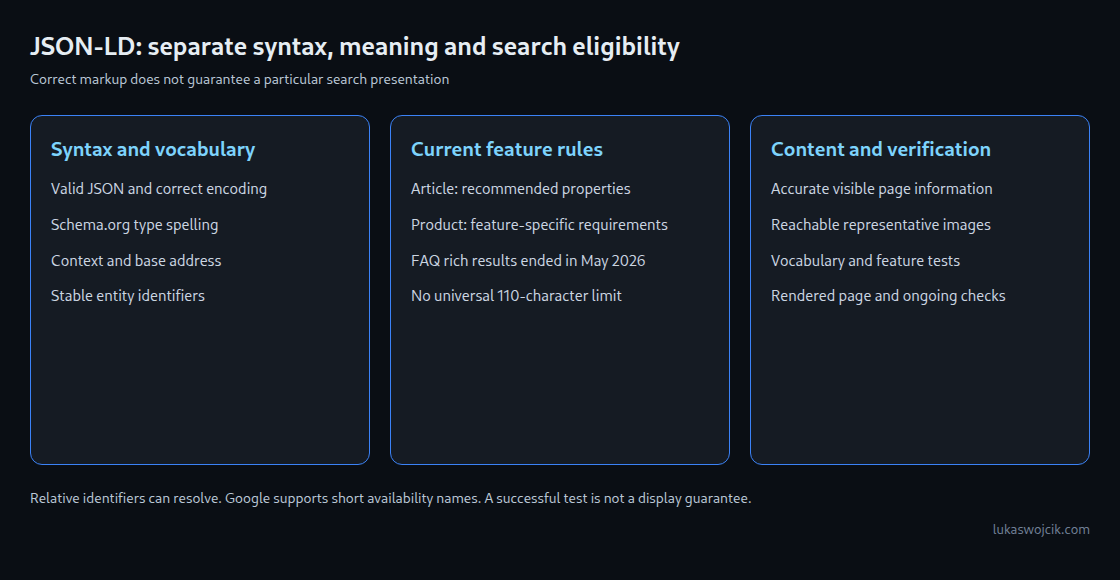
JSON-LD describes page content in a machine-readable form. A rich result is a search result with extra information, such as a product price or rating. A syntactically valid block is not proof that a page qualifies for a particular Google rich result. Four checks belong together: valid JSON, correct vocabulary, the requirements of the relevant search feature and agreement with the visible page.
Errors are often invisible in the ordinary page layout, but testing tools can detect many problems. Conversely, an absent rich result does not prove an error. Correct, eligible markup still guarantees neither a particular presentation nor a ranking position.
1. Format, vocabulary and search feature
@context defines how short terms are interpreted. For ordinary Schema.org markup, "@context": "https://schema.org" is a clear standard form. JSON-LD also permits context objects and fully expanded identifiers. Several technically valid representations are therefore possible.
Type names retain the spelling defined by the vocabulary: Article identifies the Schema.org article type; article does not. A JSON parser checks the formal structure, such as commas and quotation marks, but not whether the described information is true. Recognizing a known type requires an additional vocabulary check. Related objects can appear under @graph or in separate script blocks.
Schema.org describes more properties than individual Google search features use. Successful JSON parsing, Schema.org validation and eligibility for a Google display are therefore different outcomes. The current documentation for the intended feature determines its required and recommended fields.
2. Values that match their meaning
| Example | Interpretation and improvement |
|---|---|
"image": "/img/a.jpg" | JSON-LD can resolve relative identifiers, depending on the context and base address. A complete HTTPS address avoids ambiguity when content is copied or processed elsewhere. The image must also be accessible and relevant. |
"datePublished": "26.08.2026" | An ISO 8601 value such as 2026-08-26T10:00:00+02:00 is suitable for the article date. A localized display string should not simply be copied into this field. |
"price": "49,90 EUR" | Price and currency remain separate, for example "price": "49.90" and "priceCurrency": "EUR". An error can impair the use of offer data; it does not establish a universal rule that every offer field always disappears. |
"@type": "article" | The correct spelling is Article. A vocabulary validator or a supported rich-results test can expose unknown types. |
Templates should generate the publication time, current price and image address from the underlying business values. An already localized price string is not a suitable numeric input. Decimal places depend on the currency and pricing model; two places suit the EUR example, not every currency.

3. Article without invented required fields
Google’s current Article documentation lists no required properties. headline is one of the recommended properties. A useful record should still describe the actual title, author, publication and modification times, and representative images.
The following example is solely a template for a corresponding article page. The domain, images, author profile and timestamps are illustrative and must match the actual visible information. The product template later in this tutorial belongs on a product page; these examples are not additional metadata for this tutorial.
<script type="application/ld+json">
{
  "@context": "https://schema.org",
  "@type": "Article",
  "@id": "https://www.example.com/blog/json-ld/#article",
  "headline": "JSON-LD: reliable values and clear validation",
  "image": [
    "https://www.example.com/images/json-ld-16x9.jpg",
    "https://www.example.com/images/json-ld-4x3.jpg",
    "https://www.example.com/images/json-ld-1x1.jpg"
  ],
  "author": {
    "@type": "Person",
    "name": "Lukas Wojcik",
    "url": "https://www.example.com/about/"
  },
  "datePublished": "2026-08-26T10:00:00+02:00",
  "dateModified": "2026-09-02T14:30:00+02:00",
  "mainEntityOfPage": {
    "@type": "WebPage",
    "@id": "https://www.example.com/blog/json-ld/"
  }
}
</script>
Google has no fixed 110-character limit for headline. Long titles may be shortened depending on the presentation. Author objects using Person or Organization and an appropriate profile URL make attribution clearer. Modification dates should reflect actual changes rather than resetting on every request. Publication and modification times should form a plausible chronology.
Google recommends several relevant high-resolution article images in 16:9, 4:3 and 1:1 formats. The three example URLs require actual image variants. A logo or a purely decorative symbol is not a substitute for an image representing the article.
4. FAQPage remains a vocabulary type
Google has shown no FAQ rich results since May 7, 2026. The earlier restriction to well-known government and health websites therefore no longer describes the current situation. Documentation for the Google feature was removed in June 2026. The Schema.org FAQPage type continues independently.
Question-and-answer markup can be useful for internal search or an application expressly built to process it. That does not establish a guaranteed benefit in AI assistants or other search services. The application must actually support the format.
Agreement with accessible page content is not unique to FAQs. Article, product and rating data must also avoid invented or misleading information. A functioning expandable answer is different from an answer present only in JSON. Violations can lead to action. Not every display defect automatically results in a manual action.
5. Product snippets and merchant listings
For a Google product snippet, the documentation requires name and at least one of review, aggregateRating or offers. An offer block is therefore not mandatory for every product snippet. Merchant listings have separate requirements; a small example does not automatically satisfy every shopping feature.
<script type="application/ld+json">
{
  "@context": "https://schema.org",
  "@type": "Product",
  "@id": "https://www.example.com/switch/#product",
  "name": "Compact PoE switch, 8 ports",
  "image": [
    "https://www.example.com/images/switch.png"
  ],
  "brand": {
    "@type": "Brand",
    "name": "Example"
  },
  "offers": {
    "@type": "Offer",
    "price": "149.00",
    "priceCurrency": "EUR",
    "availability": "https://schema.org/InStock",
    "url": "https://www.example.com/switch/"
  }
}
</script>
The example describes a visible offer at EUR 149.00. priceCurrency uses the three-letter ISO 4217 code. A full Schema.org address is explicit for availability, but Google also supports short forms such as InStock for product snippets. Either form must match the actual product availability.
Additional ratings require genuine information corresponding to the page. An AggregateRating needs ratingValue, an appropriate count through ratingCount or reviewCount, and a different rating scale when applicable. Stars must not be invented merely to remove a test warning.
6. Validation as part of template maintenance
- JSON syntax check: double quotes, valid commas and character encoding.
- Validation of types and properties with a Schema.org validator. This does not establish Google display eligibility.
- Rich Results Test for currently supported search features, with errors distinguished from recommendations.
- Inspection of the delivered or rendered page, its images, actual content and accessibility. Search Console and available enhancement reports help after publication.
Passing several tests still does not guarantee display. Automated tests also cannot identify every fabricated rating or misleading price. A fresh sample check belongs in maintenance after theme, plugin or data-source changes.
Questions and answers
Are several JSON-LD blocks an error?
No. Separate blocks can describe different or related objects. Stable @id identifiers show that different blocks describe the same object, such as the same article or product. Conflicting values remain a quality problem; assuming a reliable “last block wins” rule is unsuitable. One responsible source per described object and deliberate additions simplify maintenance. A plugin is not automatically better than correctly maintained theme output.
Can Google read JSON-LD generated by JavaScript?
Yes. Google supports dynamically generated structured data. What matters is whether the rendered content is actually available. Dependencies on clicks, login or consent interactions can prevent collection. Server-generated output reduces those dependencies; other consumers need assessment against their actual processing capabilities. Google recommends initial HTML for fast-changing product prices and availability.
How do dates and prices stay correct during generation?
Date functions such as WordPress get_the_date('c') provide a standardized format. The underlying time and timezone still need to be correct. JavaScript’s toISOString() represents the same instant in UTC; its calendar date can differ from local time without changing the publication instant. Price values should come from a validated decimal amount, not an unchecked conversion of a display such as 49,90 EUR.
How are quotes and special characters embedded safely?
A JSON serializer such as wp_json_encode() converts the data into JSON and handles the required character escaping, instead of joining text fragments by hand. For embedding inside a script element, JSON_HEX_TAG | JSON_HEX_AMP | JSON_HEX_APOS | JSON_HEX_QUOT helps encode critical characters. A false return value must be handled as a generation failure. JSON encoding replaces neither business-data checks nor inspection of the resulting HTML.
Related articles