Release Metadata 2026: Assigning ISRC, UPC/EAN and ISWC, Writing Them into Files and Checking Them Step by Step

Contents
- Three codes for three different things
- Step 1: Assigning ISRCs in-house or through an ISRC Manager
- Step 2: Deciding for each version whether a new ISRC is due
- Step 3: Keeping the reference metadata for every ISRC
- Step 4: A UPC or EAN for the release
- Step 5: The ISWC through work registration
- Step 6: Writing the ISRC into the files
- Step 7: Checking the codes before upload
- Sources
Streaming services, distributors and collecting societies do not recognise a recording by its title but by its code. According to the ISRC Handbook, many online services require an ISRC, and collective management organisations that handle rights in recordings usually need it to distribute revenue from radio play and public performance. A release involves three kinds of code that identify three different things: the ISRC identifies the recording, the UPC or EAN the release as a product, and the ISWC the musical work.
This guide follows the IFPI ISRC Handbook (4th edition, 2021), the GS1 GTIN Management Standard and the information published by the ISWC agency. A measurement shows where ffmpeg actually stores an ISRC during encoding, because not every field called ISRC holds the ISRC. Finally, the codes are checked with the ISRC, UPC/EAN and ISWC Validator and the MusicBrainz lookup.
Three codes for three different things
| Code | Identifies | Assigned by | Structure |
|---|---|---|---|
| ISRC | a recording, meaning a sound recording or a music video | the owner of the rights in the recording, using a prefix from the ISRC agency, or an appointed ISRC Manager | 12 characters: prefix (5), year of reference (2), designation code (5), no check digit |
| UPC-A or EAN-13 | the release as a product, such as a single, an album or a vinyl edition | the brand owner, using a GS1 Company Prefix | 12 or 13 digits with a GS1 check digit; a UPC-A with a leading zero is the same EAN-13 |
| ISWC | the musical work, meaning the composition including lyrics | an ISWC registration agency, reached through the collecting society | T, nine digits and a check digit |
The codes are related but do not replace each other. A work can have many recordings: a cover version gets its own ISRC and still belongs to the same work. A recording, in turn, can appear on many releases and keeps its ISRC on each of them; according to the Handbook, the product identifier shows which release is meant.
Step 1: Assigning ISRCs in-house or through an ISRC Manager
According to the Handbook, an ISRC is assigned by the owner of the rights in the recording or its long-term exclusive licensee. The prefix comes from the ISRC agency of the respective country, and IFPI allocates prefixes on a strictly sequential basis, so there are no custom characters. According to the IFPI list of agencies, the agency is BVMI in Germany, LSG in Austria, IFPI Switzerland in Switzerland and ZPAV in Poland. A prefix comes with a range of designation codes; as an example for an independent artist, the Handbook names the range 23800 to 23899. Designation codes are assigned in sequence and never twice within a calendar year.
Without a prefix of its own, a rights owner can leave assignment to an ISRC Manager. According to the Handbook, these are often digital aggregators and distributors, but also small studios that offer ISRCs alongside recording, mixing and mastering. An ISRC Manager needs a prefix allocated expressly for that role, assigns ISRCs only on the instruction of the rights owner and only to recordings that do not have one yet. The codes go to the rights owner, who uses them everywhere from then on.
Retailers, streaming services and broadcasters do not assign ISRCs: according to the Handbook, a party receiving a recording for sale, streaming or broadcast uses the ISRC assigned by the owner. When printed or displayed, the code is preceded by “ISRC” and written with three hyphens, for example ISRC AA-6Q7-20-00047; the hyphens and the prefix word are not part of the code.
Step 2: Deciding for each version whether a new ISRC is due
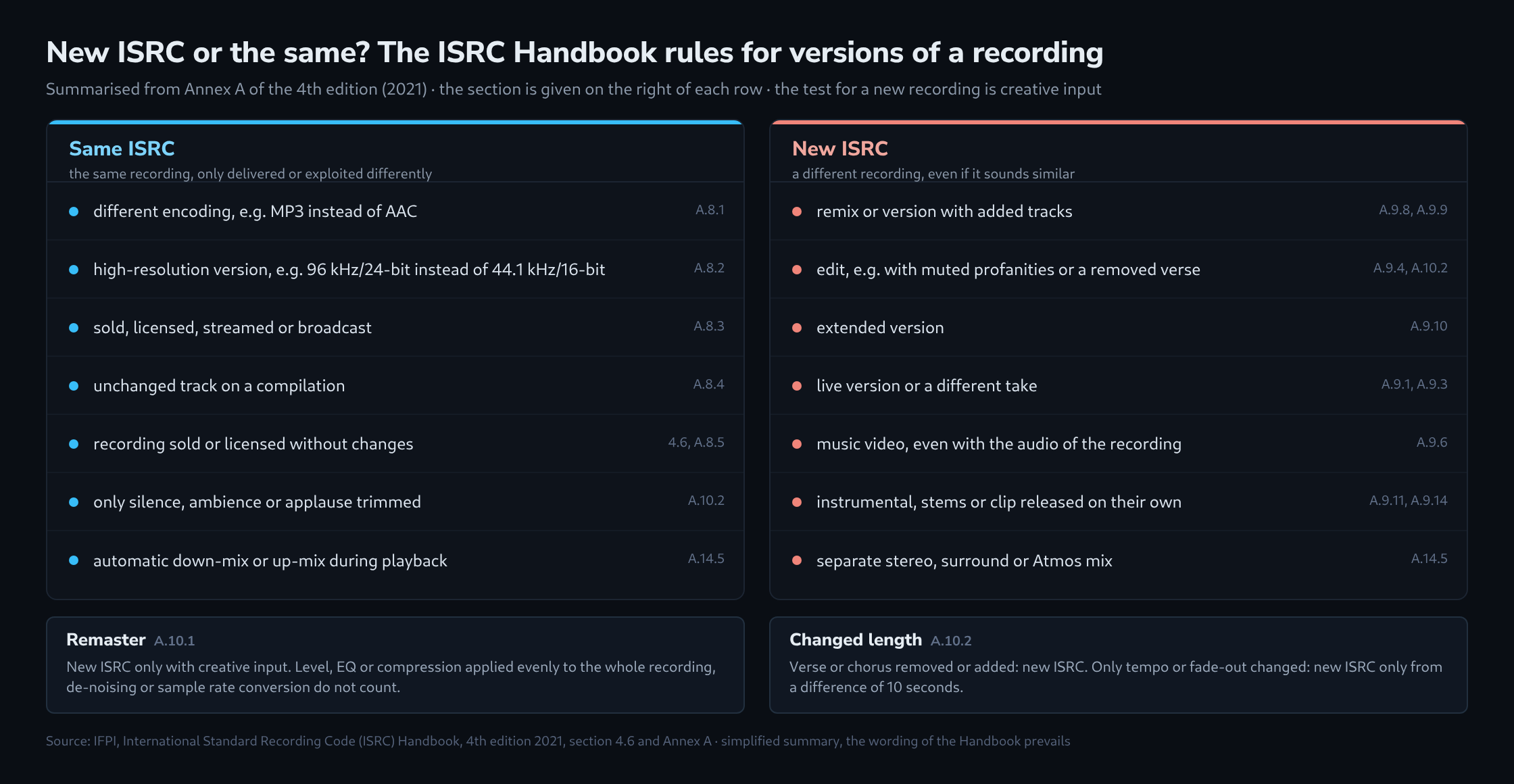
The basic rule is in section 4.1 of the Handbook: each distinct recording gets exactly one ISRC, and each ISRC belongs to exactly one recording. Whether a version is a separate recording depends, according to Annex A.7, on creative input. The chart above summarises the cases; three of them come up particularly often in production:
- Remaster: a new ISRC is only due if remastering involves creative input to the recording. A simple level change, EQ or compression applied evenly to the whole recording, de-noising, sample rate conversion or dithering with unchanged settings do not count.
- Length: if verses or choruses are removed or added, there is a new ISRC. If the length changes only through tempo or fade-out, a new ISRC is due only from a difference of 10 seconds. Trimmed silence, ambience or applause change nothing.
- Mixes: a multi-channel mix, for example in Dolby Atmos, gets a different ISRC from the stereo mix made from the same session recordings. Different technical encodings of the same mix keep their ISRC, and an automatic down-mix or up-mix in the playback device does not create a new recording either.
According to the Handbook, the ISRC is assigned once all creative work is complete and the recording is to be released or kept for later unchanged use. A provisional code during production is acceptable but should not leave the production process while the mix and the metadata may still change. The year of reference in the code is the year of assignment, not the year of recording. Lower-case letters are not part of the standard; systems are meant to convert them to upper case before validation.
Step 3: Keeping the reference metadata for every ISRC
According to section 4.7, an ISRC is only fully compliant together with a small set of reference metadata that binds the code to the recording. At the very least, it belongs in the records of whoever assigns the code:
- the ISRC itself
- the main artist, as shown on the release
- the title of the recording
- the version title, such as “Live in Paris” or “Extended Mix”
- the duration between the first and the last recorded modulation
- the type: sound recording or music video
- the date of first publication (P date)
The Handbook recommends storing the version title separately from the title, so that each delivery channel can combine the two in its own style.
Step 4: A UPC or EAN for the release
UPC-A and EAN-13 are forms of the GS1 GTIN. The GTIN Management Standard is unambiguous on one point: any new product requires a new GTIN. Whether two editions are different products depends above all on the first guiding principle of the standard, namely whether consumers or trading partners are expected to distinguish them. A CD and a vinyl edition of the same album are ordered separately and are therefore two products with two numbers, while the ISRCs of the tracks stay the same.
The number is based on a GS1 Company Prefix. According to GS1 US, the prefix identifies the brand owner, and numbers licensed directly are registered only to that company. Whether a distributor accepts its clients’ own UPCs or provides one itself is set out in the distributor’s terms.
Step 5: The ISWC through work registration
According to the ISWC agency, the ISWC uniquely identifies each musical work, but not a recording, sheet music or ownership shares. It cannot be requested directly: only authorised registration agencies assign ISWCs, and creators and publishers go through the collecting society they belong to. For new works, the ISWC is assigned automatically as part of registration; for existing works, only once all creators of the work have been uniquely identified. ISWCs assigned more than once in error can now be merged or separated.
Step 6: Writing the ISRC into the files
According to the Handbook, the ISRC should be encoded together with the recording wherever possible, for example in MP3 and MP4 files, on CD or in a stream. For MP3, IFPI recommends the ID3 tag. The Project Info window in FL Studio has no field for it: it offers Title, Genre, Author, Info and URL, and according to the manual, genre and author are saved to MP3 and WAV files on export. The ISRC therefore goes into the file after export, for example with ffmpeg.
Which tag this creates depends on the key. Measured with ffmpeg 7.1.5 on a test tone encoded into seven formats with -metadata ISRC=…; the tags were checked with ffprobe and additionally in the raw bytes of the files:
| Format | With -metadata ISRC=… |
Finding |
|---|---|---|
| MP3 | ID3 frame TXXX with the description “ISRC” | not the intended frame: ID3v2.4 defines TSRC for this, and ffmpeg writes it only with -metadata TSRC=…, in ID3v2.3 as well as ID3v2.4 |
| FLAC, Ogg Vorbis, Opus | Vorbis comment ISRC |
correct, the Vorbis comment field is intended exactly for this |
| M4A (AAC) | not written | only with -movflags use_metadata_tags, and then as a QuickTime metadata key |
| WAV | RIFF INFO field ISRC |
misleading: according to the ExifTool tag reference, this RIFF field stands for “Source”; a BWF header (-write_bext 1) does not change that |
| AIFF | not written | – |
For an MP3 with the correct frame and a FLAC with a Vorbis comment, the commands look like this; the third line reads back the tags as a check. AA6Q72000047 is the made-up example code from the ISRC Handbook that is never to be used:
ffmpeg -i master.wav -c:a libmp3lame -b:a 320k -metadata TSRC=AA6Q72000047 title.mp3
ffmpeg -i master.wav -c:a flac -metadata ISRC=AA6Q72000047 title.flac
ffprobe -v error -show_entries format_tags title.mp3
When an MP3 with a TXXX field is converted to FLAC, ffmpeg turns it back into a correct Vorbis comment ISRC. For streaming services, the delivery matters most anyway: according to the Handbook, the music industry exchanges metadata very widely through the DDEX standards, and all DDEX standards can carry an ISRC wherever a recording is specified. What counts, therefore, is that the ISRC is in the metadata of the delivery, not only in the file.
Step 7: Checking the codes before upload
- The ISRC, UPC/EAN and ISWC Validator takes all codes of a release as a list, checks structure and check digits, compares ISRC prefixes with the IFPI list and recognises training prefixes such as US-S1Z, which according to IFPI are never valid.
- The ISRC, ISWC and Barcode Lookup shows whether MusicBrainz already links an ISRC to a different recording. If an ISRC has really been assigned to two recordings, Annex A.13.3 requires a new ISRC for one or both; business partners are informed, and the ISRC agency advises.
- If a recording has been given several ISRCs by mistake, the registrant selects one as the preferred code under Annex A.13.2, notes the others internally and no longer uses them for new releases. Minor procedural errors such as a wrong year of reference remain in place under A.13.1, as long as they do not affect other recordings.
- The issuing bodies run their own searches: IFPI’s ISRC Search and CISAC’s ISWC Portal. According to IFPI, even the international ISRC database does not necessarily contain every recording, so a missing entry does not make a code invalid.
Sources
- International Standard Recording Code (ISRC) Handbook, 4th Edition, 2021
- ISRC: FAQ
- Validating an International Standard Recording Code (IFPI Bulletin 2015/01)
- ISRC Agency Code Allocations (IFPI)
- The ISWC (CISAC)
- Getting an ISWC (CISAC)
- GTIN Management Standard, Release 1.1 (GS1)
- What is a Company Prefix? (GS1 US)
- How to calculate a check digit manually (GS1)
- ID3 tag version 2.4.0 – Native Frames
- Ogg Vorbis I format specification: comment field and header specification
- RIFF Tags (ExifTool)
- Project Info (FL Studio)
Related articles