English
 Deutsch
 Polski
Mastering in FL Studio 2026: loudness, limiting and export

Management Summary
Mastering prepares a finished music mix for release by balancing its sound, controlling loud peaks and producing a suitable final file. In FL Studio, this involves both listening and measuring the exported song. A streaming loudness target describes playback level, not musical quality, and making a track louder can weaken drum impact or introduce distortion. The practical goal is a convincing sound with enough room for peaks and a file that meets the chosen distributor’s requirements.
Contents
- Three measurements with different jobs
- 1. Put the effects in a clear order
- 2. Use Fruity Limiter without treating CEIL as true peak
- 3. Alternatives: Maximus and Emphasis
- 4. Read the Analyzer in the right mode
- 5. Export the intended complete song
- 6. Measure and listen to the exported file
- FL Cloud Mastering
- Questions and answers
- Sources
Mastering prepares a finished mix for release. The work includes checking tone, dynamics, unwanted distortion and the exported file. Reaching a particular loudness number is only one part of that work. This workflow uses FL Studio 2026 and separates the settings inside the project from the measurements of the finished file.
Three measurements with different jobs
- Integrated LUFS describes loudness across the complete track. A chorus reading alone cannot establish this value.
- Short-term LUFS covers three seconds. This helps compare a chorus with a quieter verse. Momentary LUFS covers 0.4 seconds.
- True peak, in dBTP, estimates peaks in the reconstructed waveform, including between stored samples. A sample peak below 0 dBFS does not guarantee a true peak below 0 dBTP.
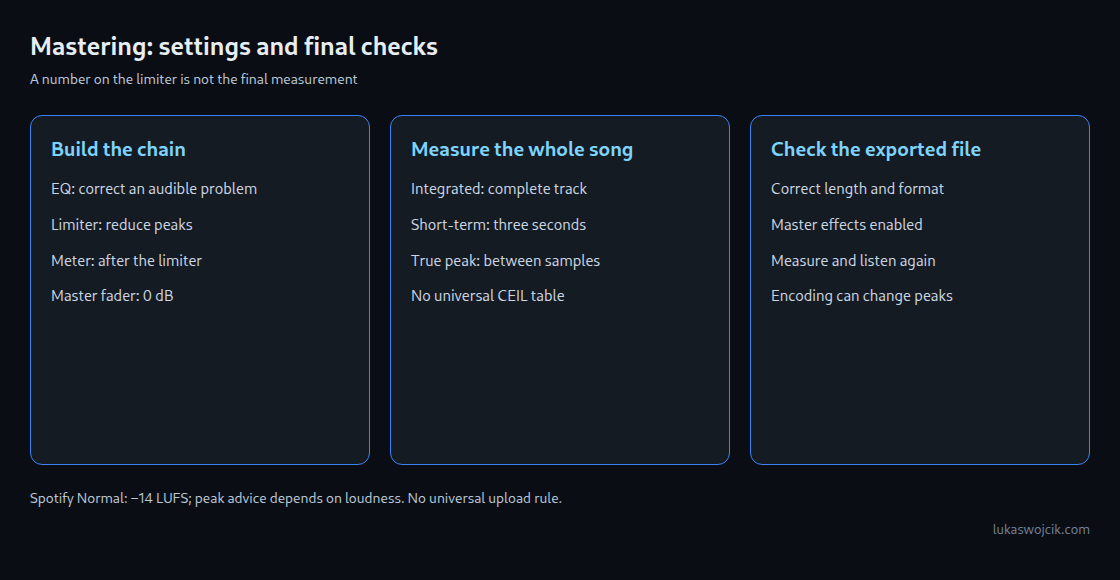
For Spotify’s Normal playback setting, the published reference is −14 LUFS. Spotify recommends a master below −1 dBTP, or below −2 dBTP when louder than −14 LUFS. Normalization has device and setting exceptions, including the web player. These figures are recommendations, not an upload acceptance test.
AES TD1008 gives separate distribution recommendations: −16 LUFS for track-normalized music and −14 LUFS for the loudest album track under album normalization. This does not mean every service uses the same target. A master’s sound and the distributor’s delivery requirements remain part of the decision.
1. Put the effects in a clear order
A simple master chain is EQ → limiter → meter. EQ changes the balance of bass, midrange and treble. A limiter reduces peaks above a chosen level. The meter checks the processed signal. Optional compression belongs before the final limiter when a deliberate change to dynamics is needed.
Fruity Parametric EQ 2 can correct an audible tonal problem. A high-pass filter reduces low frequencies, but removing bass without a reason can weaken the mix. LIN enables linear-phase processing and adds delay. More processing or a steeper filter is not automatically an improvement.
The master fader follows the effect slots. Keeping it at 0 dB avoids changing the level after the limiter and meter. The track’s built-in EQ, pan and stereo controls also need to remain neutral for this simple chain. Internal floating-point headroom does not protect every plug-in from overload or intentional saturation.
2. Use Fruity Limiter without treating CEIL as true peak
In the LIMIT tab, CEIL sets the limiter ceiling and GAIN raises the signal entering that limiter. ATT also controls look-ahead: a short delay allows the processor to react before a peak reaches the output. REL controls recovery after attenuation; overly short settings can cause distortion. SAT changes saturation, which deliberately changes the waveform.
A CEIL setting such as −1 dB is only a starting setting. The Fruity Limiter manual does not document a true-peak guarantee. The result therefore needs a true-peak measurement after export. A ceiling calculated with FFmpeg’s alimiter is not a preset for Fruity Limiter or Maximus.
GAIN can be increased in small steps while listening for flattened drum attacks, pumping or roughness. The loudest passage helps detect these problems; integrated loudness still requires the entire track. Comparing the processed and unprocessed mix at similar playback loudness helps avoid preferring a version merely because it is louder.
3. Alternatives: Maximus and Emphasis
The current edition comparison includes Fruity Limiter and FL Studio Mobile Rack in all editions, Maximus from Producer Edition, and Emphasis in All Plugins Edition. A plug-in visible in a trial installation is not proof of a permanent licence.
Maximus maps input level to output level with a curve. Its Oversample option makes the compressor stages respond to inter-sample peaks. The saturator’s CEIL is a saturation control, not a universal final true-peak ceiling. Changes to POST gain can raise the output again. The exported file remains the check that matters.
Emphasis provides an Output ceiling and a True Peak switch. Oversampling processes additional points between the original samples and can increase CPU load. Neither oversampling nor a chosen plug-in name guarantees that later EQ, gain changes or lossy encoding will preserve the same peak level.
4. Read the Analyzer in the right mode
The Analyzer module in FL Studio Mobile Rack offers LUFS modes and a True Peak mode. The manual describes Integrated as an average for the selected mode; it does not document the complete gating calculation used for standardized integrated loudness. Gating excludes very quiet sections according to defined rules. “Integrated” in True Peak mode is therefore not a track LUFS result.
The manual defines Range as maximum minus minimum. This is not the standardized Loudness Range, or LRA, which calculates the difference between quieter and louder passages under defined rules. Switching to another tab and back to LOUDNESS resets the Analyzer values. A final file measurement avoids accidentally including earlier playback or omitting the start of the song.
5. Export the intended complete song
- Song and length: check for an active timeline selection and confirm that the ending, reverb and delay tails are included.
- Master effects: enable the master chain for a stereo master. With Split mixer tracks, individual mixer stems bypass the master; an optionally included Master export contains the master effects.
- Format: a 24-bit WAV is a common delivery choice where accepted. A 32-bit float WAV suits further processing, but is not accepted by every distributor.
- Sample rate: set this in Audio Settings according to the required delivery format.
- Quality: export resampling and each plug-in’s quality settings are separate controls. A high resampling value does not turn every limiter into a true-peak limiter.
The Dithering checkbox is documented for 16-bit WAV and MP3 export. Dither is low-level noise used to reduce correlated rounding distortion when reducing bit depth. It should not be repeatedly added during intermediate processing.
6. Measure and listen to the exported file
The LUFS and True Peak Meter calculates gated integrated loudness and a four-times-oversampled true-peak estimate locally in the browser. Its WAV reader avoids browser resampling for supported WAV formats. Compressed formats depend on the browser decoder; unsupported files need another decoder or a supported WAV copy. The mono/dual-mono setting also affects the loudness result.
If the measured peak exceeds the chosen limit, the limiter ceiling can be lowered and the file exported again. Loudness and sound need checking again after that change. For example, a reading of −0.7 dBTP is above a −1 dBTP limit despite displaying a negative number. A modest extra margin is sensible because measurement and encoding can change the result.
A decoded AAC, MP3 or Ogg copy can reveal additional peaks or audible damage. A local encoder test does not reproduce every streaming service. The related article True Peak After Encoding discusses that distinction.
FL Cloud Mastering
FL Cloud offers an online mastering route. The manual describes a free Default preset, while the current product page emphasizes Plus/Pro subscriptions and a 30-day trial. Availability therefore needs checking in the account and installed version. The resulting file still needs listening and measurement; a platform preset is not evidence that every output meets a particular peak limit.
Questions and answers
Does −14 LUFS always sound better?
No. LUFS does not assess tonal balance, clipping damage or musical impact. Two files with the same integrated reading can have different drum attacks, bass balance and perceived loudness. The number helps comparison, but does not replace listening.
Can a quieter export fix distortion already created in a plug-in?
Lowering the final level makes the distorted waveform quieter. It does not restore peaks already flattened earlier in the chain. The overloaded stage needs correction, followed by another export.
Is there one CEIL value for each LUFS target?
No. The waveform, limiter algorithm, timing, later processing and encoder all affect the result. A table measured on one synthetic signal cannot establish settings for all music.
Related articles