English
 Deutsch
 Polski
Amazon Ads Refresh Tokens: 365-Day Expiry Since July 30, No Reminder

Contents
Eleven days ago Amazon changed how long a refresh token for the Advertising API stays valid. If an integration authorised an advertiser on 1 August, that token stops working on 1 August 2027, no matter how often it is used in between. There is no email, no deprecation header, no warning in the console. The only party who will notice is whoever runs the integration, at the moment a nightly export returns nothing. This article corrects a widely repeated wrong date and then builds the one thing that actually protects against it: a token ledger with a cron job.
1. What changed, and the date everyone gets wrong
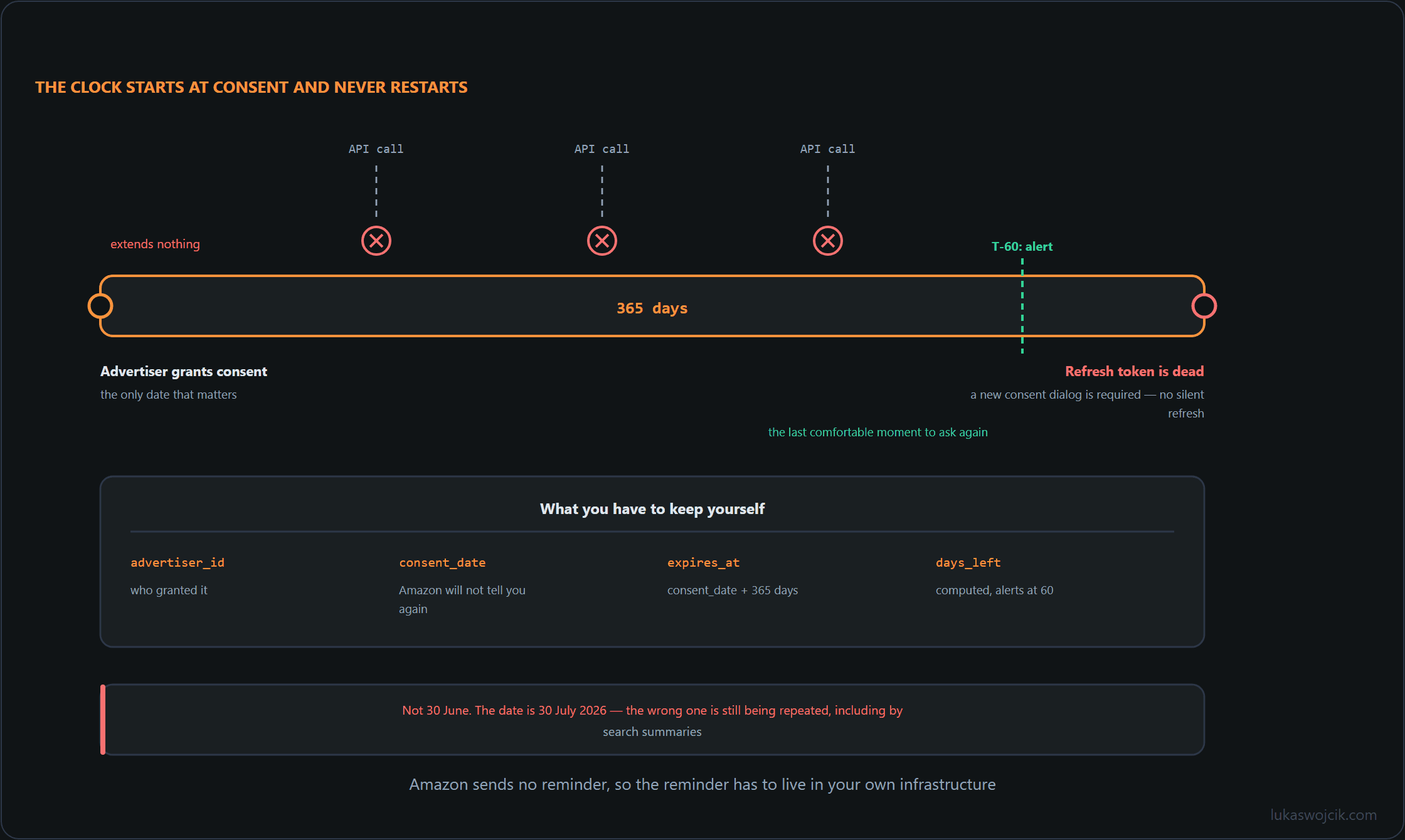
Amazon announced the change on 26 May 2026. It took effect on 30 July 2026. Refresh tokens issued on or after that date expire 365 days after the date the advertiser gave consent, not 365 days after the token was minted, and not 365 days after last use.
A wrong date is circulating persistently: 30 June. It shows up in forum posts, in vendor changelogs, and in search engine summaries that confidently answer “June 30” when asked when Amazon refresh tokens started expiring. That is a full month off. Anyone who planned a migration window around the end of June, or told a client their tokens were already covered, should re-check those assumptions. The correct cut-off is 30 July 2026, and the first mass expiries will therefore land from 30 July 2027 onward.
- Announced: 26 May 2026.
- Effective: 30 July 2026, not 30 June.
- Lifetime: 365 days from the advertiser’s consent date.
- Recovery after expiry: a fresh advertiser consent, through an interactive dialog. There is no silent path back.
- Notification from Amazon: none.
2. Why using the token does not help
This is the part that catches experienced teams. In almost every other OAuth deployment, a refresh token has either no expiry or a sliding one: each exchange for a new access token resets the idle timer, so an integration that runs every hour effectively never expires. Amazon’s clock does not slide. It is anchored to the consent date and runs to zero regardless of traffic. A pipeline that has refreshed successfully every 55 minutes for a year will fail on day 366 exactly like one that has been idle since day one.
The failure mode is therefore quiet and delayed. Monitoring sees a healthy integration right up to the boundary, then a refresh call that no longer returns an access token, and the fix is not a retry or a redeploy. Someone at the advertiser has to click through a consent dialog again. On a Saturday, for a client in another timezone, that is not a five-minute recovery.
Worth noting in the same breath, since it hits the same codebases: six legacy account management endpoints have been closed to new use since July 2026 and will return HTTP 404 from July 2027. Their replacements have been generally available since 18 June 2026. That migration belongs in the same quarter as the consent renewals.
3. A token ledger on the integrator’s side
Amazon gives no warning when a token dies, so the only fact that matters, the consent date, has to be stored locally, with everything else derived from it. One table per environment is enough. The expiry column is generated, so it can never drift out of sync with the consent date.
CREATE TABLE amazon_ads_token_ledger (
    advertiser_id   text PRIMARY KEY,
    account_name    text NOT NULL,
    region          text NOT NULL CHECK (region IN ('na', 'eu', 'fe')),
    consent_date    date NOT NULL,
    token_issued_at timestamptz NOT NULL,
    expires_on      date GENERATED ALWAYS AS (consent_date + 365) STORED,
    last_refresh_ok timestamptz,
    owner_email     text NOT NULL,
    status          text NOT NULL DEFAULT 'active'
);

CREATE INDEX ON amazon_ads_token_ledger (expires_on) WHERE status = 'active';
Backfill it once, by hand if necessary. For every advertiser onboarded on or after 30 July 2026, the consent date comes from the onboarding records. For older tokens, record the date anyway and set status = 'legacy': the moment such an advertiser re-consents for any reason, the new rule applies to the replacement token, and the row should already be in place.
4. The check script and the crontab line
The script prints nothing when everything is fine, which means cron stays silent. At 60 days it starts sending mail, and it exits non-zero once something has actually expired, so a wrapper or the monitoring stack can page on it.
#!/usr/bin/env python3
"""Warn about Amazon Ads consents approaching their 365-day limit."""
import sys
from datetime import date
import psycopg

DSN = "postgresql:///ops"
WARN_DAYS = 60

QUERY = """
SELECT advertiser_id, account_name, region, consent_date, expires_on,
       expires_on - CURRENT_DATE AS days_left, owner_email
FROM amazon_ads_token_ledger
WHERE status = 'active'
  AND expires_on - CURRENT_DATE <= %s
ORDER BY days_left
"""

def main() -> int:
    with psycopg.connect(DSN) as conn:
        rows = conn.execute(QUERY, (WARN_DAYS,)).fetchall()
    if not rows:
        return 0
    print(f"Amazon Ads re-consent needed, checked {date.today()}:")
    for aid, name, region, consent, expires, days, owner in rows:
        state = "EXPIRED" if days < 0 else f"{days} days left"
        print(f"  {aid}  {name}  [{region}]  consent={consent}  "
              f"expires={expires}  {state}  owner={owner}")
    return 1 if any(r[5] < 0 for r in rows) else 0

if __name__ == "__main__":
sys.exit(main())# crontab -e (run as the service user that owns the ops database role)
MAILTO=ads-ops@example.com
17 6 * * * /usr/bin/python3 /opt/ads/token_ledger_check.pySixty days is not arbitrary. Re-consent is a human process: it means reaching the right person at the advertiser, who then has to find someone with the authority to approve, and that chain routinely takes four to six weeks. Update last_refresh_ok from the refresh job as well, so an unrelated breakage shows up in the same table.
5. Summary
The result is a ledger that records each advertiser’s consent date, derives the expiry as consent plus 365 days in the database rather than in application code, and a cron job that starts sending mail two months before anything breaks. Total footprint: one table, one index, forty lines of Python, one crontab entry. It replaces a class of outage that has no error budget, because the recovery path is a phone call rather than a deployment.
Two things to carry away. The cut-off is 30 July 2026, not 30 June, whatever a search summary claims, so tokens issued from that day onward begin expiring on 30 July 2027. And usage does not extend the lifetime, which is why an integration that looks perfectly healthy today can be eleven months from a hard stop. Amazon documents the behaviour under refresh tokens in the Amazon Advertising API guides; that page is the source of truth, and the ledger is the alarm clock Amazon does not provide.
Questions and answers
The ledger’s expiry column is generated from the consent date. What does it show for legacy tokens that the 365-day rule does not cover?
A plausible date that means nothing: the column computes for every row, including the ones the rule never covered. That is worth knowing before someone reads the table without the status column next to it.
The alert query filters for active status, so legacy rows do not trigger these alerts. The ledger can retain the known information while the query selects the rows that need action. If people also read the table directly, a view that leaves the expiry blank for legacy rows can prevent them from mistaking the calculated date for a real deadline.
The reason those rows belong in the table at all is the interesting half. A legacy authorisation is outside the 365-day rule, but the moment it is renewed for any reason, such as a revoked consent, a scope change or an agency handover, the replacement token falls under it. Having the row already there means the consent date gets written on the day it happens, rather than being reconstructed a year later from an onboarding document nobody kept.
Sources
Related articles