English
 Deutsch
 Polski
Tutorial: Publishing an MQTT Discovery Payload That Reaches the Energy Dashboard

Contents
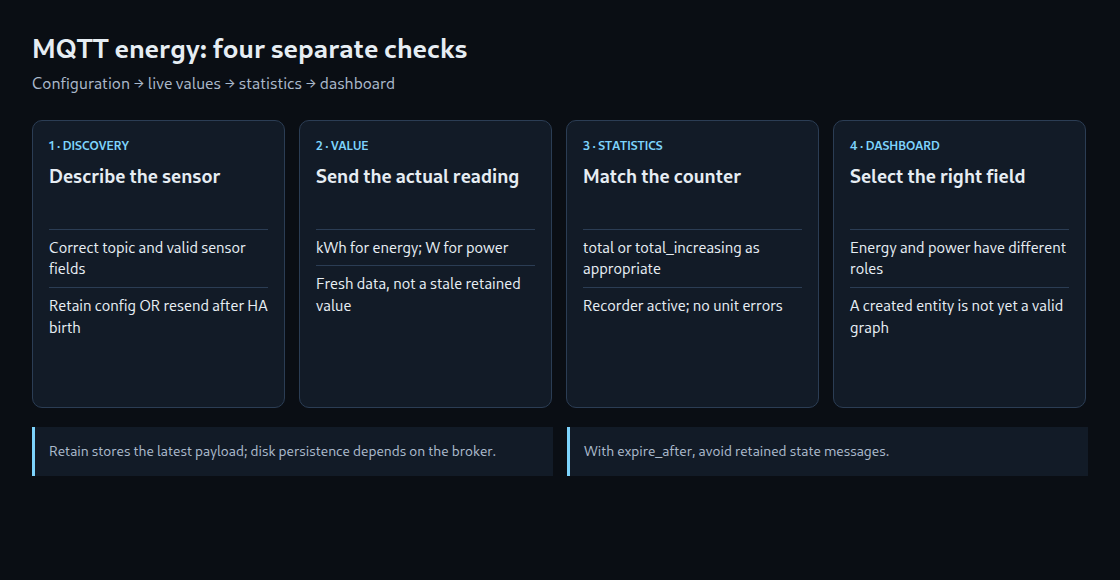
MQTT discovery describes a sensor to Home Assistant. A separate topic carries its readings. The Energy dashboard then uses suitable sensor data and statistics. These are three different stages: valid JSON alone does not guarantee a working entity or an energy graph.
1. Define the measurement first
The example represents cumulative imported electricity in kWh. The counter normally increases but may restart from zero, so total_increasing fits this example. A lifetime counter that never resets can use total without last_reset. A net counter that rises and falls needs different treatment; total_increasing would misinterpret genuine decreases.
Power in W describes the current rate, while energy in kWh describes an accumulated amount. Current Home Assistant versions also accept suitable power sensors in the dashboard’s power fields: device_class: power with state_class: measurement. A W reading cannot simply be relabelled kWh.
2. Publish a valid sensor configuration
Prerequisites are a reachable broker, a configured Home Assistant MQTT integration and enabled discovery with the expected prefix. This component-discovery example uses homeassistant/sensor/example_meter_import/config. Topic identifiers accept letters, digits, underscores and hyphens; they are not unrestricted prose.
The following file, energy-discovery.json, describes an invented meter. The stable unique ID should be unique within the installation. The display name can change independently.
{
  "name": "Imported energy",
  "state_topic": "example/meter/import_kwh",
  "unique_id": "example_meter_import",
  "device_class": "energy",
  "unit_of_measurement": "kWh",
  "state_class": "total_increasing",
  "expire_after": 900,
  "device": {
    "identifiers": [
      "example_meter"
    ],
    "name": "Example meter"
  }
}
state_topic is required for an MQTT sensor. Other fields depend on the intended behavior. A unique ID enables registry-based management and is needed for the device association shown here; it is not a universal Energy dashboard requirement. Device discovery using a single device payload has additional mandatory fields and is a different format.
3. Keep configuration available and readings fresh
The example retains the configuration at the broker. An alternative is for the publisher to resend discovery when Home Assistant announces its birth, normally online on homeassistant/status. Fresh states must also follow discovery. Retain is therefore a useful delivery option, not a compulsory field or a guarantee of disk persistence across broker failures.
The commands below require Mosquitto clients 2.1 or newer because they use -o. mqtt-client.conf contains the actual broker address, TLS settings and authentication options, one option per line. Restrictive file permissions protect its credentials; passwords are not placed in the command line. The default client configuration is an alternative on older versions. The file must not contain a retain option for state publications.
mosquitto_pub -o ./mqtt-client.conf -q 1 -r \
  -t homeassistant/sensor/example_meter_import/config \
  -f energy-discovery.json
mosquitto_pub -o ./mqtt-client.conf -q 1 \
  -t example/meter/import_kwh -m '1234.500'
mosquitto_pub -o ./mqtt-client.conf -q 1 \
  -t example/meter/import_kwh -m '1234.625'
The configuration command runs first. The entity and its state subscription must be ready before the two reading commands run; a successful publish does not prove Home Assistant has processed discovery. An existing retained value on the state topic must also be cleared during a migration. Omitting Retain from later messages does not erase that older stored value.
The two sample readings differ by 0.125 kWh. This example must use an isolated test sensor; invented readings must not enter a real meter’s history. The publisher should report regularly, comfortably within the configured 900-second expiry period.
State messages deliberately omit -r. With expire_after, a retained old state could be replayed after a reload and appear fresh again. Device availability using birth/will messages can additionally report connection loss. It does not prove that the physical measurement itself is current.
4. Check each stage separately
- Discovery: subscribe to the exact configuration topic and inspect Home Assistant’s MQTT errors. A syntactically valid JSON document can still violate the sensor schema.
- Reading: check
example/meter/import_kwhfor a numeric payload with a decimal point and no unit suffix. A subscription to that branch does not includehomeassistant/.... - Statistics: confirm the energy class, kWh unit, appropriate total class and active Recorder. Statistics errors and unavailable readings need resolving before interpreting a graph.
- Dashboard: select the sensor in the imported-energy field. Short-term statistics are compiled every five minutes, long-term statistics hourly. The first reading establishes a baseline; it is not consumption since installation. A full graph is not guaranteed immediately after discovery.
Unexpected decreases require investigating the counter and its class. A reset and a genuine negative flow are different events. Adding counters that reset at different moments can create artificial totals; separate dashboard sources avoid that particular summation problem.
Questions and answers
How is a discovered sensor removed?
An empty retained payload on this exact discovery topic removes its configuration. That does not mean historical statistics are erased. Cleanup should target only the intended topic and entity.
mosquitto_pub -o ./mqtt-client.conf -q 1 -r \
  -t homeassistant/sensor/example_meter_import/config -n
Can one net counter provide import and export totals?
Not from cumulative net readings alone. Separate import and export registers preserve both flows; netting loses that information. Available registers depend on the meter. Integrating sufficiently frequent power samples is another approach, with accuracy depending on sampling and the numerical method.
Which permissions are needed?
The example publisher needs write access to its configuration and state topics. Home Assistant needs matching subscriptions. Birth-triggered discovery and availability require their additional topics. This is a sensor example, not a complete ACL policy for actuators or an entire installation.
Sources
Related articles