English
 Deutsch
 Polski
Google Tag Manager and gtag.js Merge: What Changes in 2026

Google is bringing the Google tag and Google Tag Manager together. Two previously separate approaches to measurement are moving onto a common technical foundation. For existing GTM installations, the most interesting change is direct delivery: an optimized container can send data to Google destinations without loading an additional gtag.js library. For installations based only on the Google tag, Google is announcing access to Tag Manager’s management capabilities. [1][2]
“Merge” captures the direction, but hides several important distinctions. Optional container optimization, the ID in the loading snippet and the changed behavior of gtag('config', …) are three separate issues. The last of these can affect existing triggers even without an optional upgrade. This article examines the position on 19 October 2026 and sets out a controlled migration process.
What actually changed in October
The unification was described before the October changes. Google’s current overview announcement is dated 20 August 2026. The earlier article about unification and loading IDs covers the foundation. The latest release notes now identify two operational changes. [1][2]
- 8 October: GTM snippets using gtm.js initialize the container on load, independently of config commands. Those commands appear as visible
gtag.configevents in the dataLayer; broadly configured Custom Event triggers can match them. - 12 October: Google documents optimized containers that send directly to Google measurement products. Settings and access management are consolidated in the container.
The documentation mixes present and future wording. It does not establish a date by which every property worldwide has completed every part of the transition. The offer in the particular container and the changes shown there determine the practical migration path. A missing upgrade banner is no reason to force a new installation through a homemade combination of snippets. [1][3]
Google tag, gtag.js, GTM and destination: four terms
gtag.js is the JavaScript library behind the existing Google tag. The gtag() function queues commands; calling that function alone is therefore no proof that a measurement was transmitted. The Google tag includes the associated configuration. GTM manages tags, triggers, variables, workspaces and published versions. Unification brings these layers closer together. [1][9]
A destination is the connected recipient in Google’s measurement system. Google lists four types: a GA4 web data stream, a Google Ads account, a Floodlight configuration and a Merchant Center conversion source. A destination tag connects that recipient to the container; parameters on an individual destination tag can override shared settings. [4]
Shared management does not merge GA4 properties or advertising accounts. A purchase event still needs a business definition, its destination still needs deliberate selection, and two recipients still create two separately verifiable data paths.
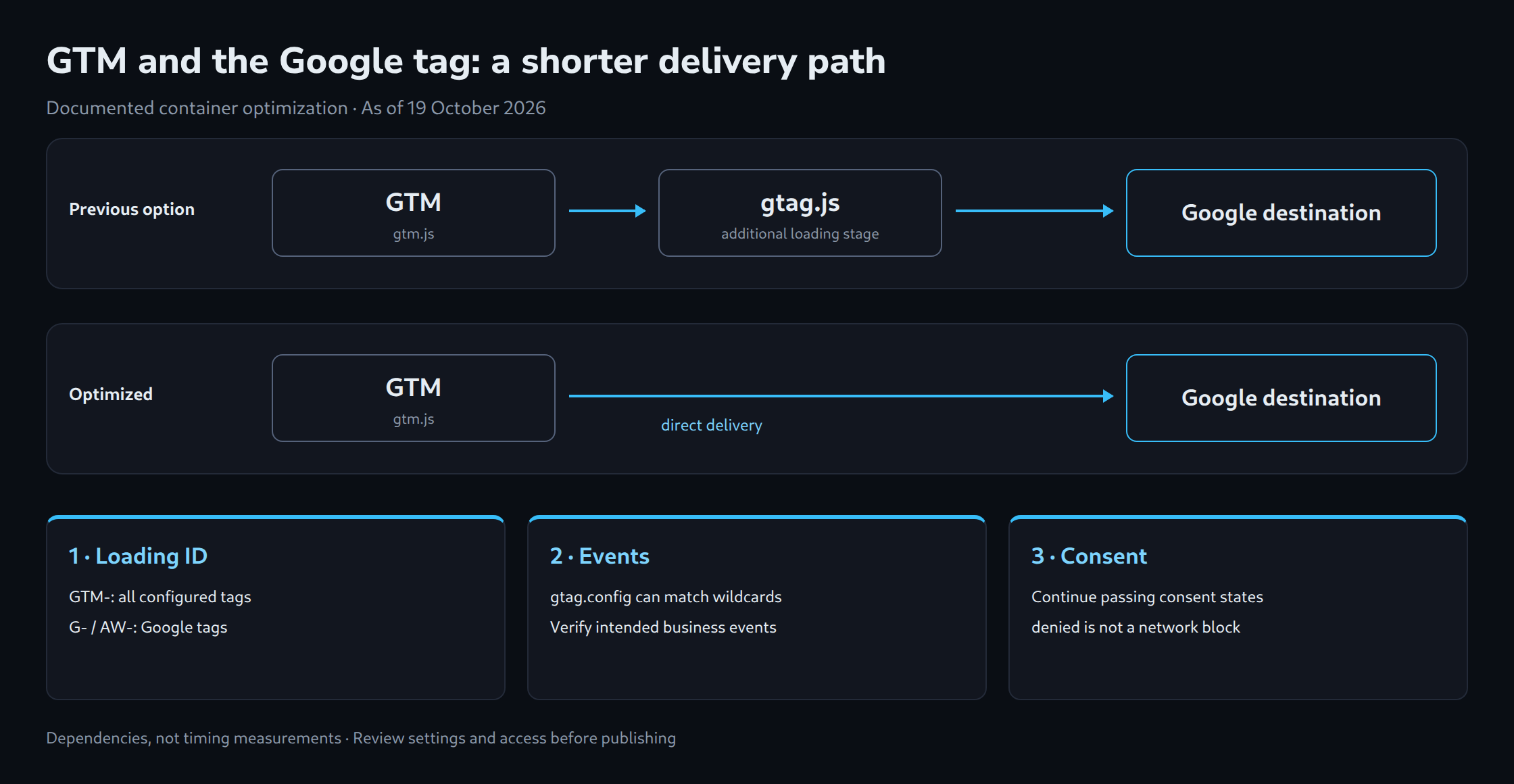
What container optimization changes
Previously, GTM could load gtag.js as an additional step for Google destinations. Optimization moves delivery into the container and consolidates Google tag settings under Settings. Google states that existing event tags and triggers are maintained. A shared overview displays destinations and data flow. [2][3]
Matching settings lead through Review details to the review flow. When multiple Google tags have different settings, Get started opens a process for selecting the configuration to consolidate. That selection deserves a business review: a shared default must not obscure differences that previously existed for a deliberate reason. [3]
The refreshed interface places triggers, variables, templates and folders under the collapsible Advanced section. These capabilities are not being removed by the redesign. A simpler entry point also leaves the need for clear event definitions intact. [1]
Why removing a loading step can help
An additional library must be discovered, requested and executed before dependent delivery can begin. Removing that stage can bring the first measurement request forward. Google describes improved website performance and data collection as benefits. The cited sources provide neither a universally applicable percentage nor a guaranteed saving in milliseconds. [2][3]
The effect depends on the implementation: cache state, connection quality, container size, other scripts, consent flow and event timing all influence the outcome. An earlier measurement request does not prove that visible page rendering improved. A credible comparison requires the same page state and repeated runs with both cold and warm caches.
Network inspection remains necessary after optimization. The absence of an additional gtag.js load can be the expected outcome. The relevant question is whether the intended events reach the correct destination. Equally, a remaining gtag.js request is no basis for blanket removal: another integration, plugin or separate configuration may still be involved.
The loading ID still limits functionality
Google ties executable capabilities to the identifier used to load the container. GTM-… permits all configured tag types, including third-party tags and Custom HTML. Product identifiers such as G-… and AW-… restrict execution to Google tags. Changing only the URL path does not replace that distinction. [5]
An interface with additional management capabilities therefore does not automatically enable third-party execution in an installation loaded with a G- or AW-prefixed ID. The inventory needs both the actual loading snippet in delivered HTML and the account configuration. A valid GTM identifier cannot be created by rewriting a prefix; valid IDs come from the relevant Google interface.
gtag.config: a small event with a broad reach
The 8 October change is separate from optional optimization. A GTM snippet no longer waits for a config command to initialize the container. At the same time, that command can appear as gtag.config in the event stream. Google explicitly warns about Custom Event triggers with wildcard matching. [2]
A regular expression such as .* matches this name too. If a generic forwarding tag passes on every event name it encounters, a technical configuration event can reach the downstream recipient. This is a possible consequence of that implementation, not evidence that every installation will count extra purchases.
The useful boundary separates business events from technical messages. An explicit selection of permitted events is easier to review than blanket forwarding. The following pattern illustrates that selection for three event names only; it is neither a complete tracking design nor a Google requirement:
^(view_item|add_to_cart|purchase)$An existing trigger should be restricted only after checking all intended events. Otherwise, legitimate measurements disappear alongside the unwanted event. Renaming gtag.config to page_view without checking its meaning is equally unsuitable.
Why existing config lines need individual review
The announcement describes new unified deployment snippets without a config command, with initialization controlled through the trigger Google calls gtm init. That initialization is distinct from the separate Consent Initialization flow. Meanwhile, gtag('config', …) remains part of the documented gtag.js installation. Google requires an appropriate Google tag snippet for implementations that still rely on that command. A statement about new snippets is therefore no instruction to delete every existing config call. [1][6]
The installation guide specifically addresses hybrid setups combining a GTM snippet and standalone configuration. In a genuine GTM setup with third-party tags, the main GTM snippet remains; Google configuration and required parameters are managed in GTM. A pure gtag.js implementation needs the complete snippet intended for that method. Adding a second system without an inventory introduces further opportunities for duplicate measurement. [6]
Automatic page views and duplicate events
Google’s definition states that adding a destination tag automatically sends a page view event for that destination. This matters particularly for single-page applications and implementations that already control page views explicitly. The existing configuration must establish which mechanism handles the initial page view and which handles route changes. [4]
Verification depends on actual delivery: event name, destination ID, page URL and, for purchases, transaction ID. Two successful tag firings in preview do not prove two correct purchases. Conversely, a single successful browser request does not establish that a second CMS or plugin source cannot send the same purchase.
Permissions: a limit to version rollback
Optimization links the container to connected Google product accounts. Google describes default read access and subsequent management of those links. This affects visibility and collaboration across product boundaries. [1]
For agencies in particular, one detail matters: permissions are not versioned. Rolling back to an earlier container version does not automatically undo those access changes. Migration records should therefore include the previous account links and permissions as well as the container export. External Account Links belongs in the post-migration review. [3]
Consent and server-side tagging require separate checks
Unification replaces neither a CMP nor the communication of consent states. With basic consent mode, Google tags remain blocked until the appropriate consent is granted. Advanced consent mode can send measurements without cookies when consent is denied. Less JavaScript therefore does not automatically mean less data transmission; denied does not mean a complete network block. [7]
In GTM, default consent states belong in the designated Consent Initialization flow. Google recommends template APIs for this purpose; a Custom HTML tag that queues a gtag consent command is not an equivalent substitute. Verification covers the state before a choice, after consent, after rejection and after withdrawal. [8]
Unification also does not create a server container automatically. Google’s server-side architecture still requires a separate server container. Existing server integrations need verification of the actual request route and transmitted consent signals. Direct delivery from an optimized web container does not demonstrate a migration to server-side tracking. [10]
Visual tagging: easier setup with defined limits
The unified platform also includes visual tagging in Tag Assistant. Its guided flow identifies information from selected elements on an order confirmation page and configures tags, triggers and variables in the background. The overview announcement describes the feature as a beta for purchase conversions in Google Ads, with further use cases rolling out progressively. This does not establish a universal replacement for every existing dataLayer integration. [1][11]
The detailed guide requires, among other things, an order confirmation page, a sitewide Google tag and edit access. Values such as transaction ID, order subtotal and currency are mapped during the flow. Google also warns of possible duplicate counting when a purchase conversion already exists. A convenient assistant therefore replaces neither a controlled test purchase nor an assessment of how page redesigns affect the selected elements. [11]
A controlled migration in seven steps
The GTM Container History and Deep Search Engine supports the inventory. It searches saved container versions for tags, triggers, variables and configuration terms, such as a destination ID or analytics_storage. Access requires Google sign-in and is read-only. Configuration inspection complements verification of actual measurement requests in the browser; consent flows and account permissions still require separate checks.
- Record the inventory: document embedded snippets, IDs, CMS plugins, destinations, config parameters, event forwarding and consent integration. With multiple containers, record their respective responsibilities.
- Preserve the baseline: export the published container version and record account links and permissions separately. Capture a reference test covering a page view, route change and test purchase.
- Review the offer: open the optimization flow in the relevant container and resolve settings differences deliberately. Review workspace changes before publication.
- Review triggers: check wildcard rules against
gtag.configand distinguish technical messages from intended business events. - Test in preview: combine Tag Assistant with network inspection. Verify destination ID, event count, parameters, consent and any server route. Assess automatic and explicitly generated page views together.
- Publish a version: release a clearly named version with documented changes and a rollback path. Handle permission changes separately.
- Verify production: repeat the same tests against the published version. Monitor business metrics over an appropriate comparison period; changes in traffic volume or campaigns do not provide a controlled performance comparison.
The technical direction makes sense: fewer separate configurations, a more direct delivery path and shared management. The benefit depends on events, destinations and responsibilities remaining explicit. The most useful immediate October check is the combination of the actual loading ID, wildcard triggers and remaining config dependencies.
Questions and answers
Is a missing gtag.js request after optimization an error?
No. An optimized container can send directly to Google destinations. Verification depends on the intended events actually reaching the correct destination IDs.
Does an earlier container version provide a complete rollback?
An earlier version can provide a rollback path for configuration. Permissions, however, are not versioned.
Account links and access rights therefore need separate documentation and, where necessary, separate reversal. A successful configuration rollback does not confirm that the group with access is unchanged.
Does gtag.config automatically count as a purchase?
No. The technical event is not a purchase. A broad forwarding trigger can nevertheless send it to a recipient. The recipient mapping and the particular tag configuration determine its subsequent effect.
Can a Google-tag-only installation execute arbitrary third-party tags after the upgrade?
The loading ID remains decisive. Product IDs such as G- and AW- restrict execution to Google tags. Additional management capabilities do not automatically remove that restriction.
Sources
- Google: Google tag and GTM unification
- Google: Release notes: October 2026
- Google: GTM container optimization
- Google: Destinations and destination tags
- Google: Container ID and tagging behavior
- Google: Correct gtag.js installation
- Google: Consent mode overview
- Google: Consent mode template APIs
- Google: The data layer
- Google: Consent mode with server-side GTM
- Google: Visual tagging in Tag Assistant
Editorial and source review: 19 October 2026. Technical behavior is based on Google’s documentation; no independent test of an optimized customer container or original performance measurements is claimed.
Related articles