English
Uploading In-Store Purchases to GA4 With the Measurement Protocol: A Loyalty Card Number as the Join Key

Contents
- What has to be bridged
- The card number is hashed before it goes anywhere
- Recording the pairing while the customer is online
- The mapping table
- A client_id for customers who were never online
- The payload, field by field
- The timestamp, and a window open at one end only
- One request per customer, and why batching works differently here
- Checking before sending, because production never answers
- What the check does not catch
- The upload rhythm, and what a weekly run costs
- What this does not solve
- Questions and answers
- Sources
A shop till knows three things about a sale: what was bought, what it cost, and which loyalty card was held up at the counter. GA4 knows none of them. It knows browsers, and it knows them by a cookie value that never existed in the shop.
The Measurement Protocol is the one path that can carry the till’s knowledge into the same property as the website data. It is an ordinary HTTPS POST, it needs no library, and it will accept almost anything — which is the reason this has to be built carefully rather than quickly.
What has to be bridged
Two fields in a Measurement Protocol payload carry identity, and they are not interchangeable.
client_id is the device identity. It is what the GA4 tag writes into the _ga cookie in a browser, and it is required — a payload without it was refused by the validation server with VALUE_REQUIRED, even when a user_id was present. user_id is the person identity, optional, and the field that survives a new device.
The loyalty card number is neither. It is a third identifier that lives only in the shop, and the whole exercise consists of turning it into the other two.
The card number is hashed before it goes anywhere
A card number identifies a person and belongs to a customer relationship. Sending it to an analytics property in clear text turns a shop identifier into a permanent record on someone else’s infrastructure, and GA4 forbids sending personally identifying data outright.
A keyed hash solves both problems at once. The pepper is a secret that stays on the server; without it the hash cannot be recomputed from a stolen list of card numbers.
function card_key(string $card, string $pepper): string {
    // Normalise first: the till writes "LW 4471 9930", the web form
    // "lw-4471-9930". Without this the two sides hash differently
    // and nothing ever joins.
    $clean = strtoupper(preg_replace('/[^A-Za-z0-9]/', '', $card));
    return hash_hmac('sha256', $clean, $pepper);
}
The normalisation is the part that quietly breaks integrations. Two systems that write the same card differently produce two different hashes, and the join then fails without an error anywhere.
Recording the pairing while the customer is online
The bridge is built once, in the browser, at the only moment when both identifiers exist in the same place: when a card number is entered on an account page or linked during an online checkout.
The client_id is stored within the _ga cookie value. To extract it, the code below joins the last two segments with a dot.
// _ga looks like GA1.1.1899482740.1757000000
// The client_id is the last two segments joined by a dot.
function ga_client_id(): ?string {
    if (empty($_COOKIE['_ga'])) { return null; }
    $parts = explode('.', $_COOKIE['_ga']);
    if (count($parts) < 4) { return null; }
    return $parts[count($parts) - 2] . '.' . $parts[count($parts) - 1];
}
At the same moment the site sets the same hash as user_id on the web stream. If the website and the uploader compute different values here, GA4 receives two unrelated people and no error is raised on either side.
The mapping table
One card belongs to one person, but that person may use several browsers. The table therefore needs to store more than one pairing per card, and the uploader needs a rule for choosing a row.
CREATE TABLE card_pairing (
  card_hash  CHAR(64)    NOT NULL,
  client_id  VARCHAR(64) NOT NULL,
  first_seen DATETIME    NOT NULL,
  last_seen  DATETIME    NOT NULL,
  PRIMARY KEY (card_hash, client_id),
  KEY by_time (card_hash, last_seen)
) ENGINE=InnoDB;
The rule that behaves best is the most recently seen pairing: ORDER BY last_seen DESC LIMIT 1. A phone used last week is a better guess than a desktop used once a year, and picking the oldest row attaches the purchase to a device the person may have replaced long ago.
A client_id for customers who were never online
In a shop most cards have no pairing at all. Those receipts still have to go somewhere, and inventing a client_id is allowed — but not in any shape.
The validation server enforces a format. Measured on 9 September 2026 with ENFORCE_RECOMMENDATIONS set, card-LW-4471-9930, a twenty-character hash prefix and the single digit 7 were all refused with client_id [...] has invalid format. It should be in <number>.<number> format. A comma instead of the dot was refused, and so was a third segment. Accepted: 1.1, 0.0, twenty-digit numbers on both sides, and — unexpectedly — 1899482740. and .1757000000, each with one side missing.
A deterministic derivation from the card hash satisfies the format and stays stable across runs.
// Two 32-bit numbers out of the first 16 hex characters.
$h   = card_key($card, $pepper);
$cid = hexdec(substr($h, 0, 8)) . '.' . hexdec(substr($h, 8, 8));
// LW-4471-9930 -> 2531008582.2372831494, accepted by the validation server
What this buys and what it does not: the receipts of one card now land on one stable identity instead of scattering. They will not merge with that person’s web sessions, because the derived value matches no _ga cookie anywhere. The user_id is what carries that connection, and only in a property whose reporting identity is allowed to use it.
The payload, field by field
Two credentials in the query string, everything else in the JSON body. measurement_id and api_secret never belong in the body — placed there they become unknown fields, and an unknown field invalidates the whole payload rather than being ignored.
POST /mp/collect?measurement_id=G-XXXXXXXXXX&api_secret=SECRET
Host: www.google-analytics.com
Content-Type: application/json
{
"client_id": "2531008582.2372831494",
"user_id": "9f2c4b1e8a7d3c5f0b6e2a9d4c8f1b3e7a0d5c2f9b4e8a1d6c3f0b7e2a5d9c4f",
"consent": { "ad_user_data": "GRANTED", "ad_personalization": "DENIED" },
"events": [
{
"name": "purchase",
"timestamp_micros": "1792301400000000",
"params": {
"transaction_id": "HH-ALT-2026-1016-0007",
"value": 48.90,
"currency": "EUR",
"affiliation": "Store Hamburg-Altona",
"session_id": "1792301400",
"engagement_time_msec": "1",
"items": [
{ "item_id": "SKU-3391", "item_name": "Hand coffee grinder",
"price": 48.90, "quantity": 1 }
]
}
}
]
}transaction_id is the receipt number and the only thing that keeps a repeated upload from counting a sale twice. affiliation carries the branch, which is the field that makes the data worth having at all. session_id and engagement_time_msec are what attach the event to a session in the reports; they are not required by the protocol, and their absence is not reported anywhere.
Two type rules, both measured. An item price of "48.90" as text is accepted, "48,90" is refused with Known item param [price] should have type [int64] or [double], and so are "abc" and an empty string. The event-level value is not checked the same way: "abc" passed there without a word. A locale-formatted amount from a German till therefore fails in one place and passes silently in the other.
The timestamp, and a window open at one end only
This is the field that decides whether an offline upload works at all, and both of its edges were measured rather than taken from the documentation.
| Offset from now | Verdict of the validation server |
|---|---|
| 71 h 59 min 55 s in the past | accepted |
| 72 h 00 min 00 s in the past | refused, VALUE_INVALID |
| 0 s — the current second | accepted |
| 5 s in the future | refused, VALUE_INVALID |
| 15 min in the future | refused |
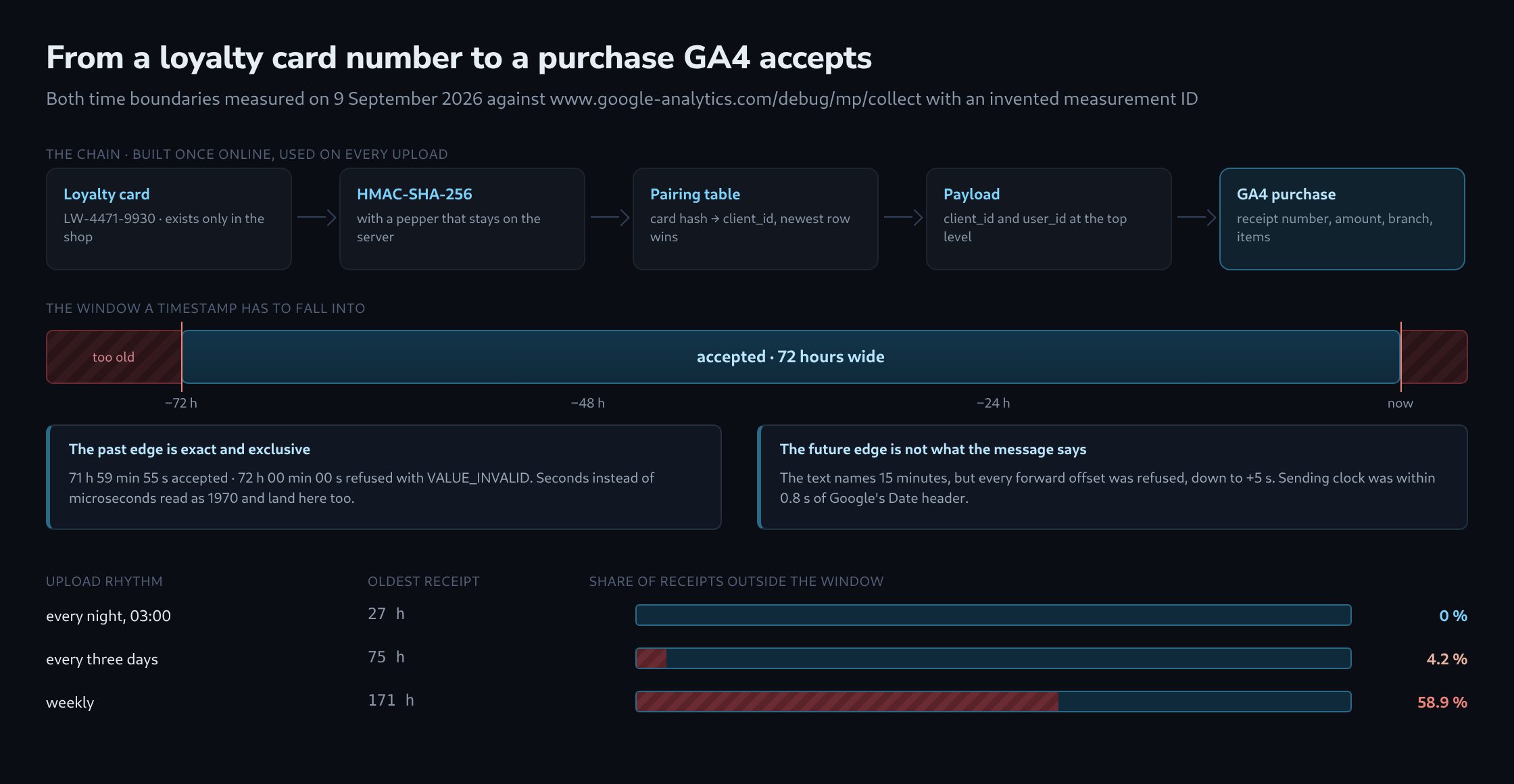
The past edge is exact and exclusive: 72 hours to the second is already too old. The future edge is the surprise. The error text reads Measurement protocol only supports timestamps [15m] into the future, but every forward offset tested was refused, down to five seconds. The sending machine’s clock was within 0.8 seconds of the Date header returned by Google during the same run, so this is not drift on the measuring side.
For a shop that means the till clock is a live risk. A checkout terminal running a minute fast produces receipts that the protocol treats as future events, and the production endpoint accepts them with 204 anyway. An uploader should compare the receipt time against its own trusted clock and hold anything dated forward instead of sending it.
The value must be in microseconds. A timestamp in seconds is interpreted as a date in 1970 and returns too far in the past. That message can suggest a backdating problem when the actual mistake is the timestamp unit.
One request per customer, and why batching works differently here
client_id and user_id sit at the top level of the payload, next to events, not inside an event. Moving a client_id into an event was refused outright: the payload stopped parsing, with invalid JSON in google.analytics.measurement.Measurement @ events[1]. The same happened for a user_id inside an event.
So a request cannot mix customers. Batching twenty-five receipts from twenty-five different card holders into one call is not possible, and the uploader’s unit of work is the customer, not the batch.
What does work is a per-event timestamp: timestamp_micros inside an event was accepted, including a payload carrying a top-level timestamp of one hour ago and a second event dated two hours ago. One request can therefore carry every receipt of one card from a whole period, each with its own time.
The documented ceiling is twenty-five events and 130 kB per request. Neither is enforced by the validation server — twenty-six events passed, and one hundred receipts with two line items each came to 28.8 kB and passed as well — but a limit that is documented and unenforced is still a limit, and the reports are where the consequence would show up.
Checking before sending, because production never answers
The production endpoint returns 204 No Content to everything. Measured with the payloads from this article: a valid receipt, a receipt dated thirty days back, a seconds-instead-of-microseconds timestamp, a four-letter currency code and a payload with no client_id at all — all 204, all in under 220 milliseconds, all with an empty body. The one with no client_id is the telling case, because the validation server refuses exactly that payload.
The validation endpoint is the same URL with /debug in front of the path. It checks neither measurement_id nor api_secret, so a payload can be checked without any credentials leaving the building.
curl -s -X POST \
  'https://www.google-analytics.com/debug/mp/collect?measurement_id=G-XXXXXXXXXX&api_secret=placeholder' \
  -H 'Content-Type: application/json' \
  -d '{"client_id":"2531008582.2372831494",
       "validation_behavior":"ENFORCE_RECOMMENDATIONS",
       "events":[{"name":"purchase","params":{"currency":"EUR","value":48.90}}]}'
validation_behavior belongs in the check and nowhere else. Sent to the production endpoint it is an unknown field, and an unknown field invalidates the payload it was meant to protect.
One property of the validation server shapes how it is used: it reports only the first fault it finds. Three problems in one event come back as one message, and the second appears only after the first is fixed. A payload built by a new integration therefore needs several rounds, which is the reason a validator that lists every fault at once exists at all.
What the check does not catch
With ENFORCE_RECOMMENDATIONS set, all of the following passed without a single message: a purchase with no transaction_id, with no value, with no currency, with no items, with an empty items array, and with no parameters at all. Two events sharing the same transaction_id in one request passed. A user_id of 257 characters passed, one character over the documented maximum. A currency code of EURO passed, and so did eur in lower case.
None of that is a bug in the checker; it is the boundary of what a protocol validator can know. Whether a receipt has a number, whether an amount is a real amount, and whether the same sale has already been uploaded are questions about the shop’s data, and they have to be answered before the payload is built.
The upload rhythm, and what a weekly run costs
The 72-hour window turns the schedule into a design decision. For an uploader that runs at 03:00 and covers whole days:
| Rhythm | Oldest receipt at upload | Share outside the window |
|---|---|---|
| every night | 27 h | 0 % |
| every three days | 75 h | 4.2 % |
| weekly | 171 h | 58.9 % |
A weekly run loses more than half of what it carries, and loses it silently: the endpoint answers 204 to the rejected receipts exactly as it does to the accepted ones. A nightly run has 45 hours of slack, which is what makes a failed night recoverable — a run that was missed can be repeated the next day and everything still lands.
That spare time also makes it useful to keep failed uploads in a queue. Each unsent receipt still has its own deadline. Recording the receipt time in the queue lets the uploader identify which receipts remain within the upload window and which are already too old.
What this does not solve
Three limits are worth stating plainly.
The measurements above describe what the protocol accepts. Whether a joined purchase then appears in a particular report depends on the property’s reporting identity and on whether user_id is collected on the website at all — that is a GA4 configuration question, not a protocol question, and none of it was measured here.
Returns and cancellations have no comfortable place in this path. A refund event exists, but a return that arrives four days after the sale falls outside the window in exactly the way a late receipt does.
What the window rules out, another path still allows. Receipts older than three days, returns that arrive a week later and any backfill of history do not belong in this protocol at all: for a property with the BigQuery export switched on, they belong in a join against the raw events_* tables, on the same identifiers this article builds. That route has no time limit. It is also the reason the 72-hour edge is a question of scheduling rather than a permanent loss — as long as the receipts themselves are kept.
And the protocol itself is finished. Google put the Measurement Protocol into a finalized state in June 2026 — no removal, no new features — and points new server-to-server integrations at the Data Manager API. For a shop that already has a till exporting receipts, that is not an emergency: the limits measured here are the limits it will keep.
Questions and answers
What happens if the pepper has to be changed, for example after a leak?
Every hash changes, and with it the person history in GA4 breaks on that day. Three places are affected:
- The user_id. The website and the uploader compute it with the same pepper. If only one side switches, the result is exactly the two unrelated people the article warns about. Both therefore have to switch at the same moment.
- The mapping table. Its keys are old hashes, and an HMAC cannot be reversed. The table can only be rebuilt by hashing every card number from the customer records with both the old and the new pepper and replacing the old key with the new one.
- The derived client_ids. They come from the hash as well. Every card without a pairing appears as a new identity from the switch onwards, and the receipts before and after do not join up.
A pepper change is therefore closer to a migration than to routine maintenance. The pepper also lives wherever the hash is computed, on the website and in the uploader, and both places need to protect it equally well.
Why a keyed hash rather than a plain SHA-256 of the card number?
Because there are too few card numbers. With an assumed format of a fixed prefix and eight digits, as in the example LW 4471 9930, only 100 million numbers are possible; hashing all of them without a key and matching each hash to its number does not take long on ordinary hardware. The pepper makes that calculation impossible for as long as it stays secret.
How does an uploader notice a failed upload if the production endpoint always answers 204?
Only from the connection itself: if no answer comes, the connection drops or a status other than 204 appears, the receipt goes into the queue. Everything concerning the content has to be settled before sending, because the endpoint will not report it afterwards. Four checks therefore belong in the uploader itself:
- The receipt time against its own clock: anything older than 72 hours no longer belongs in this protocol but on the BigQuery route, and anything dated in the future is held back.
- The formats: prices as a number with a decimal point, the client_id as <number>.<number>, the timestamp in microseconds.
- The fields whose absence the validation server lets through: transaction_id, value, currency and items.
- Every new payload shape once against the validation endpoint, in as many rounds as it takes until no message comes back, because it only reports the first finding.
Whether the receipts actually arrived can only be checked afterwards in the property’s own data, with the BigQuery export switched on, for example by way of the receipt numbers.
Related articles