English
Raspberry Pi Clock Speed: CPU Governor Versus Throttling and What vcgencmd get_throttled Reports

Contents
A Raspberry Pi reporting 700 MHz where the label says 1500 looks like a machine that has given up. The reading is real, and most of the time nothing at all is wrong.
Two completely different mechanisms lower that number, and they have nothing to do with each other. One is the operating system saving power. The other is the firmware protecting the board. A single command says which of the two is at work.
Two reasons, one appearance
The first reason is ordinary and deliberate. Linux runs a small piece of code whose entire job is to keep the processor no faster than the work requires. Between two pieces of work it drops the clock, and it raises it again the moment something arrives.
The second reason is a defence. Where the supply voltage sags or the chip gets too hot, the firmware lowers the clock itself, over the head of the operating system, to keep the board from misbehaving. That is throttling, and it is a symptom of something else.
Both produce the same reading from the same command. The clock alone cannot tell them apart, which is why so many perfectly healthy boards get written off as failing.
The governor and its ten steps
The code doing the everyday lowering is called a governor, and on a stock Raspberry Pi OS it is ondemand.
The board measured here offers ten steps: 600, 700, 800, 900, 1000, 1100, 1200, 1300, 1400 and 1500 MHz. The governor picks among them continuously, in milliseconds, from how busy the cores have been.
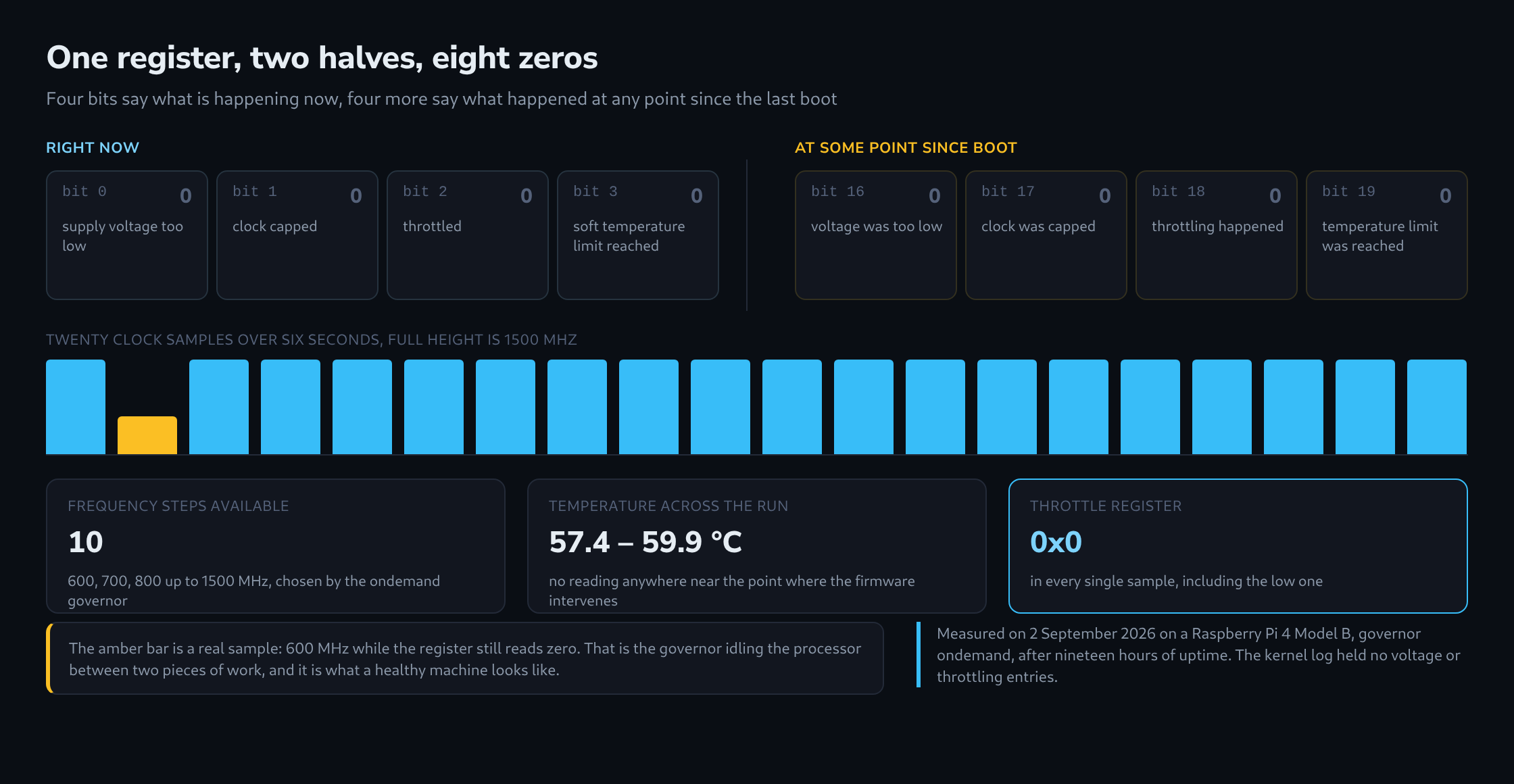
A low reading is therefore a snapshot of a moment rather than a state. Sampling twenty times across six seconds caught 1500 MHz nineteen times and 600 MHz once – and that single sample, taken on its own, would have looked alarming.
What get_throttled reports
The command that settles the question is vcgencmd get_throttled. It answers with one hexadecimal number, and that number is a set of switches rather than a measurement.
Each switch stands for one condition: supply voltage too low, clock capped, throttled, soft temperature limit reached. A switch that is on means the condition applies. The whole number reading zero means none of them do.
The essential part is that this register knows nothing about the governor. Saving power sets no bit at all. A clock at 600 MHz next to throttled=0x0 is therefore not a contradiction – it is the answer.

The number has two halves
Here is where the reading is most often misread. The four low bits describe the present moment. Four more, sixteen places higher up, record whether the same condition has occurred at any point since the machine last started.
The consequence deserves stating plainly. A brief sag at three in the morning leaves the live bits clean by breakfast while the sticky bits still hold it. Checking the register once, in a quiet moment, and finding the low half at zero proves only that nothing is wrong at that instant.
The sticky half is also cleared at every boot. Zeros on a machine that has been up for a minute mean nothing whatsoever; the same zeros after three weeks of uptime mean a great deal.
What a real board reported
The board measured here is a Raspberry Pi 4 Model B, nineteen hours into its uptime, serving this site while the measurement ran.
The register read 0x0 in every single sample, both halves, including the sample that caught the clock at 600 MHz. Temperature stayed between 57.4 and 59.9 °C throughout. The kernel log held no entry about voltage or throttling at all.
The configuration is stock: arm_freq=1500, no temperature limit set by hand, the governor untouched. Nothing was tuned here to produce a clean result.
What to check when the suspicion remains
Where the sticky bits are set, the cause is more often the power supply than the heat, and the kernel makes that straightforward to confirm. It exposes a sensor named rpi_volt alongside the temperature sensor, and it writes a line into the kernel log whenever the supply drops. An empty log is evidence in its own right.
Where heat is the suspect, temperature belongs in a series rather than a single reading, and it needs taking while the board is busy. A value read after a minute of rest says almost nothing.
And where the clock alone is the entire complaint, the register is the shortest path to an answer: one command, one number, and with it the difference between a processor resting and a board in difficulty.
Questions and answers
How can a value such as 0x50000 be decoded by hand?
The number is split into bits, and every bit that is set stands for one condition. The Raspberry Pi documentation assigns them as follows:
- Bit 0 (0x1): under-voltage, now
- Bit 1 (0x2): clock capped, now
- Bit 2 (0x4): throttled, now
- Bit 3 (0x8): soft temperature limit active, now
- Bits 16 to 19 (0x10000, 0x20000, 0x40000, 0x80000): the same four conditions, at some point since boot
0x50000 is the sum of 0x10000 and 0x40000: since boot there has been under-voltage at least once and throttling at least once, and neither applies at this moment. That pattern fits a power supply that sags under load and recovers in quiet phases. A reading of 0x50005, by contrast, means both are happening right now as well.
Why does a Pi on a phone charger report under-voltage although the charger says 5 V?
Because what counts is what reaches the board, not what is printed on the charger. Every cable has resistance, and under load voltage drops across it; thin, long cables lose more than short, thick ones. A supply delivering exactly 5.0 V leaves no headroom for that loss, which is why the official power supply for the Raspberry Pi 4 delivers 5.1 V at up to 3 A.
Some phone chargers are also designed for lower currents or let the voltage sag under load. The dip then falls precisely in the moments when all cores are working, which is why the sticky bits can be set although every reading taken at idle looks clean.
Does switching the governor to performance help?
Against the reading, yes; against throttling, no. With performance the clock stays high even at idle, but the firmware still throttles independently of the operating system when the voltage sags or the chip gets too hot. The permanently high clock also produces more heat and brings the board closer to the soft temperature limit.
Sources
Related articles