English
203 Routes: What the WordPress REST API Hands Out Without a Login

Contents
A WordPress site is two things at once. One is the pages a browser shows. The other is an interface that answers in plain data, has been switched on since the first minute, and is rarely looked at by whoever runs the site.
It lives at /wp-json/, and its first answer is a list of everything it can do.
What the interface is for
The REST API exists so that something other than a browser can work with a site: the block editor in the admin area, a mobile app, another site pulling in articles, a script that publishes on a schedule.
It is part of WordPress itself rather than a plugin, and it has answered by default since 2016. Nothing has to be switched on for it to work.
The consequence worth holding on to: whatever is published on the site is published here as well, in a form built for machines. Not a copy and not a summary – the same content, far easier to collect.
203 routes on an ordinary site
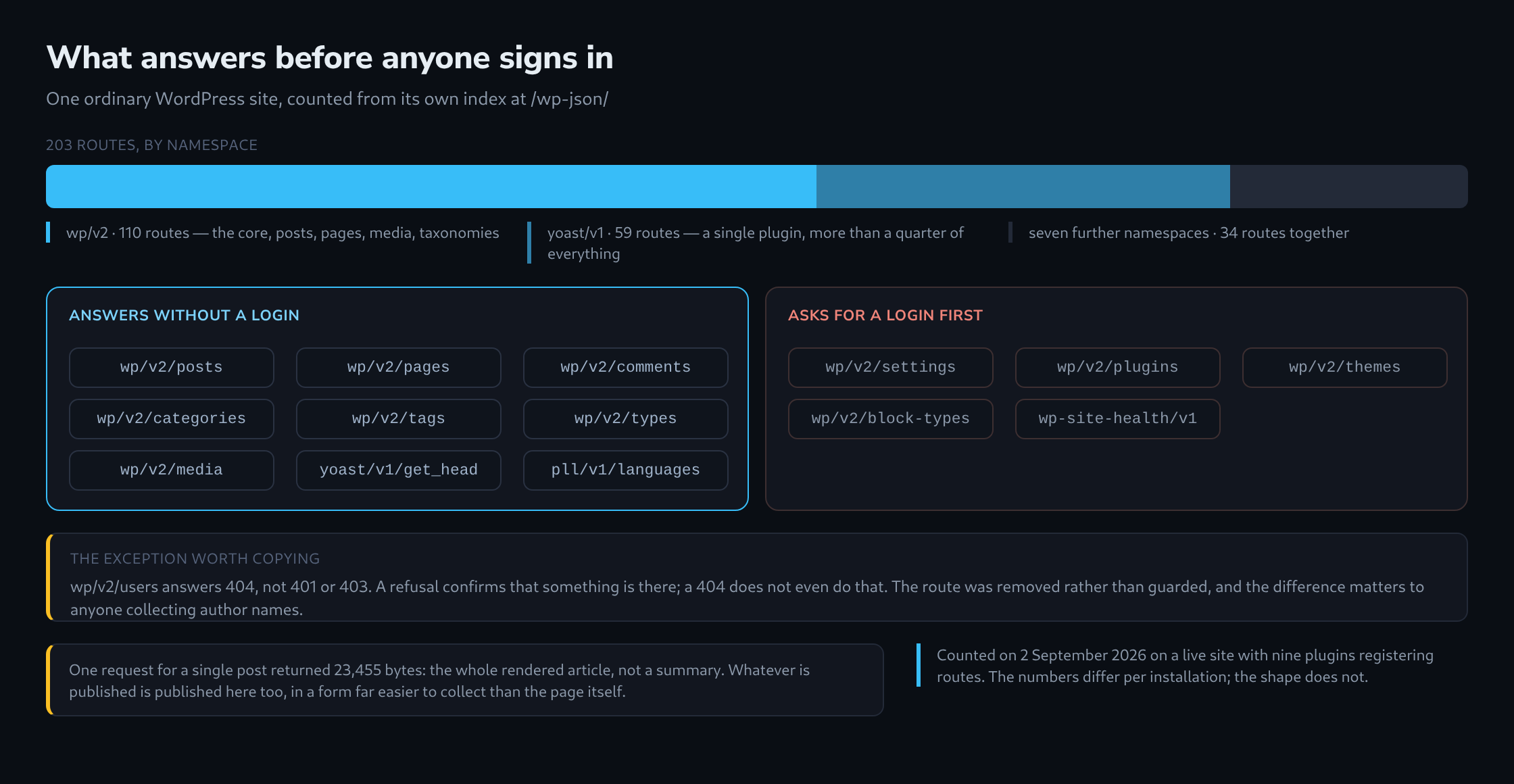
The index at /wp-json/ answered with 203 routes across nine namespaces on the site measured here.
110 of them belong to wp/v2, the core: posts, pages, media, comments, categories, tags, block types and the rest of the standard furniture.
59 belong to a single plugin. That is more than a quarter of the whole interface contributed by one piece of software, and it is not unusual – a large plugin tends to register a route for every screen it owns.
The remaining 34 are spread across seven namespaces, most of them holding between three and eight routes.
The namespace list is a plugin list
The index does not only count routes. It names the namespaces, and a namespace is chosen by whoever wrote the plugin.
So the answer to one unauthenticated request contains, in plain text, which plugins are installed: the SEO plugin, the multilingual plugin, the code-block plugin, and any custom code the site registers for itself.
That is not a leak in the sense of something being broken. It is how the interface has to work, because a client needs to know what is available. It does mean, though, that the question “which plugins does this site run” has a one-request answer – and that answer is routinely used to look up which versions have known problems.

What answers without a login
Reading is largely open, which follows from the content being public anyway.
Posts, pages, comments, categories, tags, post types, media and the routes added by the SEO and multilingual plugins all answered 200 with real content.
One detail deserves a pause. A request for a single post returned 23,455 bytes: the complete rendered article, not an excerpt. Everything published is available at one request per post, cleanly separated into fields, without any of the surrounding markup a page would carry.
What asks for a login, and the better refusal
Everything describing the installation rather than the content required authentication: the settings, the plugin list, the theme list, the block types, the site health checks. All of them answered 401.
One route answered differently, and it is the one worth copying. wp/v2/users returned 404.
The difference is not cosmetic. A 401 or 403 confirms that the route exists and is being guarded, which tells a collector that the thing behind it is real and worth another attempt. A 404 says nothing at all. The route had been removed rather than protected, and from outside that is indistinguishable from a WordPress that never offered it.
Author names are the usual reason for closing it. They are half of a login, and a public list of them is a public list of valid user names.
What is worth checking
Three questions answer themselves in one request each.
What does /wp-json/ list? Which namespaces appear, and does any of them belong to something no longer in use? A deactivated plugin registers nothing; an active but forgotten one registers everything it has.
What does /wp-json/wp/v2/users answer? A 200 hands out author names. A 401 confirms they exist. A 404 says nothing.
And what comes back for a single post? If the answer is the whole article, that is the interface working exactly as designed – but it is worth knowing that this is a shape the content is available in, and not only as a page.
The same two questions, how many routes /wp-json/ lists and what wp/v2/users answers, were also put to twelve installations; the results, from 203 to 1,107 routes, are in 1,107 Routes Without a Login: What Ten WordPress Installations Hand Out at /wp-json/.
Questions and answers
Is removing wp/v2/users enough to stop user names from getting out?
No, the route is merely the most convenient list. By default two other places give away the same thing:
- The author archive. For authors with published posts, an address such as /?author=1 redirects to /author/<slug>/, and WordPress derives that slug from the login name when the user is created. Requesting the numbers one after another yields essentially the same list.
- The oEmbed interface under /wp-json/oembed/1.0/. For every post it returns the author’s display name and the address of the author archive, slug included.
The display name in feeds and under posts is harmless as long as it differs from the login name. The lasting fix is therefore less about hiding and more about a login name that appears nowhere in public, and a login for which the name alone is useless, for example through a strong password and a second factor.
Does a site reveal its plugins even without the index at /wp-json/?
Usually, yes. A plugin’s stylesheets and scripts sit under /wp-content/plugins/ in a folder normally named after the plugin, and they often carry the version number in the ver parameter. Hiding the index therefore removes one source, not the information.
Related articles