English
 Deutsch
 Polski
Cache-Control Explained: What no-cache, no-store, max-age and s-maxage Each Do

Management Summary
Web caches keep temporary copies of pages and files so repeat visits can load faster and require less data transfer. Cache-Control is the set of website rules governing when those copies may be stored or reused. The balance matters because an old copy can show outdated information, while personal responses need careful handling. Despite its name, no-cache allows storage but requires a check before reuse; no-store forbids HTTP cache storage. Changing a rule does not automatically erase copies already held.
Jump to the interactive example ↓
Contents
Cache-Control describes whether an HTTP response may be stored and when a stored response may be reused. A fast second visit alone proves neither a cache hit nor the absence of a network request.
The central distinction: no-store prohibits storage in HTTP caches; no-cache permits storage but requires successful validation before reuse. Neither directive guarantees that no other part of an application retains data.
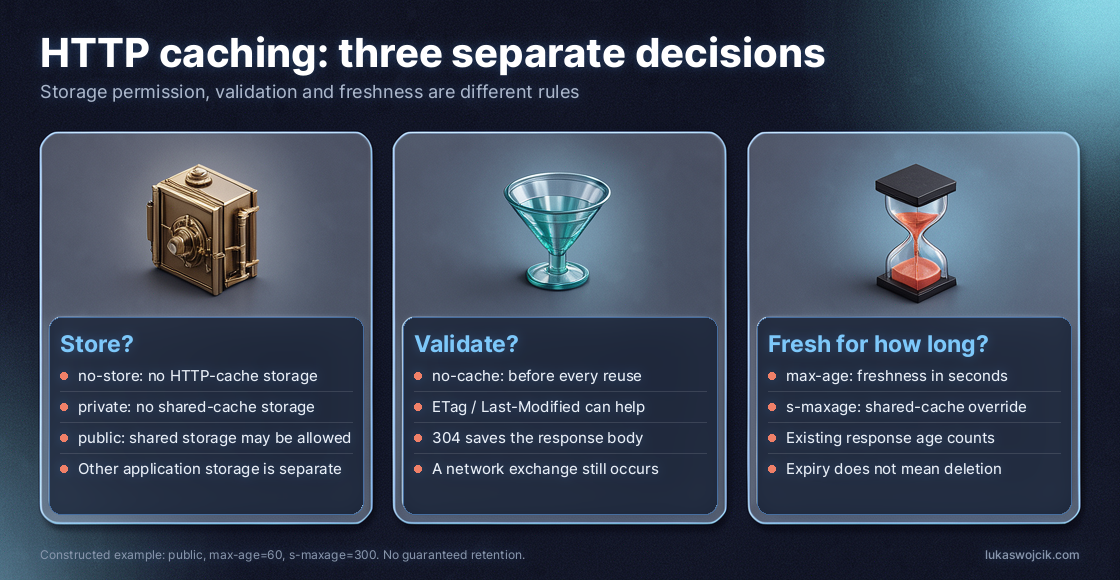
Storage and freshness are different
A private HTTP cache, usually in a browser, is separate from shared caches such as a CDN or proxy. Several cache layers can exist. “Private” describes the cache, not a guarantee that only one human has access to the device.
Validation means asking the server whether the stored response is still current. A fresh response can normally be reused without that check, subject to the other caching rules. A stale response has exceeded that freshness period. Stale does not mean deleted: a cache can retain the response for validation. Conversely, limited capacity can cause eviction before the freshness period ends.
no-cache: validation before reuse
For the unqualified response directive Cache-Control: no-cache, both private and shared caches must validate before reusing a stored response. Storage remains optional.
An ETag can be sent back in If-None-Match; a Last-Modified value can support If-Modified-Since. A successful 304 Not Modified response avoids retransmitting the response body. The request and response headers still travel over the network. Changed content normally requires a new response body. The saving depends on response size and validation cost.
no-store: an HTTP-cache rule
Cache-Control: no-store instructs HTTP caches not to store this response. Adding the directive at the origin does not remotely erase previously cached responses that have not contacted the server again.
This is not a universal deletion or confidentiality guarantee. Application storage and the JavaScript Cache API need separate handling; the Cache API does not automatically honour HTTP cache headers. The back/forward cache stores page state under separate browser rules. Chrome can allow some pages with no-store into that cache under specific conditions.
max-age and s-maxage describe freshness
max-age sets a freshness period in seconds. s-maxage sets that period for shared caches and takes precedence there over max-age and Expires. The following is a constructed example for public, non-personalised content:
Cache-Control: public, max-age=60, s-maxage=300The browser freshness period is 60 seconds; the shared-cache period is 300 seconds. These are not guaranteed storage durations. Time already spent in caches counts toward the response age. With max-age=300 and an Age value of 180, roughly 120 seconds remain, before additional transit and resident time.
must-revalidate prohibits reuse after the response becomes stale until successful validation, including during an origin outage. s-maxage imposes this restriction on shared caches as well. Absence of those directives is not unrestricted permission to serve stale content.

private and public select the cache scope
The unqualified private directive prohibits shared storage but permits private caching subject to the remaining rules. For a personalised response that may be retained locally but must be checked before reuse, one possible policy is:
Cache-Control: private, no-cacheWhen HTTP storage itself is unwanted, no-store is the relevant restriction. public can permit shared caching, but does not force storage or override a simultaneous prohibition such as no-store. None of these directives replaces authentication or authorisation.
A personalised response can leak through a wrongly configured shared cache. The risk depends on cache keys, cookies, authentication and CDN rules; missing private alone does not prove a leak. Provider rules can override origin caching instructions, so configuration and actual responses both need checking.
Stale responses need explicit limits
For public content where limited staleness is acceptable, another constructed example is:
Cache-Control: public, max-age=60, stale-while-revalidate=30, stale-if-error=90A supporting cache can serve the stale response for up to 30 additional seconds while attempting background validation. A request triggers that work; neither a successful refresh nor a fresh response for the next request is guaranteed.
stale-if-error=90 permits a response up to 90 seconds stale when a qualifying error occurs, including HTTP 500, 502, 503 or 504. This is a bounded fallback, not unlimited outage protection. An application error returned as HTTP 200 is not one of those statuses. Support and interaction with stricter directives depend on the cache; this example deliberately omits must-revalidate and s-maxage.
What a header check can establish
The HTTP security header checker makes a server-side request and follows redirects within its limits. That request does not reproduce an authenticated browser session. One response cannot prove actual storage, correct separation of different cached responses or behaviour at every CDN location. Cache-Control can also be absent; caching may then follow other rules or estimate a freshness period from available response information.
A useful check combines the response headers with browser network observations and CDN configuration. Relevant evidence includes response status, Age, validators, the selected cache key and whether a repeat request uses memory, disk or the network. Logged-out and authenticated responses need separate checks. Repeated header fields should be checked in the original network response, not only in a summarised tool display.
Questions and answers
Does no-cache guarantee a 304 response?
No. A stored response, suitable validators and a server that confirms the representation is unchanged are needed for the usual conditional-validation path. Without usable validators, a full response is generally necessary.
How can an outdated response be replaced?
A CDN purge can invalidate the relevant shared entries. Changing an origin header alone does not reach a still-fresh copy without another server contact. Later responses, including a 304, can update stored metadata.
For scripts and styles, a new URL per content version avoids reusing an old entry; the referencing HTML must also be updated and fetched. Supporting browsers can process Clear-Site-Data: "cache" from an HTTPS response, but that response must actually arrive. This is not a remote purge of browsers that never contact the site.
What changes when a request carries Authorization?
Shared reuse is normally restricted. RFC 9111 allows exceptions through public, s-maxage or must-revalidate, still subject to the other rules. A blanket shared-caching policy is therefore inappropriate for personalised protected responses without careful separation and validation.
Learn by trying
When must the browser check again?
Change the response age. Then switch to no-cache or no-store.
Model of a storable GET response with ETag. Age includes transit time. Same URL and Vary values, no other directives, no offline operation.
This module runs in your browser and does not send or store your input.
Learn by trying
One minute: can you spot the mistake?
Cache-Control: no-cache. What may a cache do?
no-cache allows storage but requires successful validation before reuse. no-store prohibits storage.
Related articles