English
 Deutsch
 Polski
Web Infrastructure Hardening: Controlling Third-Party Scripts via Content Security Policy (CSP)

Contents
Architectural Overview: Attack Vectors of Third-Party Script Injections
Modern web applications and WordPress installations frequently rely on third-party JavaScript for analytics, tag management, embedded media, and marketing automation. However, every external script source introduced into the Document Object Model (DOM) expands the attack surface. Compromised Content Delivery Networks (CDNs), supply-chain attacks on JavaScript libraries, or malicious browser extensions can silently inject unauthorized scripts into the browsing session.
Without architectural controls at the HTTP header level, browsers execute any script present in the DOM indiscriminately. This creates severe risks of Cross-Site Scripting (XSS), DOM scraping, and unauthorized data exfiltration (e.g., form skimming or cookie theft). Implementing a robust Content Security Policy (CSP) establishes an immutable permit system within the client browser, ensuring that only explicitly authorized origins and cryptographic hashes are permitted to execute code or transmit data.
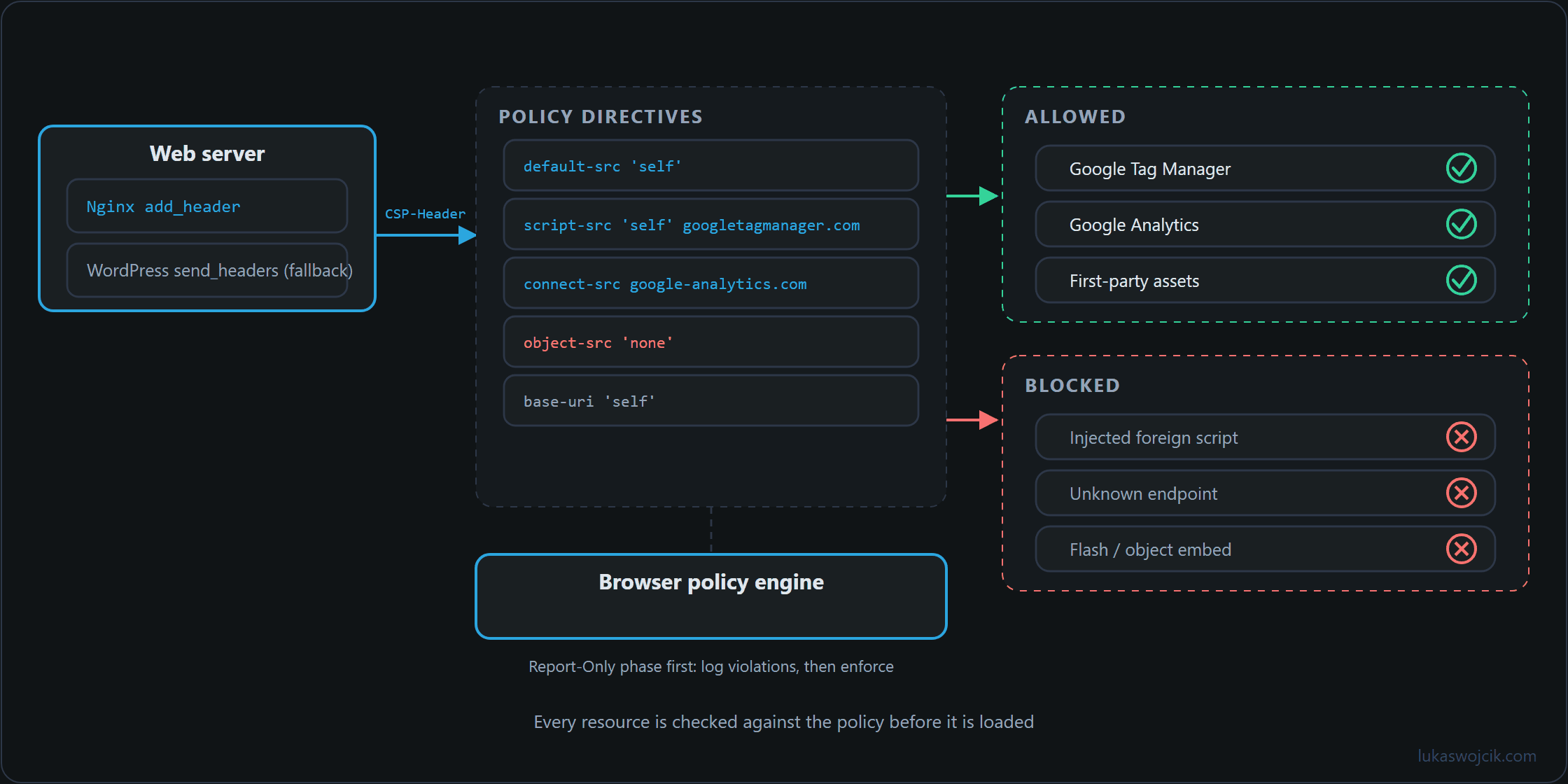
googletagmanager.com is on the allow list, injected scripts and object embeds are not.Step-by-Step Implementation Guide
Step 1: Conducting a Complete Script and Endpoint Audit
Before deploying an enforcing CSP header, all legitimate domain dependencies must be inventoried. In a standard WordPress v7.0.2 environment equipped with enterprise tag management and server-side tracking, an audit typically identifies the following necessary directives:
default-src 'self'– Restricts all fallback resource loading strictly to the primary domain.script-src 'self'– Permits scripts hosted on the primary server domain.connect-src 'self'– Limits REST API, Fetch, and XHR connections to trusted analytics endpoints.img-src 'self' data:– Allows local images and inline base64 data URIs.
Step 2: Designing a Minimal-Privilege CSP Policy
To prevent tracking script injections while preserving functionality for authorized platforms (such as Google Tag Manager, GA4, Matomo, or a custom Server-Side GTM endpoint), domain allow-lists must be explicitly defined. A secure baseline policy targeting enterprise analytics workloads is structured as follows:
default-src 'self';
script-src 'self' 'unsafe-inline' https://www.googletagmanager.com https://cdn.matomo.cloud;
img-src 'self' data: https://www.google-analytics.com https://www.googletagmanager.com;
connect-src 'self' https://www.google-analytics.com https://region1.google-analytics.com https://matomo.cloud https://tracking.lukaswojcik.com;
frame-src 'self' https://www.youtube.com;
object-src 'none';
base-uri 'self';
form-action 'self';
Note: The use of 'unsafe-inline' within script-src should ideally be replaced by automated cryptographic nonces or SHA-256 script hashes in high-security environments.
Step 3: Server-Level Deployment via Nginx Configuration
For optimal performance, CSP headers should be transmitted directly by the web server rather than being generated within the PHP application layer. Adding the policy to the SSL server block in Nginx ensures execution before PHP processing occurs:
# /etc/nginx/sites-available/lukaswojcik.com.conf
server {
    listen 443 ssl http2;
    server_name www.lukaswojcik.com lukaswojcik.com;

    # Secure CSP Header Enforcement
    add_header Content-Security-Policy "default-src 'self'; script-src 'self' 'unsafe-inline' https://www.googletagmanager.com https://cdn.matomo.cloud; img-src 'self' data: https://www.google-analytics.com https://www.googletagmanager.com; connect-src 'self' https://www.google-analytics.com https://region1.google-analytics.com https://matomo.cloud https://tracking.lukaswojcik.com; frame-src 'self' https://www.youtube.com; object-src 'none'; base-uri 'self'; form-action 'self';" always;

    add_header X-Content-Type-Options "nosniff" always;
    add_header X-Frame-Options "SAMEORIGIN" always;
}
After modifying the Nginx configuration, syntax verification and a graceful service reload are mandatory:
nginx -t && systemctl reload nginxStep 4: Application-Level Fallback via WordPress functions.php
If server-level Nginx access is restricted, the identical CSP header can be dispatched via PHP during the WordPress request lifecycle by integrating the following routine into the active theme’s functions.php:
/**
 * Content Security Policy Header Enforcement
 * Target: WordPress v7.0.2
 */
add_action( 'send_headers', 'lw_enforce_content_security_policy' );

function lw_enforce_content_security_policy() {
    if ( ! is_admin() ) {
        $csp = "default-src 'self'; " .
               "script-src 'self' 'unsafe-inline' https://www.googletagmanager.com https://cdn.matomo.cloud; " .
               "img-src 'self' data: https://www.google-analytics.com https://www.googletagmanager.com; " .
               "connect-src 'self' https://www.google-analytics.com https://region1.google-analytics.com https://matomo.cloud https://tracking.lukaswojcik.com; " .
               "frame-src 'self' https://www.youtube.com; " .
               "object-src 'none'; " .
               "base-uri 'self'; " .
               "form-action 'self';";

        header( 'Content-Security-Policy: ' . $csp );
    }
}
Step 5: Quality Assurance and Report-Only Testing
Before applying strict blocking rules to production traffic, deploying the header as Content-Security-Policy-Report-Only is recommended. This logs policy violations to the browser console without blocking script execution.
Verification must be conducted using browser developer tools (F12):
- Network Header Inspection: Open the Network tab, reload the page, and confirm that the HTTP response includes the correct
Content-Security-Policystring. - Console Anomaly Detection: Observe the browser Console tab. Unauthorized tracking tags will trigger explicit red CSP violation errors. Content scripts of browser extensions, by contrast, are not subject to the page’s CSP; only what they insert into the page as script elements is checked against the policy.
- Tracking Endpoint Validation: Verify that server-side tracking calls to custom analytics endpoints execute with HTTP 200 status codes without triggering connection refusals.
Summary and Measurable Added Value
What is achieved: Uncontrolled execution of arbitrary JavaScript within the DOM is replaced by a cryptographically enforced, domain-level allow-list managed directly by the browser’s security engine.
Resulting added value:
- Protection Against Supply-Chain Attacks: Compromised external JavaScript libraries or unauthorized third-party scripts are immediately blocked from executing or exfiltrating data.
- GDPR and Privacy Compliance: Unauthorized tracking pixels and piggyback tags are systematically prevented from establishing connections to third-party ad networks.
- Form and Session Hardening: Restricting
connect-srcandform-actionprevents credential harvesting and form skimming across all WordPress pages.
Questions and answers
Why is the CSP from the Nginx configuration missing on some URLs?
Because of how add_header is inherited. Nginx only passes add_header directives from the server block down to location blocks that contain no add_header directive of their own. If a location block for images, fonts or PHP sets its own header such as Cache-Control, all headers from the server block are dropped there, including Content-Security-Policy, X-Content-Type-Options and X-Frame-Options.
This often goes unnoticed for a long time, because the check in step 5 is usually done on an HTML page. A sample per location block is safer, covering images, scripts and the URLs served through PHP as well.
The fix is to repeat the headers in every location block that has add_header lines of its own, most easily through a shared file pulled in with include.
What happens if both Nginx and functions.php send a CSP?
Then both apply. The browser does not merge several Content-Security-Policy headers into one policy; it checks every resource against each of them, and only what all of them allow is loaded. A domain listed in only one of the two versions therefore stays blocked. That happens easily when a source is added in one place only, for instance in the Nginx configuration but not in functions.php.
Conversely, the header from functions.php can be missing even though the code is correct. A page cache that serves finished HTML files straight from the web server without starting PHP delivers them without that header unless it stores the headers as well. Anyone setting the policy through PHP should therefore also check a page served from the cache, not just a freshly generated one.
How can violations that only occur for real visitors be collected?
Through a reporting address in the policy. The console only shows violations in the browser of whoever is checking; with the report-uri directive, or the newer report-to together with the Reporting-Endpoints header, visitors’ browsers send every violation as JSON to an endpoint run by the site, in Report-Only mode as well. These reports also contain noise, for example from browser extensions, so they are best evaluated by source rather than by sheer count.
Related articles