

 English
 Deutsch
 Polski
Storage and Bandwidth Engineering for Enterprise CCTV Networks
Part 1 of 2 in the series Video surveillance on your own hardware

Management Summary
A camera system needs network capacity to move video and storage to keep recordings for the intended period. The required space depends on movement, lighting and how strongly the video is compressed, not just picture resolution. This matters when planning reliable monitoring across many cameras. Spare capacity and protection against disk failure add to the equipment needed. Keeping recordings longer increases storage demand, while a group of resilient disks still does not replace a separate backup.
Jump to the interactive example ↓
Contents
An IP camera network needs joint planning of image quality, bitrate, retention and usable storage. Bitrate is the amount of data per second; retention is the length of time recordings are kept. A codec specifies how video is compressed and decoded. Resolution alone does not determine demand: movement, image noise, lighting, codec and frame rate affect volume. The following 16-camera, 30-day calculation is a technical example only. There is no general statutory requirement to retain every recording for 30 days.
1. Bitrate measurements first
H.265 can use fewer bits than H.264 at comparable perceived quality. A fixed reduction from 12 to 6 Mbps is not a guaranteed property of a 4K stream. Camera, scene, encoder and playback software must work together. Daylight, night, rain and motion samples establish whether faces, number plates and other required details remain sufficiently clear.
H.265+ and Axis Zipstream can provide further savings, but these are different vendor features with model-specific behavior. Zipstream can compress less relevant regions more heavily, extend keyframe intervals and adjust frame rate dynamically. Fixed savings without quality loss are not guaranteed. A GOP is a group of pictures between keyframes, which allow decoding to restart. Long GOP intervals can also affect playback and seeking.
VBR means variable bitrate: the encoder adapts the amount of data per second to the scene. A maximum bitrate controls peaks but can reduce image quality or frame rate during heavy motion. An average target serves longer-term storage planning. Terminology varies between manufacturers. A quiet night scene can still produce substantial bitrate because of image noise, so average and maximum require separate checks.
2. Separate calculations for video volume, reserve and RAID
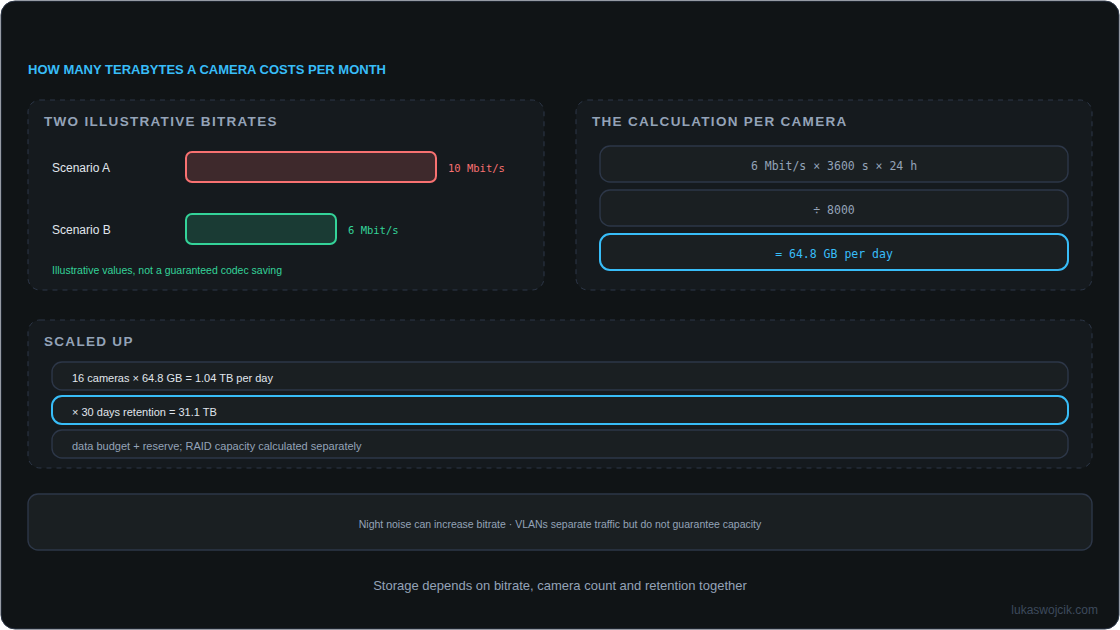
For continuous recording in decimal units: GB = average Mbps × 86,400 × days × camera count ÷ 8,000. One TB here equals 1,000 GB. This covers the recorded video stream; audio, containers, metadata and additional recordings need separate allowances. Network protocol overhead belongs in bandwidth planning and is not automatically stored in the same volume on disk.
- One camera at 6 Mbps: 64.8 GB per day.
- 16 cameras over 30 days: 31,104 GB = 31.104 TB of video.
- An illustrative 20% addition gives 37.3248 TB of required data capacity after RAID. RAID combines several drives into an array. Parity is additional recovery information stored alongside data. This allowance is not a mandatory standard and does not account for RAID parity.
- Adding 20% to demand leaves about 16.7% of the result unused. Keeping 20% of capacity free instead requires 31.104 ÷ 0.8 = 38.88 TB, before any other necessary allowances.
Six equal 10-TB disks provide 60 TB raw. RAID 6 provides 40 TB nominal data capacity; RAID 10 provides only 30 TB. Eight 10-TB disks in RAID 10 provide 40 TB. Filesystem, recorder reservations and administrative data reduce actual available space. A hot spare is a standby disk reserved to replace a failed drive. It does not increase data capacity. TB uses powers of 1,000, while TiB uses powers of 1,024. Thus 40 TB is approximately 36.38 TiB: the different unit display is not lost storage.
3. Redundancy and drives suited to the workload
RAID 6 tolerates complete failure of any two array members. Conventional RAID 10 with two-disk mirror pairs tolerates one failed disk per pair; losing both members of a pair can destroy the array. Additional read errors, controller faults, filesystem damage, power failures and mistakes remain possible. RAID does not replace a separate backup of important footage.
There is no universal 24-TB boundary above which RAID 5 becomes unusable. Disk count, capacity, failure risk, recovery time and tolerated downtime determine suitability. A rebuild restores the missing redundant data after a drive replacement. Rebuild and recording load occur together. Rebuilding a mirror may involve fewer data disks, but still shares controller, bus and CPU resources; faster recovery is not guaranteed.
An NVR is a network video recorder that receives and stores camera streams. Drive selection depends on the NVR compatibility list, continuous-operation rating, annual workload, recording technology and supported enclosure size. Surveillance, NAS or enterprise disks may suit the system. Desktop disks do not inevitably fail immediately, but may lack the required workload rating. Vibration sensors and firmware features vary by model. The example produces about 378.4 TB of incoming video per year across the system; per-disk workload also depends on RAID, playback, rebuild and administrative activity.
4. Network and power capacity
16 streams averaging 6 Mbps produce 96 Mbps, or 12 MB/s, of recorder video payload. At 8 Mbps per camera the total is 128 Mbps, or 16 MB/s. Audio, protocols, live viewing, additional streams and exports add traffic. A 100-Mbps uplink is too small for this peak example. A correctly provisioned gigabit link provides headroom for this video load, but actual bottlenecks and reserves still need measurement. These figures do not imply a universal 50-Gbps switching-fabric minimum.
A camera VLAN creates a separate logical network. Broadcast messages addressed to all devices remain within that network. ACL means access control list. Firewall or ACL rules provide additional access control, allowing only necessary connections to recording, management, time, and relevant DNS or update services. A VLAN is not automatically unroutable and does not guarantee protection against congestion. Loop prevention and, where appropriate, storm control remain separate tasks. PoE supplies power through a compatible Ethernet connection. Its class, per-port power and total budget must cover infrared (IR) lighting, heaters, motorised pan, tilt and zoom (PTZ), night operation and startup demand.
The IP MTU is the maximum IP packet size on a connection, in bytes. MTU 1500 is a reasonable starting point. Jumbo frames are Ethernet frames larger than the usual size. They are optional and help only when compatible endpoints and the entire path carry sufficiently large packets. There is no general 80% CPU saving. IP MTU 9000 and Ethernet frame length are different measurements; Ethernet and optional VLAN headers add bytes. Changes belong in a tested maintenance procedure, rather than a blanket setting on camera ports.
ping -4 -M do -s 8972 -c 3 192.0.2.10The documentation address must be replaced with an approved test destination. 8972 payload bytes plus 20 IPv4 and 8 ICMP header bytes form a 9000-byte IP packet without IP options. The local MTU must support the test. Success demonstrates that ICMP path, not sufficient NVR performance. Failure can also reflect ICMP filtering. Oversized Layer 2 frames may be silently dropped; routers can report errors depending on protocol and configuration. The command does not change MTU settings.
5. Retention and acceptance checks
Permitted retention follows purpose, necessity and applicable law. The European Data Protection Board requires stronger justification for longer storage, particularly beyond 72 hours. This is neither a universal 72-hour ceiling nor a 30-day mandate. A documented deletion policy determines capacity planning; footage relevant to a specific incident may need separately justified preservation.
Acceptance checks cover measured daily volume, available capacity, retrieval and export of a recording, recorder limits and alarms for missing streams or full storage. Controlled failure and rebuild tests belong on an appropriate test system. Codec tuning and VLANs reduce particular risks but do not guarantee uninterrupted recordings.
Questions and answers
What changes at 8 rather than 6 Mbps?
The 31.104-TB video budget lasts 22.5 rather than 30 days. Including the illustrative 20% addition would give 27 days if the entire addition were consumed by video. Reserve, however, is intended for other uncertainties. Actual storage use and recorder overwrite rules therefore need observation.
How much does motion recording save?
Demand depends on recorded duration and bitrate during recording. Pre-event and post-event buffers, event-related peaks and metadata add volume. A 20% motion duty cycle therefore does not automatically mean 80% less total storage. Sizing for continuous recording can provide a conservative technical reserve where the recording itself is lawful and necessary.
Sources
Learn by trying
How quickly do cameras fill the drive?
Change camera count, average bitrate and retention. See network load and storage needs together.
- Video data rate
- Video data
Continuous recording, constant average bitrate. 1 byte = 8 bits, 1 TB = 10¹² bytes. Excludes audio, protocol/filesystem overhead, RAID losses and reserve. With VBR, instantaneous network load can exceed the average.
This module runs in your browser and does not send or store your input.
Learn by trying
One minute: can you spot the mistake?
Four cameras each record 4 Mbit/s continuously for 24 hours. Approximately how much video data is that?
4 × 4 Mbit/s × 86,400 s ÷ 8 = 172.8 GB. Bits and bytes differ. Filesystem, RAID and reserve must be added for real planning.
Take a guess!
Explore
Take a guess!
Enter your estimate first. Then reveal the calculation, result and difference.
PNG with settings, result and article link. Created locally only when you click.
These exercises calculate in your browser. The learning module does not send your answers.
One decision, two consequences
Simplified learning model
One decision, two consequences
There is rarely just one right answer. Make a choice and compare its consequences.
These examples run only in your browser. No real systems are disrupted.
PNG with settings, result and article link. Created locally only when you click.
Video surveillance on your own hardware
- Storage and Bandwidth Engineering for Enterprise CCTV Networks
- Frigate and Home Assistant: Camera Alerts with Clear Conditions
Related articles


