Intelligent Alarm Scenarios: Integrating Frigate AI Detection in Home Assistant
Part 3 of 4 in the series Video surveillance on your own hardware

Contents
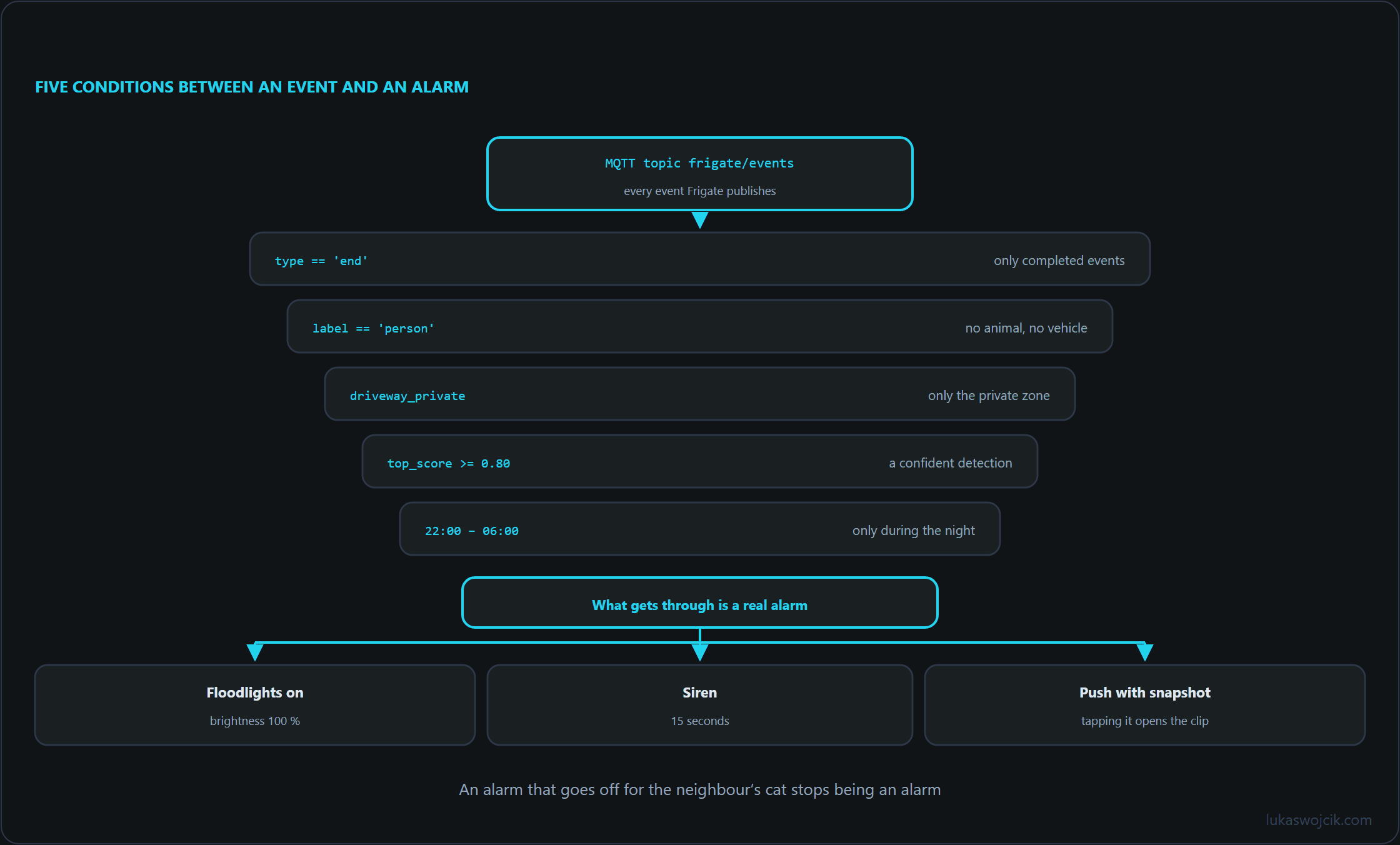
Integrating Frigate NVR with Home Assistant transforms passive video surveillance into an active, intelligent perimeter defense platform. Traditional motion-triggered automation engines generate constant false alerts caused by moving shadows or passing animals, rendering automated sirens and floodlights useless. By leveraging real-time MQTT object detection states and high-confidence AI bounding-box tracking from Frigate, Home Assistant can trigger precise deterrent actions—such as instant push notifications with annotated snapshots, floodlight activation, or siren warnings—exclusively when unauthorized human intruders cross designated security zones.
1. Integration Architecture: MQTT Broker & Frigate Integration
The communication bridge between Frigate NVR and Home Assistant relies on asynchronous MQTT messages and custom Home Assistant Integration components:
- MQTT Event Stream: Frigate publishes real-time JSON payloads to the
frigate/eventstopic whenever an object is detected, tracked, or updated across defined camera zones. - Frigate Home Assistant Integration: Installed via HACS (Home Assistant Community Store), this integration automatically creates binary sensors, camera entities, and media browser feeds inside Home Assistant.
- Media Cache API Endpoint: High-resolution snapshots and video clips generated during detection events are exposed locally via secure API endpoints (e.g.,
/api/frigate/notifications/{event_id}/snapshot.jpg), allowing instant embedding into mobile alerts.
2. Step-by-Step MQTT & HACS Setup
To establish the event telemetry pipeline, the custom integration must be authenticated and connected to the shared MQTT broker:
- MQTT Broker Verification: Ensure both Frigate NVR and Home Assistant are connected to the same Mosquitto MQTT broker instance. Verify that Frigate’s
mqtt.hostconfiguration points to the broker IP. - Install Frigate via HACS: Open HACS in Home Assistant, search for Frigate under Integrations, download the repository, and restart Home Assistant Core.
- Add Integration Entry: Navigate to Settings > Devices & Services > Add Integration, select Frigate, and enter the local HTTP URL of the Frigate NVR instance (e.g.,
http://192.168.10.20:5000).
3. Production-Ready Home Assistant Alarm Automation
The following Home Assistant automation YAML script listens to Frigate MQTT event payloads, verifies zone boundaries, turns on floodlights, triggers a high-priority mobile alert with a snapshot image, and sounds an alarm siren when an intruder enters a restricted area at night:
alias: "Security: Intruder Detection Driveway Zone"
description: "Triggers floodlights, sirens, and actionable notifications with snapshots when a person is detected."
trigger:
  - platform: mqtt
    topic: frigate/events
condition:
  - condition: template
    value_template: "{{ trigger.payload_json['type'] == 'end' }}"
  - condition: template
    value_template: "{{ trigger.payload_json['after']['label'] == 'person' }}"
  - condition: template
    value_template: "{{ 'driveway_private' in trigger.payload_json['after']['entered_zones'] }}"
  - condition: template
    value_template: "{{ trigger.payload_json['after']['top_score'] >= 0.80 }}"
  - condition: time
    after: "22:00:00"
    before: "06:00:00"
action:
  # 1. Turn on perimeter floodlights
  - service: light.turn_on
    target:
      entity_id: light.driveway_floodlights
    data:
      brightness_pct: 100
  # 2. Sound alarm siren for 15 seconds
  - service: siren.turn_on
    target:
      entity_id: siren.outdoor_siren
    data:
      duration: 15
  # 3. Send actionable mobile notification with high-res snapshot
  - service: notify.notify
    data:
      title: "🚨 INTRUDER DETECTED"
      message: "An unauthorized person was detected in the private driveway zone."
      data:
        image: "/api/frigate/notifications/{{ trigger.payload_json['after']['id'] }}/snapshot.jpg"
        tag: "intruder_driveway"
        priority: high
        ttl: 0
        clickAction: "/api/frigate/notifications/{{ trigger.payload_json['after']['id'] }}/clip.mp4"
mode: single
4. Step-by-Step Notification Optimization & False-Positive Suppression
To maintain absolute system reliability and prevent notification fatigue, granular filtering parameters must be enforced:
- Confidence Score Thresholding: Require a minimum
top_scoreof0.80(80% probability) within the automation conditions to filter out ambiguous reflections or edge cases. - Zone Transition Validation: Configure conditions using
entered_zonesrather than global motion to restrict active alarms exclusively to secure property boundaries. - Notification Throttling: Set the automation execution mode to
singlewith a delay buffer or rate limiter to prevent duplicate notifications during prolonged presence.
5. Summary & Architectural Value
What this tutorial achieves: The successful integration of Frigate NVR AI object detection with Home Assistant via MQTT and HACS, creating an automated, high-precision perimeter security response system.
Resulting value: Nuisance alerts caused by rain, shadows, or animals are completely eliminated. Active deterrents—such as floodlights, audio sirens, and actionable push notifications containing high-resolution snapshots and clip links—trigger exclusively upon verified human intrusion, delivering immediate situational awareness and robust perimeter protection without cloud subscription costs.
Video surveillance on your own hardware
- AI-Powered Edge Video Surveillance: Frigate NVR with Google Coral TPU
- Storage and Bandwidth Engineering for Enterprise CCTV Networks
- Intelligent Alarm Scenarios: Integrating Frigate AI Detection in Home Assistant
- CCTV Cabling: PoE Compared With Coax for Security Installations
Related articles