Google Ads API Passkeys: Your OAuth Client Is Fine, Your Login Is Not
Contents
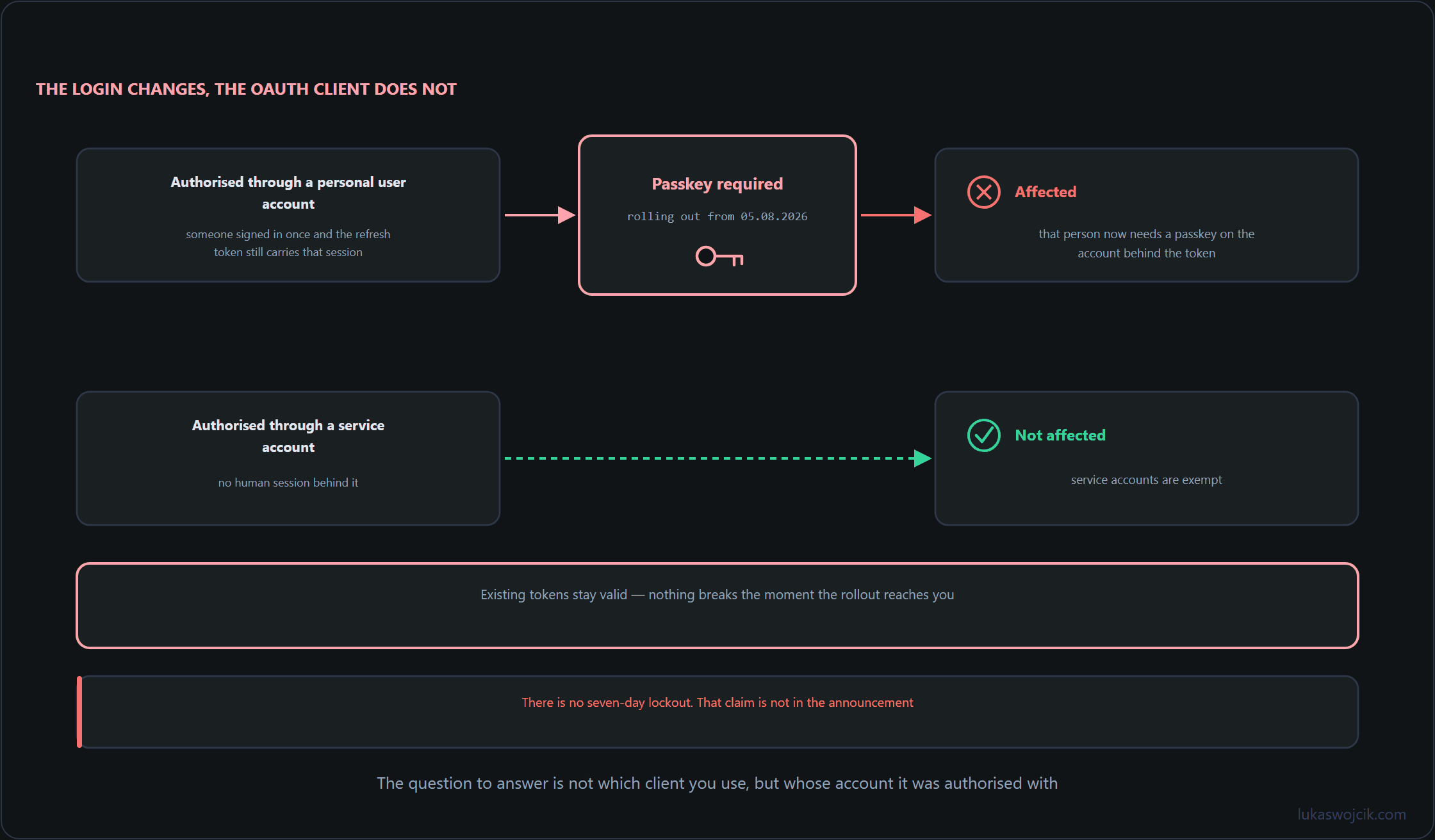
Google announced the passkey requirement for Google Ads API access on 27 July 2026, and the rollout began on 5 August. Since then the recurring question in every team chat has been some version of “do we have to reissue our OAuth client?” You do not. The requirement applies to how the user account behind an authorization signs in. The OAuth client is not the subject of this change, and existing tokens stay valid, so nothing stops working while you read this. What you need is not a panic migration but an honest inventory of which integrations depend on a human being able to log in.
1. The login is in scope, the OAuth client is not
The distinction is narrow and it decides everything else. If an integration was authorized by a person clicking through a consent screen with their own Google account, that account’s sign-in falls under the passkey requirement. If it runs through a service account, it does not: service accounts are exempt. Same API, same client library, same customer IDs; the only difference is who authenticated.
Two things follow. No dashboard goes dark on a fixed date: existing tokens keep working, so the pressure point is the next time someone has to sign in, after a token is revoked by accident or a machine is rebuilt. And the risk sits in people, not in code. Your repository will not tell you who holds the refresh token.
One correction, because it keeps circulating: several write-ups claim there is a seven-day lockout period for affected accounts. That is not in the announcement. There is no such deadline, and a migration plan built on it will make you rush the wrong work.
2. Write down who authorizes what
Start with the artefact almost nobody has: a written matrix of your own access. A YAML file in the repository is a start, but a small SQLite table is better, because you will want to query it. The columns that matter are the ones you cannot reconstruct from memory six months from now.
create table ads_authorization (
  integration     text primary key,
  auth_type       text not null check (auth_type in ('user_account','service_account')),
  google_account  text,
  config_path     text,
  token_store     text,
  owner           text not null,
  deputy          text,
  customer_ids    text,
  last_verified   date
);

insert into ads_authorization values
 ('nightly-cost-load','user_account','ads-bot@example.com','/srv/etl/conf/ads.yaml',
  'vault:kv/ads/refresh','l.wojcik','m.kowalski','123-456-7890,222-333-4444','2026-08-08'),
 ('bi-connector','service_account',null,'/srv/bi/sa.json',
'gcp-secret-manager','platform-team',null,'123-456-7890','2026-08-08');- auth_type: splits the estate into in scope and out of scope with a single
whereclause. - deputy: the field this requirement is really about. If the person in
owneris away for three weeks, who signs in? - token_store: a personal home directory here is a finding, not a value.
3. Find the authorizations you forgot about
An inventory is only as good as its coverage, and the entries you forget are the ones that hurt. Sweep the config trees, then compare the result with what you wrote down.
grep -rIls -e refresh_token --include='*.y*ml' --include='*.json' --include='*.env' \
  /etc /srv /opt /home
#!/usr/bin/env python3
"""Classify local OAuth configs and diff them against the access inventory."""
import pathlib, re, sqlite3, sys
root = pathlib.Path(sys.argv[1])
patterns = ("*.yaml", "*.yml", "*.json", "*.env", "*.ini")
has_refresh = re.compile(r"refresh_token\s*[:=]\s*\S")
is_service = re.compile(r"service_account|private_key_id")
db = sqlite3.connect("access.db")
known = {row[0] for row in db.execute("select config_path from ads_authorization")}
for pattern in patterns:
for path in sorted(root.rglob(pattern)):
text = path.read_text(errors="ignore")
if not (has_refresh.search(text) or is_service.search(text)):
continue
kind = "service_account" if is_service.search(text) else "user_account"
flag = "" if str(path) in known else " UNTRACKED"
print(f"{kind:16}{path}{flag}")Run it on every host that talks to the API, including the analyst laptop nobody wants to mention. Each UNTRACKED line is either a row you owe the inventory or a credential to revoke today. Each user_account line is a person you now have to name.
4. The emergency path for shared and agency access
Now the operational part. For every user_account row, decide in advance what happens when that person is unavailable, because a sign-in that needs a passkey needs the human who holds it.
- Name a deputy with access to the same Google account under your own policy, and record them in the matrix.
- Move the refresh token out of personal files into your secret store, so re-authentication is the only step that still requires a person.
- Note per integration which customer IDs stop reporting if that authorization dies. That is your blast radius, and it sets the order of work.
- For agency setups, agree in writing which side holds the authorization and who is called on a Friday evening. Then check whether a service account is workable there, since those rows leave the scope of the requirement entirely.
select integration, google_account, owner, customer_ids
from ads_authorization
where auth_type = 'user_account'
  and (deputy is null or last_verified < date('now','-90 day'))
order by owner;
Put that query in a quarterly cron job and mail yourself the output. An empty result set is the whole review.
5. Summary
You built three small things: a table that records which integration is authorized by which account, a sweep that finds the configurations nobody wrote down, and a query that lists every single point of failure with no deputy. None of it is specific to Google. It answers a question every API with a human in the authorization chain will eventually ask you.
What it buys you is calm. Existing tokens keep working, service accounts are exempt, your OAuth client is untouched, and the seven-day lockout the forums keep repeating is not in the announcement at all. Read the original before acting on any summary, including this one: Passkey authentication requirement for the Google Ads API. Then spend the time you saved on the rows in your matrix where deputy is still empty.
Related articles