English
Adjusting Drum Compression: How Attack and Release Change the Hits

Management Summary
Drum compression controls loud peaks and changes how strongly a hit stands out from its following sound. In music production, it helps shape the character of a rhythm. Attack controls how quickly the compressor responds; release controls how its effect fades. The comparison explains why these settings can soften or emphasize drum attacks, why the same numbers can behave differently across recordings, and why a fair sound comparison needs matching loudness.
Contents
A compressor changes the balance between brief peaks and the rest of a sound. In a drum loop, this can make the attack stand out more or become quieter. Attack and release affect how quickly the control responds and recovers. Threshold, ratio, level detection and the audio itself also matter.
This comparison tests FFmpeg’s acompressor on a synthetic drum loop at 128 BPM, or 128 beats per minute. The measurement from 23 September 2026 was reproduced in full during this review with FFmpeg 7.1.5. The figures establish level changes, not listening-test judgments.
The test setup
The mono loop contains four bars at a 48 kHz sample rate: a kick on each quarter note, snare on beats two and four, and hi-hats on the eighth notes between them. The kick combines a brief noise component with a tone that falls from 160 to 55 Hz over 40 ms. The noise decays with a time constant of 0.7 ms; that is not its fixed total duration. After the frequency drop, the low tone decays with a 120 ms time constant.
The loop’s highest sample peak is about −6.02 dBFS. 0 dBFS denotes digital full scale. The threshold is 12 dB lower, about −18.02 dBFS. The ratio is 4:1: on the static curve, 4 dB above threshold becomes 1 dB above threshold. Brief signals can behave differently because of the time response. knee=1 gives a hard transition at the threshold here; makeup=1 adds no output gain.
Six attack values from 0.1 to 100 ms were tested at release 100 ms, six release values from 10 to 800 ms at attack 10 ms, and the attack series again with peak instead of rms.
What the measurements mean
- “Punch” as a metric: the ratio of the highest peak in the first 5 ms to the RMS level from 5 to 100 ms. RMS describes an effective level over a time interval. A positive change means the start stands out more from the following sound. This is not a universal measure of perceived punch.
- Initial peak: change in the largest absolute sample value during the first 5 ms.
- Local attenuation: input and output levels are smoothed over 1 ms and compared in each beat interval. The greatest drop from each interval is then averaged. The table therefore does not show the greatest attenuation anywhere in the loop.
- Offbeat peak: change in the highest peak during the first 10 ms from the hi-hat onset, one eighth note after the kick.
- Crest factor: the distance between the highest peak and the whole loop’s RMS level. The original distance is 18.58 dB. The table gives the change.
A key limitation: the first four metrics are averages over 14 beat windows in the full loop. Seven windows also contain a snare. At the hi-hat onset, the kick is still decaying. The measurement does not separate the instruments afterwards: “initial peak” is not an isolated kick peak, and “offbeat peak” is not an isolated hi-hat level.
Attack: changes to the test loop’s attacks
| Attack | Attack/body ratio change | Mean initial-peak change | Mean local attenuation | Loop crest-factor change |
|---|---|---|---|---|
| 0.1 ms | −2.26 dB | −5.76 dB | −6.05 dB | −6.29 dB |
| 1 ms | +0.28 dB | −2.60 dB | −4.33 dB | −2.32 dB |
| 3 ms | +1.04 dB | −1.45 dB | −3.66 dB | −0.58 dB |
| 10 ms | +1.07 dB | −0.76 dB | −2.83 dB | −0.18 dB |
| 30 ms | +0.93 dB | 0.00 dB | −1.62 dB | +0.69 dB |
| 100 ms | +0.06 dB | 0.00 dB | −0.24 dB | +0.05 dB |
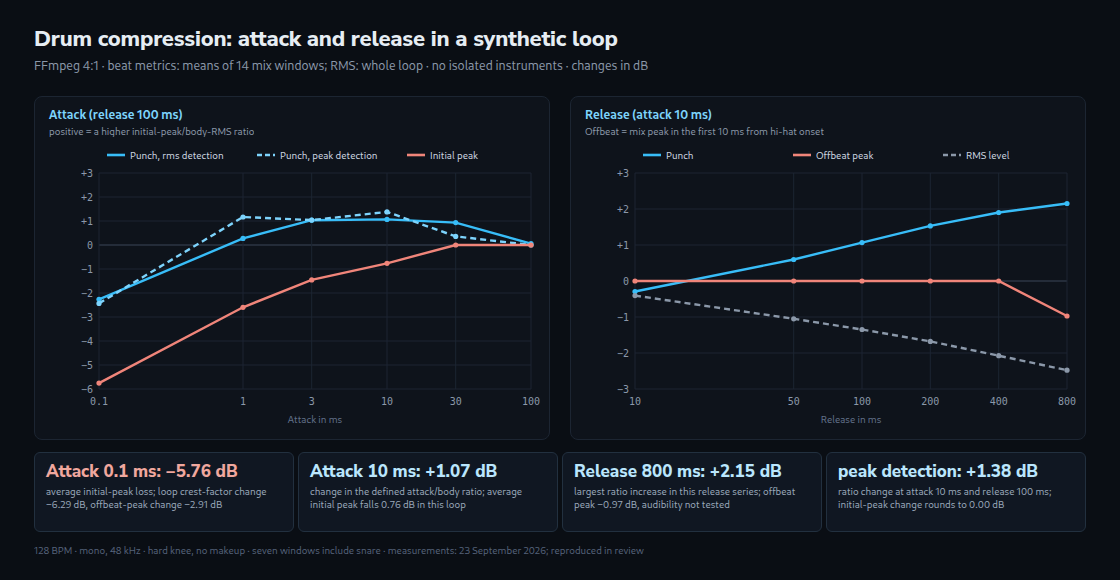
At attack 0.1 ms, the average initial peak falls by 5.76 dB. The start loses 2.26 dB relative to the following sound. At 3 and 10 ms, that ratio instead rises by about 1 dB. Initial peaks still fall somewhat. At 30 and 100 ms, peak changes round to 0.00 dB; this describes these windows, not a general boundary for drums.
Attack is not a waiting period: in the inspected code, attack smooths the detected level. Calculation starts with the first sample. An additional check with a 2 ms pulse and attack 10 ms demonstrates this: attenuation starts after about 0.15 ms with rms and 0.71 ms with peak. The pulse is not preserved merely because the attack setting is longer.

Release: the effect reaches the offbeat
At attack 10 ms, the measured attack-to-body ratio rises across the tested release settings: from −0.29 dB at 10 ms to +0.60 dB at 50 ms, +1.07 dB at 100 ms, +1.53 dB at 200 ms, +1.90 dB at 400 ms and +2.15 dB at 800 ms.
The offbeat peak remains unchanged within measurement precision through 400 ms. At 800 ms, its average falls by 0.97 dB. The control is therefore still affecting this later window. Whether that produces audible pumping or suits the music was not established by a listening test. One peak value also does not describe the full decay.
Peak and RMS: different level detectors
The inspected filter smooths the signal’s absolute value in peak mode and its square in rms mode. The gain curve then accounts for the different scale. Both modes use the same attack and release settings. This does not make peak detection universally faster; the additional pulse test actually shows earlier attenuation in RMS mode here.
At attack 10 ms and release 100 ms, peak produces +1.38 dB in the attack-to-body ratio for this loop, compared with +1.07 dB for rms. The average initial peak is practically unchanged with peak detection, while RMS reduces it by about 0.76 dB. Peak is therefore a candidate to compare for this particular effect, not an inherently better mode.
Comparing at equal loudness
When this compressor reduces loud portions of the test signal, the overall RMS level also falls. With peak detection and attack 100 ms, however, the loop is practically unchanged. “Every compressor makes audio quieter without makeup” is already too broad here. Other compressors can also use automatic gain or different operating modes.
A useful listening comparison matches loudness so that the louder version does not seem better just because of its level. The LUFS and True Peak Meter helps check exported files. Peaks also need checking after any gain increase.
Plain gain changes neither crest factor nor the defined punch ratio: peaks and the rest of the sound rise equally. A lower crest factor means less distance between peak and effective level. This alone does not establish that the sound seems “denser” or “better”.
What remains open for other recordings
These results apply to this loop, the fixed levels and the inspected filter. Other compressors can respond differently to signal changes, use lookahead or adjust release automatically. The same number on a control need not produce the same result. Even the ranking of the settings tested here is not a general rule.
Questions and answers
Can release be matched to the tempo?
Note lengths provide starting points for experiments. At 128 BPM, a quarter note lasts 468.75 ms and an eighth note 234.375 ms. Nevertheless, release 400 ms caused no measurable change to the offbeat peak here. The setting is neither a fixed duration of attenuation nor a direct boundary for audible pumping.
Why do input level and threshold matter?
For this filter with a fixed threshold, raising the input by 6 dB places it 6 dB further above that threshold. This changes the control response. It does not guarantee that every metric, such as punch or crest factor, moves in the same direction. Comparing settings therefore also requires a documented input level.
What does a high-pass filter in the sidechain do?
The sidechain is the control path whose signal determines attenuation. A high-pass filter in that path reduces low frequencies for detection. This can make a bass-heavy kick trigger the compressor less strongly. The filter does not directly remove bass from the audible signal, but the changed compression still changes the output.
The actual effect depends on the filter, threshold and material. Less attenuation or earlier recovery are not guaranteed. No sidechain high-pass filter was tested in this measurement series.
Sources
Related articles