English
WordPress Revisions: Storage, Limits and Reliable Measurement

Contents
WordPress revisions retain editing states for comparison and restoration. That history also adds data to the database. A large revision count alone proves neither a defect nor a slow website.
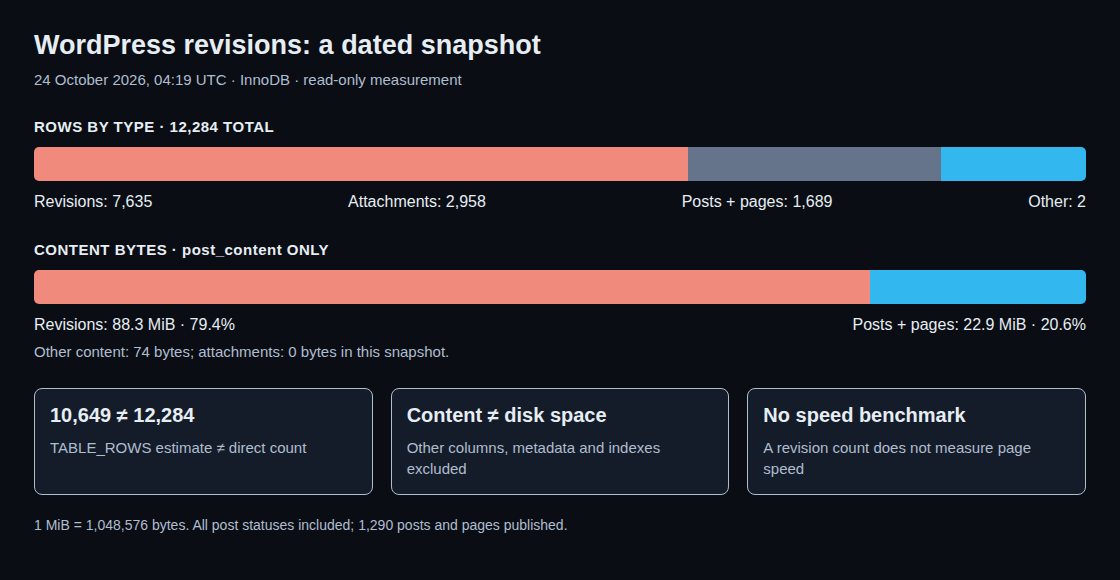
A read-only measurement of this website on 24 October 2026 at 04:19 UTC found 7,635 revisions among 12,284 rows in the posts table. Revisions accounted for about 79.4 percent of the stored content bytes. This dated snapshot replaces the earlier, now outdated figures.
What WordPress actually stores
By default, a revision stores the title, content and excerpt. WordPress saves the current editing state in a separate row linked to the post. Further edits turn that snapshot into an older state. Appropriately registered metadata can also participate in revisions. A revision is nevertheless not a complete backup of every post property or the entire website.
Not every save creates a revision. The post type must support revisions, revisions must be enabled, and the relevant fields normally need to have changed. Filters can modify this behaviour. A script touching 300 posts therefore does not necessarily create 300 revisions. Direct SQL updates bypass the normal WordPress workflow entirely.
Autosaves work differently: WordPress maintains an autosave per post and user. An existing autosave is updated; an autosave matching the saved post can be removed.
Count rows instead of relying on estimates
The measured table uses InnoDB. For this storage engine, information_schema.TABLES.TABLE_ROWS can be an estimate. During the measurement, the overview reported 10,649 rows, while a direct count returned 12,284. That difference is not evidence of missing records.
The direct count found 7,635 revisions, 2,958 attachments, 1,689 posts and pages, and two other records for global styles and navigation. The 1,689 posts and pages cover all statuses, including drafts, scheduled posts and trash. Only 1,290 posts and pages were published. An attachment record also does not represent every automatically generated image file.

Content size is not file size
OCTET_LENGTH(post_content) measured 92,563,135 bytes in revisions and 23,963,672 bytes in posts and pages: about 88.3 and 22.9 MiB respectively. One MiB equals 1,048,576 bytes. The two remaining records contained another 74 bytes combined; attachments had empty content fields in this measurement. Attachments can contain descriptions in other cases.
This query measures only the post_content column. Titles, other columns, metadata, indexes and already allocated table space are excluded. Consequently, 88.3 MiB of revision content does not establish that 88.3 MiB of disk space can be reclaimed or that compressed backups would shrink by the same amount.
Where the costs appear
Normal public post queries exclude revisions. That does not guarantee identical loading times with and without revisions: queries, indexes, caches, extensions and administration screens can behave differently. This review contains no comparative loading-speed benchmark.
Additional records increase the content of logical database exports. Backup and transfer times also depend on compression, storage and export methods. Three times as much content does not automatically require three times as long to copy.
Choose a retention policy
WP_POST_REVISIONS controls ordinary revision retention. true or -1 means unlimited; a positive integer limits revisions per post; false or 0 disables ordinary revisions. Autosaves are exempt. The measured installation used true. WordPress filters can change the effective limit.
A suitable limit depends on editing frequency and the depth of history required for restoration. Three to five versions is not a universal recommendation. Before extensive changes, a verified backup and an understandable change log complement the revision history.
Questions and answers
Does a new limit immediately remove all old revisions?
No. Normal trimming happens per post during the creation of a new revision. A configuration change or an unchanged save does not automatically clean the entire collection. Disabling ordinary revisions does not delete existing revisions either.
Why avoid deleting directly from the posts table?
A standalone SQL DELETE can leave associated metadata and cache entries behind. wp_delete_post_revision() uses the normal WordPress deletion workflow, including related cleanup. Removing old revisions requires a verified backup and an explicitly defined selection. No revisions were deleted during this measurement.
Does deletion shrink the table file?
Not necessarily. InnoDB can reuse freed space internally. Whether rebuilding returns space to the filesystem depends partly on the tablespace and configuration. Rebuilding can require additional space and maintenance time; this does not justify a blanket OPTIMIZE TABLE command.
Which query shows the distribution?
The following read-only query separates post type and status. The wp_ prefix must match the actual table prefix.
SELECT post_type, post_status,
       COUNT(*) AS row_count,
       COALESCE(SUM(OCTET_LENGTH(post_content)), 0) AS content_bytes
FROM wp_posts
GROUP BY post_type, post_status
ORDER BY post_type, post_status;
The byte count covers only the content field. During ongoing editing, successive queries can capture different snapshots.
Sources
- WordPress: wp_save_post_revision()
- WordPress: revision fields
- WordPress: wp_create_post_autosave()
- WordPress: wp_revisions_to_keep()
- WordPress: Revisions
- WordPress: wp_delete_post_revision()
- WordPress: wp_delete_post()
- MariaDB: Information Schema TABLES
- MariaDB: OPTIMIZE TABLE
- WordPress developer resources
Related articles