English
Autoload in WordPress: The Values in the autoload Column and the Query That Still Finds Them

Contents
Every page on this blog starts with the same database query, sent before WordPress knows which page was asked for at all: it reads a set of settings it expects to need.
Which settings belong to that set is decided by one column named autoload. The column gained new values in recent versions, and the query recommended by almost every older guide now returns nothing.
What autoload actually does
WordPress keeps its settings in a single table. Each row holds a name, a value, and a note saying whether the value should come along automatically.
The marker lets WordPress save database queries. Instead of fetching each setting separately when it is needed, WordPress loads all settings marked for autoloading together and keeps them in memory for the rest of the request.
That trade has a price. Whatever carries the mark travels on every single request – on pages that never touch it, on files served through PHP, on every visit from every crawler.
Three values in the column, four that count as loaded
The column used to be simple. It held yes or no, and the meaning of both was obvious. Since version 6.6 it holds more.
on and off are the explicit answers: something asked for the value to be loaded, or asked for it not to be.
auto-on and auto-off mean nobody asked and WordPress decided.
auto means nobody asked and WordPress did not decide either.
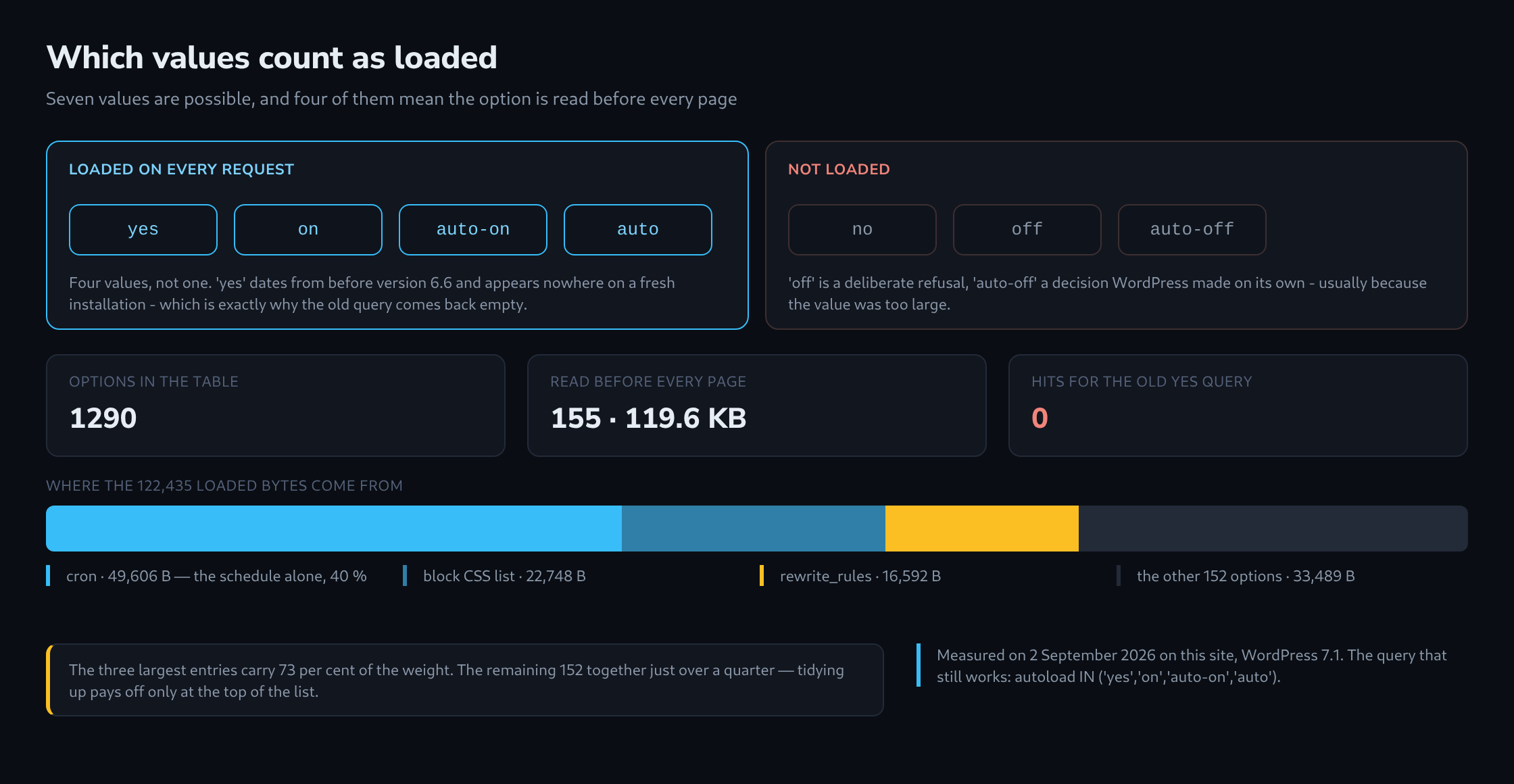
The list of values that count as loaded lives in the source as a function called wp_autoload_values_to_autoload(), and it returns four of them: yes, on, auto-on and auto. Everything else stays on disk until something asks for it by name.
Why the old query finds nothing
The line that appears in guide after guide is SELECT option_name FROM wp_options WHERE autoload = 'yes'.
Run against this site, it returns zero rows out of 1290 options – while 155 of those options are in fact read before every page. The column here holds only off, on and auto. The value yes appears nowhere at all.
Nothing warns about this. There is no error and no notice, and an empty result looks exactly like a clean bill of health. A site can be checked this way for years and appear to have no autoloaded options whatsoever.
The query that still works names all four values: WHERE autoload IN ('yes','on','auto-on','auto').

Undecided means loaded
The value auto is the surprising one. It records that no decision was made – and an option in that state is loaded regardless.
The path through the code is short. An explicit true, on or yes becomes on. An explicit false, off or no becomes off. Where nothing explicit was given, a filter gets a say: true becomes auto-on, false becomes auto-off, and no answer at all becomes auto.
Because auto sits in the load list, silence has a direction. An option added without a word about autoloading is read before every page from that moment on. On this site 55 options are in exactly that state.
The limit at 150,000 bytes
One filter ships with WordPress and does nothing but watch the size. If a value serialises to more than 150,000 bytes, the answer becomes auto-off and the option stays where it is.
Two details are worth keeping. The limit is itself a filter, wp_max_autoloaded_option_size, so a plugin can move it. And it only applies where nothing explicit was said – an option marked on by hand is loaded whatever its size.
The rule shows up plainly in the numbers here. No loaded option on this site passes 150,000 bytes, while the largest option in the entire table – a cached directory size of 102,403 bytes – is marked off and never travels.
What 155 options really cost
Measured on 2 September 2026: 155 of 1290 options are read before every page, 122,435 bytes in total, a little under 120 KB.
The distribution matters more than the sum. 145 of the 155 are smaller than a kilobyte. Three of them carry 88,946 bytes between them, close to three quarters of the entire load.
The largest by a wide margin is cron, at 49,606 bytes: 40 per cent of everything loaded, sitting in one row. It holds 338 scheduled events, and 321 of those are a single kind – one publish_future_post for each post still waiting for its date.
That is not a defect, and no plugin is to blame for it. It is what the option is for. But it does mean a blog with a long editorial calendar reads its entire calendar before serving any page at all, and that this weight grows with the schedule rather than with the traffic. Worth knowing before a search for the culprit starts somewhere else entirely.
Questions and answers
Does a persistent object cache change the cost of autoloaded options?
It saves the database query, not the load. With an object cache such as Redis or Memcached, WordPress stores the whole set of autoloaded options there and fetches it back in one piece on every request instead of asking the table. What ends up in PHP’s memory afterwards is the same as without a cache, on this site still 122,435 bytes per request, and the whole set is loaded before the first line of the page is produced.
One side effect deserves attention: the set sits in the cache as a single entry. As it grows, that entry grows with it, and Memcached in its default configuration refuses items larger than 1 MB. At a little under 120 KB this site is far from that limit; a blog whose cron option grows with its editorial calendar should still keep an eye on the total.
Can the cron option be shrunk without putting scheduled posts at risk?
Only at the margins. The 321 publish_future_post entries are not leftovers; each is the instruction to publish a waiting post at its date. Without the entry, the post stays in the future status even after its date has long passed. On average an event takes up just under 147 bytes (49,606 bytes for 338 events), so every additional scheduled post makes the option larger by roughly that amount, and every publication takes it out again.
Tidying up is worthwhile among the other 17 events. Recurring tasks from plugins that were removed long ago sometimes remain there, because a plugin has to unschedule its own events on removal and not every plugin does. Even if all 17 could go, at average size that would save only about 2.5 KB.
Nothing changes, incidentally, when WP-Cron is triggered by a system cron job instead. That only affects who kicks off the due events; the list is still stored in the same option and loaded before every page.
Does WordPress set a deactivated plugin’s options to off?
No. Deactivation leaves the table untouched, and options only disappear if the plugin cleans up after itself on uninstall, so an option created without an autoload value keeps being read before every page even after its plugin is gone. Among the 55 options in the auto state, the name prefixes usually reveal which plugin a row belongs to.
Related articles