English
 Deutsch
 Polski
Camera Resolution and Lens: Pixels per Metre and the DORI Thresholds for Identification

Contents
Megapixels alone do not describe the detail available at a doorway or across a car park. The useful planning quantity is pixels per metre (px/m) at the target position. A wide overview and a detailed face view can require different camera positions or lenses.
Pixel density depends on the recorded resolution and the width of the scene at the relevant distance. Manufacturers may publish DORI distances, so this information is not necessarily absent from datasheets. Such distances still need checking against the actual installation, recording settings and required task.
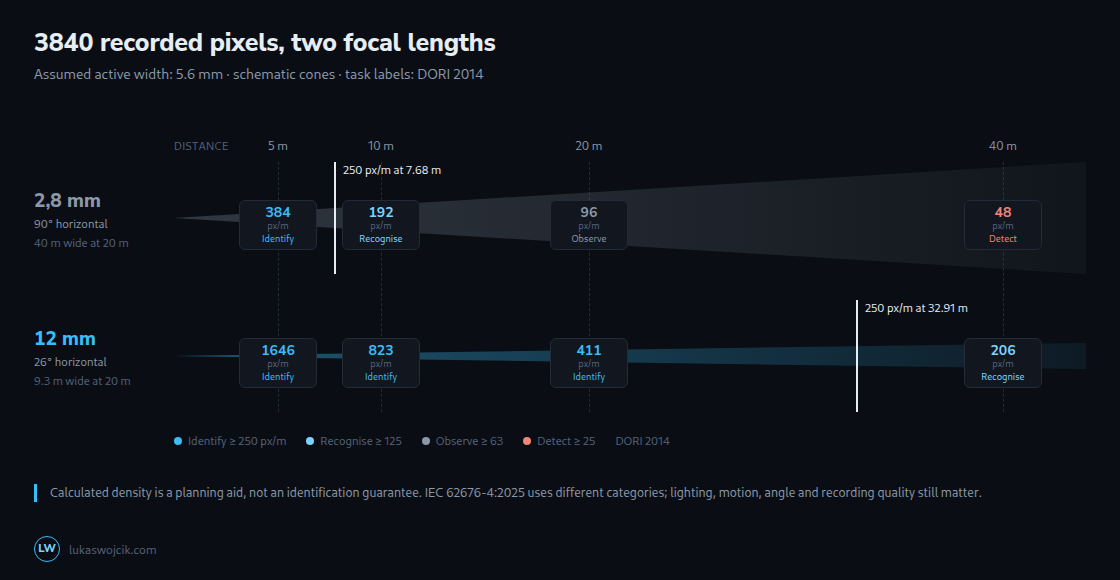
Pixel density at the target position
Image resolution counts pixels; scene pixel density relates those pixels to a real-world width. A UHD stream with 3840 horizontal pixels spreads the same count across a narrow doorway or a much wider area, depending on the field of view.
The basic calculation is density = horizontal pixels / scene width in metres. It estimates available sampling detail, not the evidential value of the recording. Focus, optics, lighting, compression, motion and viewing angle also matter.
A geometric field-of-view estimate
For a simple rectilinear lens model, scene width ≈ distance × active sensor width / focal length. Sensor width and focal length need the same unit; distance and scene width can both be in metres. Alternatively, a known horizontal angle α gives width = 2 × distance × tan(α/2). Distortion, cropping and real lens behavior can change the result. The model uses distance along the optical axis to a scene plane perpendicular to that axis.
The example assumes an active width of 5.6 mm and a recorded width of 3840 pixels, at a distance of 20 m. These are calculation inputs, not a universal definition of the “1/2.8-inch” format. The actual active area and output mode must come from the camera specification.
| Lens | Angle of view | Scene width at 20 m | Pixels per metre |
|---|---|---|---|
| 2.8 mm | 90° | 40.0 m | 96 |
| 12 mm | 26° | 9.3 m | 411 |
Within this model, with resolution and active sensor width unchanged, doubling focal length doubles px/m while narrowing coverage. Multiplying distance by four divides density by four. Real installations need a margin and a check at the target position.
DORI 2014 and the 2025 edition
The familiar DORI labels come from the 2014 edition of IEC 62676-4: detection at 25 px/m, observation at about 63 px/m, recognition at 125 px/m and identification at 250 px/m. Observation concerns counts and characteristic details; recognition concerns matching a previously seen person. These are guidance levels for human interpretation of visual images, not guaranteed identification or universal thresholds for video analytics.
The edition matters. IEC 62676-4:2025 was published on 9 October 2025 and uses seven categories, shown below using the English labels in Axis’s explanation. In that framework, 250 px/m is Characterize, 500 px/m is Validate and 1500 px/m is Scrutinize. The old and new labels must not be silently equated. Neither scale automatically establishes court admissibility or insurer acceptance; project requirements and actual footage need separate assessment. The old steps are not all doublings: 25 to about 63 is roughly a factor of 2.5.
| Category | px/m |
|---|---|
| Overview | 20 |
| Outline | 40 |
| Discern | 80 |
| Perceive | 125 |
| Characterize | 250 |
| Validate | 500 |
| Scrutinize | 1500 |
The same camera, two lenses: the 2014 scale
| Distance | 2.8 mm: field | 2.8 mm: density | 12 mm: field | 12 mm: density |
|---|---|---|---|---|
| 5 m | 10.0 m | 384 px/m · Identify | 2.3 m | 1646 px/m · Identify |
| 10 m | 20.0 m | 192 px/m · Recognise | 4.7 m | 823 px/m · Identify |
| 20 m | 40.0 m | 96 px/m · Observe | 9.3 m | 411 px/m · Identify |
| 40 m | 80.0 m | 48 px/m · Detect | 18.7 m | 206 px/m · Recognise |
For the assumed geometry, the 2.8 mm lens reaches the old 250-px/m planning value at 7.68 m and 125 px/m at 15.36 m. The 12 mm lens reaches 250 px/m at 32.91 m, with a 9.33 m scene width at 20 m. These are calculated crossings of a chosen density, not distances at which a face suddenly becomes identifiable or unidentifiable.
Resolution and coverage as a trade-off
At a fixed aspect ratio and field of view, doubling the pixel count increases horizontal sampling by √2, about 41%. The example widths 2688 and 3840 differ by about 43%; “4 MP” does not specify one mandatory width. Changing focal length from 2.8 to 4 mm gives the same 43% density increase in this model, but sacrifices coverage. Lens interchangeability, optical quality and cost depend on the camera.
At 20 m, the assumed 2.8 mm lens covers 40 m. Achieving 250 px/m across that width requires 10,000 recorded horizontal pixels. At 16:9 this is about 56.25 MP; another aspect ratio gives another total. A narrower view or multiple cameras may achieve the task more practically, but this is a coverage trade-off.
What the calculation cannot guarantee
Nominal pixel density cannot recover details lost during capture or encoding. With motion across the image plane at 1.4 m/s, a 1/30 s exposure corresponds to about 4.7 cm of travel. At 411 px/m that is about 19 pixels of blur. Higher gain, noise reduction and strong compression can also reduce usable detail. Opening an adjustable aperture admits more light; it does not itself cause the increased noise attributed to low-light capture.
Camera height and the angle to a face affect which features are visible. A steep overhead view can miss facial details even at high density. A practical design may combine an overview camera with a dedicated passage view. The mounting position should balance face visibility, coverage and protection, followed by tests with moving subjects in the expected day and night conditions.
Questions and answers
Does digital zoom in the camera or the recorder increase pixel density?
Ordinary digital enlargement of an existing recording does not add captured detail. Greater optical magnification, a shorter target distance or more genuinely recorded pixels over the same scene can increase density. Sensor cropping before downsampling differs from enlarging an already reduced recording; the relevant measure is the actual recorded detail.
Does corridor mode, with the image turned to portrait, change the pixel density?
A pure 90° rotation preserves sampling density if pixels are square and there is no additional resampling. In this example, 3840 × 2160 pixels over a 5.6 × 3.15 mm active area become 2160 pixels horizontally. With 12 mm at 20 m, the width becomes 5.25 m and density remains about 411 px/m.
Corridor mode changes the shape of the covered area. Depending on the camera, the camera module or lens assembly is physically rotated and the output orientation adjusted. Cropping, stabilization and reduced recording resolution can alter the simple result; the delivered stream needs checking.
What scene width corresponds to the chosen 250-px/m value?
For the old 250-px/m example, the calculated scene width is the horizontal pixel count divided by 250. The lens determines at what distance that width occurs. The following values are geometric limits for that chosen density, not identification guarantees:
- 3840 horizontal pixels: 15.36 m.
- 2688 horizontal pixels: about 10.75 m.
- 1920 horizontal pixels: 7.68 m.
With the assumed sensor width, the 2.8 mm and 12 mm lenses reach 15.36 m of scene width at 7.68 m and 32.91 m distance respectively. A 4 mm lens reaches that width at about 10.97 m.
At unchanged recorded resolution, a wider scene has fewer pixels per metre. Another camera, a narrower capture zone or higher effective resolution can address that constraint. The selected task, standard edition and worst expected lighting should determine the required margin.
Does a shorter exposure time remove motion blur at night?
A shorter exposure reduces motion blur even in low light; it does not necessarily eliminate blur or deliver a usable image. Under the same transverse-motion assumption, 1/120 s gives about 1.17 cm of travel and 4.8 pixels of blur. With illumination and aperture unchanged, the collected light is one quarter of that at 1/30 s, a difference of two stops.
The exposure system may compensate with gain or an adjustable aperture, within hardware and configured limits. Gain also amplifies noise; opening the aperture reduces depth of field. Additional suitable visible or infrared illumination may help. The acceptance check should use the saved recording, target motion and lighting at the capture point, including reflection and overexposure risks.
Related articles