English
Local AI for Multiple Simultaneous Requests: Comparing vLLM, llama.cpp and Ollama

Management Summary
Running a language model on controlled hardware requires software to accept requests and deliver answers. Ollama, llama.cpp and vLLM provide different ways to organise that work for a private assistant or a team. When several requests arrive together, memory and processing capacity determine waiting times. The comparison explains why the number of registered users alone is not a useful sizing measure. The practical choice balances answer quality, response time and operating effort under the expected workload.
Contents
Twenty signed-in users do not automatically create twenty simultaneous model requests. Arrival rate, prompt length, response length and acceptable waiting time matter. vLLM, llama.cpp Server and Ollama can serve multiple requests, but differ in setup, memory management and defaults. A ranking without measurements on the same hardware would be misleading.
This comparison covers vLLM 0.29.0, llama.cpp b11011 and Ollama 0.34.0. The examples calculate memory requirements; no GPU performance benchmark was run.
What continuous batching changes
With strictly sequential execution, the next request waits for the current response to finish. Continuous batching can remove completed requests from a running batch and admit new work. llama.cpp and vLLM support this approach; Ollama can also process multiple requests concurrently with suitable models.
A new response is not guaranteed to start after exactly one iteration. The prompt must first pass through prefill processing. Available slots, the scheduler, token budget and KV memory determine admission. vLLM can split long prompts through chunked prefill, making --max-num-batched-tokens important alongside --max-num-seqs.
Batching can increase aggregate throughput and shorten queues while reducing an individual response’s token rate. The KV cache stores intermediate results for tokens already processed, so the model need not calculate them again for every new token. PagedAttention manages this cache in blocks to reduce wasted gaps in memory. Neither unlimited capacity nor a universal speedup follows.

Defaults are not capacity guarantees
| Engine | Inspected default | Meaning for 20 requests |
|---|---|---|
| Ollama 0.34.0 | OLLAMA_NUM_PARALLEL=1 per model |
Normally one request runs for a single model; further requests wait up to the queue limit. |
| llama.cpp b11011 | Automatic --parallel: four slots and unified KV; continuous batching enabled |
Four slots are available. Memory, prompt processing and scheduling still affect execution. |
| vLLM 0.29.0 | GPU-dependent sequence defaults commonly 256 or 1024 | A limit above 20 guarantees neither immediate admission of every prompt nor acceptable response times. |
The inspected Ollama version restricts some model families, including qwen35, to one parallel request. Raising the environment value does not override that architecture restriction. Insufficient KV memory can cause vLLM to preempt requests and recompute later.
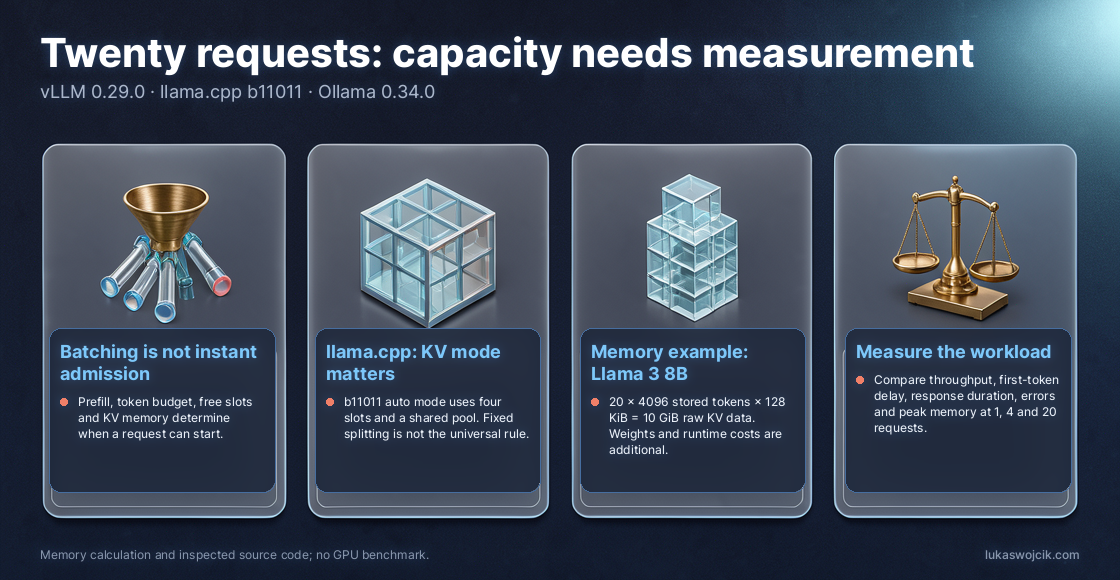
KV memory: a reproducible example
For a conventional full attention cache, raw storage per token is 2 × layers × KV heads × head dimension × bytes per value. Llama 3 8B gives 2 × 32 × 8 × 128 × 2 = 131072 bytes, or 128 KiB with 16-bit values.
Twenty separate contexts holding 4096 tokens each require 10 GiB of raw KV data. Context includes both input and generated output. Weights, workspaces, CUDA graphs, memory management and other runtime costs are additional. Different architectures, compressed caches and shared prefixes change the calculation.
Weight quantization and KV quantization are separate settings. Smaller weights leave more room for cache. GGUF supports several data types and quantizations in llama.cpp; a file need not contain uniformly sized values. vLLM supports methods such as AWQ, GPTQ and FP8 depending on model, kernels and hardware. Its documented 0.92 GPU memory fraction limits the model executor; explicit KV memory sizing can replace automatic inference.
Joint configuration of context and concurrency
In the inspected server path, Ollama multiplies effective context length by parallel request count. Twenty requests with 4096 tokens each therefore imply capacity for 81920 tokens. Memory pressure can cause CPU placement, lower throughput or startup failure; actual placement needs checking.
llama.cpp allocation depends on KV mode. Without unified KV, context capacity is divided across sequences and adjusted to internal block boundaries. With unified KV, sequences share a pool. Dividing -c by slot count is therefore not a universal rule. In b11011, --kv-unified-per-slot 4096 can cap each slot; without explicit -c, the pool is sized as slots times that limit. Startup logs and effective limits remain authoritative.
A local API as a basic function test
All three projects implement selected OpenAI-compatible API routes. Compatibility does not mean complete equivalence of endpoints, parameters, tools or chat templates. This example starts a local vLLM endpoint with bounded context and response length. Installation, model access and sufficient memory are prerequisites.
# Terminal 1: server; terminal 2 follows successful startup
vllm serve NousResearch/Meta-Llama-3-8B-Instruct \
  --served-model-name llama-3-8b --host 127.0.0.1 \
  --max-model-len 4096 --max-num-seqs 20

# Terminal 2: single function test
curl --fail-with-body --max-time 120 \
  http://127.0.0.1:8000/v1/chat/completions \
  -H 'Content-Type: application/json' \
  -d '{"model":"llama-3-8b","messages":[{"role":"user","content":"Return the word OK."}],"max_tokens":32}'
The example listens on 127.0.0.1, the loopback address accessible only from the same computer. llama.cpp normally uses port 8080 and Ollama port 11434. Team access requires an appropriate reachable address, TLS, authentication and load limits. Local Ollama does not treat an API key supplied by a compatible client as access protection. A reverse proxy can provide these controls.
Home Assistant’s OpenAI integration documents support only for the official endpoint. A separate Ollama integration exists; model capabilities and permissions for home control need their own checks.
A choice supported by measurements
A useful comparison keeps model weights identical or documents quality differences, uses the same hardware and comparable input and output lengths. After warm-up, load levels of 1, 4 and 20 active requests can reveal behaviour. Recorded metrics include aggregate throughput, time to first token, time between tokens, complete response duration, error rate and peak memory. The median marks the middle of the sorted response times. The 95th percentile is the time at or below which about 95% of responses finish; the slowest 5% take longer.
Ollama simplifies model operation, llama.cpp offers flexible local execution, and vLLM provides many controls for heavy workloads. Measured response quality, waiting time and operating effort determine the suitable choice.
Further worked examples appear in GPU Memory for an LLM: Weights and KV Cache.
Questions and answers
Does an 8-bit cache halve memory?
The raw values use half as much storage as 16-bit values: 5 rather than 10 GiB in this example. Scales, blocks and management data add overhead. Actual consumption and quality loss depend on method and model.
Does a high parallelism value suffice for twenty people?
No. Active requests, context, hardware, model restrictions and required response times matter. Queues can still form with many slots.
Does one successful API response prove team suitability?
A single call checks only the basic path. Load, long prompts, streaming, cancellation and error handling require separate tests.
Related articles