English
 Deutsch
 Polski
How to Allocate Marketing Budgets Using GA4

Contents
GA4 Cross-Channel Conversions and Budget Allocation: A Technical Deep Dive
In today’s fragmented digital landscape, users rarely convert after a single interaction. They might discover a product via a generic Google Search, click a retargeting ad on LinkedIn a few days later, and finally convert through a direct email campaign.
For a data-driven architect, relying on the old “Last Non-Direct Click” model is obsolete. It heavily skews reality, punishing top-of-funnel channels while artificially inflating the value of bottom-funnel touchpoints. With Google Analytics 4 (GA4), we have access to robust cross-channel reporting and the algorithmic power needed to inform highly accurate budgeting tools.
Here is a deep dive into how to leverage GA4’s cross-channel capabilities to optimize marketing spend.
1. Demystifying GA4 Cross-Channel Conversions Reporting
GA4 fundamentally changed how we look at attribution by moving away from session-based reporting to an event-driven architecture. This allows for a much more flexible and granular approach to cross-channel tracking.
The Power of Data-Driven Attribution (DDA)
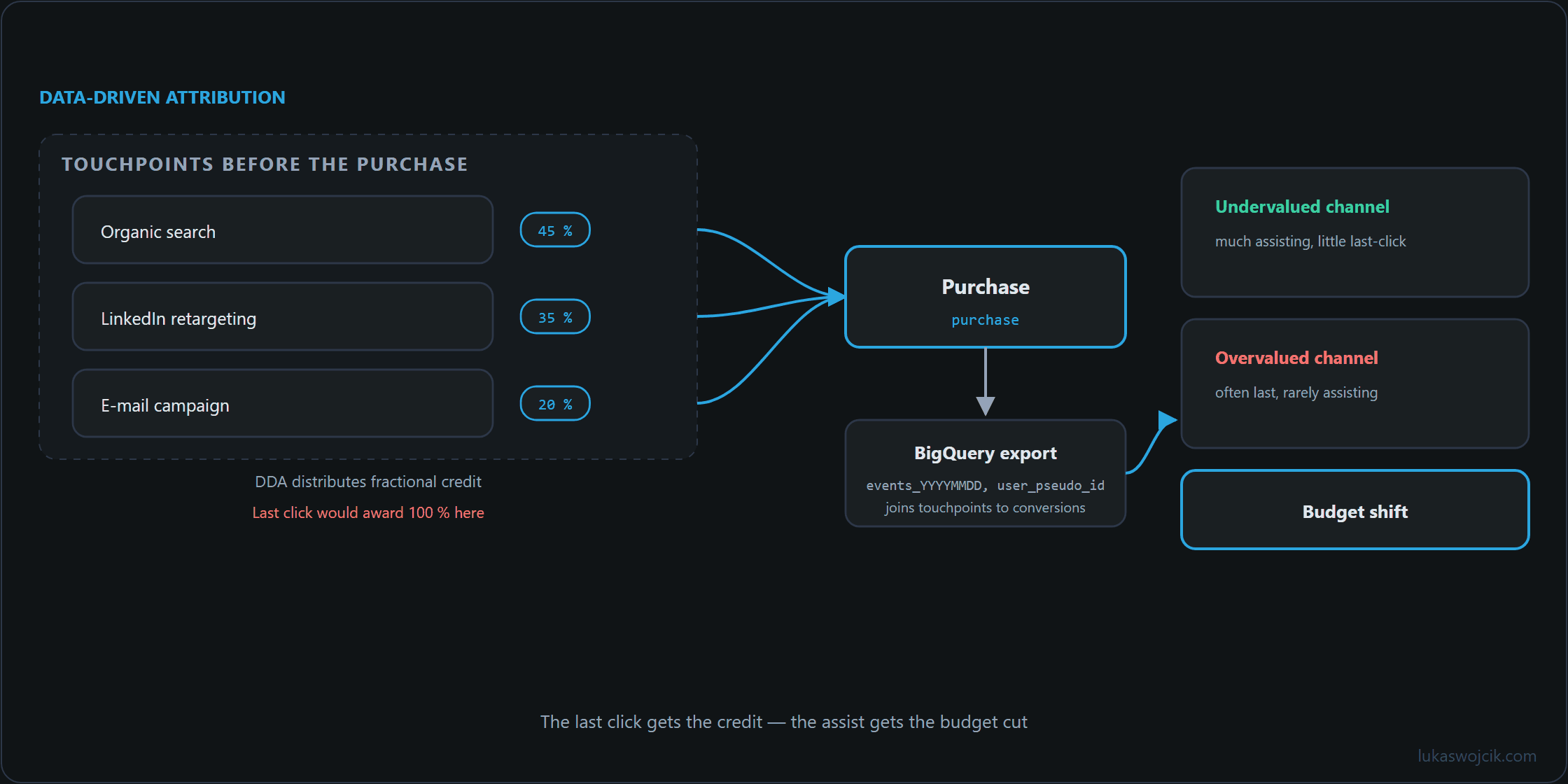
By default, GA4 utilizes the Data-Driven Attribution (DDA) model for cross-channel reporting. Unlike static models (like First-Click or Linear), DDA uses machine learning algorithms to evaluate all converting and non-converting paths. It calculates the actual contribution of each touchpoint—taking into account factors like time from conversion, device type, and ad interactions.
Key Reports in the Advertising Workspace
A clear picture of cross-channel performance starts in the Advertising section of GA4:
- Model Comparison: This report compares how different attribution models (e.g., Last Click vs. Data-Driven) value the marketing channels. If a channel’s value jumps significantly under DDA, it means it plays a crucial role in the early or middle stages of the customer journey.
- Conversion Paths: This is where the magic happens. The Conversion Paths report visualizes the exact sequence of channels users interact with before converting. It categorizes touchpoints into Early, Mid, and Late touchpoints, which gives a crystal-clear view of the funnel’s anatomy.
Privacy-First Tracking Considerations
As we prioritize compliant tracking, it is vital to mention Google Consent Mode v2 and Enhanced Conversions. GA4 uses conversion modeling to fill in the gaps for users who decline cookies. This means the cross-channel reports remain statistically robust and actionable, even in a strict GDPR environment, without compromising user privacy.
2. Translating Cross-Channel Data into Budgeting Strategy
GA4 provides the data, but the real engineering challenge is turning that data into a dynamic budgeting strategy. GA4’s cross-channel metrics can serve as the engine for a budget allocation architecture.
Identifying Under- and Over-Valued Channels
The Model Comparison report feeds budget allocation directly:
- Overvalued Channels (The “Closers”): Channels that look amazing on Last-Click but drop in value under DDA might be getting too much credit. Slightly reducing their budget is a safe experiment.
- Undervalued Channels (The “Assistants”): Channels that generate high value in early touchpoints under DDA often suffer from budget cuts because marketers don’t see direct ROI. Identifying these makes it possible to allocate budget to the top of the funnel.
Building Advanced Budgeting Tools (The Tech Stack)
For enterprise-level applications and custom SaaS solutions, looking at the GA4 UI is rarely enough. A true Cross-Channel Budgeting Dashboard integrates the GMP stack with the backend architecture:
- BigQuery Export: Enable the daily event export from GA4 to BigQuery. This delivers raw, unsampled data.
- Custom Attribution Modeling: Python or SQL queries against the raw touchpoint data build custom Markov Chain or Shapley Value attribution models, tailored to the specific business logic.
- Data Visualization (Looker Studio / Custom Dashboards): Connect BigQuery to Looker Studio to build dynamic dashboards that cross-reference GA4 attributed revenue with actual ad spend APIs (Google Ads, Meta Ads, LinkedIn Ads).
- Automated Bidding / Allocation: Node.js or Python scripts adjust daily budgets across platforms based on the calculated cross-channel ROAS (Return on Ad Spend) from the BigQuery models.
Getting the Data out of GA4: The BigQuery Export
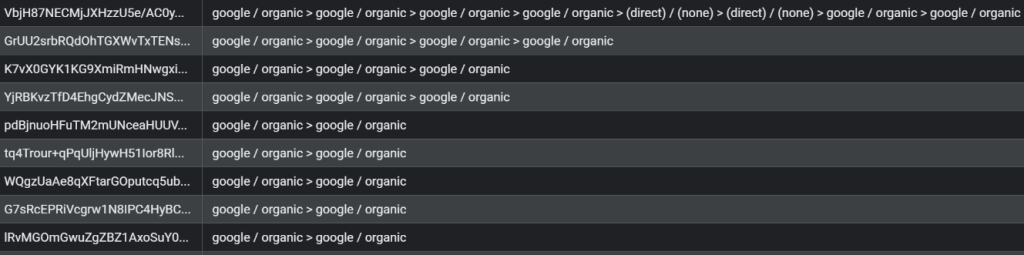
The following BigQuery Query delivers user journeys from the raw data. It shows a per user (user_pseudo_id) view and reveals which paths were taken. The example reads a single daily export table (events_20260701) and therefore only reconstructs paths within that one day. Journeys spanning several days require the wildcard table events_* instead, narrowed to the intended lookback window with WHERE _TABLE_SUFFIX BETWEEN '20260601' AND '20260701'.
WITH conversions AS (
  SELECT
    user_pseudo_id,
    event_timestamp AS conversion_time
  FROM
    `your_project.analytics_123456789.events_20260701`
  WHERE
    event_name = 'purchase'
),

touchpoints AS (
  SELECT
    e.user_pseudo_id,
    e.event_timestamp,
    c.conversion_time,
    CONCAT(
      IFNULL((SELECT value.string_value FROM UNNEST(e.event_params) WHERE key = 'source'), '(direct)'),
      ' / ',
      IFNULL((SELECT value.string_value FROM UNNEST(e.event_params) WHERE key = 'medium'), '(none)')
    ) AS source_medium
  FROM
    `your_project.analytics_123456789.events_20260701` e
  JOIN
    conversions c ON e.user_pseudo_id = c.user_pseudo_id
  WHERE
    e.event_name = 'session_start'
    AND e.event_timestamp <= c.conversion_time
)

SELECT
  user_pseudo_id,
  STRING_AGG(source_medium, ' > ' ORDER BY event_timestamp ASC) AS conversion_path
FROM
  touchpoints
GROUP BY
  user_pseudo_id
ORDER BY
  conversion_path DESC;
Summary
Cross-channel budgeting is no longer a guessing game. By leveraging GA4’s Data-Driven Attribution, respecting privacy standards, and routing raw data through robust backend systems like BigQuery, we can engineer custom analytics solutions that ensure every marketing dollar is spent exactly where it has the highest mathematical impact.
Questions and answers
Why do channel totals from a path query on the BigQuery export come out lower than those in the Advertising workspace?
The gap is expected and does not point to a bug in the query.
The interface reports modeled conversions; the BigQuery export contains only what was actually collected. Nothing that consent modeling adds back appears in events_*, so a path reconstruction from raw data is by definition the smaller of the two numbers. The same applies to user_pseudo_id: it identifies a browser, not a person, and a cleared cookie starts a new one, which cuts a journey into two shorter ones rather than losing it outright.
Both effects push in the same direction, and that is the part worth knowing before a budget hangs on it. Early touchpoints are the ones most likely to be severed from the conversion, so the export systematically understates exactly the assist channels that data-driven attribution was meant to reveal. The workable split is to take totals from the interface and ratios from the export, and to state which of the two a given figure came from.
Related articles