English
 Deutsch
 Polski
Matomo Tracking API: Server-Side Hits, Mandatory Parameters and the Mistakes That Still Return 200

Contents
Matomo can record a page view, event or goal through an HTTP request to matomo.php. Server-side tracking also covers activity outside the browser, such as a confirmed order or subscription cancellation. A hit means one tracking request; a visit can contain several hits.
A successful HTTP response does not prove correct recording in the intended site. Normal responses often contain a transparent GIF; send_image=0 requests HTTP 204 without an image. Transport, processing and attribution need separate checks, especially with excluded traffic or a tracking queue.
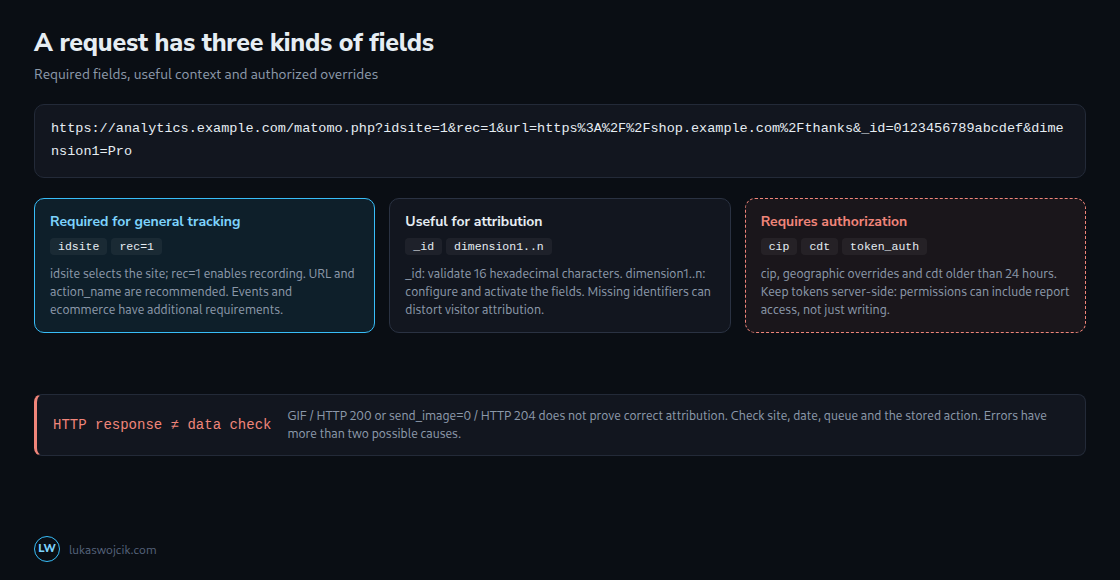
Required fields and action-specific parameters
The general API requires idsite and rec=1: the site identifier and the recording switch. url and action_name are recommended, not general mandatory fields. A meaningful page URL and title still make reports easier to interpret.
Additional requirements depend on the action: events need non-empty e_c and e_a; configured goals use idgoal. Ecommerce orders need the ecommerce fields, including order ID and revenue. String values need correct URL encoding. A valid page-view request is not automatically a valid purchase request.
Visitor identity and visit boundaries
The documented _id format is exactly 16 hexadecimal characters. UUIDs and full MD5 hashes are unsuitable input formats. However, the inspected Matomo 5.x implementation can truncate a longer _id before decoding rather than reject it. The sender should validate the documented format instead of relying on that behavior.
Without a usable visitor ID, Matomo can use a temporary configuration identifier based on attributes such as IP address, browser and language. Identical server attributes can merge unrelated activity. This does not force every hit into one visit for an entire day: identification and visit boundaries differ, with a default inactivity timeout of 30 minutes. A high event count alone cannot distinguish a batch job from bot traffic.
Dimension ID and scope
dimension1 refers to dimension ID 1 configured for the selected site. The dimension must exist and be active; the number does not create a new field automatically.
A visit-scoped dimension retains the last supplied value for that visit. An action-scoped dimension stores a value for the individual action. A current subscription tier can describe a visit; a tier selected during one event can describe that event. Both scopes support segmentation.
Authorization, timestamps and retention
cip overrides the IP address; geographic overrides and older timestamps also require authorization. cdt accepts a UTC datetime or Unix timestamp. A date within the last 24 hours does not normally require a token solely because of cdt; an older date does. Missing authorization can cause an error, but HTTP 400 is not a complete or universal diagnostic rule.
A tracking token is not a write-only credential. Depending on permissions, token_auth also retrieves reports or performs administrative operations. A dedicated account should have only the required site-level write access. Matomo 5 tokens inherit account rights; Matomo 6 additionally supports a token access-level cap. Tokens belong in server-side secrets and HTTPS POST bodies, not browser code or URL logs. Tokens restricted to secure requests require the supported POST mechanism.
Backfilling requires checking raw-data retention. The inspected 5.x implementation rejects dates beyond its configured deletion cutoff, including the deletion schedule interval. Invalid or future dates can fall back to the request time, so the stored date needs verification. Historical reports then need reprocessing; this cannot restore raw records already deleted.
Diagnosing missing or misassigned hits
| Cause | What is seen |
|---|---|
| Missing rec=1 | Recording is not enabled. |
| Wrong idsite | A valid but wrong site ID can misattribute data; an unknown site can cause an error. |
| Invalid or missing _id | Visitor attribution can change; validate 16 hexadecimal characters before sending. |
| Old cdt without authorization | Dates older than 24 hours require authorization; check the response and stored date. |
| Inactive or unknown dimension | Verify the site, dimension ID and activation. |
| Queue or exclusion | Queue delays, bot handling and exclusion rules can explain a missing action. |
A visits-log entry confirms storage of the displayed action. Absence alone does not prove rejection: the site, date, time zone, segment, availability of log views and tracking queue need checking. A small test in a separate test site helps. Temporary On-Premise tracker debug logging or queuedtracking=0 can isolate processing problems; tokens and visitor data must not be exposed during diagnosis.
Questions and answers
Where does a server get a valid _id when the same visitor is also tracked in the browser?
The JavaScript tracker provides getVisitorId() through a callback in the _paq queue after initialization. This avoids depending on cookie names or internal layouts. An approved browser-to-server handoff can attach that ID to the triggering action. Matching identifiers help attribution but do not override visit boundaries or privacy settings.
For authenticated accounts, Matomo recommends uid rather than forcing a visitor ID through cid. A stable internal identifier avoids unnecessarily sending an email address. Hashing a predictable customer number is not anonymization and may be reversible by enumeration. Identifier use must follow the measurement design and required consent; cookieless measurement does not automatically justify a permanent customer identifier.
Why do server-side hits all show the same location?
A direct backend request usually carries the sending server’s network address. Its location can describe the server or remain inaccurate. Authorized cip can supply a separately established visitor address; trusted-proxy configuration also affects address extraction. Arbitrary forwarded headers are not trustworthy. Browser language and the geolocation provider can affect the result, so a data-centre location is a clue rather than a certainty.
Related articles