English
 Deutsch
 Polski
Smart Home and AI: Automation, Home Assistant Integration and Camera Analytics

Contents
AI can add specific capabilities to a smart home: turning speech into commands, identifying objects in camera footage or analyzing sensor readings. A fixed rule such as switching on a light after motion remains sufficient for many tasks. A learning model does not automatically make a home secure or error-free.
Separate recognition from decisions
An image model may detect a person; an automation then decides whether to send a notification. Keeping these steps separate makes faults easier to trace: detection first, rule evaluation second, delivery third. Heating control also needs suitable sensors, controllable equipment and operating limits. Using AI alone does not establish an energy saving.
General-purpose AI must not replace smoke, fire or water alarms or silence those alarms based on an uncertain classification. Camera and language models can provide additional signals, but can miss hazards or misclassify harmless situations.
Connecting through Home Assistant
Home Assistant connects devices, events and automations. A voice assistant includes speech recognition, processing of the recognized text and speech synthesis. A large language model is not required for basic home-control commands.
A local Assist pipeline can use Speech-to-Phrase or Whisper for recognition and Piper for spoken responses. Speed and language support depend on the selected model and hardware. A cloud service moves processing outside the home and adds an internet dependency.
The Ollama integration connects a local model server. Home Assistant documents device control as experimental and requires a model that supports tools. Access should be restricted to deliberately exposed entities. Local processing reduces external data transfers; permissions, logs, backups and other integrations still matter for privacy.
Camera analysis with Frigate
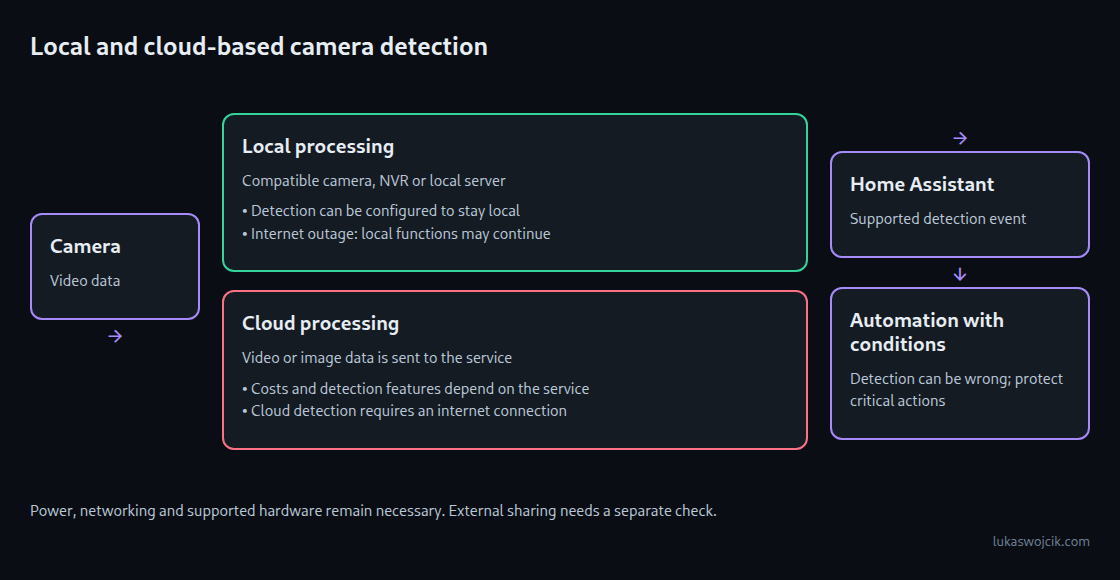
Frigate is a network video recorder with locally runnable object detection. A suitable stream, compatible codecs, enough computing capacity and a matching detector configuration are prerequisites. Google Coral is one accelerator option; other supported devices or GPUs may fit a particular installation. RTSP support alone does not guarantee trouble-free integration of every camera.
UniFi Protect: check the specific feature
UniFi Protect runs its documented edge-AI detections on premises, using supported cameras or accessories such as AI Port and AI Key. This avoids a required cloud upload for that analysis. Remote access and optional cloud archiving are separate data paths.
Person, vehicle, plate, face and audio recognition depend on camera model, microphone, accessories and software version. The current manufacturer compatibility table describes the differences. AI Key adds further analysis, but results can be inaccurate or delayed by processing queues.
A recognized license plate is not secure proof of identity. Opening a gate requires a separate access decision and the gate’s safety mechanisms. An unconfirmed AI detection should not trigger hazardous movement.
From an event to a useful automation
The UniFi Protect integration can expose supported object and sound events to Home Assistant. A useful test starts with the entity actually available, the event type and a controlled trial. Conditions such as zone, time and notification interval follow. Object detection can reduce false alerts but remains sensitive to viewpoint, lighting, weather and occlusion.
Questions and answers
Is a Raspberry Pi enough for local voice control?
A lightweight local pipeline can handle a limited set of home commands. Open-ended recognition and large conversation models may need substantially more computing power. Language, microphone, room noise and response time need testing together.
Does local detection survive an internet outage?
A fully local data path can keep working. Power, camera, network and processing hardware must still function. Cloud-based notifications may remain unavailable.
Does a missing audio entity always mean a hardware limitation?
No. Software version, settings, permissions and integration support can also explain a missing entity. Features available in Protect and entities exposed to Home Assistant need separate checks.
Related articles