

 English
 Deutsch
 Polski
Speed Up a WordPress Site with Lite Page Cache

Contents
A page cache stores completed HTML so WordPress does not have to rebuild the same public page on every request. This can reduce server work. It does not guarantee a particular loading time, search ranking or conversion increase.
This article describes the public Lite Page Cache 1.1.0 source checked on 24 October 2026. LukasWojcik.com runs an additionally adapted 1.1.1 version. Features of that local version cannot automatically be attributed to the GitHub download.
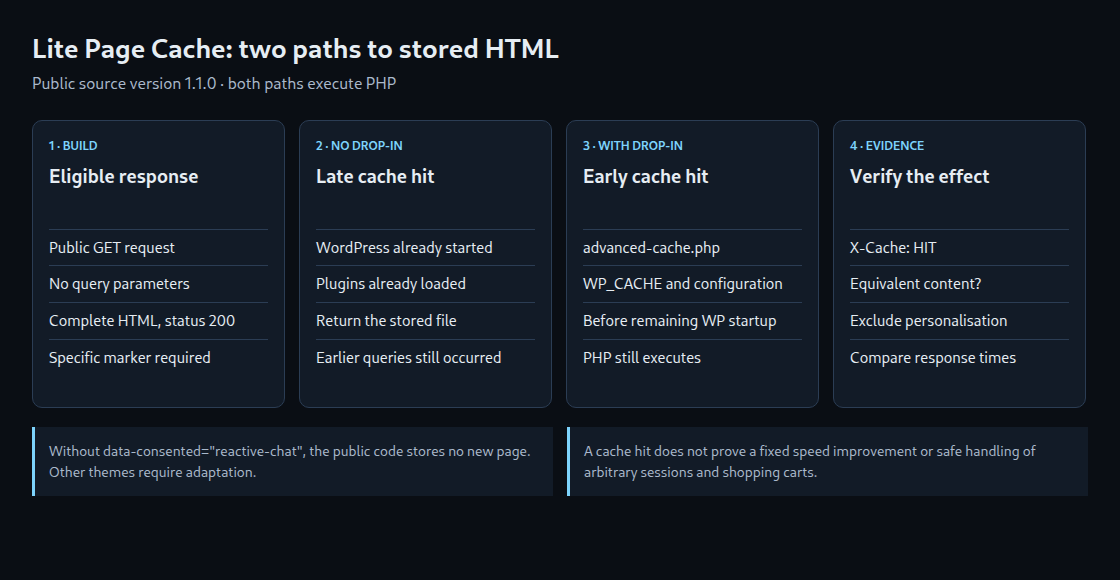
What a cache hit actually skips
Without the drop-in, a hit is served at the WordPress template_redirect hook. WordPress and plugins have already started; database queries performed earlier still took place.
The optional advanced-cache.php drop-in runs earlier and can return an existing hit before the remaining WordPress bootstrap. This path still executes PHP. Serving a static file directly through the web server is a different architecture.
An important limitation of the public download
The checked code stores sufficiently large, complete HTML responses with status 200. It also requires the site-specific marker data-consented="reactive-chat". Without that marker, this version does not create a new entry, even when the page otherwise appears suitable.
The plugin is therefore not an unchanged universal cache for arbitrary themes. Deployment elsewhere requires replacing this dependency with a completeness check appropriate to that website. Merely adding a dummy marker does not establish that a page is complete or working.
Check compatibility before installation
- Inspect the complete plugin directory from the linked repository. Drop-in operation requires the supplied
advanced-cache.phpas well aslite-page-cacher.php; the main PHP file and README alone are insufficient. - In a test environment, check the theme dependency, write permissions and existing cache components. The plugin does not replace another plugin’s drop-in.
- Transfer the reviewed directory to
wp-content/plugins/and activate the plugin. - Check the drop-in status under Settings → Lite Page Cache. Early serving requires the file in
wp-content/, valid configuration andWP_CACHE. Activation attempts setup; write failures can require manual configuration.
Which requests are excluded?
The checked version skips logged-in visits, non-GET requests and nonempty query parameters, not just UTM parameters. Certain WordPress cookies for login, password access and remembered comment details also bypass caching. Previews, search pages, error pages and other special views are not newly stored.
These checks do not detect all possible personalisation. The reviewed code has no general protection for shopping carts, sessions, membership areas or arbitrary third-party cookies. Those cases require explicit exclusions and tests with separate visitors. A hashed cache filename is not access control.
Invalidation and expiry
Saving or deleting a post invalidates its cached page and listing pages. Comment approval invalidates the associated post and listings. The default maximum age is one hour; an expired entry is discarded and rebuilt on the next eligible request. The lpc_ttl filter can change that period; 0 disables expiry.
Clear All Cache is available after global layout changes or changes without suitable invalidation. In the public version, editing or removing an already approved comment lacks the extra hooks present in the site’s local 1.1.1 version.
Verify the effect rather than assuming it
An eligible anonymous GET request builds the entry. Its initial response need not contain the cache comment added to the stored copy. A later hit shows X-Cache: HIT; the drop-in also sends X-Cache-Handler: advanced-cache.php. The HTML note reads Served from Lite Page Cache, with (drop-in) added for that path.
A before-and-after test should compare response times and equivalent page content. Also check login, query parameters, comment approval and expiry. A HIT proves a cache hit, not a measured speed improvement or full compatibility.
Questions and answers
Does approval of a reply invalidate the cache too?
Yes. A reply is also a comment and triggers the relevant approval hooks. In the public version, other individual posts generally remain cached. A recent-comments widget on those pages can therefore remain stale until the next regeneration.
Related articles


One comment
Update: Version 1.1.0 of the plugin has been on GitHub since 25 September 2026. It no longer clears the whole cache on every change, only the entry of the affected post and the list pages, and every entry expires after one hour. Hits carry an
X-Cacheheader, and an optionaladvanced-cache.phpdrop-in answers them before WordPress loads. Visitors with remembered comment data are never cached. The version uploaded on 6 September could not be activated; 1.1.0 fixes that. Source: wp-lite-page-cache on GitHub.