English
Tutorial: GA4 Consent States in BigQuery and Looker Studio

Contents
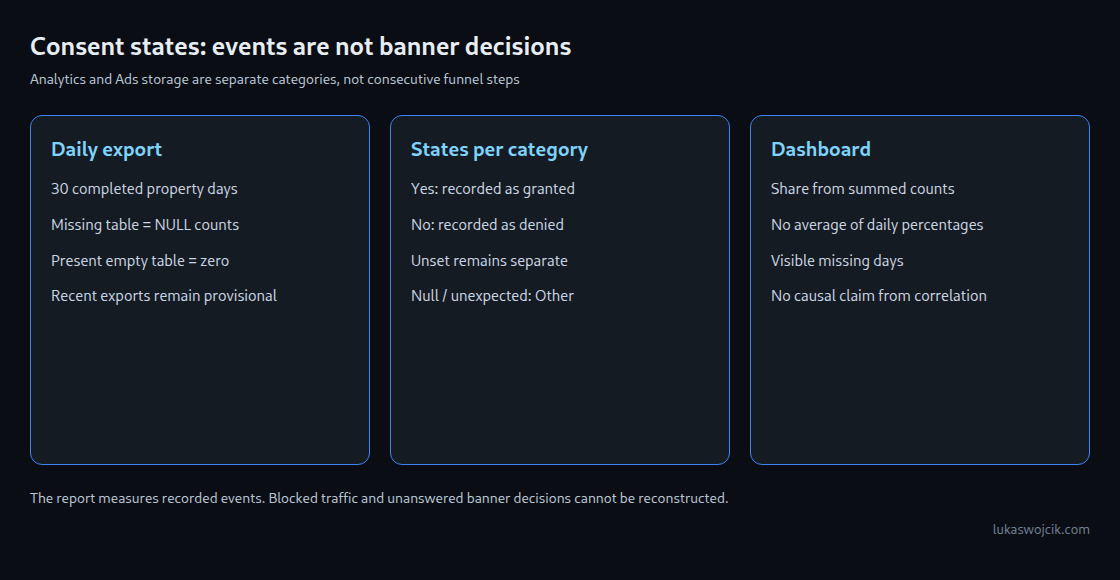
A GA4 consent report answers a narrow but useful question: what share of the exported events carries each consent state? A value of 70% for analytics_storage = Yes means 70 of every 100 recorded events have that state. It does not mean that 70% of visitors accepted the banner.
This tutorial builds a daily status report from BigQuery and prepares the counts for Looker Studio. The report separates Analytics storage from advertising storage, retains unknown states and exposes missing daily tables. Changes provide a starting point for investigation, not proof of a banner defect or lost conversions.
1. Definition and prerequisites
The starting point is an existing GA4 BigQuery link with daily export enabled, access to the dataset and permission to run queries. Consent Mode must communicate the intended default and updated states correctly. Linking BigQuery does not reconstruct historical banner decisions.
The event schema contains privacy_info.analytics_storage and privacy_info.ads_storage, with documented values Yes, No and Unset. The query also retains null or unexpected values under other. An unset state is not an explicit refusal. These two fields alone do not describe every Consent Mode setting: advertising storage is distinct from consent for advertising user data and personalization.
The denominator includes every exported event in the selected daily tables. An active visit contributes more events than a short visit; a default state before a banner decision can differ from the later state. In a basic implementation, blocked traffic is absent from GA4. Advanced implementations can send cookieless pings under denied storage. Browser blocking and collection failures still leave gaps. None of these gaps can be recovered by dividing the remaining rows.
2. Thirty completed calendar days
The example uses Europe/Warsaw; that timezone must match the GA4 property. Project and dataset names require replacement. The result contains one row per day, from 30 days ago through yesterday. It excludes intraday tables and the current day.
-- Standard SQL. Replace project/dataset and property timezone.
WITH days AS (
  SELECT day FROM UNNEST(GENERATE_DATE_ARRAY(
    DATE_SUB(CURRENT_DATE('Europe/Warsaw'), INTERVAL 30 DAY),
    DATE_SUB(CURRENT_DATE('Europe/Warsaw'), INTERVAL 1 DAY))) AS day
), available AS (
  SELECT table_name FROM `project.analytics_XXXXXXXXX.INFORMATION_SCHEMA.TABLES`
  WHERE table_type = 'BASE TABLE'
    AND REGEXP_CONTAINS(table_name, r'^events_[0-9]{8}$')
), counts AS (
  SELECT PARSE_DATE('%Y%m%d', _TABLE_SUFFIX) AS day,
    COUNT(*) AS total_events,
    COUNTIF(privacy_info.analytics_storage = 'Yes') AS analytics_yes,
    COUNTIF(privacy_info.analytics_storage = 'No') AS analytics_no,
    COUNTIF(privacy_info.analytics_storage = 'Unset') AS analytics_unset,
    COUNTIF(COALESCE(privacy_info.analytics_storage NOT IN ('Yes','No','Unset'), TRUE)) AS analytics_other,
    COUNTIF(privacy_info.ads_storage = 'Yes') AS ads_yes,
    COUNTIF(privacy_info.ads_storage = 'No') AS ads_no,
    COUNTIF(privacy_info.ads_storage = 'Unset') AS ads_unset,
    COUNTIF(COALESCE(privacy_info.ads_storage NOT IN ('Yes','No','Unset'), TRUE)) AS ads_other
  FROM `project.analytics_XXXXXXXXX.events_*`
  WHERE _TABLE_SUFFIX BETWEEN
    FORMAT_DATE('%Y%m%d', DATE_SUB(CURRENT_DATE('Europe/Warsaw'), INTERVAL 30 DAY))
    AND FORMAT_DATE('%Y%m%d', DATE_SUB(CURRENT_DATE('Europe/Warsaw'), INTERVAL 1 DAY))
  GROUP BY day
)
SELECT d.day, a.table_name IS NOT NULL AS table_present,
  IF(a.table_name IS NULL, NULL, COALESCE(c.total_events, 0)) AS total_events,
  IF(a.table_name IS NULL, NULL, COALESCE(c.analytics_yes, 0)) AS analytics_yes,
  IF(a.table_name IS NULL, NULL, COALESCE(c.analytics_no, 0)) AS analytics_no,
  IF(a.table_name IS NULL, NULL, COALESCE(c.analytics_unset, 0)) AS analytics_unset,
  IF(a.table_name IS NULL, NULL, COALESCE(c.analytics_other, 0)) AS analytics_other,
  IF(a.table_name IS NULL, NULL, COALESCE(c.ads_yes, 0)) AS ads_yes,
  IF(a.table_name IS NULL, NULL, COALESCE(c.ads_no, 0)) AS ads_no,
  IF(a.table_name IS NULL, NULL, COALESCE(c.ads_unset, 0)) AS ads_unset,
  IF(a.table_name IS NULL, NULL, COALESCE(c.ads_other, 0)) AS ads_other
FROM days AS d
LEFT JOIN available AS a
  ON a.table_name = CONCAT('events_', FORMAT_DATE('%Y%m%d', d.day))
LEFT JOIN counts AS c USING (day)
ORDER BY day;
table_present = false means that no corresponding daily base table exists. Counts remain NULL in that case. An existing empty table produces zero counts. Neither an existing table nor a zero count proves that collection was complete. The query requires at least one matching export table and compatible schemas; access or schema failures remain errors rather than fabricated zeros.
The numeric suffix filter limits the selected daily tables. Before a scheduled run, a BigQuery dry run and a bytes-billed limit provide a cost check. Daily tables can receive late events for up to three days after the event date, so recent results remain provisional. A scheduled destination table needs replacement or an upsert of the affected dates; blindly appending this 30-day result every day duplicates counts. A small reporting table reduces repeated raw scans but does not guarantee a fixed bill.
3. Dashboard setup without a false funnel
Looker Studio supports native funnel charts. The chart is still unsuitable for the sequence “all events → Analytics Yes → Ads Yes”: the final two sets need not be nested. Separate bars or time series show the two storage categories without inventing a sequence.
The reporting table connects through the BigQuery connector. day is the date dimension; count fields use Sum. Two scorecards calculate the event shares from the sums:
CASE WHEN SUM(total_events) > 0 THEN SUM(analytics_yes) / SUM(total_events) ELSE NULL ENDThe fields are formatted as percentages, without another multiplication by 100. The equivalent Ads formula uses ads_yes. A zero denominator remains blank. A daily time series can use the same calculation grouped by day. A companion table displays Yes, No, Unset and Other counts for each storage category, total events and table_present. Missing days stay visible as gaps.
Period comparison uses equally long windows and reports missing days alongside the result. A mean of daily percentages gives small and large days equal weight: 1 of 1 events and 0 of 99 events would average to 50%, while the correct combined event share is 1%. Missing tables must not disappear silently from a period comparison.
4. Interpretation and boundaries
A change can reflect the event mix, traffic sources, defaults, banner configuration, tag timing or an export problem. A controlled test of the banner and tag requests, together with release history and export checks, helps distinguish these explanations. Correlation between an event share and total volume does not establish causation.
The report does not reveal whether GA4 behavioral modeling is eligible or active. Google’s criteria include absolute event and user volumes over several days, implementation requirements and additional model-quality checks. An event percentage alone cannot test these criteria. Behavioral modeling and conversion modeling also answer different questions.
The output contains daily aggregates without user identifiers. Access restrictions and care with small groups remain necessary; aggregation alone is not an automatic anonymity guarantee. A decision-based acceptance rate needs a separately defined CMP measure, including the treatment of repeated prompts, changed choices and unanswered banners.
Questions and answers
Can a share near 100% prove that the banner is successful?
No. If only consented traffic reaches GA4, almost all recorded events can carry Yes while many declined visits remain absent. The report describes available event data, not all banner interactions.
Does Unset belong in the No category?
No. Keeping Unset and other missing or unexpected values separate makes configuration gaps visible. The displayed Yes share still uses all recorded events as its denominator.
Does a missing day mean that no events occurred?
No. A missing export table is a data-availability issue. The query returns null counts for that day; zero is reserved for a present but empty table.
Related articles