English
 Deutsch
 Polski
Extracting Specific Tables from Massive SQL Dumps using PHP

Contents
A large MySQL dump may contain only one table that needs further work. Extracting relevant text does not require loading the entire file into an editor or PHP memory. The important distinction is the intended result: a text excerpt for inspection or a database backup that can actually be restored.
A line-based filter is not an SQL parser. The PHP example below copies selected table sections identified by standard comments. Its output remains a text excerpt for review. A targeted fresh export or a validated restore workflow is preferable when recoverability is the goal.
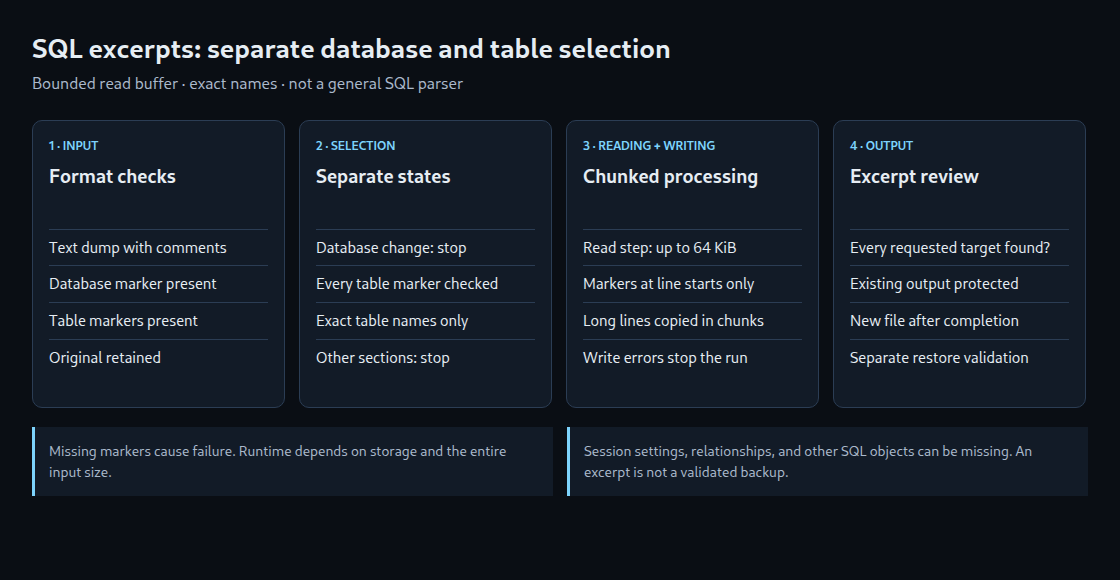
Why one on/off flag is insufficient
Database and table are separate states. A database change ends the current selection. Every new table marker requires another selection decision. Checking table markers only while copying is disabled would continue copying unrelated tables after the first match.
fgets() alone does not guarantee tiny memory usage. Without a length limit, it reads a whole line, and an extended INSERT can be large. This example reads at most 65,536 bytes per step and examines markers only at the start of a line. Long data lines are copied in chunks.
Required dump format
- An uncompressed text file using the usual
mysqldumpcomment format with database markers, such as an export made with--databasesor--all-databases. - The file contains
-- Current Database:and the relevant-- Table structure for tableand/or-- Dumping data for tablemarkers. Dumps made with--skip-commentsare not supported by this method. - Exact database and table names, rather than one ambiguous shared prefix. Embedded backticks in identifiers and different generator formats are outside its scope.
- PHP 8 CLI and a local filesystem supporting hard links within one directory. Input, partial output, and final output belong outside publicly accessible web directories.
Compressed dumps first need decompression into a protected workspace with sufficient storage. Inspecting the file header helps identify the format, but does not establish the complete contents, every later table, or all line lengths.
PHP example: explicitly named table sections
php extract.php dump.sql excerpt.txt shop orders customers selects orders and customers from database shop. Neither the output file nor its .part file may already exist.
<?php
// PHP 8 CLI. Produces a text excerpt, not a validated restore file.
umask(0077);
if ($argc < 5) {
    fwrite(STDERR, "Usage: php extract.php input.sql excerpt.txt database table [table...]\n");
    exit(2);
}
[, $input, $output, $database] = $argv;
$tables = array_fill_keys(array_slice($argv, 4), true);
$part = $output . '.part';
$in = $out = false;
$created = false;

try {
    $in = @fopen($input, 'rb');
    if ($in === false) throw new RuntimeException('Cannot open input');
    $out = @fopen($part, 'xb');
    if ($out === false) throw new RuntimeException('Cannot create new partial output');
    $created = true;
    $currentDatabase = null;
    $copy = false;
    $lineStart = true;
    $seen = [];

    while (($chunk = fgets($in, 65537)) !== false) {
        if ($lineStart) {
            if (preg_match('/^-- Current Database: `([^`]+)`\r?\n?$/D', $chunk, $m)) {
                $currentDatabase = $m[1];
                $copy = false;
            } elseif (preg_match('/^-- (?:Table structure|Dumping data) for table `([^`]+)`\r?\n?$/D', $chunk, $m)) {
                $copy = $currentDatabase === $database && isset($tables[$m[1]]);
                if ($copy) $seen[$m[1]] = true;
            } elseif (str_starts_with($chunk, '-- ')) {
                $copy = false;
            }
        }
        if ($copy) {
            $offset = 0;
            $length = strlen($chunk);
            while ($offset < $length) {
                $n = fwrite($out, substr($chunk, $offset));
                if ($n === false || $n === 0) throw new RuntimeException('Write failed');
                $offset += $n;
            }
        }
        $lineStart = str_ends_with($chunk, "\n");
    }
    if (!feof($in)) throw new RuntimeException('Read failed');
    if (array_diff_key($tables, $seen)) {
        throw new RuntimeException('Requested table marker missing; format or names differ');
    }
    if (!fflush($out)) throw new RuntimeException('Flush failed');
    if (!fclose($out)) throw new RuntimeException('Close failed');
    $out = false;
    // Same-directory hard link: fails if the final name already exists.
    if (!@link($part, $output)) throw new RuntimeException('Cannot publish new output');
    if (!unlink($part)) throw new RuntimeException('Output exists, partial link cleanup failed');
    $created = false;
    fwrite(STDERR, "Text excerpt written. Separate restore validation required.\n");
} catch (Throwable $e) {
    if (is_resource($out)) fclose($out);
    if ($created && is_file($part)) unlink($part);
    fwrite(STDERR, $e->getMessage() . "\n");
    exit(1);
} finally {
    if (is_resource($in)) fclose($in);
}
The final output appears only after the input has been read, writes have succeeded, and at least one matching marker has been found for each requested table. A marker proves section selection, not complete SQL objects. An existing result is not overwritten. Errors produce a nonzero exit status rather than reporting a partial excerpt as a finished result.
From an excerpt to a restore
Session settings such as character set and SQL mode, foreign-key dependencies, triggers, views, and routines may sit outside the copied sections. Unusually formatted SQL strings can also contain comment-like text. This example does not interpret those SQL structures and is not a universal import filter.
When the original server remains available, mysqldump accepts a database followed by explicitly selected table names. For InnoDB, --single-transaction can provide a consistent backup; other storage engines and concurrent schema changes require an appropriate strategy. When only a dump remains, an isolated restore followed by targeted object export offers a more controlled route. Target version, storage, dependencies, and permissions need checking before import.
Questions and answers
How fast is the filter?
The entire input file is read. Runtime and memory use depend on storage, output volume, PHP, and other factors. A blanket promise of several gigabytes in seconds is not reliable. The bounded read buffer simply avoids holding an entire unusually long line in PHP memory.
What does a missing match mean?
A name may be absent, spelled differently, or present without the expected comments. The script reports an error in that case. An empty excerpt is not presented as evidence of an empty table.
Does success prove that every selected object can be restored?
No. A restore test with schema, row, and dependency checks is a separate step. The original dump remains unchanged.
Sources and review date
2026-10-24
Related articles