English
Activation, deactivation, uninstall: the plugin lifecycle

Contents
- Three phases, three entry points
- Activation is not an update hook
- Custom table with dbDelta and a versioned schema
- Deactivation: stop, but do not delete
- Uninstall: uninstall.php, register_uninstall_hook and the opt-in
- Multisite: once per network, but data per site
- Limits and open points
- Questions and answers
- Sources
Many plugins leave traces long after they have stopped doing useful work: a table nobody reads, cron events with no callback left to handle them, or a capability on the administrator role that no longer controls access to any screen. WordPress offers three separate entry points for activation, deactivation and uninstall, with some behaviour that is easy to overlook. The activation hook does not run on updates, a network activation on multisite fires exactly once instead of once per site, and an uninstall routine registered as a closure ends in a fatal error.
This article follows a small but complete plugin through all three phases. It creates its own table with dbDelta(), stores a schema version and migrates on updates, schedules a daily cron event, grants a capability to administrators and removes all of it again through an uninstall.php that deletes data only after an explicit opt-in. Every statement about core behaviour is checked against the handbook, the function reference and the source code of WordPress 7.1.2, the current release on 29.09.2026.
Three phases, three entry points
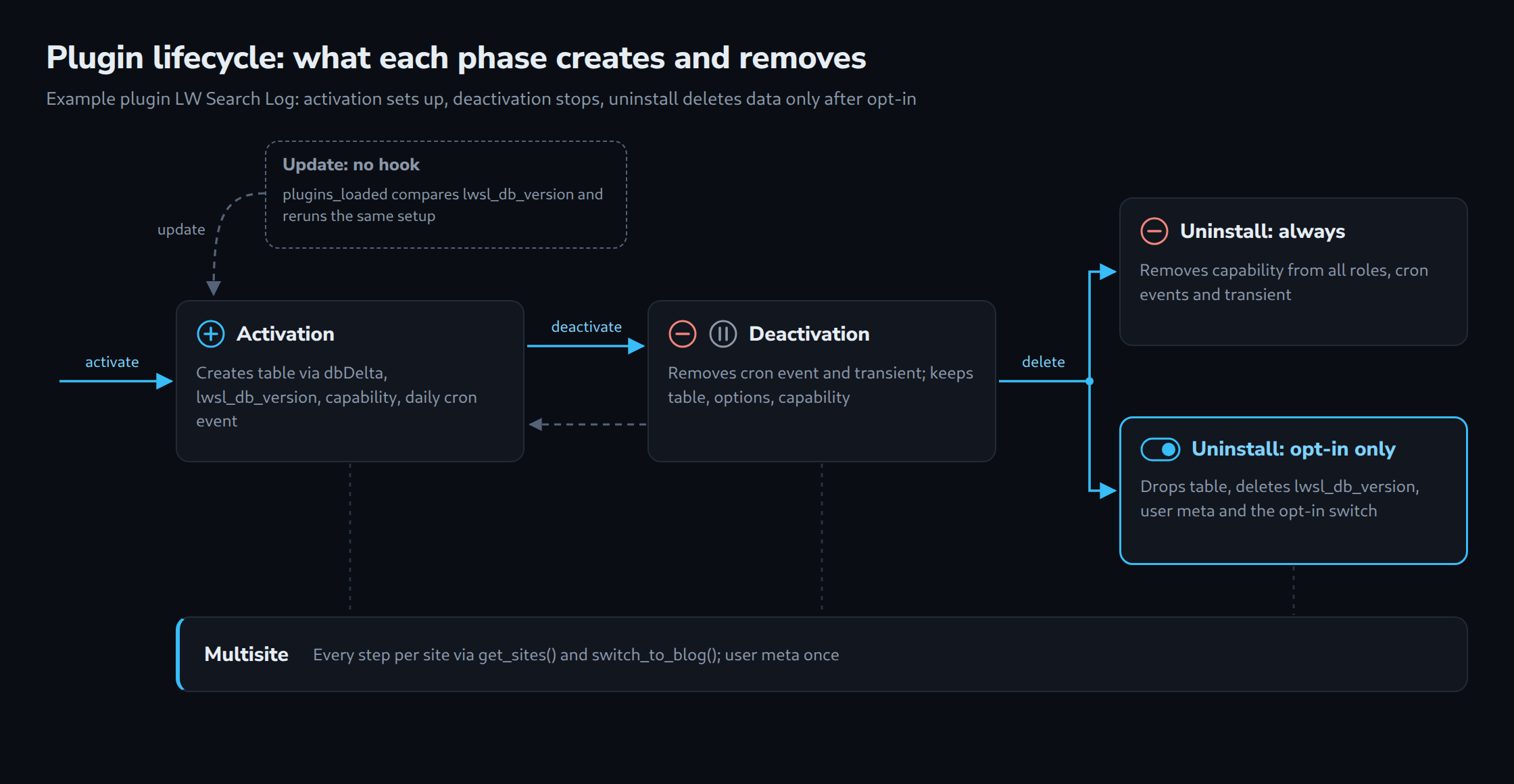
The Plugin Handbook separates the phases cleanly: activation is the place for rewrite rules, custom tables and default options, deactivation removes temporary data such as caches, and only uninstall should remove permanent data like options and tables.
Technically, register_activation_hook() and register_deactivation_hook() are thin wrappers. Both call plugin_basename() on the file passed in and attach the callback to a dynamic action, activate_{$plugin} or deactivate_{$plugin}. The first argument therefore has to be the main plugin file, normally __FILE__ in that very file. Uninstall works differently: either WordPress includes an uninstall.php from the plugin folder, or it calls a callback registered with register_uninstall_hook(). Both variants run only when the plugin is deleted, not when it is deactivated.
| Phase | Entry point | Example plugin: creates or removes |
|---|---|---|
| Activation | register_activation_hook() |
creates table, schema version, capability, cron event |
| Update | no hook, version check on plugins_loaded |
same setup routine, plus data migration |
| Deactivation | register_deactivation_hook() |
removes cron event and transient, keeps everything else |
| Uninstall | uninstall.php |
always removes capability, cron and cache; table, options and user meta only after opt-in |
Activation is not an update hook
Since WordPress 3.1 the activation hook no longer fires on updates. Andrew Nacin explained the change on Make WordPress Core in October 2010: before that, the hook ran on single updates but not on bulk updates, and manual updates via FTP or SVN never triggered it. The recommendation from the same post still applies: a version is stored in the database and compared with the version in the code, and the upgrade procedure runs whenever the two differ.
The current source confirms this. Before an update, Plugin_Upgrader::deactivate_plugin_before_upgrade() deactivates an active plugin with deactivate_plugins( $plugin, true ), and the second argument means silent, so no deactivation hook runs. During background updates via cron the plugin is not deactivated at all. Afterwards, wp-admin/update.php reactivates the plugin with activate_plugin( $plugin, '', ! empty( $_GET['networkwide'] ), true ), again silently. The docblock of activate_plugin() confirms that silent activation skips the activation hooks.
The hook upgrader_process_complete is a poor fit for migrations. It fires in the request that performed the update, and a note in the hook reference points out that the code running at that moment is still the old version of the plugin. A migration written for version 2 would therefore only run one update later. The version check on plugins_loaded, as recommended by the handbook chapter on custom tables, runs on every request with the new code, no matter how the update arrived.
Custom table with dbDelta and a versioned schema
Whether a separate table is worth it is covered in the article on the performance limits of wp_postmeta; here it is a given. dbDelta() lives in wp-admin/includes/upgrade.php, which has to be included explicitly. The function compares a CREATE TABLE statement with the existing table and adds what is missing. It parses the SQL as text and is strict about formatting. According to the handbook:
- each field on its own line;
- two spaces between
PRIMARY KEYand the definition of the key; KEYinstead of its synonymINDEX, and at least oneKEY;- no apostrophes or backticks around field names;
- field types in lower case, SQL keywords such as
CREATE TABLEin upper case; - a length for every field type that accepts one, for example
int(11).
The function reference adds a few limits: dbDelta() does not drop columns, a renamed field ends up as an additional column, and the returned messages are not proof that a change was actually executed. Renaming or removing columns and converting data therefore belong in explicit migration steps. The character set comes from $wpdb->get_charset_collate().
The complete main file of the example plugin follows. It logs front-end searches into a table, prunes rows older than 90 days once a day and shows the most frequent terms under Tools to everyone with the capability lwsl_view_log.
<?php
/**
 * Plugin Name:       LW Search Log
 * Description:       Stores front-end search terms in a custom table and prunes old rows once a day.
 * Version:           1.1.0
 * Requires at least: 6.5
 * Requires PHP:      7.4
 * Author:            Lukas Wojcik
 * License:           GPL-2.0-or-later
 * License URI:       https://www.gnu.org/licenses/gpl-2.0.html
 * Text Domain:       lw-search-log
 *
 * @package LW_Search_Log
 */

defined( 'ABSPATH' ) || exit;

const LWSL_DB_VERSION = 2;
const LWSL_CRON_HOOK  = 'lwsl_prune_log';
const LWSL_CAP        = 'lwsl_view_log';

/**
 * Returns the log table name of the current site.
 *
 * @return string
 */
function lwsl_table() {
	global $wpdb;
	return $wpdb->prefix . 'lwsl_searches';
}

/**
 * Creates the log table or brings it to the current structure.
 */
function lwsl_create_table() {
	global $wpdb;

	require_once ABSPATH . 'wp-admin/includes/upgrade.php';

	$table   = lwsl_table();
	$collate = $wpdb->get_charset_collate();

	// dbDelta() parses this text: one column per line, two spaces after
	// PRIMARY KEY, KEY instead of INDEX, no backticks around names.
	$sql = "CREATE TABLE {$table} (
	id bigint(20) unsigned NOT NULL AUTO_INCREMENT,
	term varchar(190) NOT NULL DEFAULT '',
	result_count int(11) unsigned NOT NULL DEFAULT 0,
	searched_at datetime NOT NULL,
	PRIMARY KEY  (id),
	KEY searched_at (searched_at)
) {$collate};";

	dbDelta( $sql );
}

/**
 * Data migration for schema version 2: terms are stored in lower case.
 * The new column result_count is added by dbDelta() itself.
 */
function lwsl_migrate_to_2() {
	global $wpdb;
	// phpcs:ignore WordPress.DB.DirectDatabaseQuery.DirectQuery, WordPress.DB.DirectDatabaseQuery.NoCaching
	$wpdb->query( $wpdb->prepare( 'UPDATE %i SET term = LOWER(term)', lwsl_table() ) );
}

/**
 * Brings the current site to the state this code expects.
 * Idempotent: used on activation, after updates and for new sites.
 */
function lwsl_setup_site() {
	$installed = (int) get_option( 'lwsl_db_version', 0 );

	lwsl_create_table();

	if ( $installed > 0 && $installed < 2 ) {
		lwsl_migrate_to_2();
	}

	$role = get_role( 'administrator' );
	if ( $role && ! $role->has_cap( LWSL_CAP ) ) {
		$role->add_cap( LWSL_CAP );
	}

	if ( ! wp_next_scheduled( LWSL_CRON_HOOK ) ) {
		wp_schedule_event( time() + HOUR_IN_SECONDS, 'daily', LWSL_CRON_HOOK );
	}

	// Read on every request by lwsl_maybe_upgrade(), so it stays autoloaded.
	update_option( 'lwsl_db_version', LWSL_DB_VERSION, true );
}

/**
 * Runs a callback once for every site of the network, 100 sites per query.
 *
 * @param callable $callback Function without parameters.
 */
function lwsl_for_each_site( $callback ) {
	$offset = 0;
	do {
		$site_ids = get_sites(
			array(
				'fields' => 'ids',
				'number' => 100,
				'offset' => $offset,
			)
		);
		foreach ( $site_ids as $site_id ) {
			switch_to_blog( $site_id );
			call_user_func( $callback );
			restore_current_blog();
		}
		$offset += 100;
	} while ( 100 === count( $site_ids ) );
}

/**
 * Activation: set up the current site, or every site on network activation.
 *
 * @param bool $network_wide True when the plugin is network-activated.
 */
function lwsl_activate( $network_wide = false ) {
	if ( is_multisite() && $network_wide ) {
		// On large networks the sites are set up lazily by lwsl_maybe_upgrade().
		if ( ! wp_is_large_network() ) {
			lwsl_for_each_site( 'lwsl_setup_site' );
		}
		return;
	}
	lwsl_setup_site();
}
register_activation_hook( __FILE__, 'lwsl_activate' );

/**
 * Update path: activation hooks do not run on updates, so the stored
 * schema version is compared with the code on every request.
 */
function lwsl_maybe_upgrade() {
	if ( (int) get_option( 'lwsl_db_version', 0 ) < LWSL_DB_VERSION ) {
		lwsl_setup_site();
	}
}
add_action( 'plugins_loaded', 'lwsl_maybe_upgrade' );

/**
 * Stops scheduled work and drops caches on the current site. Keeps all data.
 */
function lwsl_teardown_site() {
	wp_clear_scheduled_hook( LWSL_CRON_HOOK );
	delete_transient( 'lwsl_top_terms' );
}

/**
 * Deactivation: current site, or every site on network deactivation.
 *
 * @param bool $network_deactivating True when the plugin is network-deactivated.
 */
function lwsl_deactivate( $network_deactivating = false ) {
	if ( is_multisite() && $network_deactivating ) {
		lwsl_for_each_site( 'lwsl_teardown_site' );
		return;
	}
	lwsl_teardown_site();
}
register_deactivation_hook( __FILE__, 'lwsl_deactivate' );

/**
 * Cron callback: deletes log rows older than 90 days.
 */
function lwsl_prune_log() {
	global $wpdb;
	$cutoff = gmdate( 'Y-m-d H:i:s', time() - 90 * DAY_IN_SECONDS );
	// phpcs:ignore WordPress.DB.DirectDatabaseQuery.DirectQuery, WordPress.DB.DirectDatabaseQuery.NoCaching
	$wpdb->query( $wpdb->prepare( 'DELETE FROM %i WHERE searched_at < %s', lwsl_table(), $cutoff ) );
	delete_transient( 'lwsl_top_terms' );
}
add_action( LWSL_CRON_HOOK, 'lwsl_prune_log' );

/**
 * Logs the search term of the main front-end query.
 */
function lwsl_log_search() {
	global $wpdb, $wp_query;

	if ( ! is_search() || is_paged() ) {
		return;
	}

	$term = mb_substr( sanitize_text_field( get_search_query( false ) ), 0, 190 );
	if ( '' === $term ) {
		return;
	}

	// phpcs:ignore WordPress.DB.DirectDatabaseQuery.DirectQuery, WordPress.DB.DirectDatabaseQuery.NoCaching
	$wpdb->query(
		$wpdb->prepare(
			'INSERT INTO %i (term, result_count, searched_at) VALUES (LOWER(%s), %d, %s)',
			lwsl_table(),
			$term,
			(int) $wp_query->found_posts,
			current_time( 'mysql', true )
		)
	);
}
add_action( 'wp', 'lwsl_log_search' );

/**
 * Adds the log page under Tools, visible with the plugin capability only.
 */
function lwsl_admin_menu() {
	add_management_page(
		__( 'Search log', 'lw-search-log' ),
		__( 'Search log', 'lw-search-log' ),
		LWSL_CAP,
		'lwsl-search-log',
		'lwsl_render_page'
	);
}
add_action( 'admin_menu', 'lwsl_admin_menu' );

/**
 * Renders the top terms (cached in a transient) and the searches since the
 * current user's last visit (stored in user meta).
 */
function lwsl_render_page() {
	global $wpdb;

	$user_id   = get_current_user_id();
	$last_seen = (int) get_user_meta( $user_id, 'lwsl_last_viewed', true );
	update_user_meta( $user_id, 'lwsl_last_viewed', time() );

	$top = get_transient( 'lwsl_top_terms' );
	if ( false === $top ) {
		// phpcs:ignore WordPress.DB.DirectDatabaseQuery.DirectQuery, WordPress.DB.DirectDatabaseQuery.NoCaching -- cached in a transient.
		$top = $wpdb->get_results(
			$wpdb->prepare( 'SELECT term, COUNT(*) AS hits FROM %i GROUP BY term ORDER BY hits DESC LIMIT 20', lwsl_table() )
		);
		set_transient( 'lwsl_top_terms', $top, HOUR_IN_SECONDS );
	}

	// phpcs:ignore WordPress.DB.DirectDatabaseQuery.DirectQuery, WordPress.DB.DirectDatabaseQuery.NoCaching
	$new = (int) $wpdb->get_var(
		$wpdb->prepare( 'SELECT COUNT(*) FROM %i WHERE searched_at > %s', lwsl_table(), gmdate( 'Y-m-d H:i:s', $last_seen ) )
	);

	echo '<div class="wrap"><h1>' . esc_html__( 'Search log', 'lw-search-log' ) . '</h1><p>';
	echo esc_html(
		sprintf(
			/* translators: %d: number of searches since the last visit */
			__( 'New searches since the last visit: %d', 'lw-search-log' ),
			$new
		)
	);
	echo '</p><ol>';
	foreach ( $top as $row ) {
		printf( '<li>%s (%d)</li>', esc_html( $row->term ), (int) $row->hits );
	}
	echo '</ol></div>';
}

/**
 * Multisite: drop the log table together with a deleted site.
 *
 * @param string[] $tables  Tables WordPress is about to drop.
 * @param int      $site_id ID of the deleted site.
 * @return string[]
 */
function lwsl_drop_site_table( $tables, $site_id ) {
	global $wpdb;
	$tables[] = $wpdb->get_blog_prefix( $site_id ) . 'lwsl_searches';
	return $tables;
}
add_filter( 'wpmu_drop_tables', 'lwsl_drop_site_table', 10, 2 );
The central function is lwsl_setup_site(). It is idempotent: dbDelta() changes nothing when the table already matches, the capability is only written when it is missing, and the cron event is only scheduled when wp_next_scheduled() finds none. That makes it safe to call from the activation hook, from the version check and for sites not yet set up on multisite. Schema version 2 shows both kinds of migration. The new column result_count is added by dbDelta() alone, whereas converting the existing terms to lower case is a data migration that needs its own step and only runs when the stored version is 1.
Two details are easy to miss. The option lwsl_db_version is read on every request, so it is saved with autoload enabled; otherwise every page view would cost an additional query. On every call, add_cap() passes the complete role option to update_option(). That function writes to the database only when the capability is new. Even so, the example adds the capability only during setup, never on init. Table names use the placeholder %i, which $wpdb->prepare() has supported for identifiers since WordPress 6.2.
Deactivation: stop, but do not delete
Deactivation is often temporary, for example while troubleshooting. The example therefore removes only what would keep running without the plugin or would be stale on reactivation: the cron event and the cached top list in the transient. The table, the schema version, the capability and the user meta stay.
For cron, two functions are available. wp_clear_scheduled_hook() removes all events of a hook with the specified arguments, and the reference stresses that the arguments must match exactly. If a plugin schedules the same hook with different arguments, only wp_unschedule_hook() helps; available since 4.9, it removes all events of a hook regardless of their arguments, and its docblock names cleaning up the cron queue on deactivation as a use case. The example schedules without arguments; the uninstall routine still uses the second function to be safe.
The deactivation callback receives a boolean that is true when the plugin is network-deactivated on multisite. lwsl_deactivate() uses it to clean up all sites. The capability deliberately stays in place during deactivation. Without the plugin no code checks it, and removing and re-adding it would mean two needless writes to the role option per site.
Uninstall: uninstall.php, register_uninstall_hook and the opt-in
When a plugin is deleted, delete_plugins() calls uninstall_plugin() for each plugin before the files are removed. The source code settles the priority between the two variants: if an uninstall.php exists, WordPress removes any registered callback from the option uninstall_plugins, defines the constant WP_UNINSTALL_PLUGIN with the plugin basename and includes only this file. The main plugin file is not loaded in this case. That is why the file below repeats every name instead of using constants such as LWSL_CAP. Only when no uninstall.php exists is the main file included and the stored callback executed on uninstall_{$file}; in that case every line of code at file level runs as well.
The check for WP_UNINSTALL_PLUGIN at the top of the file protects against direct calls, as the handbook requires. register_uninstall_hook() has stricter rules than the other two registration functions because it stores the callback in an option. A closure cannot be serialized and ends in a fatal error; an object method is rejected with a _doing_it_wrong() notice. Only function names and static methods are allowed. Every call reads the option and writes it whenever the entry is missing or differs, so the registration belongs in the activation routine, not on every request.
// Counter-example: what register_uninstall_hook() accepts and what it rejects.

// Accepted: a function name or a static method. The callback is stored
// in the option uninstall_plugins, so register it once, on activation.
register_uninstall_hook( __FILE__, 'lwsl_uninstall' );
register_uninstall_hook( __FILE__, array( 'LWSL_Plugin', 'uninstall' ) );

// Rejected: a closure cannot be serialized into that option (fatal error),
// an object method triggers _doing_it_wrong() and is not registered.
register_uninstall_hook( __FILE__, function () {} );
register_uninstall_hook( __FILE__, array( new LWSL_Plugin(), 'uninstall' ) );
What does “delete data on uninstall” mean as an opt-in? A site owner who deletes a plugin is not necessarily saying goodbye to its data; reinstalling to rule out a damaged set of files involves a deletion as well. The example therefore splits the cleanup into two groups. Technical leftovers always go: cron events, transients and the capability are useless without the plugin, and activation recreates them anyway. Content and configuration only go after an explicit yes: the log table, the schema version, the user meta and the switch itself. Without the opt-in, a reinstall finds the old log including its schema version.
<?php
/**
 * Uninstall routine of LW Search Log.
 *
 * WordPress includes this file when the plugin is deleted. The main plugin
 * file is not loaded, so every name is spelled out here.
 *
 * @package LW_Search_Log
 */

// Only run when WordPress itself starts the uninstall.
if ( ! defined( 'WP_UNINSTALL_PLUGIN' ) ) {
	exit;
}

/**
 * Cleans one site: technical leftovers always, data only after opt-in.
 *
 * @param bool $delete_data Whether the site owner opted in to data removal.
 */
function lwsl_uninstall_site( $delete_data ) {
	global $wpdb;

	// Always: scheduled events, caches and the capability.
	wp_unschedule_hook( 'lwsl_prune_log' );
	delete_transient( 'lwsl_top_terms' );

	foreach ( wp_roles()->role_objects as $role ) {
		if ( $role->has_cap( 'lwsl_view_log' ) ) {
			$role->remove_cap( 'lwsl_view_log' );
		}
	}

	if ( ! $delete_data ) {
		return;
	}

	// Opt-in only: the log table and the schema version.
	// phpcs:ignore WordPress.DB.DirectDatabaseQuery.DirectQuery, WordPress.DB.DirectDatabaseQuery.NoCaching, WordPress.DB.DirectDatabaseQuery.SchemaChange
	$wpdb->query( $wpdb->prepare( 'DROP TABLE IF EXISTS %i', $wpdb->prefix . 'lwsl_searches' ) );
	delete_option( 'lwsl_db_version' );
}

// The opt-in switch: a network option on multisite, a normal option otherwise.
$lwsl_delete_data = (bool) get_site_option( 'lwsl_delete_data_on_uninstall', false );

if ( is_multisite() ) {
	$lwsl_offset = 0;
	do {
		$lwsl_site_ids = get_sites(
			array(
				'fields' => 'ids',
				'number' => 100,
				'offset' => $lwsl_offset,
			)
		);
		foreach ( $lwsl_site_ids as $lwsl_site_id ) {
			switch_to_blog( $lwsl_site_id );
			lwsl_uninstall_site( $lwsl_delete_data );
			restore_current_blog();
		}
		$lwsl_offset += 100;
	} while ( 100 === count( $lwsl_site_ids ) );
} else {
	lwsl_uninstall_site( $lwsl_delete_data );
}

if ( $lwsl_delete_data ) {
	// wp_usermeta is shared by all sites: one call removes the key for every user.
	delete_metadata( 'user', 0, 'lwsl_last_viewed', '', true );
	delete_site_option( 'lwsl_delete_data_on_uninstall' );
}
User meta is removed with delete_metadata() and the fifth argument $delete_all set to true, which deletes the key for all users at once. delete_user_meta() would only work for one user ID at a time. delete_transient() also takes care of an external object cache: in that case it deletes the entry from the cache instead of the options table. A LIKE query on _transient_% in wp_options does not reach such a cache.
How the switch is set is a matter for the settings page; a separate article in this series covers the Settings API. For a test, WP-CLI is enough. wp plugin uninstall with --skip-delete runs only the uninstall procedure and keeps the files, while wp plugin delete removes the files without deactivating or uninstalling. The article on WP-CLI delete commands and the tables they touch looks at that difference in more detail.
# Single site: opt in, then run only the uninstall routine (files stay).
wp option update lwsl_delete_data_on_uninstall 1
wp plugin deactivate lw-search-log
wp plugin uninstall lw-search-log --skip-delete

# Multisite: the switch is a network option.
wp site option update lwsl_delete_data_on_uninstall 1
wp plugin deactivate lw-search-log --network
wp plugin uninstall lw-search-log --skip-delete

# Deletes the files only: neither deactivation nor uninstall code runs.
wp plugin delete lw-search-log
Multisite: once per network, but data per site
On multisite, most data of the example exists per site: the table carries the site prefix, options and transients are per site, cron events live in each site’s cron option, and roles in an option made of the site prefix plus user_roles. User meta, by contrast, sits in one table for the whole network, and the opt-in switch is stored as a network option via get_site_option(), which falls back to a normal option on single sites.
A network activation fires the activation hook exactly once, in the context of the current site, with $network_wide set to true. activate_plugin() also sets this flag when the plugin header contains Network: true. The plugin itself has to take care of all other sites. lwsl_for_each_site() does that with get_sites() and switch_to_blog(). Two pitfalls: get_sites() returns at most 100 sites by default, which is why the loop pages explicitly; and switch_to_blog() only switches the database context, not the loaded code. Here that does not matter, because the loop only calls functions of this plugin.
On large networks, a loop over all sites during activation can hit time limits. WordPress considers a network large at more than 10,000 sites or users, and wp_is_large_network() can be filtered. In that case the example skips the loop and relies on the version check: lwsl_maybe_upgrade() runs on every request of every site where the plugin is active, and sets up a site on its first request. This also covers sites created after activation. Anyone who wants to set up new sites immediately can hook into wp_initialize_site; core runs its own site initialization there at priority 10, so a plugin callback belongs at a later priority.
Deleting a single site is handled by the filter wpmu_drop_tables, which lists the tables WordPress drops together with the site. The example adds its table there regardless of the opt-in, since the whole site disappears anyway. Deleting the plugin itself is reserved for super admins on multisite, as the capability mapping of delete_plugins shows, and uninstall.php then runs once in the network admin. The loop over all sites in the uninstall routine is therefore not optional; the handbook explicitly warns that this can be resource-intensive on large networks.
Limits and open points
The example code was tested on WordPress 7.1.2 (PHP 8.4, MariaDB 11.8) on a single site and on a subdirectory network: activation, network activation, a site created later, deleting a site, an update from schema version 1 to 2, deactivation and uninstall with and without the opt-in. Plugin Check 2.1.0 reports no issue in the two PHP files.
- Parallel requests right after an update can run
lwsl_setup_site()twice. Here that is harmless because every step is idempotent; other migrations need a lock. - The handbook requires a length for integer types such as
int(11). On MariaDB 11.8, repeateddbDelta()calls withint(11)reported no change; without a length they reported “Changed type” on every call, because MariaDB showsint(10). For MySQL 8.0.17 and later, core has ignored pure width differences since WordPress 6.1 (according to the source, not measured). - Capabilities granted directly to individual users are stored in user meta and are not removed by the loop over roles.
- In installations with several networks,
get_sites()withoutnetwork_idreturns the sites of all networks, while the opt-in switch is stored per network. The right behaviour for that case remains open. - Deletions via FTP, Git or deployment scripts bypass
uninstall.phpcompletely. No plugin can clean up in that case.
Questions and answers
Does uninstall.php run when a plugin is removed via FTP or with wp plugin delete?
No. WordPress calls the uninstall routine only from delete_plugins(), that is, when the plugin is deleted in the dashboard. WP-CLI offers wp plugin uninstall for this; according to its documentation, wp plugin delete removes the files without deactivating or uninstalling. With FTP, Git or deployment scripts, everything stays in the database.
What happens if a plugin uses both uninstall.php and register_uninstall_hook()?
The file wins. uninstall_plugin() first checks whether uninstall.php exists, then removes the registered callback from the option uninstall_plugins and includes only the file. The callback is never called in that case.
Why does the version check run on plugins_loaded and not on admin_init?
Updates do not only arrive through the dashboard but also via WP-CLI, automatic background updates or uploaded files. On admin_init, the migration would only run once somebody opens the dashboard; until then, the new code runs on the front end against the old schema. plugins_loaded runs on every request, and the handbook places the check exactly there. The schema version option should therefore be autoloaded.
Sources
All sources retrieved on 29.09.2026.
- Plugin Handbook: Activation / Deactivation Hooks
- Plugin Handbook: Uninstall Methods
- Plugin Handbook: Creating Tables with Plugins
- Make WordPress Core: Plugin activation hooks no longer fire for updates (27.10.2010)
- Function reference: register_deactivation_hook()
- Function reference: register_uninstall_hook()
- Function reference: dbDelta()
- Hook reference: upgrader_process_complete
- Function reference: wp_clear_scheduled_hook()
- Function reference: wp_unschedule_hook()
- Function reference: get_sites()
- Function reference: switch_to_blog()
- WordPress 7.1.2 source: wp-admin/includes/plugin.php
- WordPress 7.1.2 source: wp-admin/update.php
- WordPress 7.1.2 source: class-plugin-upgrader.php
- WordPress 7.1.2 source: wp-includes/plugin.php
- WordPress 7.1.2 source: wp-includes/option.php
- WordPress 7.1.2 source: wp-includes/meta.php
- WordPress 7.1.2 source: class-wp-roles.php
- WordPress 7.1.2 source: wp-includes/cron.php
- WordPress 7.1.2 source: wp-includes/ms-site.php
- WordPress 7.1.2 source: ms-default-filters.php
- WordPress 7.1.2 source: ms-functions.php
- WordPress 7.1.2 source: capabilities.php
- WordPress 7.1.2 source: class-wpdb.php
- WP-CLI: wp plugin uninstall
- WP-CLI: wp plugin delete
- WP-CLI: wp site option update
Related articles