English
H.265 Against H.264, Measured: Storage Savings at Matched Quality on a Quiet and a Moving Scene

Contents
The figure appears in nearly every text about camera storage: switching from H.264 to H.265 halves the space needed, or close enough. Forty to fifty per cent, at the same picture quality.
Measured at matched quality on a machine that has to encode while it records, it came out at twelve per cent on a quiet scene – and on a moving one at nothing at all.
Where the usual figure comes from
It is not invented. H.265 really does need roughly half the data of H.264 for the same picture – in the comparisons the codec was designed against, which give the encoder as much time as it wants.
Those comparisons answer the question “how good can this method be”. A camera asks a different question: “how good can this method be in one twenty-fifth of a second, over and over, without falling behind”.
The two questions have different answers, and the gap between them is what this measurement is about.
Why the speed setting decides the outcome
Every encoder has a dial between effort and speed. At the slow end it tries many ways of describing each block of picture and keeps the smallest; at the fast end it takes the first workable answer.
The newer the method, the more that dial matters. H.265 and AV1 gain their advantage from having far more options to choose between – and a fast setting is precisely an instruction to stop choosing.
Everything here was encoded at a setting a recording device could keep up with: the second-fastest preset for H.264 and H.265, and the matching one for AV1. That single decision is why these numbers are lower than the ones usually quoted, and it is the honest setting for anything that records live.
How two methods can be compared at all
Comparing file sizes is only meaningful at equal picture quality, and the quality dial of each encoder is numbered differently. The same number means something else in each one.
The material was therefore encoded three times with each method, using different quality settings, and every result was compared against the original frame by frame. This gives a size-versus-quality curve for each method, from which file sizes can be read at the same quality rather than at the same setting.
Skipping that step is the usual way to get a wrong answer. Comparing at the same dial position had H.265 looking eleven times better on the first attempt here – which was purely a difference in quality, not in efficiency.

The quiet scene: twelve per cent
The first source was built to look like what a fixed camera sees most of the day: a still background with real detail, one small object moving across it.
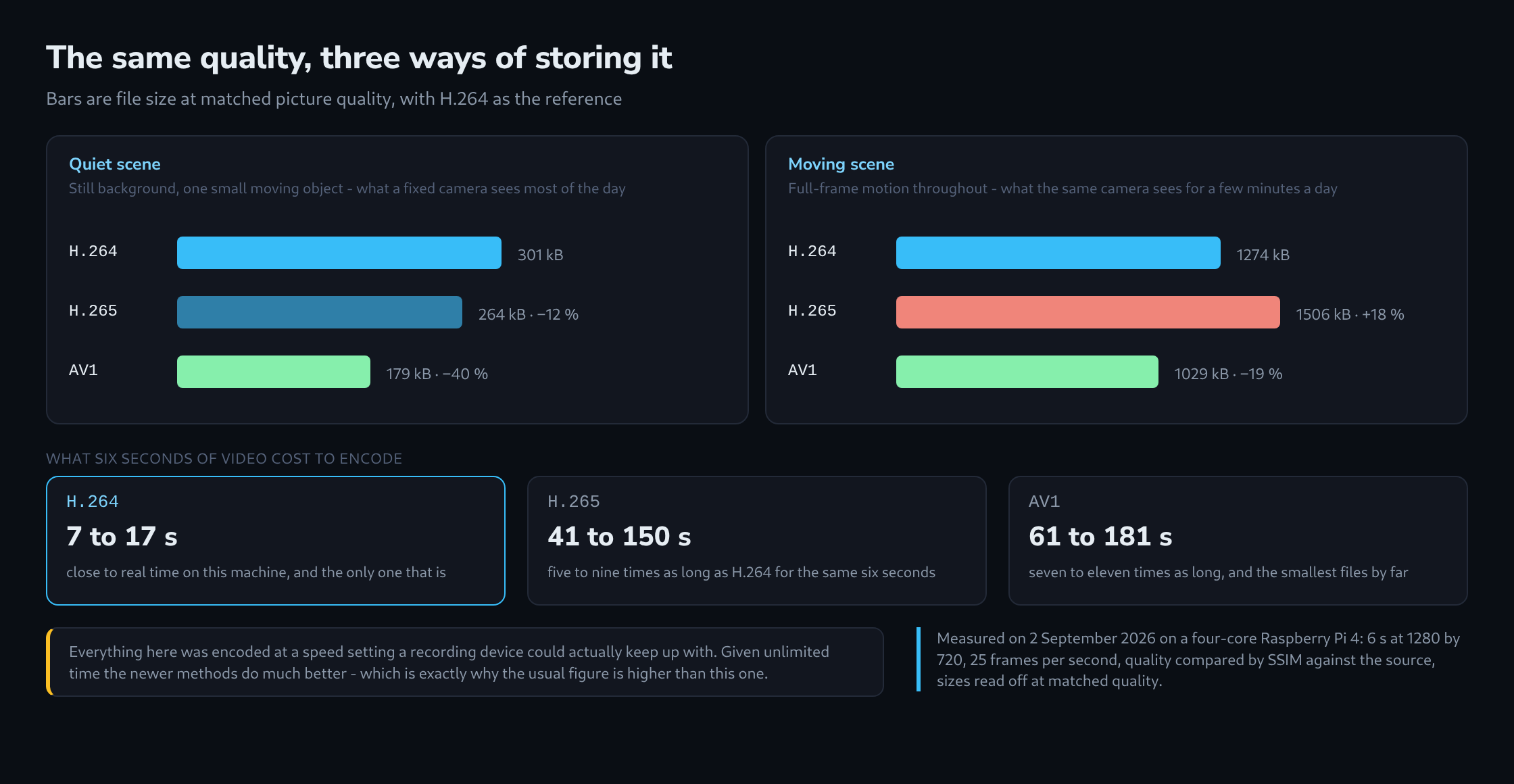
At matched quality, six seconds came to 301 kB under H.264 and 264 kB under H.265. That is twelve per cent, not forty.
AV1 did far better: 179 kB, forty per cent below H.264. On this kind of material the newest method is the one that delivers what the middle one is credited with.
The moving scene: no reliable gain
The second source moves across the whole frame the whole time – what the same camera sees for a few minutes a day, and exactly the footage anyone would want to keep.
Here H.265 produced 1506 kB against 1274 kB for H.264 at matched quality: eighteen per cent larger. At a lower quality point it came out four per cent smaller. Between those two, there is no saving worth planning with.
AV1 stayed ahead at 1029 kB, nineteen per cent below H.264, and at the lower quality point it was fifty-eight per cent below.
The pattern is consistent: the fast setting costs H.265 most of its advantage, and costs AV1 much less of it.
What the encoding costs
Six seconds of video, on four cores.
H.264 needed between 7 and 17 seconds. That is the only one of the three anywhere near keeping up with a live camera on this hardware, and even it is not comfortably ahead.
H.265 needed 41 to 150 seconds, five to nine times as long. AV1 needed 61 to 181 seconds, seven to eleven times.
Which turns the whole question around. On a device with a dedicated encoding chip, none of this applies – the chip does H.265 at full speed and the storage saving is real. In software, on a small machine, the choice is not between two file sizes. It is between a file size and whether the recording keeps up at all.
Questions and answers
How much motion can a recording contain before H.265 saves nothing on these figures?
Just under a seventh of the time. Per second, H.265 saves 6.2 kB in the quiet scene (44.0 instead of 50.2 kB/s) and costs 38.7 kB more in the moving one (251.0 instead of 212.3 kB/s). The two cancel out when moving footage makes up 6.2 / (6.2 + 38.7) ≈ 13.8 per cent of the recording, which for a camera running around the clock is about 3.3 hours a day.
Below that, H.265 saves something, but never more than the twelve per cent of the quiet scene; with the few minutes of motion a day the article assumes, the saving sits just below that. Above it, the file becomes larger than with H.264.
The calculation only applies to the matched quality point, and only on the assumption that a day’s footage behaves like the two test scenes. At the lower quality point H.265 came out four per cent smaller in the moving scene as well; there the break-even point would disappear, provided the quiet scene also saves at that point. AV1 saves in both scenes but fails on this hardware because of the encoding time.
Could footage be recorded in H.264 and re-encoded to AV1 later?
For selected clips, yes; for the whole archive, no. AV1 needed 61 to 181 seconds for six seconds of video, ten to thirty times the running time, so one day of recording would keep the same machine busy for ten to thirty days. On top of that, every re-encode starts from an already compressed file whose losses remain, and the savings measured against the original source cannot simply be carried over to that case.
Sources
Related articles