English
How Much GPU Memory Does an AI Language Model Need? Three Worked Examples

Management Summary
Running a language model locally requires graphics memory not just for the model file, but also for the text being processed and the ongoing calculations. Longer conversations and several simultaneous requests can therefore need much more capacity than the download size suggests. This matters when choosing hardware for a private AI assistant or shared service. Smaller number formats may save space at some cost to answer quality, and two graphics cards do not automatically combine into one usable memory pool.
Contents
A language model needs GPU memory for three things: learned numbers, saved calculations for the preceding text, and the work performed while generating a response. The model file therefore does not describe the entire requirement. The examples below support planning; a test with the chosen model and server is still needed to establish whether a configuration works.
Weights, tokens and cache in plain language
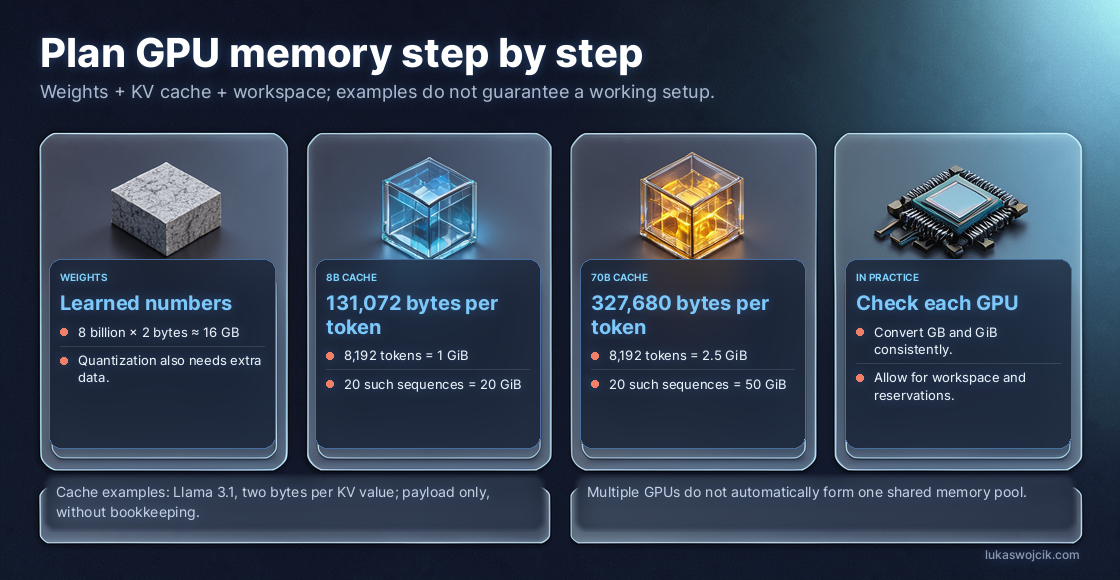
Weights are the numbers learned during training. “8B” means approximately eight billion parameters. FP16 and BF16 each use two bytes per number: eight billion multiplied by two gives roughly 16 GB for the values alone.
Tokens are the text pieces processed by the model, such as part of a word or a punctuation mark. Input and generated output share the context window. The number of registered accounts is not the relevant measure: memory depends on the text sequences processed concurrently and the amount of text retained for each sequence.
The KV cache saves intermediate results so that each new token does not require all preceding calculations to be repeated. Server and GPU workspaces add further memory use. Prepared execution paths such as CUDA graphs can also require additional space.
Calculating weights: bit width alone is not enough
Weight data ≈ parameter count × average bytes per parameter
Quantization stores numbers with lower precision. This saves memory but can change answer quality. Four bits mathematically equal half a byte. Actual formats also need information such as scaling factors; mixed formats do not store every parameter in the same way.
The llama.cpp table reports approximately 4.89 bits per weight for Llama 3.1 8B in Q4_K_M. That figure describes the listed model; it is not an exact specification for arbitrary 27B models. The actual file is a better starting point, while GPU buffers and runtime costs still need separate consideration.
GB and GiB are different units: 1 GB is one billion bytes; 1 GiB is 1,073,741,824 bytes. The card examples below explicitly assume budgets of 24 GB or 48 GB. Reported device capacity and memory already in use need comparison in the same unit. The “24 GB” label alone is not a reliable basis for claiming extra headroom.
Calculating the KV cache
For a model with uniform layers, full attention and equally sized key and value vectors, the raw cache values follow this formula:
KV bytes = 2 × layers × KV heads × values per head
           × retained tokens per sequence
           × concurrent sequences × bytes per value
The factor two represents the two kinds of intermediate results: keys and values. Heads are parallel parts of the attention calculation. The required number is the KV head count, not simply the total attention head count. For sequences of different lengths, their total retained token count replaces length multiplied by sequence count.
The formula describes payload data, not every allocated memory block. Other architectures, sliding context windows, shared prefixes and the server’s memory management change the calculation. Quantized weights do not automatically imply a quantized KV cache.
Example 1: Llama 3.1 8B
The model description specifies 32 layers, eight KV heads and 128 values per head. At two bytes per cached value, each retained token needs 2 × 32 × 8 × 128 × 2 = 131,072 bytes. A sequence containing 8,192 tokens therefore uses exactly 1 GiB of raw cache data.
Twenty concurrently retained sequences of that length need 20 GiB of cache, in addition to roughly 16 GB of weights and the workspace. Here, 8,192 tokens is an example length, not Llama 3.1’s maximum context length.
An assumed total budget of 24 GB minus roughly 16 GB of weights leaves 8 GB on paper. Before any further costs, this holds about 61,000 cache tokens: seven complete sequences of 8,192 tokens plus a remainder. Less is available in practice. Shorter texts, fewer concurrent requests or smaller weights can reduce the requirement.
Example 2: A hypothetical 27B model
Twenty-seven billion parameters at two bytes each require roughly 54 GB. Idealized eight-bit storage would require 27 GB, and four-bit storage 13.5 GB, counting only the number values. Metadata and higher-precision portions of a real quantization format add to those figures.
“Q6 always fits in 24 GB” would therefore be incorrect. A specific file’s actual size, model architecture, cache type, context length and server all matter. A cache budget can only be established after accounting for the full model and runtime requirement.
Example 3: Llama 3.1 70B across multiple GPUs
llama.cpp lists approximately 43.1 GB for the Llama 3.1 70B Q4_K_M file. This is a file size, not a measurement of total GPU memory during operation. Subtracting it from an assumed total budget of 48 GB initially leaves 4.9 GB, before additional costs.
With 80 layers, eight KV heads and 128 values per head, a cache using two bytes per value requires 327,680 bytes per token. A sequence of 8,192 tokens therefore occupies 2.5 GiB; twenty such sequences require 50 GiB. The assumed remaining budget of 4.9 GB would hold just under 15,000 tokens before other costs.
Two graphics cards do not automatically form one shared memory pool. The model and workspaces need a suitable distribution that fits each individual card. The server must support that distribution. Tensor parallelism distributes parts of a calculation across GPUs; the architecture and backend impose constraints. A GPU count that divides the head count is not sufficient to guarantee a working configuration.
Other options include fewer concurrent requests, shorter contexts or partial offloading to system memory. Offloading also affects speed. A quantized cache can save space when supported by the model and backend.
Building a useful capacity estimate
- Record the model, exact quantization file and server version.
- Convert reported free device capacity, file size and calculated values to the same unit.
- Calculate cache demand for the intended text lengths and concurrent requests.
- Test representative inputs: measure memory use, waiting time, answer quality and errors under high load.
Server behaviour under concurrent requests is covered in the comparison of vLLM, llama.cpp Server and Ollama.
Questions and answers
Why does nvidia-smi show substantial memory use before any requests?
vLLM can reserve memory for a cache pool in advance. The source checked on 25 October 2026 sets gpu_memory_utilization to 0.92 by default. This is a budget fraction for the model instance, not a promise of constant actual usage or sufficient remaining space for unrelated processes. An explicit kv_cache_memory_bytes setting replaces automatic cache budgeting. Reserved memory does not mean that many requests are currently being processed.
Does an eight-bit cache halve memory use?
Changing from two bytes to one byte halves the raw cache values, not the entire GPU requirement. Scaling values, rounding and bookkeeping add further costs. Q8_0, for example, stores 32 values in a 34-byte block: 53.125 percent of the corresponding 16-bit payload.
For the two Llama examples, the calculation gives 65,536 and 163,840 bytes per token at one byte per value. The stated Q8_0 block format gives 69,632 and 174,080 bytes respectively. This payload calculation does not replace checking backend support or testing answer quality on the actual tasks.
Related articles