English
GA4 BigQuery Export: Sessions That Cross Midnight Land in Two Tables

Management Summary
A GA4 session is a connected period of activity during a website visit. Crossing midnight does not by itself begin a new session, although the BigQuery data export stores the activity in separate daily tables. A visit active on two days can therefore count on both daily reports while still being one visit across the whole period. This matters for management totals: adding daily figures answers a different question from counting distinct visits. The reporting period and the meaning of the count must match.
Contents
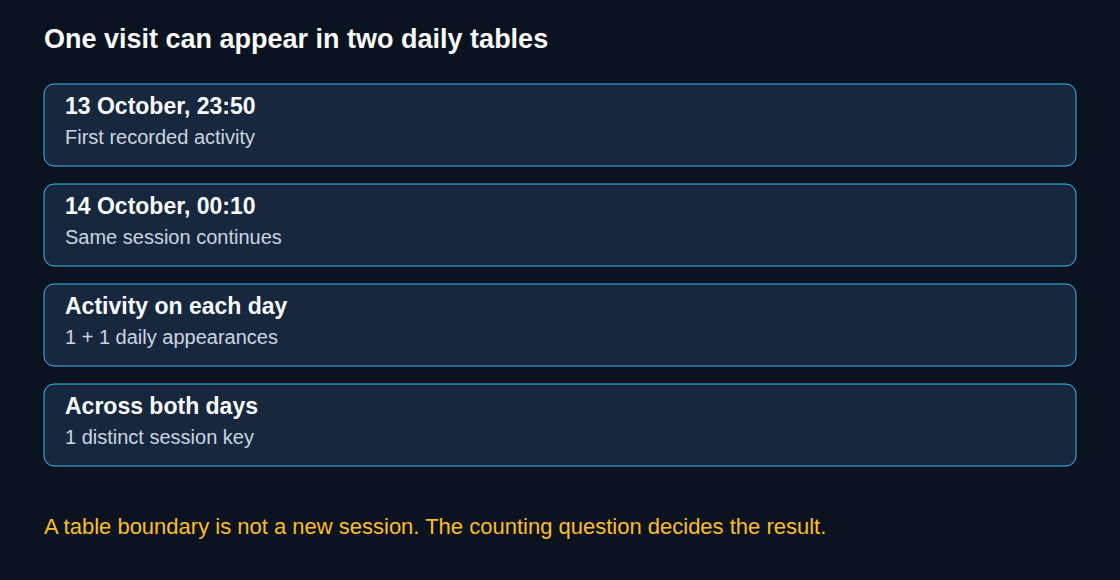
A visit starts on 13 October at 23:50 and continues until 00:10 the next day. GA4 can treat that activity as one session. In the BigQuery export, however, the events can appear in two daily tables: events_20261013 and events_20261014. Midnight changes the event’s date; it does not by itself start a new session.
The result depends on the question. A count of sessions with activity on each day can return one on Tuesday and one on Wednesday. Across both days, the same session counts once. Adding the two daily results would answer a different question from counting distinct sessions across the whole period.
What identifies the session?
Google generates ga_session_id from the session’s start time in seconds. Two different visitors can start in the same second, so that number alone is not a unique session key. user_pseudo_id identifies a browser or app installation rather than a verified person. The example keeps that identifier and ga_session_id together, and uses stream_id to distinguish the configured website or app data sources. Separate grouping columns avoid accidental collisions from joining strings without a separator.
The session ID sits inside the repeated event_params field, a list of event parameters. Google tags and Firebase SDKs normally attach it; Measurement Protocol and Data Import do not attach it automatically. Missing identifiers must be reported separately, not combined into one invented session. Replacing user_pseudo_id with user_id midway through a visit can also split the count when a login changes the available identifier.
The first row found is not necessarily the start
MIN(event_timestamp) finds the earliest timestamp among the rows actually read. If the query reads only Wednesday, the first Tuesday event is outside its view. A window function calculates a value across related rows, such as all events with the same session key. It cannot recover a missing row. Reading one previous day helps with some visits, but does not guarantee a full history: an active session has no fixed maximum duration.
The start encoded in an automatically generated session ID offers another route. It can reveal a Tuesday start even when only a Wednesday event is available. This relies on the documented ID format. A manually assigned Measurement Protocol ID needs separate validation. Neither route discovers sessions with no exported event in the selected data.
Dates and export delivery are separate
event_date records a date in the configured reporting time zone. event_timestamp is a UTC value in microseconds; the current schema describes receipt by Analytics. It is not the time when the BigQuery export job ran. A BigQuery dataset’s storage location does not set its reporting time zone.
For an explicit timestamp conversion, DATE(TIMESTAMP_MICROS(event_timestamp), ‘Europe/Warsaw’) uses Warsaw time. Without the time-zone argument, DATE uses UTC. For example, 00:30 in Warsaw in summer corresponds to 22:30 UTC on the previous day. A timestamp-derived date and the exported event_date should not be assumed interchangeable for every delayed event or changed time-zone configuration.
The daily export is not a job guaranteed to finish at midnight. Google describes typical afternoon delivery, with possible delays into the following day. Daily tables can receive late events for several days and can exceptionally be reprocessed later. A present table is therefore not proof that no more rows will arrive.
One query, two clearly named counts
The following GoogleSQL example reads only the daily tables for 13 and 14 October 2026. The project and dataset names are placeholders. It reports distinct session keys observed in those tables, the subset whose ID indicates a start in that period, and the number of event rows without a usable key. The last number counts events, not missing sessions.
WITH extracted AS (
  SELECT
    stream_id,
    user_pseudo_id,
    (SELECT IF(COUNT(*) = 1, MAX(param.value.int_value), NULL)
     FROM UNNEST(event_params) AS param
     WHERE param.key = 'ga_session_id') AS session_id
  FROM `example-project.analytics_123456789.events_*`
  WHERE _TABLE_SUFFIX BETWEEN '20261013' AND '20261014'
    AND REGEXP_CONTAINS(_TABLE_SUFFIX, r'^\d{8}$')
), valid_keys AS (
  SELECT DISTINCT stream_id, user_pseudo_id, session_id
  FROM extracted
  WHERE stream_id IS NOT NULL
    AND user_pseudo_id IS NOT NULL
    AND session_id BETWEEN 1 AND 253402214399
), dated_keys AS (
  SELECT *,
    DATE(TIMESTAMP_SECONDS(session_id), 'Europe/Warsaw') AS start_date
  FROM valid_keys
)
SELECT
  COUNT(*) AS sessions_observed_in_range,
  COALESCE(COUNTIF(start_date BETWEEN DATE '2026-10-13' AND DATE '2026-10-14'), 0)
    AS observed_sessions_started_in_range,
  (SELECT COUNT(*) FROM extracted
   WHERE stream_id IS NULL OR user_pseudo_id IS NULL
      OR session_id IS NULL
      OR session_id NOT BETWEEN 1 AND 253402214399)
    AS events_without_usable_session_key
FROM dated_keys;
The numeric range prevents impossible timestamp conversions; it does not prove that an ID was generated correctly. Repeated ga_session_id parameters are treated as unusable instead of choosing an arbitrary value. The chosen stream-based key keeps streams separate; it is not a cross-device identity model.
For a complete count of session starts, the export must contain enough evidence of those sessions. The example cannot recover a missing table, an excluded stream or an unexported start with no later observed event. A dry run checks the query without running the full analysis. In the target BigQuery project, it can check syntax, permissions and the estimated scan size before a paid query runs.
Daily and intraday tables must not overlap
events_* also matches names beginning events_intraday_. The example’s eight-digit suffix filter excludes those staging tables. Intraday data arrives quickly but can have gaps; it is not a final copy of the day. Attribution fields can also be incomplete.
A query combining daily and intraday data needs an explicit choice for each date: the available completed daily table, or a provisional intraday table where no suitable daily table is available. “Daily until yesterday, intraday only today” can miss yesterday if its daily export is delayed. A bare UNION ALL of two overlapping wildcards can count the same events twice. A union with genuinely disjoint table selections is valid.
Why a correct query can still differ from GA4
GA4 estimates session counts using HyperLogLog++, an algorithm for counting many distinct keys with less memory. COUNT(DISTINCT) can count exported keys exactly; BigQuery also offers approximate functions. Google’s published session precision is 12. The Cloud table gives approximately ±3.25 percent for the 95 percent confidence interval at that precision, not ±1.63 percent. This statistical interval is not a guarantee that any UI-versus-export comparison falls inside it.
Reports and exports can also differ because of modeling, report filters, identity settings and missing data. Cookieless events can appear in the raw export, but the modeled additions used in reports are not exported. Counting session_start rows is a separate operation from counting distinct session keys; the two must not be declared identical without checking the data.
Questions and answers
Is a daily count always wrong?
No. It can correctly describe sessions with activity on that day. The mistake is adding those daily counts and presenting the sum as unique sessions across the whole period. The sum can equal the period count when no key appears on more than one day.
Must every query read the previous day?
No. A count of keys observed today does not require yesterday. A reconstruction from the earliest observed row needs enough earlier data, while a trusted timestamp-based session ID can supply the start date without that lookup. The question and the available evidence determine the required range.
Should a Wednesday purchase move to Tuesday?
Not in a report about when purchases occurred. Tuesday can be the session’s start date while the purchase remains a Wednesday event. Assigning all events to the start day creates a different analysis and needs an explicit label.
Sources
- Google Analytics: BigQuery Export schema
- Google Analytics: About Analytics sessions
- Google Analytics: BigQuery Export and table updates
- Google Analytics: Unique count approximation
- Google Cloud: HLL++ sketches and confidence intervals
- Google Cloud: Query multiple tables using a wildcard
- Google Cloud: Date functions
- Google Cloud: Timestamp functions
- Google Analytics: Basic queries for event export
Related articles