English
 Deutsch
 Polski
Frigate and Coral TPU: How Many Cameras One Accelerator Can Handle

Contents
One Coral has no fixed camera capacity. Detector load depends on how often Frigate requests inference, the selected model and the time required per request. The rest of the system must also acquire, decode, track and store video. A detector budget is a useful estimate, not a guarantee that every relevant object will be recognized.
Regions are not simply moving objects
Frigate finds motion, groups nearby motion boxes into detection regions and considers existing tracks. A region can include several objects; two visible motion patches do not necessarily produce two independent inferences. Stationary objects are also checked periodically. A quiet scene therefore does not mean zero system load or necessarily zero detector work.
The useful factor is the observed number of actual inference calls per processed detection frame, including frames without a call and frames with several calls. That factor varies with framing, motion, tracking, masks and configuration. A value of 1.5 is an illustrative assumption below, not a measured typical value for outdoor cameras.
A budget with explicit assumptions
requested inferences/s = sum(processed frames/s × mean inference calls/frame)
estimated serial detector demand = requested inferences/s × ms/inference

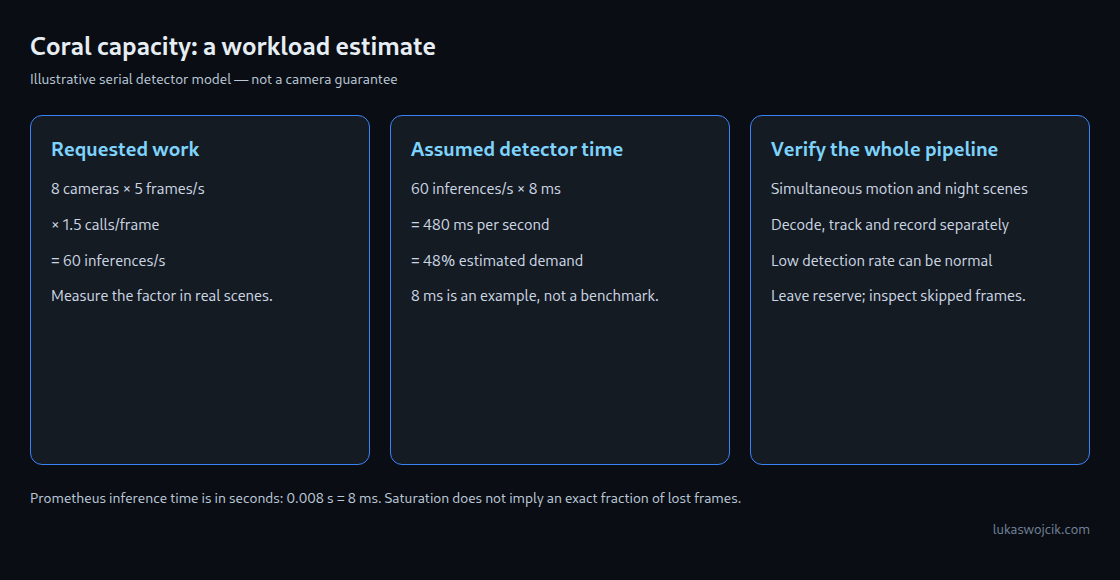
8 × 5 × 1.5 = 60 inferences/s
60 × 8 ms = 480 ms/s = 48% of one serial detector

16 × 10 × 1.5 × 8 ms = 1920 ms/s = 192% requested demand
The example assumes one serial detector, eight cameras processed at 5 fps, an average of 1.5 inference calls per processed frame and 8 ms per call. The result is 48% estimated detector demand. It does not measure CPU utilization, whole-system latency or available recording capacity. The 8 ms value is hypothetical; the chosen model and actual host must supply a measured value.
The 192% example requests more serial work than fits into one second. It cannot establish that exactly half of all video frames will be discarded. Queueing, processing delays and frame skipping depend on the pipeline and workload. Under saturation, the observed completed rate can also understate the requested work.
Simultaneous activity matters more than an all-day average. Useful trials include several moving subjects, wind, changing light and night images. Even a result below 100% needs reserve for variation and other work; no universal percentage guarantees reliable tracking.
Measure the detector instead of assigning camera counts
Inference time depends on model, input dimensions, runtime, host, connection and operating conditions. A universal table of 7 ms for PCIe, 8 ms for USB and a fixed number of supported cameras would conceal those dependencies. Two compatible Coral detectors can add capacity through a shared queue, but do not guarantee double the total installation capacity.
The single-serial-detector estimate is not a universal GPU benchmark. Some GPU backends can process work concurrently. Frigate’s basic CPU TensorFlow Lite detector is not recommended for general use; OpenVINO in CPU mode is a distinct option. Core count alone does not establish either option’s inference time.
Decode, detect and record separately
The Coral performs model inference, not video decoding. FFmpeg decoding can use supported GPU or media-engine hardware through the appropriate Frigate preset. A fixed claim such as one CPU core per 4K camera is not transferable across codecs, hardware and stream settings.
A lower-resolution stream for detection and the main stream for recording is often useful. Detection resolution must still preserve sufficient detail for small or distant objects. Frigate crops regions and resizes them to the model input; a small model input does not prove that every low-resolution source is adequate.
Where recording uses video stream copy, that video does not require decoding and re-encoding for the copy itself. Additional viewing, transcoding or analysis paths can add work. Snapshots come from the detection stream. The camera should preferably emit the desired detection-stream frame rate: reducing only detect.fps can leave the cost of decoding extra incoming frames.
Read the right metrics
frigate_detection_fps counts detector runs per second, not simply the configured frame rate. A low value in a quiet scene is normal and does not prove frame loss. The camera, process and skipped-frame rates describe different stages. Rising skipped frames or falling processing rates under realistic simultaneous load deserve investigation alongside detector timing, CPU/GPU use, memory, logs and actual tracking.
The Prometheus metric frigate_detector_inference_speed_seconds is in seconds. A value of 0.008 corresponds to 8 ms. A slower value alone does not prove thermal throttling: model changes, host contention, power or connection problems are also possible. An absent event is likewise not proof of detector saturation; model confidence, masks, zones and retention rules need inspection.
Two PCIe detectors as a configuration fragment
detectors:
  coral1:
    type: edgetpu
    device: pci:0
  coral2:
    type: edgetpu
    device: pci:1
This fragment requires two available devices; it does not create a second accelerator. Host drivers and container access must expose both relevant device nodes, commonly /dev/apex_0 and /dev/apex_1. For two USB Corals, the selectors are usb:0 and usb:1. Each detector process takes requests from the shared camera queue. This is not a complete Frigate or Docker configuration.
Questions and answers
Can masks reduce load without losing detections?
Small motion masks can suppress irrelevant motion, such as a timestamp overlay. Excessive masking can impair tracking. A masked object may still be detected when another trigger creates a region covering it; motion somewhere else does not guarantee coverage of every masked area. Motion masks are not privacy obscuration and do not guarantee removal of objects from recordings.
What do stationary-object settings change?
The documented default threshold is ten times the detection frame rate; at 5 fps that is 50 frames. A stationary interval of 50 checks again every 50 processed frames, approximately ten seconds at 5 fps. At 3 fps, the same interval corresponds to about 16.7 seconds. Actual settings and achieved processing rate matter. Stationary handling reduces repeated inference but does not eliminate all checks.
Does reducing 5 fps to 3 fps save 40%?
Only in the illustrative model with unchanged 1.5 calls per frame and 8 ms per call: demand falls from 480 to 288 ms/s, a reduction of 40%. Real region and tracking behavior can change. Fewer frames also provide fewer chances to recognize a briefly visible object. Debug-view trials establish whether the reduced rate remains suitable.
How is the USB connection checked?
On Linux, lsusb -t shows negotiated link speed. For the relevant Coral branch, 5000M indicates a 5 Gbit/s SuperSpeed link and 480M a USB 2.0 high-speed link. Port color and an 8 or 22 ms inference measurement are not substitutes for this check. Cable, hub and power supply also matter. Coral changes USB identity during initialization; passthrough must support that transition. Frigate’s Docker example maps the USB bus, which grants access to more than one specific device.
Related articles